Agent Skills Tutorial: Progressive Disclosure and Customization in Practice

Agent Skills use folders and progressive disclosure to let Agents master skills on demand, with precise descriptions being key.
This article systematically outlines the core concepts and practical points of Agent Skills. It clarifies that a Skill is not a single Markdown file but a folder containing SKILL.md plus subdirectories like scripts, references, and assets, with name and description as required metadata. It then explains the progressive disclosure mechanism: the Agent first reads the description to decide whether to invoke, then loads scripts and resources on demand. The article also notes that description detail directly determines matching success and stresses explicit directory pointers. Finally, it offers a learning path: read the official Best Practices and description optimization guides first, then start from a minimal Skill folder.
Agent Skills Tutorial: Progressive Disclosure and Customization in Practice
When everyone is talking about Agents, a more concrete question surfaces: how do you get an Agent to truly master a skill, rather than starting from scratch with prompts every time? A tutorial on Bilibili about Agent Skills offers a systematic answer. The video walks from conceptual foundations to hands-on code, centered on a frequently misunderstood mechanism—progressive disclosure. This article, drawing on its content and key points from the official documentation, reconstructs the complete picture of Agent Skills.
What Exactly Are Agent Skills
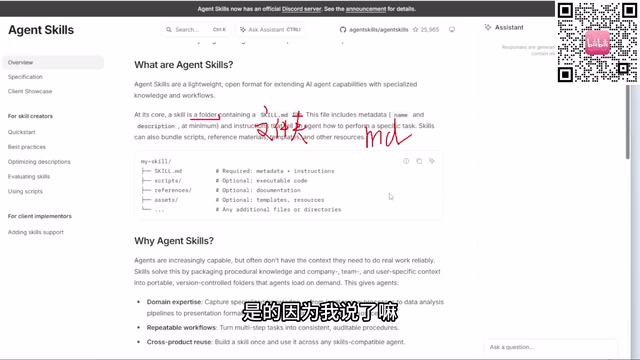
According to the video's author, many learners equate Skills directly with a Markdown file, and this is a misconception that needs correcting first. The official documentation clearly states that a Skill is essentially a folder, not a single MD file. This folder must contain a file named SKILL.md, and the filename cannot be changed.
This SKILL.md must contain at least two pieces of metadata: a name and a description. The reason is that the large model itself doesn't know which Skills exist in the current environment—it needs the name to identify that a capability exists, and the description to judge what problem that capability can solve. The video particularly emphasizes that when many people encounter task-matching failures with Skills, the root cause is often that the description isn't detailed enough.
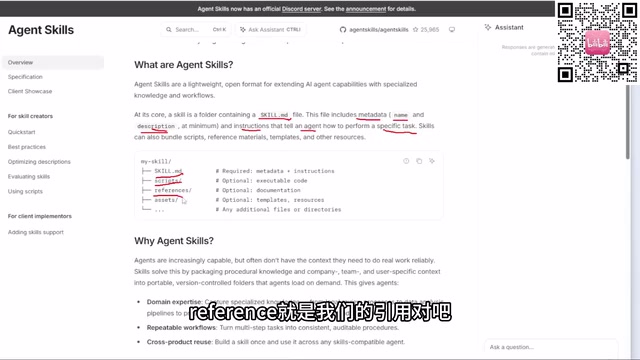
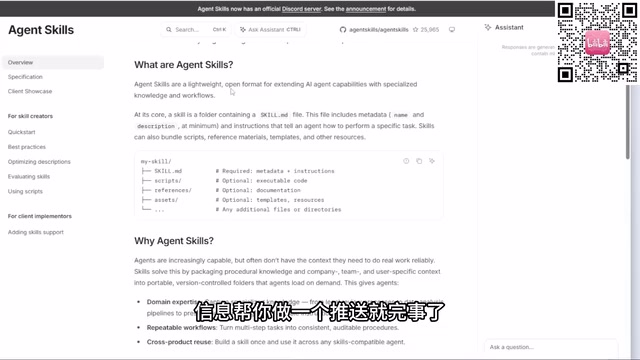
Beyond SKILL.md, a complete Skill folder can also contain scripts (executable scripts such as Batch or Python scripts), references (documentation), and assets (templates, resources, data samples, styles, etc.). If there are other folders in the directory, SKILL.md must explicitly point to them, telling the Agent which file under which folder to call when handling a given task—otherwise it cannot make a judgment. This is a point many beginners easily overlook.
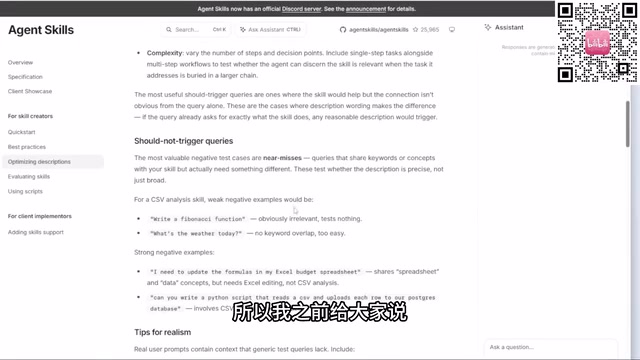
The name and description in SKILL.md are not ordinary comments—they are the metadata entry points through which the Agent invokes tools. At runtime, a large model typically cannot directly perceive the file system; it must learn about available skills through system prompts or a tool list. The name provides a unique identifier, while the description serves as a "capability manual" that helps the model determine whether the current user request matches a given skill. The official documentation recommends that the description include the skill's functional scope, applicable scenarios, and trigger conditions—it can even list typical user intents. The more specific the description, the higher the model's accuracy at the intent-recognition stage. Conversely, if the description is vague—something like "handles documents"—the model will struggle to choose correctly among many skills, leading to skills sitting idle or being invoked incorrectly.
Progressive Disclosure: The Core Mechanism of Skills
The video lists progressive disclosure as the third core topic of Agent Skills. Understanding this mechanism is key to understanding why Skills adopt a folder structure rather than a single file.
Simply put, progressive disclosure means the Agent does not load a Skill's entire contents all at once. It first reads the name and description in SKILL.md to determine whether the current task requires invoking that Skill; once confirmed, it loads scripts, reference materials, or resource files on demand. This layered loading approach allows the Agent to maintain efficient context management even when it has a large number of Skills, without having to cram every skill's details into a single conversation.
This also explains why a Skill's directory structure needs to be clear and its description precise: disclosure is progressive, but each step's judgment depends on the accuracy of the previous layer's information. If the description is vague, the Agent may make a wrong judgment at the very first step, and the subsequent scripts and resources naturally never get loaded.
Progressive disclosure is borrowed from human-computer interaction and information architecture design; its core idea is to present only the necessary information when the user needs it, avoiding cognitive overload. In the Agent context, this principle is transferred to context management. A large model's context window is limited—loading all skill details at once not only wastes tokens but may also distract the model from the current task. Agent Skills achieves this through a layered structure: the first layer is the name and description in SKILL.md, which is extremely small and used for quick filtering; the second layer is scripts and reference documents loaded on demand; the third layer is deeper resource files. This design lets the Agent maintain a lightweight context even while holding many skills, similar to how a human expert first uses experience to judge "which tool set to use," then digs into the details.
How to Customize the Skills List and Tools
The fourth part of the video focuses on customizing the Skills list and the Skills tools. Although the original content covers this segment briefly, combined with the official documentation's guidance, several practical paths can be outlined.
Two sections of the official documentation are worth reading first: one is Best Practices, which lists recommended ways to use Skills that can be directly transferred to production or learning environments; the other covers principles for optimizing the description, which is especially critical for improving the success rate of Skills matching.
The video's author also shares a method for getting technical news: set up a scheduled task for your commonly used Agent, having it push LLM- or AI-related information at a fixed time each day. This approach is more timely than passively waiting for secondhand information digested by self-media, and it's closer to the original source. He also suggests that when learning new technologies, you should browse official websites first, because self-media and video content are often paraphrases after others have digested them, and the wording may not be accurate. As for language, browser translation tools are already sufficient for reading English documentation.
Project Practice and Learning Path
The fifth part of the video is a hands-on Skills project, but the original material records limited specific code and steps for the practice segment, so it cannot be fully reconstructed here. From the available information, the practice segment builds on the understanding of the first four parts: first clarify the Skill's folder structure, then design the name and description in SKILL.md, then organize scripts, references, and assets as needed, and finally use the progressive disclosure mechanism to let the Agent invoke them at the right time.
For readers who want to get started, a practical path is: open the official documentation's homepage and read through the basic definition of Skills; then focus on Best Practices and the description optimization guide; next, create a minimal Skill folder in your own Agent environment, starting with a single SKILL.md, gradually adding scripts and resources, and observing the Agent's matching behavior. This process itself is an intuitive experience of the progressive disclosure mechanism.
Common Misconceptions and Key Reminders
Drawing together the video's content, several misconceptions deserve to be listed separately. Treating Skills as a single MD file is the most common one; it limits the use of scripts, resources, and reference documents, greatly reducing a Skill's capabilities. Writing an overly brief description is the second high-frequency problem, directly causing task-matching failures. Ignoring directory pointers is the third problem—when a Skill folder contains multiple subdirectories, without explicit pointers in SKILL.md, the Agent cannot independently determine which one to call.
The design philosophy of Agent Skills is not complicated: use a lightweight, open format to package professional knowledge and workflows into skill packs that an Agent can draw on as needed. What really determines whether it works well is whether the description is precise, the structure is clear, and the disclosure path is smooth. Get these three right, and Skills can truly extend the boundaries of an Agent's capabilities, rather than becoming a folder that sits in the directory with no one calling it.
Related articles

Vaani Developer Platform: Build Human-Like Voice AI Agents with Zero Code
Vaani Developer Platform tops Product Hunt with 175 upvotes, offering zero-code construction of human-like voice AI agents with flow design, tool and knowledge base connections, real phone deployment, and structured call data output.

Knocket AI: A Lightweight Tool That Lets Visitors Chat with Zero Friction
Knocket AI is a lightweight tool that lets visitors start real-time chats via a website or link without registering, targeting founders, creators, and small teams.

XWiki Launches Open-Source MCP Server: Let AI Read Your Wiki
XWiki's open-source MCP Server extension connects your Wiki knowledge base to AI agents like Claude Code and GitHub Copilot, supporting Q&A, page editing, and structured data—self-hosted to keep data control.