AI Agent Control in Practice: A Guardrail Demo for MCP Servers
Control AI Agent MCP tool calls through MCP Proxy guardrails covering tool visibility, field masking, and request limits.
Through a sample workspace, this article demonstrates how to configure guardrails for AI Agents calling MCP Tools. The core is establishing an MCP Proxy Guardrail layer between the Agent and the MCP server, with controls across three dimensions: tool permissions that open only necessary tools and keep disabled tools completely invisible to the Agent; data controls with field-level denial and masking, such as desensitizing the assignee email; and behavioral intensity with request limits and a graduated Warn-to-Block response. In addition, each Agent has an independent role, ID, and a disable-able delegation capability for identity attribution and permission containment. Together the three dimensions form defense in depth, offering a reusable configuration approach for bringing Agents into production.
When AI Agents start calling MCP tools, how do you ensure they don't access sensitive data beyond their authority and don't fire off unlimited requests? A product demo lays out a concrete path to do exactly that.
Demo Workspace and Creating a Guardrail
This demo runs in a sample workspace called Acme Demo Corp., using only test data to avoid touching real business information. You start from the Policies and Guardrails menu and click Guardrail to add a new protection rule.
For an Agent that needs to call MCP Tools, select the MCP Proxy Guardrail type. This type is designed specifically for Agents that call external tools through the MCP protocol, effectively adding a proxy layer between the Agent and the tools—every tool call has to pass through this checkpoint first.
MCP (Model Context Protocol) is an open protocol introduced by Anthropic in late 2024 to standardize how AI models connect to external tools and data sources. In traditional integrations, each tool needs custom adapter code; MCP defines a unified client–server interaction spec, where the Agent acts as the client and discovers and calls tools through MCP servers. That's precisely why the proxy layer's position in MCP Proxy Guardrail matters: it sits between the Agent and the MCP server, giving it a unified view of all tool call requests and returned data without having to intrude into the internals of each MCP server implementation. This architecture lets policies be enforced centrally at the protocol level, and it's also the technical precondition for this article's guardrails to cover all three dimensions—tools, data, and rate—at once.
Three Control Dimensions: Tools, Data, and Rate
The guardrail's configurable options revolve around three core questions: what the Agent can use, what it can see, and how much it can use.
Tool Permissions: Open Only What's Needed, Hidden When Disabled
In the role settings step, you simply turn on the switches for the tools the Agent actually needs and leave the rest off. The demo specifically highlights one design detail: disabled tools are completely invisible to the Agent.
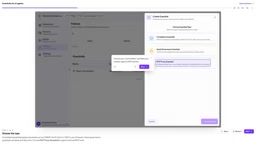
This is more thorough than a simple "deny the call." If the Agent doesn't even know a tool exists, it won't try to work around restrictions during reasoning, and it won't waste tokens or produce anomalous behavior by failing repeatedly. This "invisible by default" approach moves the attack surface from passive interception to proactive hiding.
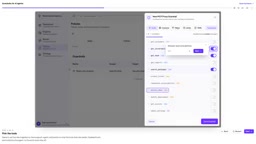
Column-Level Data Control: Field Denial and Masking
In the Columns settings, you can desensitize specific fields. The demo's example is denying a certain field and masking the assignee's email. This means that even if the Agent has permission to call a tool, the data it receives has already been trimmed—the email never enters the Agent's context in plaintext, so it won't end up in logs, caches, or downstream reasoning chains.
For scenarios involving customer information, internal tickets, or personnel data, field-level control granularity is more practical than rejecting entire tables—it isolates sensitive information while preserving tool usability.
Field masking and field denial are two data-control measures of different strength. Denial keeps the field entirely out of tool results, suitable for sensitive fields the Agent should never touch; masking preserves the field structure but replaces its content—for example, replacing an email with u***@example.com, so the Agent can still recognize the field's presence and format but cannot obtain the real value. Common masking strategies include full masking, partial masking, hash replacement, and tokenization, with the choice depending on whether downstream tasks need to preserve correlatability. In Agent scenarios, masking is especially important because model context, logs, and caches may retain data for a long time—once plaintext enters, it's hard to fully remove.
Request Limits and Graduated Responses
In the Limits settings, you can cap the number of requests and configure a graduated response policy from Warn to Block, then save to apply.
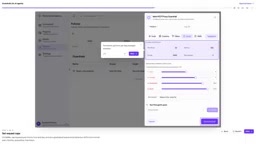
Graduated responses are more workable than an all-or-nothing ban. When the Agent approaches the threshold, it first receives a warning, giving it a chance to adjust its behavior; only when it keeps crossing the line does blocking trigger. This design is friendlier to automated processes in production, reducing task interruptions caused by momentary traffic spikes while retaining a hard cap as a fallback.
After saving, the new guardrail is immediately active and takes effect alongside any other existing guardrails.
Agent Identity and Delegation Management
Beyond the guardrails themselves, the demo also visits the Agents page under Settings. Here, each Agent is assigned a role and an ID, and its delegation capability can be turned off individually.
This is worth noting: guardrails restrict what an Agent does with MCP Tools, while the Agent identity system addresses the question of "who you are and who you can represent." Each Agent having a manageable, independent identity means audit logs can be attributed precisely to a specific Agent, and permission revocation has a clear target. When multiple Agents collaborate or a delegation chain exists, turning off a given Agent's delegation capability cuts off a potential path for permission spread.
Delegation refers to an Agent's ability, once authorized, to initiate operations on behalf of another entity (a user or another Agent). In multi-Agent collaboration chains, delegation can let permissions pass along the chain—for example, Agent A delegates to Agent B to call a tool, and B effectively inherits part of A's permissions. This mechanism improves automation efficiency but also brings permission-spread risk: once a downstream Agent is manipulated or behaves anomalously, an attacker could gain access far beyond expectations through the delegation chain. Being able to disable delegation per Agent is therefore equivalent to cutting off a propagation path at the identity level, complementing the guardrails' restrictions at the behavioral level.
The Design Logic Behind This Mechanism
As the demo shows, this protection system places control points at the proxy layer between the Agent and the MCP server, rather than dispersing them inside individual tools. The advantage of centralized control is consistent policy and unified configuration—no need to write separate restriction logic for each tool.
The combination of the three dimensions also forms defense in depth: tool visibility controls the entry point, field masking controls data outflow, and request limits control behavioral intensity. If any single dimension is bypassed, the others still provide constraints.
For teams bringing Agents into production systems, this configuration order—"define identity first, then scope permissions, and finally set limits"—is itself a reusable implementation approach.
Related articles
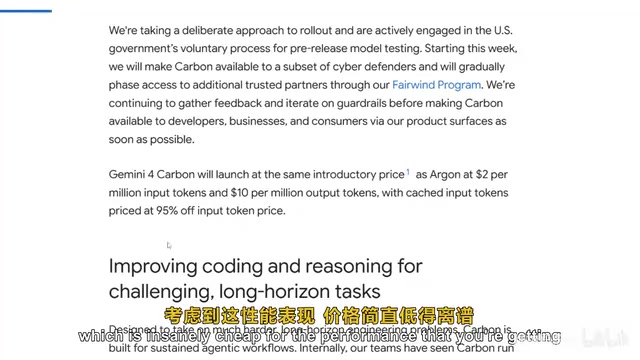
Gemini 4 Carbon Hands-On: The Strongest AI Model? Compared with Claude Opus 5.5
Google's Gemini 4 Carbon tops the Artificial Analysis leaderboard with 71% on CW Bench and leads Vending Bench. Hands-on comparison with Claude Opus 5.5: stunning front-end design but slightly behind in web development, with a clear price advantage.

Gemini 4 Carbon Tops Global Rankings as AI Productivity and Open-Source Ecosystems Surge
Google DeepMind's Gemini 4 Carbon tops global benchmarks, built for complex agents and system security. ByteDance launches Doubao Work integrated with Feishu, Anthropic's AI autonomously breaches 5 system-level attack chains, and ModelBest and Fudan open-source on-device multimodal and image generation models.

Overseas Creator Breaks Down N8n AI Agent Business Playbook: From Tooling to Monetization
An overseas creator breaks down the N8n AI agent business playbook: comparing Zapier, Make, and N8n, detailing four monetizable automation categories—lead capture, WhatsApp follow-up, booking, and content pipelines—plus agency pricing and a sales playbook.