AI Frontend Design Showdown: Opus 4.5 Dominates with a Single Markdown Skill File

Opus 4.5 goes from worst to best AI frontend design tool with a single Markdown skill file
Developer Theo compared Gemini 3 Pro, Opus 4.5, and GPT 5.2 for frontend design, finding that while Opus performed worst and Gemini best in default state, Opus paired with a Markdown frontend design skill file achieved a qualitative leap to become the best option. The skill file works by explicitly prohibiting AI aesthetic clichés and demanding design intentionality. Additionally, Opus far outperforms Gemini in iteration capability, truly understanding user preferences and executing precisely.
The AI Frontend Design Battle: Who's the Best Choice?
Gemini 3 Pro, Opus 4.5, GPT 5.2—these three frontier AI models all excel at coding, but their performance in frontend design varies wildly. Prominent developer Theo (t3.gg) conducted a systematic comparison test that revealed a surprising conclusion: Opus 4.5, widely considered the worst at design, paired with a Markdown-format "frontend design skill file," actually became the best AI frontend design tool.
This finding defies many developers' intuitions. Let's walk through the complete testing process and key discoveries.
Testing Methodology: Same Prompt, Six Agents in Parallel
Theo designed a unified test scenario: building a marketing landing page for an AI image generation studio called "T4 Canvas." He ran six agents simultaneously—two Gemini, two Claude Code (Opus 4.5), and two GPT 5.2 (Codex)—testing the difference in results with and without the "frontend design skill file."
The agents here refer to AI systems capable of autonomously executing multi-step tasks, distinct from simple chat-based conversations. In frontend development scenarios, agents can independently read project files, write code, run build commands, and fix errors—forming a complete development loop. Claude Code, Codex, and Gemini CLI used in Theo's tests are command-line agent tools from Anthropic, OpenAI, and Google respectively, all capable of directly operating on local projects from the terminal. Running six agents in parallel means launching six independent development environments simultaneously, ensuring consistency and comparability of test conditions.
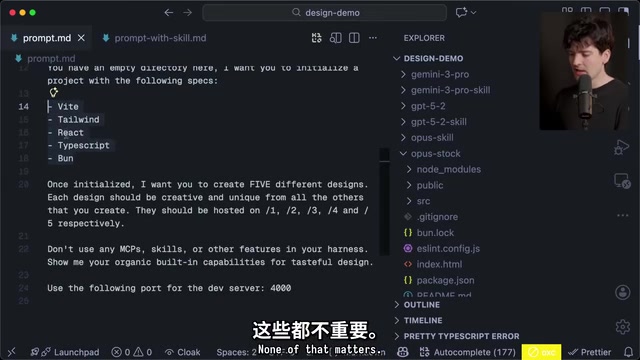
Key Prompting Technique: Generate Five Design Variants at Once
One particularly useful prompting technique emerged from the test: asking the model to create five different design variants at once, hosted on routes from /one to /five.
The value of this technique goes far beyond "pulling the slot machine more times for better odds." When a model creates multiple designs within the same context, it knows the other four variants exist and deliberately makes each one distinct. This yields far greater design diversity than simply regenerating five separate times.
This method also helps you gauge the depth of a model's "template library"—Theo estimates GPT-5 series has roughly 10 built-in templates, Opus around 20, and Gemini only 1-2. During training, AI models learn common design patterns and layout structures from massive web data, and these internalized patterns can be understood as the model's "implicit template library." When asked to generate frontend pages, models tend to sample from these high-frequency patterns, leading to the so-called "AI aesthetic" problem—purple-blue gradients, rounded cards, Inter/Roboto fonts, dark backgrounds with neon accents appearing repeatedly. This phenomenon is a form of what's called "mode collapse" in machine learning: the model over-concentrates on high-density regions of training data, lacking the ability to explore low-density but equally valid design spaces. The difference in template library depth between models fundamentally reflects the diversity and quality differences in frontend design samples across their training data.
Bare Comparison: Raw Frontend Design Capabilities of the Three Models
Opus 4.5: Worst Design in Default State
Without any skill file, Opus 4.5's frontend design output was disappointing. All five variants were plagued with purple-blue gradients, noise texture backgrounds, and poor text readability. Theo stated bluntly: "These aren't even good starting points—I think they're all terrible."

GPT 5.2: Mediocre but Heavily Templated
GPT 5.2 performed slightly better, but with a notable finding: even when Theo explicitly requested no skill file, Codex's system priority still forced the frontend design skill to load. This means GPT's "bare" results may have already benefited from the skill file.
Even so, the five design variants were structurally near-identical—each version had virtually the same model showcase block, with extremely limited layout variation.
Gemini 3 Pro: Best Design Instinct by Default
Gemini 3 Pro demonstrated the best design instinct without any skill file. It generated some visually appealing variants, including cool neon styles and fluid organic designs.
But Gemini's problems lay elsewhere: its CLI tool is extremely unstable. Theo encountered CLI freezes, unexecuted commands, and build failures multiple times during testing. He even vented: "Every time I use a Gemini model, I question how anyone could use it for anything beyond basic chat and data parsing."
Gemini CLI is a command-line AI coding tool Google launched in 2025, aimed at competing with Anthropic's Claude Code and OpenAI's Codex. CLI tool stability depends on multiple factors: API call reliability, streaming output handling, tool use parsing accuracy, and local file system error handling. The freezes and unexecuted commands Theo encountered are likely related to Gemini's engineering maturity in function calling and multi-turn tool use chains. In comparison, Claude Code has established strong engineering advantages in agent workflow stability through multiple version iterations. This explains why even when Gemini's model capabilities excel in certain dimensions, the actual development experience remains unsatisfying.

The Frontend Design Skill File: One Markdown Changes Everything
What Exactly Is a Skill File?
A skill file is essentially a Markdown document describing the behavior you want the AI model to follow—think of it as a reusable context instruction. Claude Code's GitHub repository has open-sourced these skill files.
Technically, skill files work through the large language model's context window. When the model receives a user prompt, the skill file content is injected as system-level instructions at the front of the context, with higher priority than the user's regular conversation content. This is similar to configuration files in traditional software development—it doesn't change the model's parameter weights but constrains and guides the model's output through carefully designed natural language instructions. In Claude Code, skill files are stored in the .claude/skills/ directory at the project root; in Cursor, similar functionality is achieved through .cursorrules files. This approach is an advanced application of prompt engineering, with the core idea being: rather than expecting the model to automatically understand your aesthetic preferences, explicitly tell it what to do and what not to do.
The core content of a frontend design skill file covers three aspects:
- Clear design direction guidance: "Choose a clear conceptual direction and execute it precisely. Bold maximalism and refined minimalism are both fine—the key is intentionality, not intensity."
- Explicit anti-AI-aesthetic prohibitions: No Roboto, Inter, or other overused fonts; no cliché purple gradients on white backgrounds; no cookie-cutter layout patterns.
- Diversity requirements: Alternate between light and dark themes, different fonts, and different aesthetic styles—never converge on common choices.
Opus 4.5 + Skill File: A Qualitative Leap from Worst to Best
When Opus 4.5 was paired with the frontend design skill file, the results were stunning.
The first design showcased a minimalist style with a blurred animated background that exuded sophistication. Theo commented, "This is so much better than almost everything we've seen before." The model even automatically added a design variant switcher at the bottom—demonstrating that the skill file improved not just visual aesthetics but also UX interaction awareness.
The second design left both Theo and his livestream audience in awe. Comparing the same model's output with and without the skill file, the gap can only be described as "night and day":
- Without skill file: Purple-blue gradients, noise backgrounds, illegible text
- With skill file: Refined typography, intentional color choices, professional-grade layouts
Iteration Capability Comparison: Opus's True Moat

Gemini's Iteration Problem
When Theo selected Gemini's two best designs and asked it to generate five more iterations based on those preferences, the results were disappointing. The newly generated variants showed virtually no reference to any elements from the original designs—they looked like random pulls from a completely different template library.
Theo's verdict: Gemini is essentially applying templates from its training data to your requirements, rather than truly "designing." It cannot understand which aspects of a design you liked, nor iterate meaningfully based on those preferences.
Opus's Iteration Advantage
In contrast, Opus excelled at iteration. When told which two designs the user preferred, its new variants clearly inherited the essence of the originals—preserving the favored layout concepts and visual styles while making meaningful changes in the details.
The iteration capability difference between Gemini and Opus reflects two fundamentally different model behavior patterns. Gemini's behavior more closely resembles "retrieval-augmented generation"—it retrieves the best-matching design templates from its internal representations, then fills in the user's specific content. This approach may produce visually decent results during initial generation, but lacks fine-grained understanding of user preferences during iteration. Opus demonstrates stronger "instruction following" capability, able to parse the implicit preferences in user feedback (such as layout style, color tendencies, typographic density, etc.) and incorporate these preferences as constraints in the next generation round. This difference likely stems from Anthropic's particular emphasis on precise instruction execution during the RLHF (Reinforcement Learning from Human Feedback) training phase, making Claude-series models particularly strong in scenarios requiring precise adherence to complex, multi-layered instructions.
Livestream audience voting confirmed this: Opus 4.5 with the frontend design skill file was overwhelmingly chosen as the best solution. As one viewer aptly summarized: "Gemini can occasionally randomly produce good designs, but Opus actually does what you tell it to."
Open-Source Model Kimi K2.5's Frontend Design Performance
Theo also tested the open-source model Kimi K2.5. While it showed some visual aesthetic highlights, it was severely lacking in engineering capability—misplacing package.json, complete build failures, and other issues arose frequently. Theo had to manually fix the code just to see the design output.
The final verdict: "Genuinely impressive for an open-source model, but none of the variants are ones I'd actually use."
Frontend Design Skill File Setup Tutorial
The configuration process is dead simple—five steps:
- Visit skills.sh (Vercel's Agent skill directory)
- Search "front end" or find the frontend design skill on the leaderboard (currently ranked #5)
- Click copy, paste and execute in your terminal
- Select which tool to configure (Cursor, Claude Code, etc.)
- Choose project-level or global configuration
skills.sh is an open-source Agent skill directory platform launched by Vercel where developers can share and discover various pre-made skill files. The emergence of this platform signals that AI-assisted development is shifting from "pure model capability competition" to "model + configuration ecosystem competition." Sharing and reusing skill files lowers the barrier to prompt engineering—developers don't need to figure out from scratch how to guide AI toward high-quality frontend design; they can simply install community-validated skill files. This model is similar to sharing ESLint configs or the VS Code plugin ecosystem in traditional development—essentially encoding expert knowledge into reusable configuration.
Theo recommends setting it as a global configuration and sharing it across different tools via symlinks. Symlinks are a file reference mechanism in Unix/Linux systems—by creating soft links to files, multiple project directories and tools can share the same skill file. Edit once, take effect globally, so all projects automatically benefit.
Conclusion: How to Choose Your AI Frontend Design Model?
After this comprehensive test, Theo's frontend design model ranking is:
- Opus 4.5 + Frontend Design Skill File (best overall solution)
- Gemini 3 Pro (best initial design by default, but poor iteration capability)
- GPT 5.2 (mediocre, heavily templated)
- Opus 4.5 bare (worst)
A workflow worth trying: Use Gemini to generate initial design inspiration, then use Opus with the skill file for iteration and refinement.
The most noteworthy finding from this test is that a simple Markdown file can so dramatically change an AI model's frontend design output quality. This suggests that current AI models' design capabilities aren't absent—they just need proper guidance to be "unlocked." For frontend developers, prompt engineering still holds enormous value in AI-assisted design—mastering skill file configuration may matter more than which model you choose.
Key Takeaways
- Opus 4.5 paired with a frontend design skill file (Markdown format) achieves a qualitative leap in design quality, going from worst to best
- Gemini 3 Pro has the best design instinct by default, but extremely poor iteration capability—essentially applying templates from training data
- The prompting technique of requesting five different design variants at once significantly improves output diversity and quality
- The frontend design skill file's core is explicitly prohibiting AI aesthetic clichés (purple gradients, generic fonts, etc.) while demanding design intentionality
- Recommended workflow: Use Gemini for initial inspiration, then iterate and refine with Opus + skill file
Related articles
 Product Reviews
The Programmer's Desk Setup Guide: Building a Workspace That Feels Like Home
Discover how programmers build productive, comfortable workspaces. From multi-monitor setups to ergonomic design, explore the desk philosophy that drives focus and flow.
 Product Reviews
Qoder vs Cursor Real-World Comparison: Which $20/Month AI IDE Is Better?
Hands-on comparison of Qoder vs Cursor AI IDEs: Agent autonomy, human interaction count, and architecture decisions. Qoder needed only 2 interactions vs Cursor's 8.
 Product Reviews
Cursor Cloud Agent Demo: Eliminating Bottlenecks Across the Entire Software Development Lifecycle
Deep analysis of Cursor's Cloud Agent demo showing how cloud VMs, automated test artifacts, and a full-chain control plane systematically eliminate human bottlenecks across the software development lifecycle.