AI Tool Power Rankings: Which AI Is Best for Each Task?
A curated guide to the best AI tool for each task, from writing to research to presentations.
Stop using ChatGPT for everything. This guide recommends the best AI tool for 8 key tasks: Claude Opus for writing and email, Perplexity for deep research, Google AI Studio Live for skill learning, Notion AI for note management, NotebookLM for information absorption, Claude for Small Business for finances, Gamma AI for presentations, and ChatGPT as a separated personal assistant.
Most people use ChatGPT as a one-size-fits-all tool — and that's a huge mistake. There are tens of thousands of AI tools on the market today, and those who master the art of "right tool for the right job" are rapidly pulling ahead of average users in productivity. After testing hundreds of AI tools, a well-known content creator has compiled a definitive list of the best AI tools for core use cases including writing, research, learning, note-taking, finance, and presentations.
Writing & Email: Claude Opus Is the Undisputed King
What's the biggest pain point with AI writing? The output reeks of "AI" — the tone is inexplicably enthusiastic, and complex tasks often result in missed context. After testing multiple AI models, the verdict is clear: Claude (especially the Opus model) significantly outperforms competitors across all writing tasks.
Claude is a large language model series developed by Anthropic. Anthropic was founded in 2021 by former OpenAI Research VP Dario Amodei and others, with a focus on AI safety research. Opus is the most powerful model in the Claude 3 series, featuring a 200K token context window (approximately 150,000 words). This means it can process extremely long documents or email threads in a single pass without losing information. By comparison, the earlier GPT-3.5 only supported 4K tokens. It's precisely this ultra-long context capability that allows Opus to maintain global coherence when handling complex writing tasks.
A typical use case: paste an entire email thread containing a dozen messages into Claude and ask it to draft a reply that covers all key points and moves things forward. Opus's performance is described as "every single point not only addressed, but addressed near-perfectly, usually requiring zero edits."
Even more critical is Claude's "Skills" feature. You can feed it your actual writing samples — your tone, habitual phrases, formatting preferences — and Claude saves them as a reusable style profile. From that point on, every email and document it generates reads like you wrote it yourself. Whether it's emails, essays, project plans, or anything requiring writing craft, Claude Opus is the top choice.
Deep Research: Perplexity Is Nearly Irreplaceable
When you need to dive deep into a topic, the days of manually Googling, opening 20 browser tabs, and dodging ads are over. Perplexity has virtually no competition in the deep research space.

Perplexity's core technology is Retrieval-Augmented Generation (RAG). Traditional LLMs have knowledge cutoffs tied to their training data and are prone to "hallucinations" — generating plausible-sounding but factually incorrect information. RAG retrieves relevant documents from external knowledge sources (such as a real-time web index) before generating an answer, then feeds those results as context to the model, dramatically improving accuracy and timeliness. Perplexity productized this technology so that every answer comes with traceable citations.
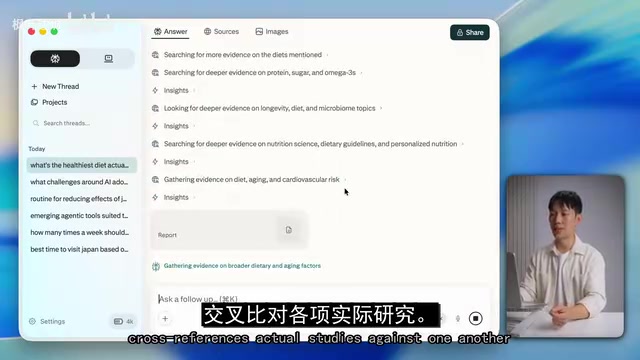
Take "the healthiest diet supported by science" as an example — Perplexity doesn't just cite sources, it links directly to actual peer-reviewed research papers with clear analysis — and nobody is trying to sell you a meal plan.
The real magic lies in the Deep Research button. Click it, and Perplexity searches dozens of sources, cross-references actual studies against each other, and generates a complete research report — something that might otherwise take you half an hour. Additionally, you can use the "Spaces" feature to organize research on different topics into separate workspaces, so health research doesn't get mixed up with tech comparisons or travel planning.
Perplexity's core advantage is that it's an answer engine, not a conversational chatbot. It fuses real-time web indexing with advanced models, letting you skip generic summaries and pinpoint highly specific information with verified facts.
Skill Learning: Google AI Studio Live Mode Is Like a Private Tutor
Learning a new skill or software usually means either fumbling around online or paying someone to teach you. Google AI Studio's Live mode is essentially an always-available screen tutor.
Google AI Studio is an AI model experimentation platform from Google DeepMind, and its Live mode is powered by the Gemini series of multimodal models. "Multimodal" means the model can simultaneously understand and process multiple forms of information — text, images, audio, video, etc. The screen-sharing feature leverages the model's visual understanding capabilities — it doesn't simply "see" screenshots but understands the hierarchical relationships of interface elements, recognizes software operation logic, and provides real-time guidance through voice interaction. This capability draws on Google's decades of technical expertise in computer vision and natural language processing.
The workflow is simple: enter Playground mode → click Real Time → enable screen sharing. It can see everything on your screen. In one demonstration, a video editing issue with missing media files was identified, and Google AI Studio not only accurately diagnosed the problem but walked through the steps of right-clicking in the project media list and selecting "Relink Files."
You can even interrupt it while it's speaking to ask follow-up questions, just like having a tutor sitting beside you watching your screen — except this tutor knows every piece of software ever developed by humanity and is available on demand.
Note Management: Notion AI Makes Your Past Notes Useful Again
Meeting notes, project notes, random ideas, voice memos — these are scattered across various apps, and organizing and processing them is incredibly time-consuming. Notion AI isn't just a transcription tool; it's a system that "thinks alongside you."
Notion AI's core capability goes beyond text generation — it excels at semantic search and knowledge association. Traditional note search relies on exact keyword matching, but Notion AI uses Vector Embedding technology to convert each note into a point in high-dimensional vector space. When a user asks a question, the system calculates semantic similarity between the question and all notes. Even if your notes don't contain the exact words from your question, they can still be retrieved as long as they're semantically related. This is why you can ask questions in natural language without needing to remember specific keywords.
Meeting summaries, action items, and full transcripts are stored directly in your Notion workspace alongside project documents and tasks. You can ask Notion AI "What did we agree on during last Tuesday's call?" and it will extract the answer directly from that meeting you'd almost forgotten about.
The more you use it, the more powerful it becomes. Every note, every meeting, every idea feeds into a queryable knowledge base. It doesn't just store information — it makes all your past notes useful again.
Information Absorption & Learning: NotebookLM Is a True Game-Changer
Google NotebookLM has fundamentally changed how information is absorbed and learned. Throw whatever you want to study — PDFs, articles, even YouTube videos — into NotebookLM, then explore all the concepts using simple language.
NotebookLM was developed by Google Labs, and its core design philosophy is "grounded generation." Unlike general-purpose chatbots, NotebookLM strictly limits its answers to the scope of user-uploaded materials. Technically, it employs a constrained RAG architecture: the retrieval scope is hard-limited to the user's provided document collection, and the model won't draw on its pre-trained knowledge to supplement answers. This design sacrifices some flexibility but delivers extremely high reliability — every answer can be traced back to a specific paragraph in the source documents, fundamentally eliminating the AI hallucination problem.
For example, if you want to transition into project management: upload the PMP certification guide, a few articles about what hiring managers value, and a YouTube video breaking down the role. Then ask "What are the most important skills I should focus on first?" It synthesizes all materials into one clear answer.
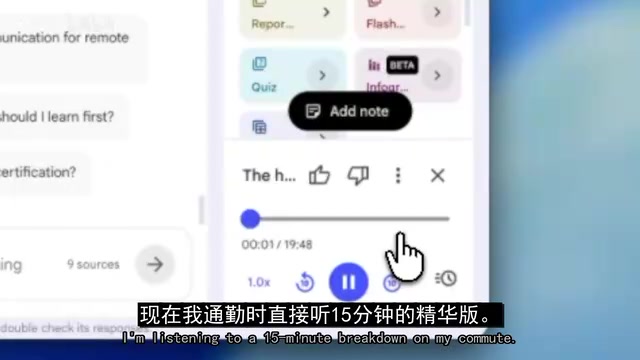
The most impressive feature is Audio Overview: NotebookLM generates a podcast-style conversation where two AI hosts discuss everything you've uploaded. That 50-page report you'd never re-read? It's now a 15-minute audio summary for your commute.
Unlike other AI tools, NotebookLM works only from the sources you provide — no hallucinations, no random information, just your materials presented in a more digestible format.
Financial Management: Claude for Small Business Takes Over Back-Office Drudgery
For freelancers, small business owners, or anyone with investments, Claude for Small Business is a powerhouse for handling financial administration. This feature from Anthropic can be enabled in Claude's collaboration mode, connecting to your financial tools (like QuickBooks, PayPal, etc.). It then automatically reconciles accounts, builds 30-day financial forecasts, flags overdue payments, sends invoice reminders, prepares tax documents, and even sends contracts with automatic filing upon signature.
It essentially takes over the entire back-office workload that most small businesses and freelancers either can't afford to hire someone for or end up doing themselves during late-night sessions.
Presentations: Gamma AI Creates Professional Slides in Seconds
Say goodbye to spending countless hours tweaking layouts in PowerPoint or Google Slides. Gamma AI can create beautifully designed, complete presentations from a single prompt or based on existing content and branding.
Using a single prompt — "Create a fundraising pitch deck for a freelance design agency targeting tech startups" — a complete presentation was generated in 30 to 60 seconds — with proper design standards, consistent styling, and logical layouts, rather than simply dumping text onto slides. Even better, you can give further instructions on generated slides, such as "make slide three more visual," "add a comparison table to slide five," or "make the overall tone more casual," and it redesigns instantly.
General Assistant: ChatGPT Remains the Go-To, But Separation Is Key
While the recommendation is against using ChatGPT as a catch-all tool, it still serves well as a personal general assistant. The core strategy is separation: let Claude know your business — tone, clients, workflows; let ChatGPT know you personally — preferences, fitness plans, travel habits.
The "memory" features in ChatGPT and Claude are essentially persistent user profiling systems. The models extract user preferences, habits, and background information across multiple conversations, store them as structured memory entries, and automatically reference them in subsequent conversations. This delivers a significantly more personalized experience, but also raises data privacy discussions — this memory data is stored on the service provider's servers and may be used for model improvement. The recommended "separation strategy" isn't just an efficiency optimization; it's objectively a form of privacy risk distribution — preventing any single platform from possessing your complete digital profile.
This separation allows both tools to build deeper, more accurate memory profiles. Claude drafts brand partnership emails in a professional tone, and an hour later ChatGPT recommends date-night restaurants based on your taste preferences — two completely different memory profiles, non-interfering, each doing what it does best.
Summary: Build Your Own AI Tool Stack
| Use Case | Recommended Tool | Core Advantage |
|---|---|---|
| Writing & Email | Claude Opus | Style mimicry, strong context understanding |
| Deep Research | Perplexity | Real-time search, traceable sources |
| Skill Learning | Google AI Studio Live | Screen-sharing with real-time guidance |
| Note Management | Notion AI | Queryable knowledge base |
| Information Absorption | NotebookLM | Podcast-style audio summaries, zero hallucinations |
| Financial Management | Claude for Small Business | Auto-reconciliation, invoice collection |
| Presentations | Gamma AI | Professional slides in seconds |
| General Personal Assistant | ChatGPT | Personal preference memory |
Those who start building their AI tool stack now — even imperfectly — will be far ahead of those who dump everything into a single AI tool. Using the right tool for the right job is what a true productivity revolution looks like.
Related articles
Codex Security: A Configuration Guide to Automatically Blocking Vulnerabilities at the PR Stage
OpenAI engineers demonstrate Codex Security PR Reviews: automatically scan for vulnerabilities at the GitHub PR stage, have AI generate fix commits and re-verify, with repository-level automatic review and alert threshold configuration.
Daybreak Blue Application and Enablement: Complete Process Guide
Based on the official demo video, this guide details the Daybreak Blue application and enablement process, covering enterprise verification, intended use statements, role permission configuration, user access verification, and API key creation to help cybersecurity teams quickly onboard frontier AI models.

United Airlines Bans AI Agents from Booking Flights, Escalating the Battle Between Airlines and Intelligent Agents
United Airlines bans AI agents from booking flights for travelers, sparking Hacker News debate. This analysis examines channel control, risk logic, the trust gap in the agent economy, and practical impacts on travel AI developers.