Anthropic Python SDK v1.11.0 Released: New Spend Limits Query API
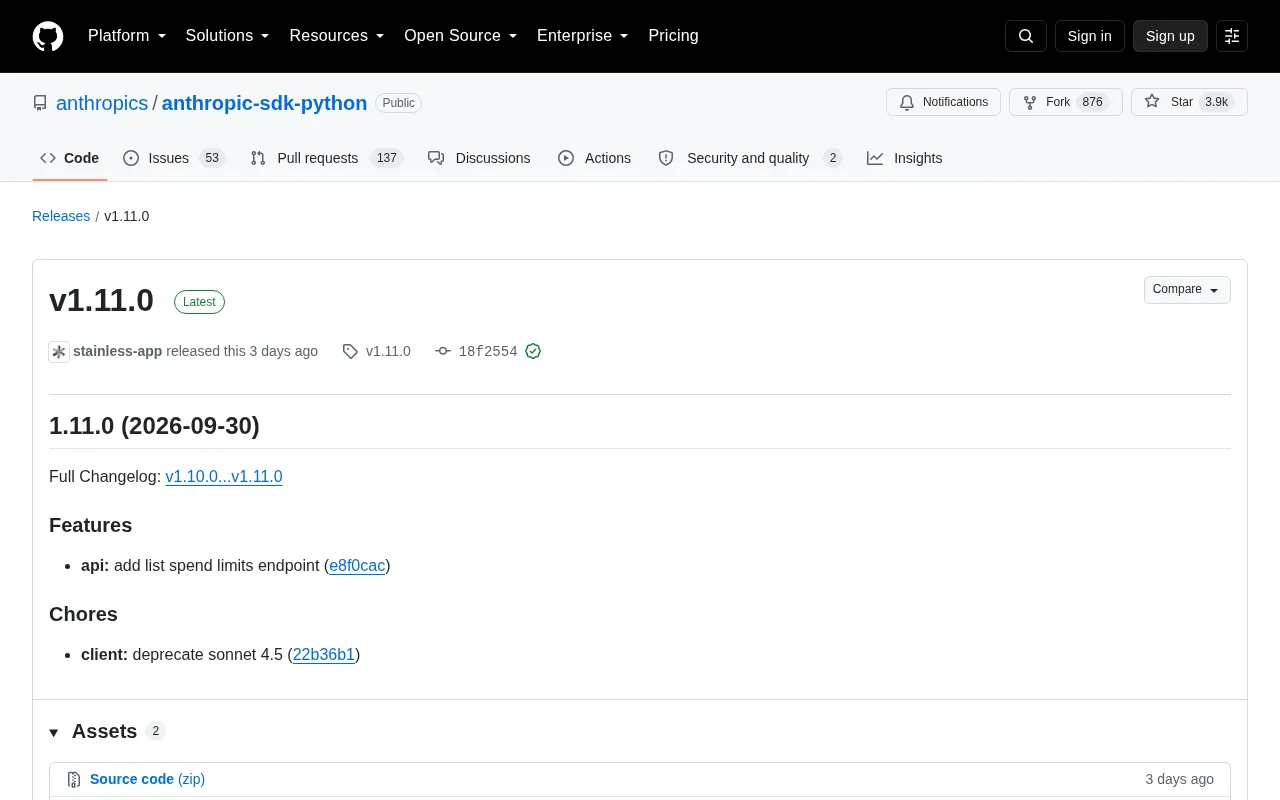
Anthropic Python SDK v1.11.0 adds a spend limits query API and deprecates the Sonnet 4.5 model.
Anthropic's official Python SDK v1.11.0 brings two key changes. The main new feature is a `list spend limits` endpoint that lets developers read account or project API quota status programmatically, enabling budget monitoring, automated alerting, and multi-tenant quota management. On the maintenance side, Sonnet 4.5 is deprecated at the client level, signaling developers to migrate to newer models. Upgrade via `pip install --upgrade anthropic`.
Version Overview
Anthropic's official Python SDK (anthropic-sdk-python) has released version v1.11.0. As the official library for calling Claude models in Python, the repository has accumulated approximately 3.9k stars and 876 forks on GitHub, making it the primary way to access the Anthropic API in the Python ecosystem.
This update was pushed by the automated release tool stainless-app and confirmed with a GitHub verified signature. The release is an incremental update containing one new feature and one maintenance change — teams looking to stay current with the official API capabilities should consider upgrading promptly.
New Feature: Spend Limits Query API
The most notable change in this release is the addition of a list spend limits API endpoint.
For teams running large-scale LLM workloads in production, cost control has long been an operational pain point. Previously, developers typically had to rely on the billing dashboard or manually tally request volumes to estimate spend — there was no programmatic way to monitor quota status in real time. The new spend limits query API means applications can now read current account or project limit information directly in code, enabling more granular budget monitoring and automated alerting logic.
This endpoint is especially useful for building multi-tenant SaaS products where quotas need to be allocated per customer — developers can pipe limit data into internal dashboards or billing systems to avoid unexpected charges from over-usage.
Anthropic's Spend Limits system is typically structured across two dimensions: account-level and project-level. Account-level limits cap total consumption for an entire organization within a billing cycle, while project-level limits allow budget allocation across different applications or teams. Before this SDK update, developers who wanted to check remaining quota generally had to log into the Anthropic Console manually, or rely on passive signals like receiving a 429 rate_limit_error when limits were exceeded. The new list spend limits endpoint exposes this information as a programmable data endpoint, making cost governance strategies — such as scheduled polling, threshold alerting, and automatic fallback — natively implementable at the application layer, without needing to route through third-party monitoring tools.
Maintenance Change: Sonnet 4.5 Deprecation
Under the Chores section, this release marks deprecate sonnet 4.5, deprecating Sonnet 4.5-related configuration at the client level.
Model deprecation is standard practice in the LLM vendor release cycle, and typically signals that a model version will gradually be phased out of support. Developers should migrate to newer model versions as soon as possible. It's worth noting that SDK-level deprecation is usually an advance notice of behavioral changes — if your code still hardcodes references to the deprecated model identifier after upgrading, it's a good time to audit your call logic and replace it with the officially recommended latest model to avoid compatibility issues down the line.
In Anthropic's model naming system, the Claude series is tiered by capability: Haiku (lightweight and fast), Sonnet (balanced), and Opus (flagship), with new generations released over time within each tier. SDK-level "deprecation" typically rolls out in two phases: the first phase adds deprecation warnings in code — the console will print a notice but the feature still works; the second phase is a full API-level removal, at which point calling the deprecated model identifier returns an error. Developers receiving the Sonnet 4.5 deprecation signal today still have a migration window, but it's advisable to replace the model ID with claude-sonnet-4 (or the latest stable version listed in official documentation) proactively, to avoid service disruptions when Anthropic eventually removes it.
Upgrade Recommendations
The jump from v1.10.0 to v1.11.0 is a low-risk minor update. For teams focused on cost observability, the spend limits endpoint is a direct incentive to upgrade; for projects still using older model configurations, this is a good opportunity to audit model dependencies.
Upgrading is straightforward via pip install --upgrade anthropic. After upgrading, it's recommended to review the official Full Changelog (v1.10.0...v1.11.0) to confirm the specific parameters and response structure of the new endpoint, and to verify in a test environment that existing calls are not affected by the model deprecation.
Summary
v1.11.0 continues Anthropic SDK's pattern of stable, automated incremental releases: on the feature side it enhances cost management capabilities, and on the maintenance side it advances model version lifecycle management. While the changes are modest, for engineering teams deeply reliant on Claude, infrastructure-level APIs like spend limits queries often deliver more practical value than pure performance improvements.
Related articles

Gemini 4 Argon Hands-On: Aggressive Pricing, 3D Capabilities Need Coaching
Gemini 4 Argon hands-on: limited-time $2/$10 pricing, million-token output, strong 3D and reverse-engineering work, but weak front-end aesthetics and zero-shot ability need coaching.

Build Your Own ChatGPT with Flutter and Gemini API: Streaming Chat in 200 Lines of Code
Learn to build a ChatGPT-like AI chat app with Flutter and the Gemini API: secure API keys via Firebase AI Logic, stream replies with sendMessageStream, maintain memory with chat sessions—all in under 200 lines of code.

A Practical Guide to Pairing a Wear OS Phone with a Virtual Watch
Based on a YouTube walkthrough, this guide details creating a Wear OS project in Android Studio, configuring phone and watch emulators, and completing pairing, with troubleshooting for five common failure scenarios and three verification criteria.