Antigravity 2.0 Complete Guide: MCP, Skills, and Automation Explained

Antigravity 2.0 is a desktop AI tool for parallel multi-project development with MCP, Skills, and automation built in.
Antigravity 2.0 is a desktop AI development tool built around a Project–Conversation–Agent architecture, enabling true parallel multi-project and multi-model collaboration. Through tiered permissions, plan review, and message queuing, users can balance safety and efficiency. The tool includes a built-in browser Agent, scheduled automation, MCP integration for services like Figma and Firebase, and reusable Skill modules for domain-specific tasks. Real-world demos cover design-to-code conversion, Android app generation, and product page recreation — all with strong automation and fidelity.
Antigravity 2.0 Complete Guide: From Basics to 6 Real-World Use Cases
Antigravity is a desktop AI development tool built for multi-project, multi-Agent collaboration. Unlike traditional IDEs, it's closer in interaction style to desktop apps like Codex or Claude Code. This guide is based on a comprehensive tutorial and covers Antigravity 2.0's core interface, key settings, automation features, and advanced capabilities like MCP and Skills — illustrated through multiple real-world examples.
Antigravity vs. Antigravity IDE
Before diving in, it's worth clarifying two easily confused products. This tutorial uses the Antigravity desktop app, not Antigravity IDE.
- Antigravity (desktop app): Similar to Codex or Claude Code, this is a desktop application focused on running multiple projects and Agents in parallel — more of a task orchestration hub.
- Antigravity IDE: More like a traditional IDE such as VSCode, where you view code alongside an Agent that helps you work through it.
Downloading is straightforward: visit the official website, choose the version for your OS, install it, and log in with your Google account to access the main interface.
Three Core Concepts: Projects, Conversations, and Agents
The Antigravity interface looks simple, and understanding it really comes down to three concepts:
- Project: Your code or working directory.
- Conversation: A task you hand off to the AI.
- Agent: The executor that actually completes the task.
Clicking New Conversation creates a task, which you can bind to a specific project directory and assign a model to individually. The tutorial demonstrates running two conversations simultaneously — one bound to Demo1 using Gemini 3.8 Flash, and another bound to Demo2 using Claude Opus 4.6 — with both projects running truly in parallel.
The Conversation History panel on the left serves as your task list, where you can manage and search both completed and in-progress tasks. This design encourages a practical workflow: use lightweight models for simple tasks and higher-performance models for heavy coding or complex reasoning, allocating compute on demand.

Key Settings: Message Queue, Permissions, and Plan Review
While there are many settings, mastering a few core toggles goes a long way.
Message Queue Mode
Under General, there are two message-handling modes: in queue mode, subsequent messages in the same conversation wait for the current task to finish before being sent to the Agent; Send Immediately lets the Agent receive follow-up messages as early as possible. The tutorial illustrates the difference by comparing two instructions — "search for AI news" vs. "search for today's AI news in the US" — sent under each mode.
Permission Levels
Permissions come in three tiers. Most users are recommended to use the middle option:
- Request Review: Safest option; all terminal commands require confirmation.
- Default: Recommended mode; routine operations within the project complete automatically, while sensitive actions prompt a second confirmation.
- Turbo: Maximum permissions, essentially full access.
Plan Review (Agent Behavior)
You can also configure what the Agent does after generating an execution plan. The recommended setting is Always Ask (review the plan before execution), rather than Always Proceed (execute immediately). Combined with the /Plan command, this lets the Agent first ask clarifying questions, then generate an editable live plan document that you can review before it proceeds. The tutorial walks through an example of creating a personal website — the Agent asks about tech stack, features, visual style, and whether to use dark mode, then generates a plan document for you to modify before execution begins.
Browser Agent and Rule Configuration
Antigravity has a built-in browser Agent. After installing Google Chrome, you can invoke it with the /Browser command. The tutorial demonstrates having it "open Baidu" — the Agent spawns a subtask and runs its own JS in the browser to handle more complex web interactions.
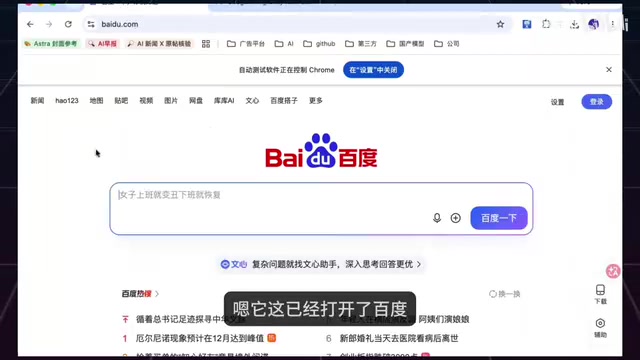
Browser permissions also have three levels: disabled, review required, and full access. Even more granular are Rules: browsing a page and interacting with a page are treated as two independent permission layers that can be configured separately. A typical use case is allowing the Agent to view GitHub, but blocking it from automatically clicking, submitting, or entering data when it accesses a banking backend — balancing security with efficiency.
The Application settings also include a few useful toggles: Prevent Sleep (keeps your computer awake for long-running tasks), continue running in the background after closing the window, and remote control — so you can check progress, assign tasks, or approve actions from your phone when you're away. Note that when using remote control, you should also enable Prevent Sleep.
Automation: Scheduling AI to Work on a Timer
Antigravity supports creating automated tasks via prompts. The tutorial demonstrates using a fixed prompt format to create a task called "AI News": it runs every morning at 9 AM and fetches domestic AI updates. Once created, tasks can be opened, run, or deleted from the list.
Common automation use cases include weekly report generation, meeting notes, email assistance, and data aggregation — essentially handing off repetitive information-processing work to an Agent on a schedule.
Under the hood, Antigravity's automation tasks rely on the OS's scheduling mechanism (similar to cron jobs), combined with the Agent's tool-calling capabilities for end-to-end unattended execution. Unlike simple scripted cron tasks, AI-driven automation can handle unstructured inputs — such as extracting key information from news pages or summarizing and categorizing content — rather than just fixed-format data processing. Worth noting: long-running automation tasks typically depend on a stable network connection and available model API quota. If a task encounters a network interruption or API rate limit mid-execution, it may fail silently. The Prevent Sleep toggle mentioned in the tutorial addresses exactly this: macOS and Windows will both suspend background processes after a period of inactivity, which can interrupt a running Agent. Enabling that option keeps the machine active during the task window.
MCP: The Bridge to Third-Party Tools
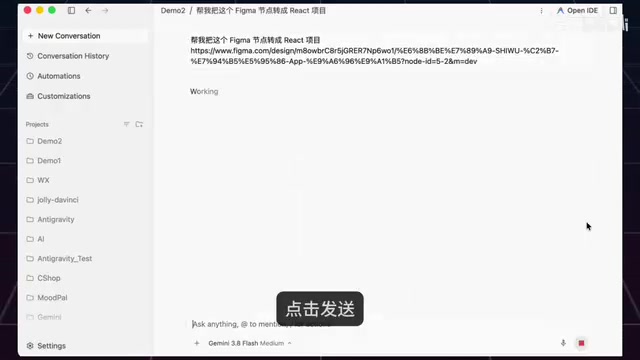
MCP (Model Context Protocol) can be thought of as a bridge that connects Agents to third-party tools. The tutorial uses the classic design-to-code scenario as an example: a design is in Figma, and MCP lets Antigravity communicate directly with Figma.
In practice, you click the plus icon next to MCP Server, search the list for Figma, and install it (the list also includes Firebase and many other services). You then create a new conversation, provide the prompt "convert this Figma node into a React project," and paste the design page URL. The task completes in a few minutes — the tutorial compares the output webpage against the original design, and the page elements, images, and colors are reproduced almost 1:1.
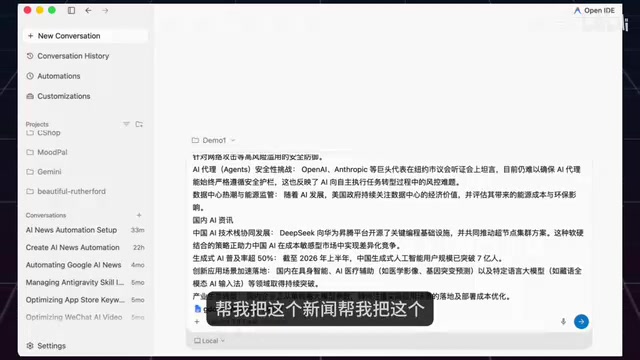
Through Google Workspace integration, you can also use commands like @docs to sync generated AI news directly to a Google Doc with one click — first-time use requires authorization. The Google ecosystem's Android CLI also works as a development toolbox; the tutorial has it create a "weather query" app from scratch, with code writing, app building, and unit testing all completing automatically.
MCP (Model Context Protocol) is an open protocol standard proposed and open-sourced by Anthropic in late 2024, designed to solve the fragmented integration problem between AI models and external tools and data sources. Before MCP, every AI tool that wanted to connect to Figma, GitHub, or a database had to build its own custom plugin — extremely high maintenance overhead. MCP provides a unified "tool calling" specification: an external service only needs to implement an MCP Server that conforms to the protocol, and any MCP-compatible AI client (such as Antigravity, Claude Desktop, etc.) can communicate with it via a standard interface. Architecturally, MCP uses a client-server model: the AI application acts as the MCP Client, sending tool call requests to an MCP Server, which handles the actual interaction with the external service and returns results. The MCP ecosystem now includes hundreds of official and community Servers for Figma, Firebase, Slack, PostgreSQL, and more — and developers can also write their own Servers to connect private systems.
Skills: Installing Specialized Expertise into Your AI
Skills are essentially specialized modules you install into your AI. The tutorial demonstrates installing a "de-AI-ify" Skill: copy the address, have the Agent install it, then paste in a sample text full of clichés, hollow exaggerations, and overblown language to test it. The Skill successfully identifies the inflated buzzwords, meaningless filler phrases, and formulaic sentence structures, then outputs a naturally rewritten version. When you no longer need a Skill, you can uninstall it directly.
The value of this capability is that it packages domain-specific expertise into reusable modules, allowing a general-purpose model to perform more professionally on specific tasks.
From a technical standpoint, a Skill is essentially a pre-configured system prompt or dedicated toolset — similar to "custom instructions" or "GPTs" on other platforms. In ordinary conversations, a model relies on its general training data to handle all kinds of tasks and often lacks sufficient rule constraints in specific domains. A Skill addresses this by pre-injecting domain knowledge, judgment criteria, and output format requirements, giving the model clearer behavioral guidelines for a specific task. The "de-AI-ify" Skill works because it contains built-in recognition rules for AI writing patterns — such as overuse of adverbs, repetitive sentence structures, and leading with conclusions — and applies targeted corrections on top of the general model's output. This encapsulation-and-reuse approach lowers the barrier to applying domain expertise and saves users from having to manually craft complex prompts every time.
Full Walkthrough: 1:1 Recreation of a Product Landing Page
The tutorial wraps up with a comprehensive exercise: using Gemini 3.8 Flash to build a local static promotional page that recreates a phone manufacturer's official product page 1:1, with permission to fetch assets from the official site. The task completes in a few minutes, and the output faithfully replicates the homepage's text animations, banner transitions, color switching, size switching, and interactive button details — closely matching the official site.
Summary
Antigravity 2.0 has a clear product philosophy: built on a "Project–Conversation–Agent" skeleton, it integrates multi-project parallelism, on-demand model switching, tiered permissions, plan review, scheduled automation, MCP external tool connections, and Skill-based expertise into a single desktop application. Based on the demo cases — whether converting design files to code, generating Android apps, or recreating product pages — it performs well in both fidelity and degree of automation. For developers who need to juggle multiple tasks simultaneously while maintaining control over Agent behavior, this is a tool worth trying.
Related articles

T3 Code: The Open-Source AI Coding Assistant's Comeback Story
T3 Code is an open-source AI coding assistant that unifies subscriptions like Codex and Claude, with powerful remote control and parallel task management.

Never Elected, Yet Ruled New York for 30 Years: The Ultimate Case Study in the Mechanics of Power
Robert Caro's biographies reveal how unelected Robert Moses ruled New York for 30 years through legal drafting and public authorities, and how Lyndon Johnson built leverage as a "powerless" Senate Majority Leader. Unpacking the underlying logic of accumulating and sustaining power.

The CPython 3.10 Recursion Trap and Synthetic Recovery in TokenGuard, an LLM Circuit Breaker
TokenGuard's author recounts a recursion crash caused by OrderedDict.pop in CPython 3.10 and introduces v0.3.0's Loop Nudge synthetic recovery, inline DLP scanning, and other new LLM agent circuit-breaker capabilities.