Bilibili's Most Detailed Codex Walkthrough: From Installation and Configuration to Real-World Pitfall Avoidance

Bilibili Codex tutorial breakdown: a practical pitfall-avoidance guide to installation, login errors, quotas, and permissions.
Based on a Bilibili Codex tutorial called "the most detailed," this article maps out the full path for newcomers. Installation: installing to a non-C: drive may prevent launch—use the Microsoft Store instead. Login errors (phone verification, 403, token exchange failure) mostly stem from network and cache issues; the "reconnect 5 times" issue needs a `.env` file with the correct proxy port. The "5-hour limit" is really a weekly quota—max 20 points per 5 hours, and the top model burns it fast. Grant full permission on first use to reduce pop-ups. The article also discusses the creator's view that tutorials' value lies in using them, and notes official rules may change.
Bilibili's Most Detailed Codex Walkthrough: From Installation and Configuration to Real-World Pitfall Avoidance
Recently, a Codex getting-started tutorial has been circulating on Bilibili that viewers call "the most detailed explanation out there." In just a few minutes, the creator walks through the entire journey—from registering a GPT account to logging into Codex, resolving common errors, and understanding the quota mechanism. For newcomers to AI coding tools, the value of this content isn't in showing off tricks, but in flagging the pitfalls one by one that official documentation never mentions. This article is based on that video's content, combined with similar issues that keep recurring in the community, to provide a systematic overview and interpretation.
Starting from Zero: Account Registration and Desktop Installation
The creator's starting point is registering a GPT account: open the official website, click "Sign up for free" in the top right corner, and complete registration by receiving a verification code via a 163 or QQ email address. Name and age can be filled in arbitrarily. This step itself has no barriers—the real dividing line appears after downloading the desktop client.
The video specifically warns that if the Codex desktop app is installed to a drive other than C:, it may fail to open after installation. The creator's alternative is to search for and install it directly through the Microsoft Store, which installs to the system drive by default and basically never runs into startup problems. This detail may seem trivial, but it's the first hurdle many newcomers get stuck on—before they can even use the tool, they're put off by the installation path.
Full Breakdown of Login Errors: Network, Cache, and Phone Verification
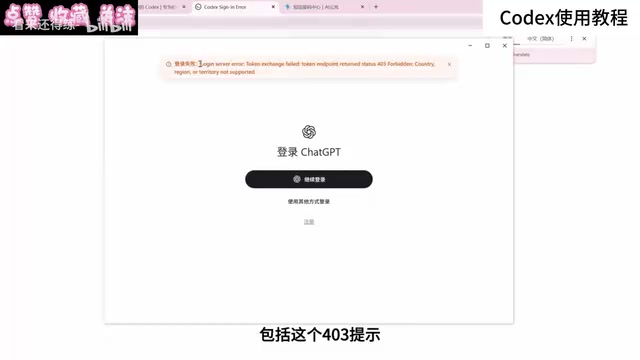
The login phase is where the video spends the most time, and it's also where comment-section feedback concentrates. The creator categorizes common errors into several types: phone number verification, 403 region not supported, token exchange failure, and a series of unknown errors that pop up during login.
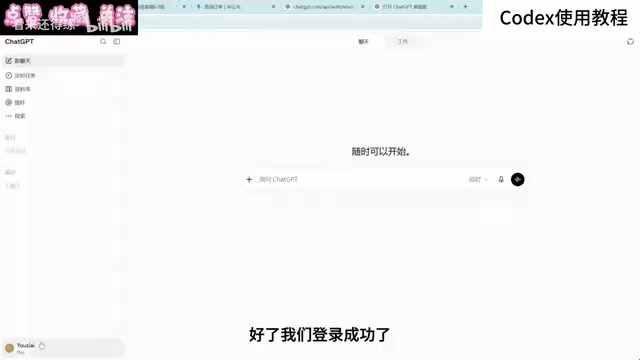
His assessment is that these phenomena are "basically all network and cache issues." Optimizing the network, clearing the cache, and switching browsers to log in will resolve most cases. As for phone verification, there are two approaches: subscribing to a membership has a chance of skipping verification, or finding a US-region phone number for SMS verification. The creator also admits that newly registered accounts will most likely still need verification when logging in even after subscribing; accounts registered longer ago have a higher chance of skipping verification after subscribing.
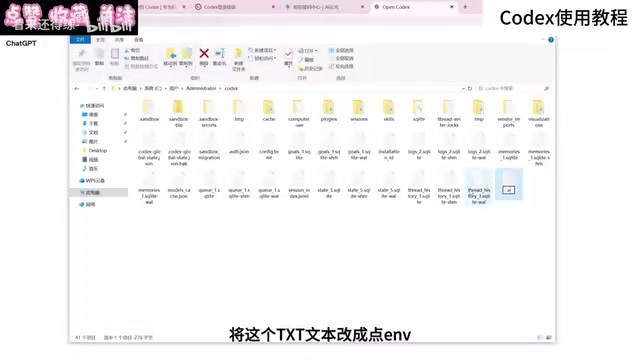
Another high-frequency issue is the repeated "reconnect 5 times" prompt during conversations. The solution given in the video: go to the .codex folder under the user directory on the C: drive, create a new text file, paste the specified code, and change the port number at the end to your network proxy's global or TUN mode port, then rename the file to .env and restart Codex. Users who can't find the port can simply ask Codex to help locate it.
There's also a scenario where users who previously used cc switch or other relay-type software can't log back in after logging out. The creator suggests restoring the configuration, and the safest way is to go to the web version and have GPT guide you step by step; some people also recover simply by logging out and back in. He warns that directly deleting the Codex directory, while "the most brute-force" approach, may delete local projects along with it—before doing so, you should first ask the web version of GPT to teach you how to save your projects.
What is TUN mode?
TUN (Tunnel) mode is a working mode of proxy software (such as Clash, Sing-box, etc.): it creates a virtual network adapter in the system, takes over all traffic on the device at the adapter level, and forwards it according to rules. Compared with the traditional "system proxy," TUN mode doesn't require setting up a proxy for each application individually, and is especially effective for programs that don't read system proxy settings (many Electron desktop apps fall into this category). The video asks you to change the port number to the "global or TUN mode port" precisely because clients like Codex may not go through the system proxy—only by pointing the port to TUN's listening port will requests be taken over by the proxy. Note that enabling TUN mode usually requires administrator privileges and may conflict with some VPNs and virtual machine networks.
The .env file and the .codex directory
.codex is the configuration folder that the Codex client generates in the user directory, used to store login credentials, session information, and local settings. .env is a conventional environment variable file; when a program starts, it reads the key-value pairs within, commonly used to inject API addresses, proxy ports, keys, and other parameters. The workflow in the video—"create a new text file—paste code—change the port—rename to .env"—is essentially manually telling the client which proxy exit to use. When renaming on Windows, pay attention to the extension: if the system hides known extensions, the file may actually become .env.txt and fail to work, so you need to first enable "show file extensions" in File Explorer.
Quota Mechanism: The Real Usage Boundaries of Plus Membership
Many newcomers misunderstand the "5-hour limit," thinking it means unlimited use within 5 hours. The creator uses a simple analogy: a total of 100 points per week, with a maximum of 20 points usable within any 5-hour window; once the 20 points are used up, you wait for the next 5-hour window to recover, until the weekly quota is exhausted, then wait for next week's reset. And GPT's top model consumes at a very fast rate—maxing out reasoning effort might burn through the quota in just a few minutes. This is also a pain point for many Plus users.

The upgrade path mentioned in the video is to upgrade the plan by paying the difference through the store. You can check whether the account was recharged in a non-region by looking at whether the billing transaction record shows php. After upgrading, the 5-hour limit disappears, the quota is substantially restored, and the plan recalculates one month from the upgrade date. The creator himself chose to upgrade because of high demand for motion graphics videos, but he also warns that the top model should be used with caution—he only maxed it out for material demonstration.
The relationship between weekly quota and the 5-hour window
This kind of "rolling window + periodic total" rate-limiting design is quite common in AI services: the total resets weekly, while a short window limits instantaneous bursts to prevent a few users from occupying all compute in a short time. Once you understand this, you can explain why "waiting 5 hours" sometimes doesn't restore anything—if the week's total is already exhausted, waiting any number of 5-hour windows won't bring new quota; you can only wait for the weekly reset.
Why reasoning effort consumes quota
Reasoning effort controls the depth of the model's "thinking" before giving an answer. The higher the effort, the more intermediate reasoning tokens the model generates, and billing and quota consumption are usually calculated by token—so when effort is maxed out, a single request may cost several times or even ten-plus times the default tier. This is also why the video says "quota burns out in minutes": what's being consumed isn't time, but tokens. For tasks like formatting and simple corrections, using a low effort tier is often more cost-effective.
General Settings and Permission Configuration Recommendations
The settings after entering Codex aren't many, but the creator offers a few practical suggestions: grant full access permission on first use, otherwise the tool will repeatedly pop up permission requests while working, and frequent confirmations really disrupt your flow; configure permissions as broadly as possible; enable web search and reasoning effort fully, then flexibly choose based on task complexity. The essence of these settings is a trade-off between security and efficiency—for individual users, the benefit of reducing friction usually outweighs the risk.
What full access permission means
Coding agents like Codex need to read and write files, execute terminal commands, and access the network to complete tasks. Granting "full access permission" is equivalent to letting it operate autonomously within your machine's user privileges, without asking item by item. The flip side of convenience is risk: the agent may accidentally delete files, overwrite uncommitted code, or execute dangerous commands when subjected to malicious prompt injection. The safer approach: operate in an isolated working directory or Git repository, ensure critical code is committed or backed up, and stay vigilant about operations involving production environments, key files, and system directories. The balance between efficiency and security varies from person to person, but for individual developers, "back up first, then delegate" is the lowest-cost compromise.
A Debatable Viewpoint: The Value of a Tutorial Is in "Using It"
At the end of the video, the creator expresses a view that's quite controversial in the community: most AI usage tutorials online today, especially paid courses, are essentially fleecing people. His reasoning: large models are already capable enough—needs like building websites and editing videos can be accomplished by simply explaining clearly, and when you don't understand something, just ask the model; much of the content demonstrating plugin installation and computer control is more about performance effect.
His advice is simple: get hands-on and start using it first, watch more creators share finished products and skills, and directly use them to create—with enough usage, you'll naturally be able to achieve the effects you want. This view is admittedly a bit reductive—systematic tutorials still have value for building a knowledge framework—but the direction he points to is correct: the learning curve for tools like Codex is mainly not about "learning" but about "using."
Also worth noting: the model naming and quota rules mentioned in the video are based on the creator's demonstration; official product information may be adjusted at any time, so in actual operation, refer to what's displayed in the client.
One-line Summary
A Bilibili Codex tutorial breakdown: a real-world pitfall-avoidance guide covering installation, login errors, quota mechanisms, and permission settings.
Paragraph Summary
Based on a Bilibili Codex getting-started tutorial called "the most detailed," this article systematically maps out the complete path for newcomers from registration to real-world use. On installation: installing the desktop app to a non-C: drive may prevent it from opening, which can be avoided by installing via the Microsoft Store. On login: errors mainly center on phone verification, 403 region not supported, and token exchange failure—mostly related to network and cache, solvable by optimizing the network, clearing cache, and switching browsers; the "reconnect 5 times" issue requires creating a .env file in the .codex folder under the user directory and filling in the correct proxy port. On quota: it clarifies that the "5-hour limit" is actually a weekly quota system, with a maximum of 20 points consumed within 5 hours, and the top model consuming extremely fast. On settings: granting full permission on first use is recommended to reduce pop-up interruptions. The article ends by discussing the creator's view that "the value of a tutorial is in using it," and reminds readers that official rules may change at any time.
Related articles

The Truth Behind Titanic's Sinking: Key Decisions and Communication Failures in the National Geographic Documentary
National Geographic's The Unsinkable Ship uses survivor testimony to reconstruct Titanic's fatal decisions—from the missing MSG telegram prefix and the broken boiler-room-to-bridge link to how 'unsinkable' thinking delayed damage control and evacuation.

74M-Parameter Open-Source Model Partially Outperforms Jev AI in Testing
Fastino AI's Glider 2.5 models, with just 74M–300M parameters, reportedly outperform Jev AI in some guardrail benchmarks per YouTube testing, run on consumer hardware, and even play Doom. We analyze small models' competitiveness and deployment value on specific tasks.

Gemini 4 Argon Hands-On: Aggressive Pricing, 3D Capabilities Need Coaching
Gemini 4 Argon hands-on: limited-time $2/$10 pricing, million-token output, strong 3D and reverse-engineering work, but weak front-end aesthetics and zero-shot ability need coaching.