Bolt + Expo in Practice: A Complete Tutorial on Developing Mobile Apps with AI-Generated Code

Bolt integrates Expo to generate cross-platform mobile apps from natural language using AI
Bolt's new mobile development feature deeply integrates with the Expo framework, allowing users to describe requirements in natural language while AI automatically generates React Native code — one codebase that builds both iOS and Android apps simultaneously. Combined with EAS cloud build services, there's no need to configure local development environments for compilation, signing, and app store submission, dramatically lowering the mobile development barrier and making it ideal for rapid prototyping and MVP validation.
Introduction: AI Code Generation Enters Mobile Development
Bolt recently released a major update — support for mobile app development. Through deep integration with the Expo framework, users can now describe their requirements in natural language, have AI automatically generate React Native code, and build both iOS and Android apps simultaneously. This means that even people without mobile development experience can quickly turn ideas into working native applications.
Bolt belongs to the new generation of AI code generation platforms. Unlike inline completion tools such as GitHub Copilot, it adopts a "full-stack project generation" approach. After users describe their app requirements in natural language, Bolt calls a large language model (LLM) to understand the intent, then generates a complete project structure including directory organization, component code, routing configuration, style files, and more. Its "Enhance" feature is essentially a prompt optimization step — expanding the user's brief description into a detailed prompt containing technical specifications, UI details, and interaction logic, thereby improving the quality and completeness of the generated code. This approach is particularly well-suited for Rapid Prototyping and MVP (Minimum Viable Product) validation scenarios.
This article provides a detailed walkthrough of the Bolt + Expo workflow, development experience, and deployment process based on hands-on demonstrations.
Core Advantages of Bolt + Expo
One Codebase, Two Platforms
Bolt builds apps based on Expo (a mobile app development framework for React Native), where a single codebase can be compiled into native apps for both iOS and Android platforms. Developers don't need to maintain two separate codebases, significantly reducing development and maintenance costs.
Expo is a development toolchain and service platform built on top of React Native. React Native was open-sourced by Meta (formerly Facebook) in 2015, allowing developers to use JavaScript and React's component-based approach to build truly native mobile apps rather than WebView-based hybrid apps. Expo further encapsulates numerous native modules (such as camera, push notifications, file system, etc.) and provides a unified build and release toolchain, so developers don't need to directly work with Objective-C/Swift or Java/Kotlin code. The advantage of this layered architecture is that React Native handles bridging JavaScript with native UI components, while Expo simplifies project configuration, dependency management, and build processes — together they dramatically lower the barrier to entry for mobile development.
For independent developers and small teams, this cross-platform approach means covering two markets with one effort, offering an extremely high return on investment. It's worth noting that cross-platform mobile development is a significant technology trend in recent years. Besides the React Native/Expo approach, the market also offers Google's Flutter (using Dart), Microsoft's .NET MAUI, and web-technology-based options like Ionic/Capacitor. React Native's core advantage lies in its massive JavaScript/TypeScript developer ecosystem and npm package resources, while Flutter is known for more consistent cross-platform rendering and higher performance ceilings. Bolt chose Expo/React Native as its mobile development tech stack largely because JavaScript is one of the most abundant languages in AI code generation model training data, and models have the most mature understanding of React component patterns, ensuring better quality and usability of generated code.
Cloud Build and Deployment
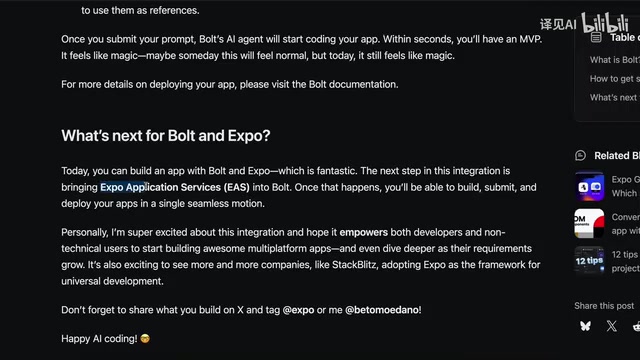
Bolt has partnered with Expo to use EAS (Expo Application Services) for cloud-based builds. In traditional mobile development, Android requires Android Studio and iOS requires Xcode, making environment setup tedious. With EAS, all build work is completed in the cloud, and the final product can be submitted directly to the App Store and Play Store.
EAS is a cloud infrastructure service provided by the Expo team, consisting of three core modules: EAS Build, EAS Submit, and EAS Update. In traditional mobile development, iOS apps must be compiled in a macOS environment using Xcode, while Android apps require configuring Gradle and the Android SDK — environment setup that often takes hours. EAS Build hosts these compilation environments on cloud servers, where developers only need to submit source code and configuration files, and the cloud automatically handles code compilation, native dependency linking, app signing (including iOS certificate and Provisioning Profile management), and the entire process. EAS Submit can then directly submit build artifacts to Apple App Store Connect and Google Play Console, achieving full automation from code to publication.
Hands-On Demo: Creating a Chat App with Bolt
Step 1: Describe Requirements and Generate Code
After visiting the Bolt website, you can see the new mobile app development entry point. Click it and enter your app description to get started. In this demo, the requirements are:
- Create a beautiful chat application
- Use the OpenAI SDK
- Use a light theme
- User messages in blue bubbles, AI replies in gray bubbles
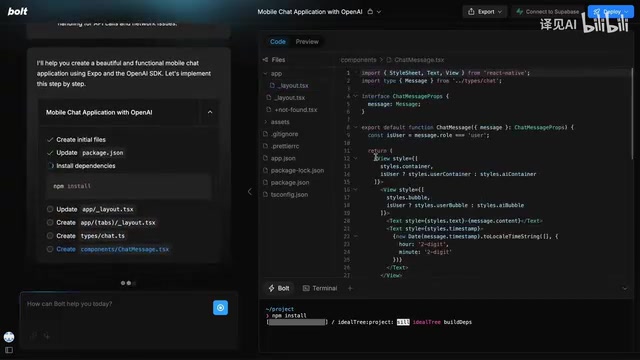
After writing the basic prompt, you can click the "Enhance" button to let Bolt automatically optimize the prompt, making the description more detailed and precise. After submission, Bolt begins writing code automatically — first setting up the Expo project structure, then designing the layout and creating relevant tabs.
Step 2: Iterative Refinement
The initially generated app can't run directly because the OpenAI API key needs to be configured. At this point, you can continue using natural language to ask Bolt to add features — for example, "provide an option to set the API key in the interface." Bolt generates code again, ultimately implementing the ability to enter the API key directly in the app interface.
The entire process is similar to developing web applications — code modifications are very convenient, and you can also manually edit code to adjust the base URL or add model selection features.
Running and Debugging Locally
Download Code and Start the Project
Bolt's one-click deployment feature is still under development, so regular users currently need to download the code and run it locally. The steps are:
- Download the code archive from Bolt and extract it
- Open the project with VS Code or another editor
- Run
npm installto install dependencies - Run
npx expo startto start the project
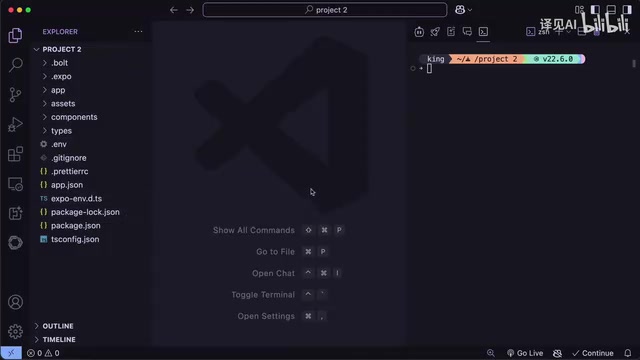
Once started, you can choose to preview the app in a browser, or download the Expo Go app and scan the QR code to view the results on your phone in real time. Expo Go is the official development debugging client provided by Expo. It has all Expo SDK native modules built in, so developers don't need to recompile the native app every time they modify code — just save the file and see live updates on the phone (Hot Reload). The actual running results are consistent with the Bolt preview, including details like message bubble animations that perform excellently.
Deployment Process Explained
Cloud Build with EAS
Following Bolt's recommendations, the deployment process uses EAS CLI:
- Install EAS CLI: Run
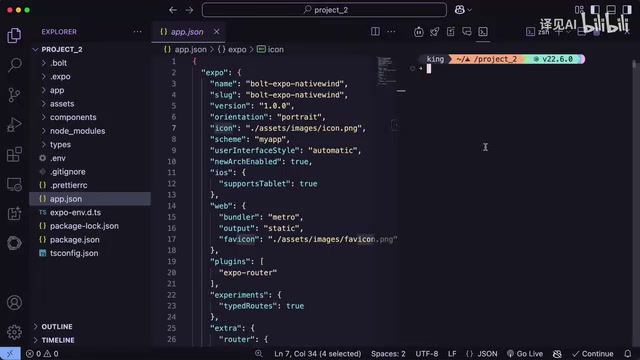
npm install eas-cli - Configure app information: Modify the package name, app name, icon, etc. in
app.json - Initialize the project: Run
eas init, select your account and configure deployment options - Build configuration: Run
eas build:configure, select the target platform (iOS/Android/Web)
Multi-Platform Deployment Options
- Web deployment: Run
npx expo export --platform webto generate bundled files, then runeas deploy --prodto get a shareable preview URL - Mobile deployment: Run
eas build --platformfollowed by the target platform parameter, follow the prompts to submit to the App Store or Google Play Store
The entire deployment process requires no local installation of Xcode or Android Studio — all compilation and signing is completed in the cloud.
Current Limitations and Outlook
Current Shortcomings
- Bolt's built-in one-click deployment feature is not yet available to regular users; manual code download and local operations are still required
- For complex apps (such as scenarios requiring databases and authentication), additional configuration is still needed
- While the quality of generated code is good, production-grade apps may still require manual review and optimization
Future Potential
Integrating AI code generation with the Expo ecosystem is a very smart choice. Once the one-click deployment feature officially launches, the entire process from "idea" to "listed on app stores" will be greatly simplified. For independent developers and small teams, this could be a game-changing tool.
Before AI-assisted tools, a mobile app typically went through these stages from concept to launch: requirements analysis (1-2 weeks), UI/UX design (2-4 weeks), frontend development (4-8 weeks), backend development (4-8 weeks), testing and bug fixes (2-4 weeks), and app store review (1-2 weeks) — with a total cycle usually spanning 3-6 months. Even experienced full-stack developers need several weeks to independently complete a fully functional app. The Bolt + Expo combination compresses the frontend development phase to hours or even minutes. While production-grade apps still require subsequent optimization and testing, for validating business ideas and gathering early user feedback, this speed advantage is revolutionary.
Conclusion
The Bolt + Expo combination dramatically lowers the barrier to mobile app development. Through natural language requirement descriptions, AI-automated code generation, and cloud-based building and deployment, the entire workflow becomes unprecedentedly smooth. While there are still some functional limitations, it already demonstrates the enormous potential of AI-assisted mobile development. For developers looking to quickly validate product ideas or build MVPs, this is undoubtedly a tool worth watching.
Key Takeaways
- Bolt adds mobile app development capabilities, generating both iOS and Android apps simultaneously based on the Expo framework
- Cloud-based builds through EAS (Expo Application Services) eliminate the need for local Android Studio or Xcode configuration
- The development workflow mirrors web app development: describe requirements in natural language → AI generates code → iterate and refine → deploy
- One-click deployment is still under development; regular users need to download code for local execution and manual deployment
- Supports multi-platform deployment: Web preview, App Store, and Google Play Store publishing
Related articles
 Tutorials
ChatGPT Plus Subscription Guide: Are GPT-5.5, image-2, and Codex Worth the Upgrade?
A detailed look at ChatGPT Plus features — GPT-5.5, image-2, and Codex — with a Plus vs Pro comparison and a complete step-by-step subscription guide for users outside the US.
 Tutorials
Harness AI Engineering in Practice: Using Claude Code to Master Enterprise-Level E-Commerce Development
Deep dive into Harness AI Engineering: master enterprise e-commerce development with Claude Code using the Rules, Skills, Wiki, and Changes framework.
 Tutorials
Cursor + Codex Dual-IDE Collaboration: A Practical Methodology for Open-Source Project Customization
A complete methodology for open-source project customization based on real-world experience, detailing the Cursor+Codex dual-IDE workflow, seven-stage process, MVP validation, and AI source code reading techniques.