Browser Use Deep Dive: A Practical Guide to Natural Language-Driven Browser Automation Agents

Browser Use: A comprehensive analysis of the natural language-driven browser automation agent tool
Browser Use is a natural language-driven browser automation agent tool where users simply describe tasks in everyday language to automate browser operations. It adopts a standard Agent + LLM + Tools architecture, interacting with large models through Structured Output (rather than Function Calling) for broad model compatibility. The underlying layer has migrated from Playwright to CDP protocol, improving long-running stability. Combined with frameworks like pytest, it enables production-grade Web automation testing.
What is Browser Use?
Browser Use is a natural language-driven browser automation agent tool. The official team defines it as "automatically executing browser tasks in plain text." In other words, you simply describe what you want to accomplish in the browser using everyday language, and Browser Use handles the execution automatically — no need to write complex locator scripts or operation code.
This tool is widely recognized in the industry as one of the best browser automation agents available. Alibaba Cloud has also mentioned using Browser Use as a core agent solution in their technical articles. Its core philosophy is straightforward — repetitive browser work is outdated. With the power of AI Agents, a massive amount of mechanical browser operations can be efficiently automated.
The AI Agent mentioned here refers to an intelligent system capable of perceiving its environment, making autonomous decisions, and taking actions to achieve goals. Unlike traditional single-turn Q&A AI, an Agent possesses capabilities for task planning, tool invocation, memory management, and multi-step reasoning. A typical Agent consists of three components: a perception module (gathering environmental information), a decision module (usually powered by a large language model), and an execution module (calling external tools to complete operations). In browser automation scenarios, the Agent continuously observes page states, reasons about the next action, executes browser commands, and adjusts its strategy based on results, forming a continuous perception-decision-action loop.
Architecture Analysis: How Browser Use Works
As a standard AI Agent, Browser Use exhibits the typical characteristics of an intelligent agent. Let's break down its architecture design layer by layer.
Client Layer
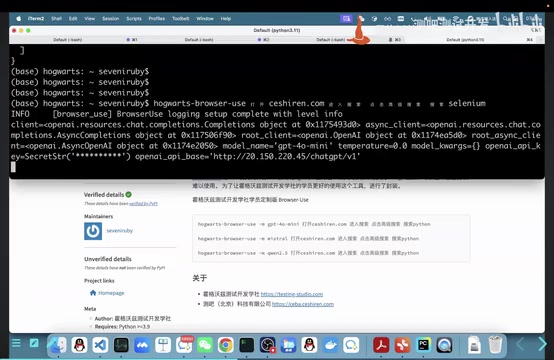
Browser Use provides three interaction methods: command line (CLI), code invocation (Python API), and an online cloud service. Developers can flexibly choose based on their specific scenarios.
Agent Core
At the tool's heart is a complete agent system composed of three key elements: a large model, a toolset, and prompts. The agent manages message history and coordinates interactions between components.
Large Model Support
Browser Use is compatible with multiple mainstream large models, including Ollama (locally deployed models), OpenAI, Claude, and more. What you might not have noticed is that it uses Structured Output to interact with large models rather than traditional Function Calling. This design choice gives it broader model compatibility — any model that supports structured output can be integrated.
To understand the significance of this design choice, you need to know the difference between the two approaches. Function Calling is a mechanism introduced by OpenAI in 2023 that allows large models to declare the need to call a predefined function during conversation and output parameters matching the function signature. This approach depends on specific API implementations from model providers, with varying levels of support and formats across vendors. Structured Output is a more universal approach — by defining a JSON Schema in the prompt, it requires the large model to directly output JSON data conforming to that Schema. This method doesn't depend on specific API features; as long as the model can follow instructions to output valid JSON, it works, resulting in better compatibility across different models. Browser Use chose Structured Output over Function Calling precisely to maximize model compatibility.
Browser Control Layer
The underlying technology has undergone a critical evolution: earlier versions used Playwright for browser control, while the latest version has switched to CDP (Chrome DevTools Protocol), directly calling Chrome's developer protocol. This change significantly improved performance and stability in long-running scenarios.
Chrome DevTools Protocol (CDP) is Chrome's built-in remote debugging protocol that allows external programs to communicate with the browser at a low level via WebSocket connections. CDP provides programmatic access to virtually all browser features, including DOM manipulation, network interception, JavaScript execution, performance profiling, page screenshots, and more. Google's official Node.js browser automation library, Puppeteer, is built directly on CDP. In contrast, while Playwright also uses CDP to communicate with Chromium, it adds its own abstraction protocol and process management layer on top, which can introduce additional overhead and instability in long-running scenarios. Building directly on CDP means eliminating intermediate layers for more granular browser control, but it also means handling many convenience features that Playwright already encapsulates.
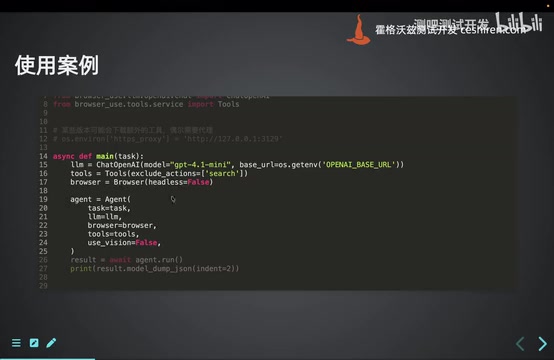
Complete Workflow
A typical task execution flow looks like this:
- The user issues a task to the agent in natural language
- The agent constructs a prompt and sends it to the large model
- The large model returns structured tool invocation instructions based on the tool catalog
- The agent controls the browser via CDP protocol to execute specific operations
- The browser returns the page's DOM structure and current state
- The agent feeds execution results back to the large model for the next round of decision-making
- After multiple iteration cycles, the process continues until the large model determines the task is complete
Installation and Quick Start
Environment Setup
The official recommendation is to use a Python 3.12 environment. Here are the specific installation steps:
# Create an isolated environment (using the uv tool)
uv venv --python 3.12
# Activate the environment
source .venv/bin/activate
# Install Browser Use
pip install browser-use
# For CLI tools
pip install browser-use[cli]
# Install browsers (leveraging Playwright's installation capability)
playwright install
Note: The latest version downloads some overseas resources at startup. Users in China may need to configure a proxy for the first run.
Code Invocation (Recommended)
The officially recommended approach is through the Python API, offering maximum flexibility:
from browser_use import Agent
from langchain_openai import ChatOpenAI
from dotenv import load_dotenv
import asyncio

load_dotenv()  # Load environment variables from .env config file

async def main():
    llm = ChatOpenAI(model="gpt-4o")  # Initialize the large model
    agent = Agent(llm=llm, task="Open Baidu and search for Browser Use")
    result = await agent.run()  # Execute the task asynchronously

asyncio.run(main())
The advantage of the code approach is its flexibility for encapsulation — for example, combining it with pytest to run batch test cases automatically.
Command Line Usage
browser-use --model gpt-4o "Open Baidu and search for Browser Use"
The CLI approach is easy to get started with and suitable for quick verification. However, it exposes limited parameters, and many advanced configurations cannot be achieved through the command line.
Core Configuration Deep Dive
Three-Tier Configuration System
Browser Use's configuration is divided into three levels: config file (.env) → environment variables → API parameters. Priority increases in that order, with API parameters enabling the most granular control.
Agent Parameters
Agent is the most critical API entry point, with both initialization and the run method offering rich parameter options:
- Browser configuration: window size, visualization mode, headless mode, reusing existing browser instances, etc.
- Model configuration: choosing the large model type, enabling vision capabilities
- Tool configuration: managing built-in tools (adding/removing)
- Execution control: maximum execution steps, pre/post hook functions, etc.
Regarding the vision model, the default setting is auto (auto-detect). However, based on practical experience, it's recommended to disable the vision model since visual recognition stability is still insufficient. In text-only mode, Browser Use parses page content based on the Accessibility Tree and DOM structure — this is currently the most stable and reliable approach.
The Accessibility Tree is a semantically structured tree generated by the browser from the page's DOM structure. It was originally designed to provide screen readers and other assistive technologies with a structured description of page content. Each node contains semantic information about the element's role (e.g., button, link, text input), name, and state (e.g., clickable, expanded). In AI-driven browser automation, the Accessibility Tree has become an extremely efficient page representation — compared to raw HTML code, it filters out massive amounts of styling and layout noise, retaining only interaction-relevant semantic information. This dramatically reduces the Token count passed to the large model while providing sufficient context for the model to understand page structure and make operational decisions. This is the technical foundation for Browser Use's recommendation to disable the vision model and adopt text-only mode.
Tool System (Tools)
Browser Use includes over a dozen built-in tools covering operations like search, click, input, and screenshot. The tool system supports flexible customization:
from browser_use import Controller

# Exclude unnecessary built-in tools (e.g., Google search unavailable in China)
controller = Controller(exclude_actions=["search_google"])

# Add custom tools
@controller.action("Custom tool description", param_model=MyParams)
async def my_custom_tool(params: MyParams):
    # Execute custom business logic
    return ActionResult(extracted_content="Execution result")
Regarding tool response handling, by default all tool outputs are sent to the large model. However, for scenarios generating images, videos, or large PDFs, you can customize the response strategy — only telling the model "task completed" while saving the actual artifacts locally, avoiding unnecessary Token consumption.
Prompt Engineering and ReAct Mechanism Deep Dive
By analyzing the communication between Browser Use and the large model through packet capture, you can see that its prompt engineering design is quite sophisticated.
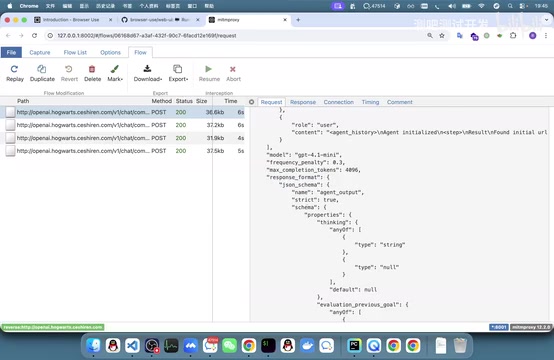
Five-Layer System Prompt Structure
- Role definition: Explicitly tells the large model "you are an AI capable of executing browser automation tasks"
- Capability description: Lists all executable operations one by one (click, input, submit forms, etc.)
- Context information: Current browser state, page DOM structure, execution history, original user request
- Rule constraints: Contains numerous reasoning rules and behavioral norms guiding the model toward sound decisions
- Response format: Requires the model to output in a structured ReAct format
Structured ReAct Strategy
Browser Use implements the ReAct (Reasoning + Acting) strategy through structured output. The JSON structure returned by the large model each time contains the following fields:
thinking: The current reasoning processevaluation: Assessment of the current page statememory: Key information that needs to be remembered across stepsnext_goal: The specific goal for the next stepaction: The specific operation to execute (selected from the tool catalog)
ReAct is an AI Agent reasoning framework proposed jointly by Princeton University and Google in 2022. Its core idea is to have large language models alternate between "Reasoning" and "Acting" during task execution. At each step, the model first expresses its current thought process in natural language (similar to Chain-of-Thought), then selects a specific tool or action to execute based on the reasoning results, and then performs the next round of reasoning based on the execution outcome. This approach significantly improves task completion accuracy and interpretability compared to pure reasoning or pure action approaches. Browser Use structures the ReAct thinking process into fields like thinking, evaluation, memory, next_goal, and action, making the decision process at each step clearly traceable.
This implementation doesn't rely on the Function Calling mechanism but completes tool invocation through structured output, offering stronger compatibility across different large models.
Underlying Framework Evolution: From Playwright to CDP
The Browser Use team developed a custom browser automation framework based on the CDP protocol to replace their earlier dependency on Playwright. The primary reasons for migration were performance bottlenecks and stability issues that Playwright exhibited in long-process, long-running scenarios.
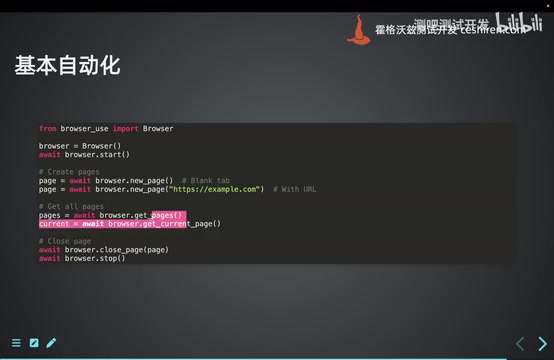
The new framework features:
- Direct CDP protocol communication, reducing intermediate layer overhead for better performance
- Encapsulation of browser instances, page management, and other fundamental concepts
- Support for precise element targeting via CSS selectors
- Integrated AI-assisted locating capabilities — using natural language descriptions to have the large model help locate page elements
- Support for features like getting the current active page and page counting that are inconvenient to implement with Playwright
Of course, there are trade-offs. Playwright, developed and maintained by Microsoft, is currently one of the most popular cross-browser automation testing frameworks, providing many developer-friendly advanced features. For example, Locator's Auto-waiting mechanism — before executing click or input operations, Playwright automatically waits for elements to become visible and interactable, without requiring developers to manually write waiting logic. Additionally, Playwright supports cross-browser testing (Chromium, Firefox, WebKit), network request interception, Trace Viewer visual debugging, and more. Browser Use's migration from Playwright to a custom CDP framework, while gaining improvements in long-running stability, also means these convenient advanced encapsulations need to be reimplemented or handled by developers themselves — a classic engineering trade-off between control and convenience.
Practical Example: Batch Browser Automation Testing with pytest
Browser Use's application in Web automation testing is very intuitive — combined with pytest's parameterization feature, you can easily implement batch test case execution:
import pytest
from browser_use import Agent

test_cases = [
    "Open Baidu and search for Python",
    "Open Testerhome community, go to advanced search, and search for automation testing",
]

@pytest.mark.parametrize("task", test_cases)
async def test_browser_task(task):
    agent = Agent(llm=llm, task=task)
    result = await agent.run()
    assert result is not None
Building on this, you can further extend the setup: pull test cases remotely from Jira, Zentao, or other test management platforms, dynamically convert them into parameterized data, and build a fully automated test execution pipeline.
Summary and Selection Recommendations
Browser Use is one of the most mature open-source tools in the browser automation agent space. Its core advantages can be summarized as follows:
- Natural language-driven: Dramatically lowers the barrier to browser automation, making it accessible even to non-technical users
- Clear architecture design: Follows the standard Agent + LLM + Tools paradigm, easy to understand and extend
- Broad model compatibility: Based on Structured Output rather than Function Calling, compatible with more large models
- Excellent underlying performance: After migrating from Playwright to CDP protocol, long-running stability improved significantly
- Strong extensibility: Supports custom tool development and seamless integration with testing frameworks like pytest
For Web automation testing teams, Browser Use has reached production-ready quality. Whether for daily regression testing, exploratory testing, or building end-to-end automation pipelines, it's a choice worth serious evaluation.
Related articles
 Tutorials
ChatGPT Plus Subscription Guide: Are GPT-5.5, image-2, and Codex Worth the Upgrade?
A detailed look at ChatGPT Plus features — GPT-5.5, image-2, and Codex — with a Plus vs Pro comparison and a complete step-by-step subscription guide for users outside the US.
 Tutorials
Harness AI Engineering in Practice: Using Claude Code to Master Enterprise-Level E-Commerce Development
Deep dive into Harness AI Engineering: master enterprise e-commerce development with Claude Code using the Rules, Skills, Wiki, and Changes framework.
 Tutorials
Cursor + Codex Dual-IDE Collaboration: A Practical Methodology for Open-Source Project Customization
A complete methodology for open-source project customization based on real-world experience, detailing the Cursor+Codex dual-IDE workflow, seven-stage process, MVP validation, and AI source code reading techniques.