Building a Canva-Like Online Design Platform: Full-Stack SaaS Architecture with AI Integration

A full-stack breakdown of building an AI-powered Canva-like graphic design SaaS platform from scratch
This article explores a full-stack project led by developer Antonio, aimed at building a Canva-like online graphic design tool from scratch. The project covers a visual canvas editor, AI integration, user authentication, payment subscriptions, and a complete SaaS product pipeline, featuring free/paid tiers, a template marketplace, and AI image generation — an excellent reference for learning full-stack development and SaaS architecture.
Project Overview: An AI-Powered Graphic Design SaaS Platform
This is an ambitious full-stack project — building a Canva-like online graphic design tool from scratch. Led by developer Antonio, the project covers a visual canvas editor, AI feature integration, user authentication, payment subscriptions, and a complete SaaS product pipeline. For developers looking to systematically learn full-stack development and SaaS product architecture, this serves as an invaluable reference case.
The project goes far beyond a simple front-end editor demo — it's a fully commercializable product featuring free/paid tiers, a template marketplace, AI image generation, auto-save, import/export, and other core functionalities. Let's break down the key technical modules.
Visual Canvas Editor: Core Interaction Capabilities
A Canva-like canvas editor is typically built on the HTML5 Canvas API or SVG technology. The Canvas API provides pixel-level bitmap rendering for high-performance graphics operations, while SVG (Scalable Vector Graphics) describes graphics in XML, natively supporting lossless scaling and DOM event binding. Modern design tools (like Figma) tend to use WebGL-accelerated rendering to handle performance bottlenecks in complex scenes. In the React ecosystem, Fabric.js and Konva.js are two mainstream canvas wrapper libraries that provide object models, event systems, and serialization capabilities on top of native Canvas, significantly reducing the complexity of building interactive editors.
Text Tool System
The editor's text tools offer professional-grade typography capabilities. Users can add headings, body text, and other hierarchical text elements with rich style controls: bold, italic, strikethrough, underline, and other basic formatting options are all available. Font selection supports switching between different font families (e.g., Times New Roman, Arial Black), combined with alignment tools for precise layout control.
An interesting detail: by copying and pasting text elements with color offsets, you can quickly create 3D text effects. Multi-select operations are also supported — selecting multiple text elements simultaneously for batch control, which is highly practical in real design scenarios.
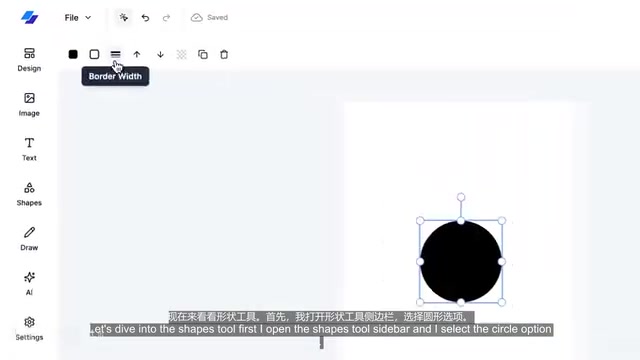
Shapes and Layer Management
The shape tool supports basic geometries like circles and rectangles, with fine-grained control over fill color, stroke style (solid/dashed), stroke width, and color for each shape. More importantly, the editor implements a complete layer management system — using "bring forward" and "send backward"
Related articles
 Tutorials
ChatGPT Plus Subscription Guide: Are GPT-5.5, image-2, and Codex Worth the Upgrade?
A detailed look at ChatGPT Plus features — GPT-5.5, image-2, and Codex — with a Plus vs Pro comparison and a complete step-by-step subscription guide for users outside the US.
 Tutorials
Harness AI Engineering in Practice: Using Claude Code to Master Enterprise-Level E-Commerce Development
Deep dive into Harness AI Engineering: master enterprise e-commerce development with Claude Code using the Rules, Skills, Wiki, and Changes framework.
 Tutorials
Cursor + Codex Dual-IDE Collaboration: A Practical Methodology for Open-Source Project Customization
A complete methodology for open-source project customization based on real-world experience, detailing the Cursor+Codex dual-IDE workflow, seven-stage process, MVP validation, and AI source code reading techniques.