Building a LinkedIn Lead Scraping and Enrichment Automation Workflow with n8n

Use n8n to automate LinkedIn lead generation — just enter 4 filters and get a verified email contact list.
This article walks through an automated LinkedIn lead generation workflow built with the open-source tool n8n. Users input just four parameters — job title, location, industry, and company size — and the system automatically scrapes LinkedIn profiles, enriches and verifies email addresses, and outputs a structured Google Sheet with full name, company, LinkedIn URL, professional email, and email validity. Batch size can scale from 5 to 100 leads per run. The article also highlights key risks: LinkedIn's terms of service restrict scraping, enrichment data quality depends on third-party services, and bulk outreach must comply with GDPR and similar privacy regulations.
Manually searching for prospects on LinkedIn one by one, copying their information, and then verifying email addresses is one of the most time-consuming tasks for sales and marketing teams. A YouTube creator shared an n8n-based LinkedIn lead scraping and enrichment automation workflow that compresses this tedious process into just a few minutes: simply fill in a few filter criteria, and the system handles everything else — then delivers a ready-to-contact lead list straight into a Google Sheet.
What Problem This Workflow Solves
Traditional lead generation typically goes like this: manually search for target prospects on LinkedIn, view each profile individually, record company names, job titles, and locations, then use third-party tools to find and verify contact emails. The entire process is repetitive and mechanical, prone to errors, and hard to scale.
The core idea behind this workflow is to chain all these steps into a single automated pipeline. The user-facing operation is stripped down to its bare minimum — just four input parameters: target job title, location, industry, and company size. Once submitted, the scraping, organization, email enrichment, and verification are all handled automatically by the system.

Live Demo: Generating a Target List in a Few Steps
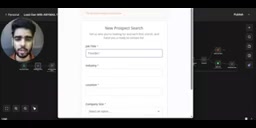
The creator walks through the entire flow using a concrete example. Suppose the goal is to find marketing agency founders based in Delhi with companies of 11 to 50 employees. The process is straightforward: enter "founder" in the job title field, "marketing agency" in the industry field, "Delhi" for location, and select "11 to 50" for company size, then hit submit.
From the user's perspective, that's everything you need to do. What follows is simply waiting for the workflow to finish running — a fully automated background process that requires no human intervention.

Output: A Structured, Actionable Lead List
Once the workflow completes, all results are automatically consolidated into a Google Sheet. Based on the demo, each lead entry includes a fairly comprehensive set of fields:
- Full Name
- Job Title
- Company
- Industry
- Location
- Company Size
- LinkedIn Profile URL
- Professional Email
- Email Status (valid or not)
- Company Website
- Enrichment Status and Date
The "email validity" field is particularly useful. One of the most common pain points in lead generation is high email bounce rates. By flagging the verification status of each email at the output stage, the workflow essentially handles part of the data cleaning upfront — directly improving the usability of the final list.

Configurable Scraping Volume
The creator set the number of leads per run to 5 in the demo, primarily to showcase results quickly. In practice, this number can be adjusted as needed — the video mentions it can be increased to 25, 30, or even 100 leads per run.
This configurable batch size means the workflow can support both small-scale, targeted outreach and larger list-building campaigns. For sales, growth, or marketing teams, this is an automation template that can be adopted directly.
A Few Considerations and Caveats
From a technical standpoint, this workflow demonstrates the typical strengths of n8n as an open-source automation tool: using visual nodes to connect scraping, data processing, email enrichment, and spreadsheet writing into an end-to-end pipeline — no scripting from scratch required to deploy a practical business automation.
That said, there are a few things worth noting for anyone looking to use this. First, LinkedIn has explicit terms of service restrictions on data scraping, and large-scale automated scraping may trigger account risk controls or compliance issues — this warrants careful evaluation. Second, email enrichment typically relies on third-party data services, and their accuracy and coverage will directly affect the quality of the final list. Third, mass outreach to cold email addresses involves compliance requirements under anti-spam and privacy regulations such as GDPR.
At its core, this workflow engineers the "find people → fill in information → verify" pipeline to dramatically improve efficiency. But what it replaces is manual labor — not the judgment required around data source legality and outreach compliance. Before putting this into production, working out the compliance piece is just as important as getting the workflow up and running.
n8n is a node-based open-source workflow automation platform, similar to Zapier or Make (formerly Integromat), but with support for self-hosted deployment and fully open-source code. Its core design wraps API operations from various services into draggable "nodes" that users connect through a visual interface to build complex automation flows — no code required from scratch. Self-hosted deployment means data never passes through third-party servers, which is especially important for scenarios involving personal information like sales leads — one of the key reasons it attracts attention in privacy-sensitive automation use cases.
Email Enrichment refers to the process of inferring a professional email address given a person's name and company domain, by querying third-party databases or using algorithmic pattern matching. Common service providers include Hunter.io, Apollo.io, and Clearbit, which maintain large-scale enterprise email indexes and match or infer addresses based on a company's email naming conventions (e.g., firstname.lastname@company.com). Email Verification goes a step further, using SMTP handshakes or DNS record checks to confirm whether an address actually exists — filtering out invalid addresses before sending to reduce bounce rates and protect sender domain reputation. Used together, these two techniques are a standard approach in B2B sales outreach for completing contact information.
Related articles

OpenAI's Claimed Refutation of ETH Sparks Debate, Meta Bets Big on AI Infrastructure
OpenAI claims an AI-assisted discovery that challenges the Exponential Time Hypothesis (ETH) and launches the mid-tier GPT-6.1 Tera. Cloudflare discloses a cross-customer data leak postmortem, and Meta plans $95B in AI infrastructure financing.

Data Scraping, AI Proofs, and Open Source Contracts: This Week's Deep Dive into the Tech World
From the 3D model crawler controversy and OpenAI's Lean formal proofs to AI agents challenging Brooks' Law and Debian rejecting LLM review, this week's tech discussions center on openness and verifiability.

Build a Reasoning Model from Scratch: An 11-Hour Open-Source Course Breakdown
Sebastian Raschka releases a free 8-episode, ~11-hour video course teaching you to build a reasoning model from scratch with Python and PyTorch—from a small Qwen3 model through Verifier, Inference Time Scaling, GRPO, and distillation, with open-source code on GitHub.