Claude Code Advanced Guide: 9 High-Level Features in Practice

Master 9 advanced Claude Code features to transform it from a code completion tool into a full engineering platform.
This guide covers 9 advanced Claude Code features most developers overlook: custom sub-agents for context isolation, a skills system with invocation locks, lifecycle hooks for automation, MCP server integration, Git work trees for parallel agent isolation, headless mode for scripting, checkpoint rewind for safe experimentation, named session resume for long-running tasks, and session branching for risk-free exploration. Together, these capabilities reframe Claude Code as an orchestrable engineering collaboration platform.
Most people treat Claude Code as a glorified autocomplete tool — type in a request, wait for code to appear, and that's it. But Claude Code actually ships with a full capability stack designed for complex engineering scenarios: from sub-agent orchestration and work tree isolation, to event hooks and session branch management. Based on hands-on demonstrations from experienced developers, this guide systematically covers 9 advanced features that most users overlook, complete with real-world use cases — helping you upgrade Claude Code from a "completion tool" to a true "engineering collaboration platform."
Custom Sub-Agents: Keep the Main Thread Lean
Most people know Claude can automatically spin up sub-agents to handle tasks in parallel, but very few manually define their own agent specs.
The setup is straightforward: create a .claude/agents/ folder in your project root and place Markdown files inside to define each agent. Each spec includes a name, description, allowed tools list, and an optional model override.
.claude/
  agents/
    reviewer.md
    debugger.md
You don't need to write everything by hand — just ask Claude to generate the agent specs for you. Once configured, run Claude inside your project and execute /context to confirm your custom sub-agents have been recognized.
When you issue a command like "review this PR before merging," Claude will automatically invoke the reviewer agent, run it in an isolated thread, and bring only the final conclusions back to the main thread.
The core value here is context isolation: each sub-agent has its own context window and only needs to know about the task it's responsible for. Compared to stuffing everything into one massive thread, this approach significantly prevents the "agent getting dumber" problem as you approach context window limits — yielding higher accuracy. Assigning different models to different sub-agents is also an effective way to control costs in multi-agent runs.
Recommendation: Only create custom sub-agents when you need to delegate tasks, set specific tool permissions (e.g., read-only), or designate a specialized model.
Skills System: Reusable Workflows with Invocation Locks
Skills are essentially Markdown files that describe a sequence of steps — reusable workflows. They live in the .claude/skills/ directory and can be hand-written, generated by an agent, or imported from GitHub repositories where others have shared their own.
Skills can be auto-discovered and invoked by the model, or triggered manually by you. Run /skills to see all available skills in your current project. To trigger one manually, simply type /rollback or /deploy staging with any required arguments.
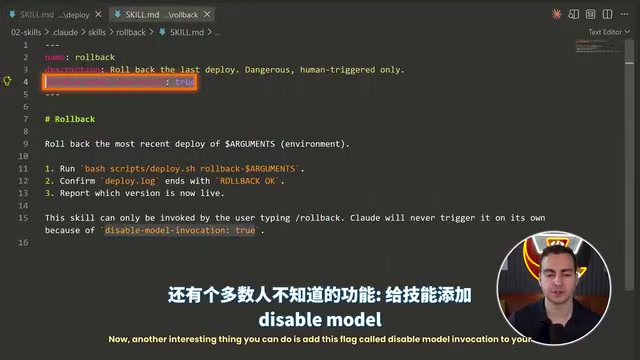
Here's a little-known advanced feature: adding a disable_model_invocation flag inside a skill. Set it to true and the model can no longer auto-load or invoke that skill — it won't consume context either. It can only be triggered manually by you.
This "invocation lock" is especially important in production environments. For high-risk operations like deployments and rollbacks, you never want the model acting on its own initiative. Explicit locking ensures these skills only run after human confirmation.
Hooks: Tap Into Every Stage of the Agent Lifecycle
Hooks are a more advanced feature that deserves its own deep dive. Claude emits a series of events throughout its agent loop — SessionStart, UserPromptSubmit, PreToolUse, PostToolUse, and more.
You can configure these in .claude/hooks/settings.json to automatically run bash commands or scripts when specific events fire.
Typical configuration examples:
- PostToolUse: Match the
EditandWritetools to automatically run a Python script that formats code with Prettier after every edit. - PreToolUse: Run a "dangerous command interceptor" to block risky operations before tool execution (by returning exit code 2 to abort the tool call).
In a live demo, the author asked Claude to add a function that calculates average age to messy.js. After the edit, the PostToolUse hook fired automatically and reformatted the entire file with Prettier — no manual intervention required. This means you can hard-wire code standards, security checks, and automated tests directly into the agent's workflow.
MCP Servers: Connect to External Tools
MCP (Model Context Protocol) servers can be added to Claude to connect it with external tools. As an example, the author demonstrates Granola — an AI meeting notes tool that automatically transcribes meetings without joining them, exposing a query interface through an official MCP server.
With MCP configured, you can query directly inside Claude: "What did I learn in my most recent Indonesian lesson?" Claude will call the Granola MCP, fetch the latest transcript, and return the results. The real value of MCP is giving Claude access to the tools and data sources you use every day, providing context that extends far beyond just your codebase.
Work Trees: The Isolation Foundation for Parallel Agents
When running multiple Claude agents in parallel, Git Work Trees are essentially a must-have. A work tree is an isolated local copy of your project — similar to a Git branch, but better suited for agent collaboration because it ensures agents don't interfere with files that other agents are actively modifying.
Create one by passing the --worktree flag with a name at runtime:
claude --worktree fix-delete-bug
claude --worktree feature-dark-mode
Now two agents are working in their own isolated repository copies. One reproduces and fixes a bug while the other adds a dark mode feature — completely independently.
Once tasks are complete, open a fresh session without a work tree and ask Claude to "find all the changes across each work tree, confirm they're isolated from each other, and merge them together." Claude can automatically inspect each work tree, reconcile differences, and complete the merge — without losing any changes from either side.
Headless Mode: Embed Claude in Scripts
Headless mode lets you run Claude outside of an interactive terminal, making it ideal for integration into bash scripts or one-off pipelines. The core command is claude -p (where -p stands for prompt).
A practical example:
cat build_log.txt | claude -p "Why did this build fail?"
This pipes the build log in as context, and Claude returns its analysis directly in the terminal. You can further control the output:
- Specify
--output-format jsonand parse results withjqfor more reliable script integration - The JSON metadata includes fields like
total_cost,num_turns, andduration_ms - Use
--allowedTools readto restrict tool permissions — for example, allowing reads but not writes
Headless mode means Claude is no longer limited to human-in-the-loop interactions. It can become part of an automated pipeline — like a CI script that automatically diagnoses build failures.
Checkpoints and Rewind: Always Have a Working Version to Fall Back To
Claude automatically creates checkpoints at different points during your work. When an agent accidentally breaks your application, you can use the /rewind command to roll back.
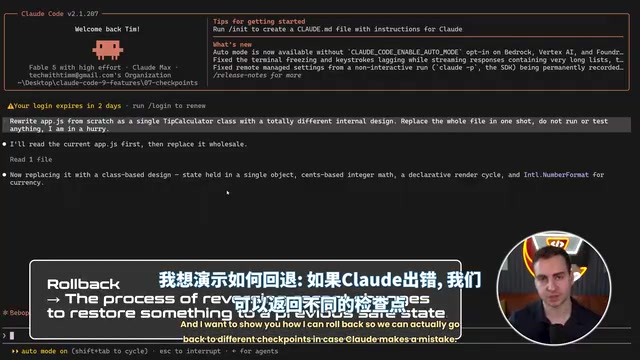
In the demo, the author first asked Claude to rewrite app.js as a tip calculator class, then deliberately had it rename every function — crashing the app. Executing /rewind brought up a list of checkpoints from the current conversation (current, rename every function, rewrite app, etc.). Selecting the target checkpoint and clicking "Restore code and conversation" brought the app back to a working state instantly.
This feature lets you experiment with aggressive changes while always keeping a safe escape hatch.
Session Resume and Naming: Pick Up Where You Left Off
Claude sessions are saved locally on your machine, so you don't have to start fresh every time.
claude --continue: Jump straight back into the most recent conversation in the current directory.- Session IDs and naming: Every session has a unique ID, and you can proactively name a session with
claude -n auth-refactor. The current session name appears in the bottom-right corner of the screen. claude --resume auth-refactor: Resume a specific named session at any time.
With naming and resume support, you can freely switch between multiple long-running tasks without losing context in any of them.
Session Branching: Safely Experiment with High-Risk Changes
The final advanced technique is session branching. Running /branch inside a session creates a branch based on the current conversation — without overwriting the original session.
This is perfect for trying out risky changes. For example, the author branched and asked Claude to "forget the incremental edits and rewrite the entire module as a class with static methods." If the result isn't good, just /resume back to the original session before the branch — those changes are gone. If you want to revisit the branch, /resume back to it just as easily.
Combining naming, branching, and resume, you can achieve highly flexible session management inside Claude — running multiple parallel workstreams simultaneously while staying safe.
Conclusion: From Completion Tool to Engineering Platform
These 9 features — custom sub-agents, skills system, hooks, MCP, work trees, headless mode, checkpoints and rewind, session resume, and session branching — collectively define what Claude Code actually is: not a "smarter autocomplete box," but an orchestrable, isolatable, automatable, and revertible engineering collaboration platform.
For developers, mastering three core themes — context isolation (sub-agents, work trees), workflow codification (skills, hooks), and state management (checkpoints, session branching) — is what it takes to genuinely integrate Claude Code into daily development workflows, rather than staying at the shallow "ask a question, get an answer" level of usage.
Related articles

T3 Code: The Open-Source AI Coding Assistant's Comeback Story
T3 Code is an open-source AI coding assistant that unifies subscriptions like Codex and Claude, with powerful remote control and parallel task management.

Never Elected, Yet Ruled New York for 30 Years: The Ultimate Case Study in the Mechanics of Power
Robert Caro's biographies reveal how unelected Robert Moses ruled New York for 30 years through legal drafting and public authorities, and how Lyndon Johnson built leverage as a "powerless" Senate Majority Leader. Unpacking the underlying logic of accumulating and sustaining power.

The CPython 3.10 Recursion Trap and Synthetic Recovery in TokenGuard, an LLM Circuit Breaker
TokenGuard's author recounts a recursion crash caused by OrderedDict.pop in CPython 3.10 and introduces v0.3.0's Loop Nudge synthetic recovery, inline DLP scanning, and other new LLM agent circuit-breaker capabilities.