Claude Code + Agent SDK for a Personal AI Assistant: A More Elegant Solution Than OpenClaw

Use Agent SDK to reuse Claude Code instead of OpenClaw, eliminating the double maintenance burden
The article critiques OpenClaw and similar projects for essentially rebuilding capabilities Claude Code already has, creating a double maintenance burden. The author proposes an alternative: using the Anthropic Agent SDK to directly reuse Claude Code's full capabilities via subprocess, paired with Telegram for remote access. The solution features a three-layer memory system (session context, SQLite semantic/episodic memory, context injection) and a Mega Prompt for rapid 10-minute setup. Key advantages include zero duplicate configuration, no extra API costs, and an architecture that can swap underlying models.
Why OpenClaw Is Creating a Double Maintenance Burden
Over the past few weeks, the hype around OpenClawAd (formerly ClodBot) and its derivatives (NanoClaw, PicoClaw, etc.) has shown no signs of slowing down. The core goal of these projects is to build a personal AI assistant you can interact with anytime, anywhere. However, after extensively tinkering with these projects, one power user reached a thought-provoking conclusion: We've been reinventing the wheel, when the tools we actually need already exist.
What is OpenClaw at its core? It's an attempt to rebuild the capability framework that Claude Code already possesses, using various patches and glue code. After you clone the OpenClaw repo, customize it, and debug it until it runs perfectly, you'll discover a fatal problem—the double maintenance burden. Skills and configurations in your desktop Claude Code must be manually synced to OpenClaw separately. You're not creating an assistant; you're creating a "derivative of a derivative of a derivative."
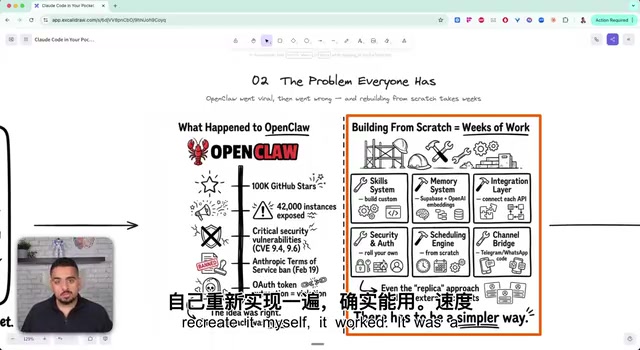
Here's a concrete example: if you have a perfectly running Skill in desktop Claude Code, you still need to write an additional adapted version for OpenClaw. Want scheduled tasks? You'll need to deploy to the cloud. Want security auditing? Every component needs to be checked separately. This architectural redundancy causes maintenance costs to grow exponentially over time.
Anthropic Agent SDK: Directly Reusing All of Claude Code's Capabilities
The core philosophy of the new approach is dead simple: Don't rebuild Claude Code—just reuse it.
Specifically, the solution leverages the Agent SDK officially provided by Anthropic to create a Claude Code subprocess on your local machine. Understanding the technical choice here is important: the subprocess model is a well-established inter-process communication paradigm in software engineering—the parent process exchanges data with the child process via standard input/output streams (stdin/stdout), while the child process maintains a completely independent memory space and runtime environment. This means all of Claude Code's local state is fully preserved in the subprocess, and the parent process is only responsible for message routing and format conversion, without disrupting any existing configuration. This subprocess operates just like typing the claude command in your terminal, with full Claude Code capabilities—including your 30+ global skills, MCP servers, per-project Claude.md configurations, web search, and all other infrastructure.
It's worth mentioning that MCP (Model Context Protocol) is an open protocol launched by Anthropic that allows Claude to communicate with external tools and data sources in a standardized way. Each MCP server can expose specific capabilities—file system access, database queries, API calls, etc.—and Claude calls these capabilities through a unified interface without needing custom integration code for each tool. Claude.md is a project-level context configuration file, similar to a repository's README, but specifically designed to convey project specifications, coding styles, business context, and other structured information to Claude. Together, these two mechanisms form Claude Code's "capability foundation," and the subprocess approach makes this foundation fully and transparently available to mobile devices.

Then, by using Telegram (or any messaging tool you prefer) as the interaction interface, you have a personal AI assistant accessible remotely from anywhere. Compared to OpenClaw, this approach has several key advantages:
- No additional API costs: Directly uses your existing Claude Code subscription plan
- No dependency on third-party bridge services: Agent SDK is natively provided by Anthropic
- Zero duplicate configuration: All desktop skills and configurations are automatically available
- Full multimodal capabilities: Supports video, images, voice, and other input types
End-to-End Message Processing Flow
The entire system's message processing is divided into 8 stages, taking less than 5 seconds total:
- Telegram message sent → 2. Telegram API receives → 3. Authentication → 4. Media processing (video/images/voice) → 5. Memory injection (loading recent memories from local SQLite) → 6. Agent SDK calls Claude subprocess → 7. Response conversion (text or voice) → 8. Return to Telegram
The elegance of this architecture lies in the following: if you only use the Anthropic API, you get the model's intelligence—it can give you smart answers, but you need to build the entire infrastructure for tool calls and task execution yourself. Through the Agent SDK, however, you get a complete Claude Code runtime environment with all tool calling and execution logic already built in.
Three-Layer Memory System: From Session Context to Semantic Retrieval
The memory system is the most sophisticated part of this approach, employing a three-layer progressive design. Notably, this architecture wasn't designed in a vacuum—it's an engineering mapping of human memory models. Cognitive science categorizes human memory into working memory (short-term), episodic memory (event-based long-term memory), and semantic memory (knowledge-based long-term memory), and the three-layer system closely corresponds to these categories.
Layer 1: Session Context
When you send the first message, the system generates a new session and assigns a unique Session ID. All messages within the same session share the same Session ID, enabling context persistence. This layer corresponds to human working memory and directly leverages Claude Sonnet's million-token context window—a borderline "cheat code" advantage.
Layer 2: SQLite + Semantic/Episodic Memory
Uses a local SQLite database (free, no need for Supabase or Convex or other cloud services) to store conversation history. Memory is divided into two types:
- Semantic Memory: Vector database-based memory retrieval, ideal for finding specific knowledge points. Vector databases convert text into high-dimensional numerical vectors and match semantically similar content by computing cosine similarity between vectors, rather than relying on keyword matching. This enables understanding of fuzzy queries like "the project budget issue we discussed last week."
- Episodic Memory: Conversation memory with temporal decay—recent messages carry higher weight while older messages gradually fade. This design draws from the Ebbinghaus forgetting curve—more recent memories carry higher weight, closely matching natural human memory patterns.
Layer 3: Context Injection
Before processing each message, the system automatically searches for recent relevant memories and injects them into the current conversation's context. This ensures the assistant always "remembers" previous interactions, even across different sessions.
Mega Prompt Guided Construction: Complete System Setup in 10 Minutes
The author designed a "Mega Prompt"—a structured super-prompt document used to guide Claude Code in automatically building the entire system. The design philosophy behind this prompt is quite clever: You don't need to copy and paste code; you just need Claude Code to read this document, and it will autonomously complete the build.
Mega Prompt is essentially a "Meta-Prompt" technique—describing the complete system specification in natural language and letting the model autonomously translate from specification to implementation. This aligns with the traditional software development concept of "Spec-Driven Development," except the executor changes from a human engineer to an AI model.

The build process is designed as an interactive wizard that significantly lowers the barrier for non-technical users through multiple-choice questions. This design pattern has decades of history in enterprise software installers—by decomposing complex technical decisions into limited options, users don't need to understand underlying implementation details, they just need to express intent:
- Voice engine selection: Groq, OpenAI, 11 Labs, no voice, or custom
- Memory system selection: Episodic + semantic memory, custom, or factory settings
- Feature module selection: Scheduled task scheduler, video analysis, WhatsApp bridge, background services, etc.

The entire build process takes approximately 10 to 30 minutes, depending on the complexity of features you choose. Building from scratch, the author says it took about 1-2 hours, and the initial prompt wasn't complex—it simply told Claude Code "I want to connect Claude Code via Telegram without violating the terms of service."
The Fundamental Difference from OpenClaw: One Brain vs. Two Systems
The greatest value of this approach lies in unification. When using OpenClaw, you're maintaining two systems—a separate "brain" for desktop and mobile. Now, you have a single unified AI operating system:
- Improve a Claude Code desktop skill → Mobile automatically benefits
- Set a skill to global → Shared across all projects
- No cloud deployment needed → A local Mac Mini will do (just keep it running)
Something you might not have noticed: this approach isn't locked to Claude Code. Any language model with a CLI interface—Codex, Gemini, etc.—can replace Claude Code as the underlying engine. CLI (command-line interface) is the key here: as long as a model can receive input and return output via the command line, the subprocess architecture can adapt seamlessly without modifying the upper-layer message routing and memory systems. You could absolutely build a "Codex Claw" or "Gemini Claw"—the architectural flexibility far exceeds OpenClaw.
Go Deep with Existing Toolchains, Rather Than Chasing Derivatives
The insights from this case extend far beyond the technical level.
Related articles
 Tutorials
ChatGPT Plus Subscription Guide: Are GPT-5.5, image-2, and Codex Worth the Upgrade?
A detailed look at ChatGPT Plus features — GPT-5.5, image-2, and Codex — with a Plus vs Pro comparison and a complete step-by-step subscription guide for users outside the US.
 Tutorials
Harness AI Engineering in Practice: Using Claude Code to Master Enterprise-Level E-Commerce Development
Deep dive into Harness AI Engineering: master enterprise e-commerce development with Claude Code using the Rules, Skills, Wiki, and Changes framework.
 Tutorials
Cursor + Codex Dual-IDE Collaboration: A Practical Methodology for Open-Source Project Customization
A complete methodology for open-source project customization based on real-world experience, detailing the Cursor+Codex dual-IDE workflow, seven-stage process, MVP validation, and AI source code reading techniques.