Claude Code Ban Prevention and Memory Management: CLAUDE.md and ccswitch in Practice

Install Claude Code via NPM in China, bypass login with ccswitch, then use CLAUDE.md to enforce engineering specifications
The article lays out a solution for domestic developers to use Claude Code stably, with the core idea of replacing the two uncertain factors — network and account — with controllable local configuration. For installation, it recommends the NPM method from the official site's "Advanced Settings," together with Node.js 22+ and Git, which has a higher success rate than PowerShell or CMD; for login, it points out that official login carries ban risks, and switching to ccswitch with a third-party API Key bypasses the account system, thus eliminating ban problems. ccswitch needs separate configuration for different tools and also supports custom providers and third-party relay services. The latter half turns to engineering habits, introducing CLAUDE.md to store project conventions, along with MCP, Skills, Hooks, and the SDD spec-driven development idea, turning Claude Code from a one-off chat tool into a project collaborator with memory and constraints.
Claude Code is a powerful AI coding assistant in the terminal, but developers in China often get stuck on two things: the network doesn't work during installation, and accounts get banned after login. Recently, a Bilibili creator shared a stable solution verified over several months, whose core idea is installing via NPM to bypass network restrictions, and using ccswitch to bypass official account login. This article combines their demonstration with official documentation to lay out a reproducible path, and adds the engineering value of CLAUDE.md project memory and specification constraints.
Installation: Prefer NPM over PowerShell or CMD
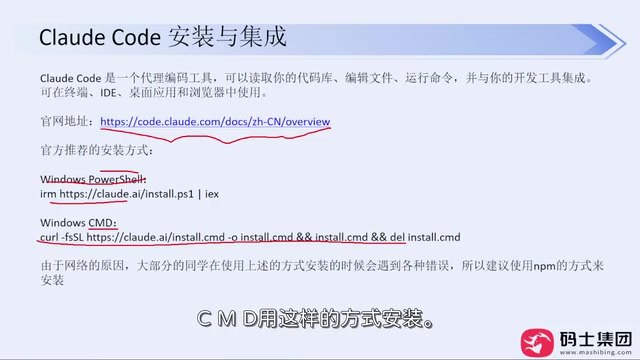
At the start of the video, the creator emphasized that when installing Claude Code, you must first check the official documentation — there's a Chinese version on the official site that explains things clearly. The official site lists several installation methods, among which Windows users commonly use PowerShell or CMD commands. But the creator warns that due to the domestic network environment (the Great Firewall), these two methods have a low success rate, especially when the ISP itself imposes restrictions, which may cause repeated failures.
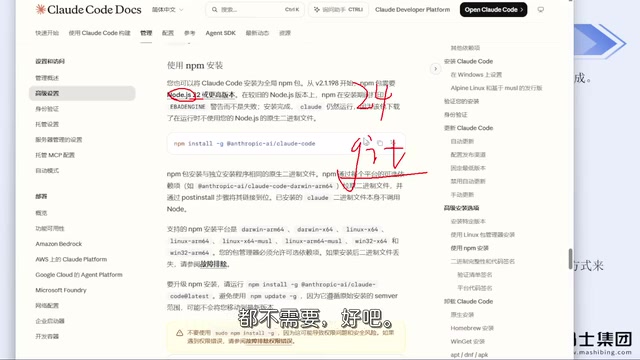
He recommends the NPM installation method mentioned under "Advanced Settings" on the official site. In practice, as long as you have a VPN/proxy tool configured, installing with the NPM command basically won't go wrong. The creator has installed it many times for company colleagues and himself without encountering account bans. The prerequisite is two straightforward dependencies:
- Node.js: requires version 22 or above; the latest on the official site is 24, so just download the installer and keep clicking Next.
- Git: likewise download the installer and use default installation; if C drive space is tight, you can change the directory.
After installation, if entering claude --version in the command line outputs the version number normally, the installation was successful. The creator says this method has never produced an error so far, and if you run into problems you can share them for everyone to look at together.
NPM (Node Package Manager) is the package management tool bundled with Node.js. Claude Code is distributed via NPM, and installation pulls dependency packages from the official npm registry or its mirrors. Compared with PowerShell scripts or CMD batch files, NPM installation has higher fault tolerance: dependency versions and file paths are managed uniformly by the package manager, and failures usually come with clear error messages that are easy to troubleshoot. Domestic users can also switch to a domestic mirror via npm config set registry to further reduce the probability of network timeouts.
Node.js is a server-side JavaScript runtime. Claude Code's CLI is essentially a Node program, so Node.js must be installed first. The version 22+ requirement is because the newer runtime provides more stable module loading and API support; lower versions may simply fail to start. When installing, check "Add to PATH" so the command line can directly recognize the node and npm commands.
First Launch and Login Pitfalls to Avoid
The first time you enter claude in the project directory, the tool will walk you through: choosing whether to trust the current folder, choosing the interface theme style, and choosing the login method. The creator specifically warns that the official login methods carry a risk of account bans — even if you have a corresponding account, it's not recommended to enable them. He himself has been banned many times before; the money isn't the main issue — switching accounts after a ban is a hassle.
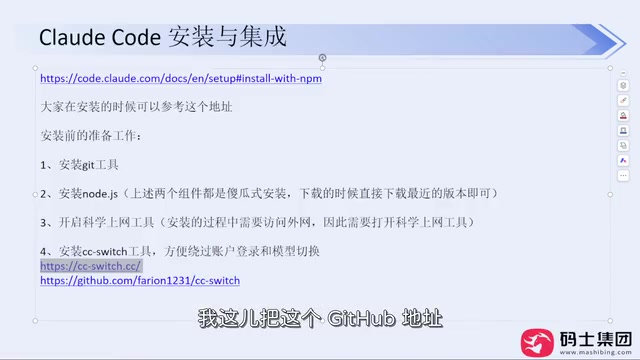
The alternative is a tool called ccswitch. It was originally an open-source project on GitHub and now has an official website offering downloads and Chinese documentation. On the release page, choose the Windows MSI installer and double-click to install. After opening it, there's only one configuration item by default; click the plus sign to add different model providers, such as DeepSeekAd, Zhipu, etc., fill in the API Key and save. In the creator's own configuration, everything except the API Key is the same.
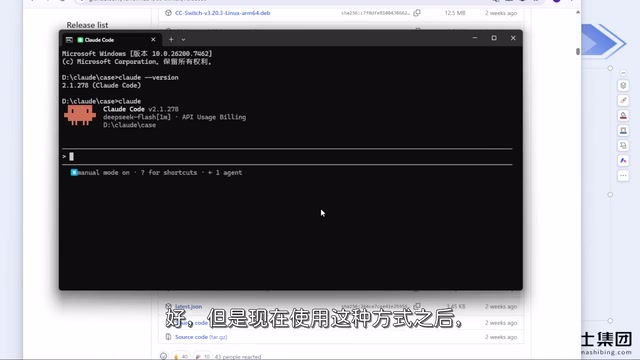
After configuring ccswitch, re-enter claude, and the login step will be bypassed directly. With no account, there's naturally no ban problem. The creator has run this way stably for several months without being banned again. If you've already logged in via the official method before, you can also reinstall ccswitch to skip the login.
ccswitch positions itself as an "API endpoint switcher." Claude Code sends requests to Anthropic's official API by default and verifies the account login state at startup; ccswitch rewrites the configuration files that Claude Code reads (usually located in the .claude-related configuration in the user directory), replacing the request address and authentication information with a third-party compatible API specified by the user, while skipping the official OAuth login flow. So it doesn't crack the official service — it makes the client go through another legitimate API channel.
When using third-party API Keys, note that different providers vary in their support for model names, context length, and concurrency limits; some providers are only compatible with some models in the Claude series. If errors occur after configuration, first check whether the model name matches the provider's documentation. API Keys should be treated as sensitive credentials — don't commit them to Git repositories or share them publicly.
More Uses of ccswitch and Caveats
ccswitch doesn't only serve Claude Code; it also supports tools like Codex, but different tools need to be configured separately. The creator gives an example: DeepSeek was configured in Codex, but Codex couldn't use it — the reason was that the API Key wasn't additionally filled in under Codex's configuration item. As long as you fill in the Key under the corresponding tool, nothing else needs to be done.
For model providers that aren't preset in the market, ccswitch offers a "custom configuration" option where you can fill in the API Key, official jump address, etc., and it works — the same goes for third-party relay services. The creator also mentions that Mac and Windows follow the same logic, only the installation commands differ; if you install via NPM, the commands are identical on both.
Regarding VPN/proxy tools, the creator gives a very practical piece of advice: don't buy an annual membership. These tools currently carry relatively high risk; if the service is unstable, your money is wasted. Even if monthly payment is a bit more expensive, it's better to buy month by month. Also, if it's just to meet basic work needs, domestic models are actually sufficient — there's no need to insist on experiencing foreign models.
From Installation to Engineering: CLAUDE.md and Specification Constraints
The latter half of the video turns to engineering habits in actual use. The creator mentions that Claude Code easily forgets things when you switch conversations; the solution is to put a CLAUDE.md file in the project, writing down project conventions, tech stack, code style, and common commands. This way, every time a new conversation starts, Claude Code first reads this "project memory," reducing the cost of repeatedly explaining context.
Combined with mechanisms such as MCP, Skills, and Hooks, constraints like "check the specification before modifying code" can be locked in. The SDD (spec-driven development) idea mentioned by the creator is essentially about having the AI align with project specifications before acting, rather than improvising. Hooks can trigger checks before and after specific operations, while Skills encapsulate reusable workflows. Combined, these mechanisms can turn Claude Code from a "one-off chat tool" into a project collaborator with memory and constraints.
MCP (Model Context Protocol) is an open protocol that lets AI clients uniformly connect to external tools and data sources. Through MCP Servers, Claude Code can read databases, call internal APIs, and query documentation without manually pasting content into the conversation. Compared with temporarily pasting code, MCP provides a structured, reusable context channel.
Skills in Claude Code are reusable instruction packages, usually described in Markdown files with task steps and constraints, executed according to a preset flow when triggered — suitable for solidifying fixed routines like "pre-release checks" and "generate migration scripts." Hooks are event hooks that automatically execute scripts before and after tool calls or at the start/end of sessions, such as running lint before writing files or validating specifications before committing. The division of labor among the three and CLAUDE.md is: CLAUDE.md manages persistent background, Skills manage reusable flows, Hooks manage mandatory checkpoints, and MCP manages external data access.
Summary
The essence of this solution is to replace two uncertain factors — network and account — with controllable local configuration: NPM installation reduces network failure rates, and ccswitch bypasses the account system to eliminate ban risks. The remaining energy can then be spent on CLAUDE.md and specification constraints, letting the AI coding assistant truly integrate into the project workflow. The creator's experience is several months of stable operation, which has direct reference value for domestic developers.
One-line Summary
Install Claude Code via NPM in China, bypass login with ccswitch, then use CLAUDE.md to enforce engineering specifications
Paragraph Summary
The article lays out a solution for domestic developers to use Claude Code stably, with the core idea of replacing the two uncertain factors — network and account — with controllable local configuration. For installation, it recommends the NPM method from the official site's "Advanced Settings," together with Node.js 22+ and Git, which has a higher success rate than PowerShell or CMD; for login, it points out that official login carries ban risks, and switching to ccswitch with a third-party API Key bypasses the account system, thus eliminating ban problems. ccswitch needs separate configuration for different tools and also supports custom providers and third-party relay services. The latter half turns to engineering habits, introducing CLAUDE.md to store project conventions, along with MCP, Skills, Hooks, and the SDD spec-driven development idea, turning Claude Code from a one-off chat tool into a project collaborator with memory and constraints.
Related articles

Claude Code Pitfall Guide: Using CC Switch to Avoid Account Ban Risks
Claude Code installation failing in China? A Bilibili creator shares a stable NPM install + CC Switch login-bypass solution with no bans for months, plus spec-driven development and project memory to keep code from getting messier with each change.

Microsoft Foundry: How Enterprises Can Keep Runaway AI Costs Under Control
Microsoft Foundry, part of Azure, offers built-in security and governance with a unified view of model counts, credit usage, and total spend—helping enterprises prevent runaway AI agent token costs. This article analyzes its enterprise positioning, use cases, and cost-control value.

Training-Free Fix for Model Repetition Loops: The Weight-Surgery Claude Code Plugin
A developer packaged a weight-surgery pipeline for small-model repetition loops into a Claude Code plugin. By scanning induction heads, splitting functional directions, and editing feed-forward write weights, it cuts loop rates without training or decoding penalties while preserving reading ability.