Claude Code Installation and Anti-Ban Configuration Guide

Install via NPM and configure third-party models with ccswitch to bypass official login and use Claude Code stably.
Based on a Bilibili tutorial, this article covers stable Claude Code usage across environment setup, model switching, and permission modes. Bans stem from official account risk controls; the fix is to skip login and use ccswitch to configure third-party model APIs. NPM installation is more reliable than official commands—verify the version and never enter the login flow. Four permission modes exist: Default, Accept Edits, Plan, and Auto; start with Default, use Plan for complex projects, and avoid Auto. Structured prompts matter, and Claude Code isn't bound to any model—non-programmers can't easily build commercial-grade projects alone.
Title
Claude Code Installation and Anti-Ban Configuration Guide
Meta Description
Claude Code installation tutorial for users in China: stable installation via NPM, using ccswitch to configure third-party models to bypass official login and avoid account bans, with detailed explanations of four permission modes and advanced prompting techniques to help you use AI coding tools safely and efficiently.
Article Content
As an AI agent focused on programming, Claude Code is attracting increasing attention from developers. However, users in China often face issues such as installation failures, account bans, and confusion over permission mode selection in practice. Based on a step-by-step tutorial from a Bilibili creator, this article breaks down how to use Claude Code stably and efficiently from three dimensions: environment configuration, model switching, and permission modes.
Why Does Your Claude Code Always Get Banned?
When using Claude Code, many developers' biggest headache isn't the quality of code generation—it's accounts getting banned for no apparent reason. The creator states outright in the video that the root cause of bans is accounts being blocked by Anthropic's official website, which is related to the platform's policy tendencies, making it easy for users in China to trigger risk controls.
So, is there a way to bypass this restriction? The answer is yes—the key is to not register and not log in to an official account. The creator shared his own experience: from the very first day of installing Claude Code, he never logged in with an official account, and to this day has never been banned. The specific approach: after installation, don't perform any login operation; instead, use a third-party tool ccswitch to configure the model API, thereby bypassing the account verification step.
Installation: Why Recommend the NPM Method?
Pitfalls of the Official Installation Method
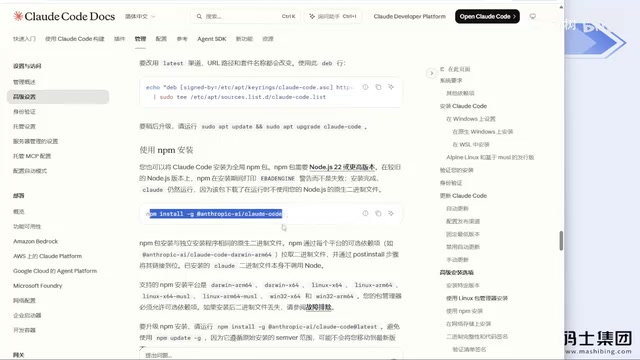
If you open the Claude Code official website, you'll see several recommended installation commands. But the creator warns that in China's network environment, these commands will likely throw a bunch of permission errors, with a very low installation success rate. Even with a VPN enabled, some carrier networks may still restrict connections, causing installation failures.
The Stable Path of NPM Installation
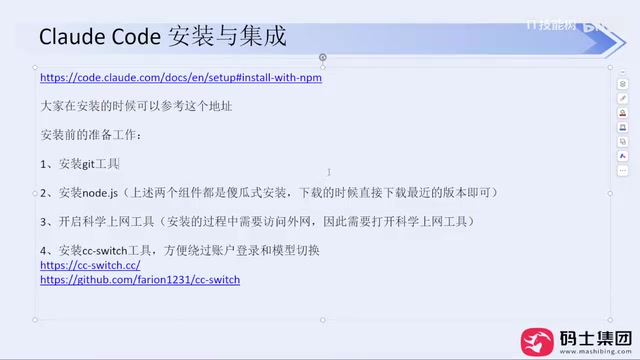
The creator strongly recommends installing via NPM with the command npm install -g @anthropic-ai/claude-code. When installing for several non-programmer colleagues, he found that NPM almost never failed. Before installation, you need to prepare three things: install Git, install Node.js (just click Next through the straightforward installer, only changing the install directory), and enable a VPN.
After installation, first enter claude --version to verify the version number. If the version number displays correctly, the installation was successful. At this point, do NOT directly enter claude to go through the login flow, otherwise it will trigger account verification and plant hidden risks for future bans.
The Relationship Between NPM Global Installation and the Node.js Environment
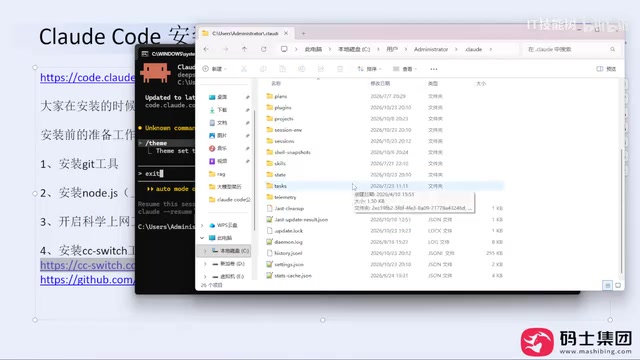
NPM is the package manager bundled with Node.js. npm install -g means global installation, which links the package's executable entry into the system PATH so that the claude command can be run directly from any directory. Under China's network conditions, the official NPM registry may be slow; you can temporarily switch to a domestic mirror (such as npm config set registry https://registry.npmmirror.com) to improve download success rates. Additionally, write permissions for the global installation directory occasionally require an administrator terminal on Windows, otherwise EACCES errors may occur. Installing Git is to ensure that Claude Code can properly invoke git commands when version control or repository cloning is needed—it's not required for the installation process itself.
ccswitch: The Key Tool for Bypassing Login
What Exactly Is It?
ccswitch is a small open-source tool that is essentially a model switcher. The creator explains that previously, to switch models, you had to manually edit the settings.json configuration file in the .claude folder under the C drive's user directory, which was extremely unfriendly to beginners and easy to get wrong. ccswitch's purpose is to visualize this configuration process—you simply select the model provider in the interface, enter the API Key, click add and enable, and you're done.
It's worth noting that ccswitch itself doesn't require login or a Claude subscription. It just helps you modify local configuration files; it doesn't increase token consumption, let alone create any association with an official account.
Configuration Process
Installing ccswitch is very simple: download the installer for your system (an exe file for Windows) and install it directly—no VPN needed throughout. Once opened, the interface lists the agents available for configuration. Taking DeepSeekAd as an example: click the plus sign, select the model provider, the official website address auto-fills, enter the API Key, click add, then click enable, and the configuration is complete.
After configuration, enter claude in the command line to launch Claude Code. It will now use your configured third-party model instead of the official account system, fundamentally avoiding the risk of bans. The creator emphasizes that accounts are basically never banned this way—he has been using this method all along without any issues.
A Common Misconception
A viewer asked: if you're not using Claude's official model after this installation, can it still be called Claude Code? The creator's answer is direct: Claude Code is a programming agent tool that isn't bound to any model. You can absolutely use GPT, DeepSeek, Kimi, GLM, or any model that provides an API interface. The model is only responsible for responding to requests, while Claude Code handles engineering operations like reading codebases, editing files, and executing commands. The two are decoupled.
The creator also adds a point: don't over-idolize model leaderboards. In daily development, tasks like writing code, organizing documentation, and analyzing requirements can be handled by ordinary models. From his personal experience, domestic models like the new version of DeepSeek, Kimi K3, and GLM are already very capable and more than sufficient.
How settings.json and Model Configuration Work
Claude Code itself is a command-line program that doesn't have a built-in model; instead, it reads the .claude/settings.json file in the user directory to determine which API endpoint to send requests to. The env field in this file can set environment variables like ANTHROPIC_BASE_URL and ANTHROPIC_AUTH_TOKEN, specifying the API address and key respectively. What ccswitch does is wrap this manual editing process into a graphical interface—after you select a provider, it automatically writes the corresponding fields and supports quick switching between multiple configurations. Therefore, it doesn't modify Claude Code's executable files or intercept network traffic; it simply helps you maintain a local configuration file. Understanding this makes it clear why configuring third-party models requires no official account login—the requests never go to Anthropic's authentication servers.
Permission Modes: Let AI Work Within Controllable Boundaries
Analysis of the Four Modes
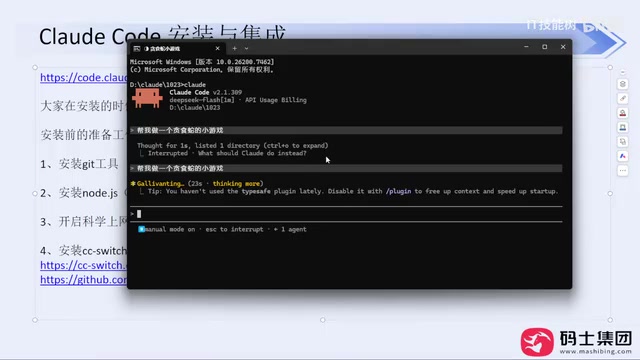
After installation and configuration, when you enter Claude Code's interactive interface, you'll encounter frequent confirmation pop-ups. Behind this is Claude Code's permission mode mechanism. The creator explains that you can switch between four modes using Shift + Tab:
Default Mode (Manual Approval): All read-only operations are allowed directly, but modifying code or executing commands triggers a confirmation dialog requiring manual approval. This is the safest mode and the creator's most recommended starting choice.
Accept Edits Mode: File modification operations are allowed directly, but command execution is still blocked and requires confirmation. Suitable for scenarios where you're already familiar with the tool and want to reduce the number of confirmations.
Plan Mode: This is the mode the creator particularly recommends. When enabled, Claude Code won't directly start writing code; instead, it first generates a planning document based on your requirements, clarifying feature points, technology choices, and architecture design. Once you confirm the document is correct, it begins coding. This is equivalent to moving the requirements review phase of the traditional development process earlier, avoiding rework caused by AI acting blindly.
Auto Mode: All operations are allowed with no confirmation dialogs. The creator explicitly advises against using this mode because the permissions are too broad—AI may produce incorrect results with no one to intercept them.
The Implementation Mechanism Behind Permission Modes
Claude Code's permission modes are essentially a set of tool-call approval policies. Before executing shell commands, writing or editing files, accessing the network, and other operations, it decides based on the current mode whether to allow directly, request user confirmation, or only generate a plan. In Default mode, read-only tools (such as reading files and searching code) execute automatically, while write operations hang waiting for confirmation; Accept Edits mode relaxes file writing but still intercepts command execution; Plan mode disables all write operations, allowing the model only to output planning text; Auto mode allows everything. This mechanism is directly related to the safety boundaries of agentic programming, because AI may accidentally delete files or execute dangerous commands—the approval step is the last line of human defense.
How to Choose?
The creator's advice is pragmatic: beginners should start with Default mode. Although you'll need to click confirm constantly, every step is under your control. Once you're proficient and the AI has learned your coding standards and preferences, you can switch to Accept Edits mode to improve efficiency. Plan mode is suitable for the early stages of complex projects—discuss the approach clearly before starting. Auto mode is not recommended for daily development.
Advanced Prompting: Don't Treat AI as a Wish-Granting Well
In the video, the creator demonstrates a negative example: directly entering "help me make a Snake game." Claude Code can indeed generate runnable code. But if you bring this approach to a real production project, the results will be very poor—because there are no constraints on technology choices, no code quality requirements, and no clear acceptance criteria.
The correct approach is to provide structured prompts: clarify the role (e.g., "You are a senior front-end engineer"), project goals (e.g., "Complete a runnable, interactive mini-game using as few dependencies as possible"), technology stack constraints, feature requirement list, code quality requirements, and workflow. The creator emphasizes that AI programming agents replace execution-level work, but project design, architecture selection, requirements definition, and acceptance criteria still need to be done by humans.
As for claims that "non-programmers can build commercial-grade projects with AI," the creator says bluntly that it's "complete nonsense." Small tools and toy projects are fine, but building a launchable, commercially valuable product is very difficult for non-programmers—even if they manage to build one, the token consumption and time cost would be staggering. Programmers still have a natural advantage in the AI era; technological democratization doesn't mean programmers are obsolete.
Final Thoughts
The barrier to installing and using Claude Code largely comes from the network environment and account system. Through the combination of NPM installation + ccswitch model configuration, developers in China can bypass official login and use this tool stably. The choice of permission mode is about balancing development safety and efficiency—Default mode and Plan mode are options worth prioritizing. As for prompts, remember one thing: the clearer the constraints you give AI, the more reliable the code it returns.
One-line Summary
Install via NPM and configure third-party models with ccswitch to bypass official login and use Claude Code stably.
Paragraph Summary
Based on a Bilibili tutorial, this article breaks down stable usage of Claude Code from three dimensions: environment configuration, model switching, and permission modes. The root cause of bans lies in official account risk controls; the recommendation is not to log in after installation, but instead use ccswitch to configure third-party model APIs to avoid them. For installation, NPM is more stable than the official website commands—verify the version number after installation and never enter the login flow directly. There are four permission modes: Default, Accept Edits, Plan, and Auto. Beginners should start with Default mode, use Plan mode for complex projects to plan before coding, and avoid Auto mode for daily use. The article also emphasizes the importance of structured prompts and points out that Claude Code isn't bound to any model, and that non-programmers struggle to independently complete commercial-grade projects.
Related articles
 Tech Frontiers
Buoyant Open-Sources Kinference: An Inference Control Plane for vLLM on K8s
Buoyant open-sources Kinference, an inference control plane for vLLM on Kubernetes, with declarative routing, KV-cache-aware load balancing, and per-tenant metrics—claiming 95% lower median TTFT in official benchmarks.
 Tech Frontiers
The Truth Behind Anthropic's 2x R&D Speedup: A Deep Dive into the METR Report
METR's external evaluation shows Anthropic's AI testing progress over the past year roughly equals the prior two years, with R&D accelerating about 2x—and roughly 80% likely from AI assistance. The report also admits key evidence was redacted, the range spans 1.3x to 3x, and Anthropic says it hasn't doubled yet, diverging from METR's judgment.

Sugra MCP: One-Click Access to 200+ Data Sources, Connecting Mainstream AI Applications
Sugra MCP connects mainstream AI apps like Claude, ChatGPT, and Cursor through a unified MCP protocol, offering 200+ data sources and 1,600+ endpoints. Listed in Anthropic, OpenAI, and GitHub directories—integrate with one command.