Cline CLI v3.0.74 Released: Task Resume and Model Catalog Overhaul

Cline CLI v3.0.74 fixes task resume, hanging health checks, and retry logic, and updates the model catalog.
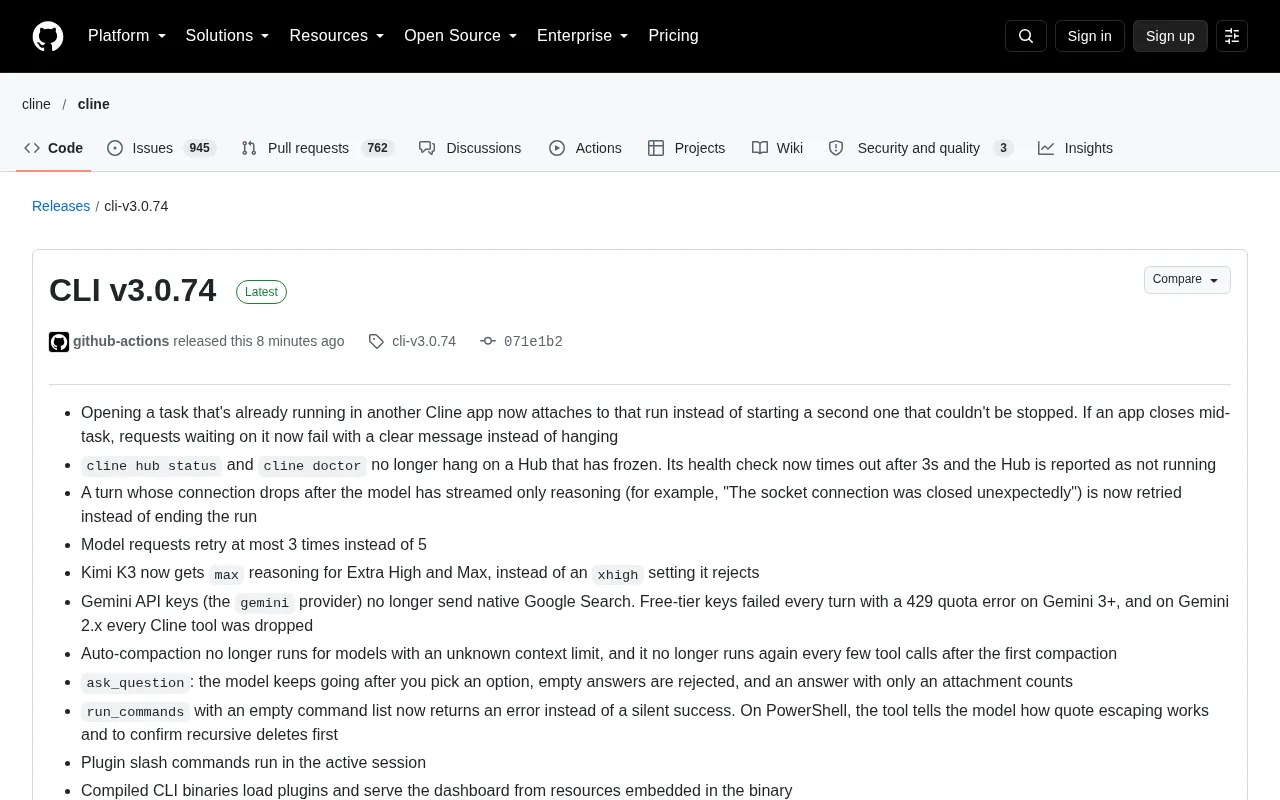
Cline CLI v3.0.74 is a stability and model ecosystem update. It attaches to existing running tasks instead of spawning unstoppable ghost processes, returns errors instead of hanging when an app closes mid-task, adds a 3-second timeout to `cline hub status` and `cline doctor`, and reduces model request retries from 5 to 3 while covering disconnects after reasoning-only output. It also fixes Kimi K3 reasoning effort mapping, stops sending native Google Search for the Gemini provider to restore free-tier keys, corrects auto-compaction triggers and `ask_question`/`run_commands` edge cases, and refreshes the model catalog — adding two providers, removing three, and changing defaults for 56 providers.
Cline CLI v3.0.74 is a release focused primarily on stability fixes and model ecosystem updates. If you use Cline for everyday automated coding tasks, this version resolves several issues that could directly interrupt your workflow.
Task Resume: No More Unstoppable Ghost Processes
Previously, when you opened a task that was already running from another Cline application, the system would attempt to start a second running instance — one that could not actually be stopped. v3.0.74 changes this to attach directly to the existing running instance, preventing process leaks.
Another related fix targets the scenario where an application closes mid-task: requests waiting for a response from that application would hang indefinitely. They now return an explicit error message. For long-running automated tasks, this is far more useful for determining task status than waiting forever.
Timeout Added to Hub Health Checks
Both cline hub status and cline doctor would hang indefinitely when the Hub was frozen. The new version sets a 3-second timeout for health checks, reporting that the Hub is not running once the timeout is reached.
These seemingly minor changes have a major impact on users who integrate Cline into CI or script workflows — a stuck diagnostic command leaves the entire pipeline at a standstill.
Hub and Health Checks: Cline Hub is the local runtime state management and coordination layer for Cline in multi-task, multi-session scenarios. It registers running task instances, maintains session information, and exposes query interfaces. cline hub status reads the current Hub and its managed task status, while cline doctor is a diagnostic self-check command that also verifies Hub reachability and configuration completeness. Both are essentially "liveness probe" operations that should semantically return success or failure quickly. Previously, they relied on the default wait behavior of underlying calls — once the Hub process got stuck or the socket stopped responding, the caller would block indefinitely. With a 3-second cap in place, health checks become bounded operations: a timeout is treated as the Hub not running, making them safe to use in CI steps, pre-commit hooks, or shell scripts.
Retry Strategy Adjustments: Fewer Attempts, More Precise Triggers
v3.0.74 makes two adjustments to retry logic.
First, the maximum number of retries for model requests is reduced from 5 to 3. Second, a boundary case is fixed: when the connection drops after the model has only streamed reasoning content — for example, "socket connection was closed unexpectedly" — the entire run would previously end immediately. It now triggers a retry.
In other words, retries are fewer but cover the scenarios that need them more accurately.
Streaming Output and Reasoning Content: In Cline's model calls, responses are typically returned incrementally via streaming. Some models that support reasoning first output reasoning (thinking process) content, then the actual answer or tool calls. This means a connection drop after partial output has already been produced is not the same as the request never succeeding — the model state has already advanced, and terminating the run outright loses progress, whereas a retry has a chance to complete the remaining content. Previously, the code treated any streaming interruption as a fatal error, making the scenario where the connection drops after only reasoning output unrecoverable. This fix distinguishes that state and routes it into the retry path. Note that reducing the retry limit from 5 to 3 lowers the ceiling on total elapsed time and quota consumption — suitable for stable environments with few network fluctuations, but potentially failing earlier on weak networks or high-load providers.
Compatibility Fixes for Reasoning Effort and Gemini Search
For Kimi K3, the Extra High and Max tiers now use max reasoning effort instead of sending the xhigh setting it does not accept.
The Gemini issue is more practical: the gemini provider's API key no longer sends native Google Search. Previously, free-tier keys would fail every turn on Gemini 3+ due to 429 quota errors, while on Gemini 2.x all Cline tools would be dropped. This fix directly restores the usability of free-tier keys.
Reasoning Effort Tiers: Reasoning effort is a parameter exposed by some models to control the thinking budget the model invests before producing an answer, with common tiers including low, medium, high, and so on. Different vendors do not use consistent naming or values — some accept high/max, while others use extended values like xhigh. When a client sends a value the provider does not recognize, the request may be rejected outright or behave abnormally. That is why Kimi K3's Extra High and Max tiers are mapped to the max value it accepts — this is client-side parameter normalization. Similarly, native Google Search refers to Gemini's built-in grounding retrieval capability on the server side, constrained by the API key's permissions and quota; mixing it with third-party tool calls can both trigger 429 rate limiting and cause tool results to be dropped by the server — which is precisely the motivation for disabling this behavior.
Behavior Fixes for Tool Calls and Auto-Compaction
Auto-compaction no longer triggers in two cases: when the model's context limit is unknown, and on every few tool calls after the first compaction. The latter previously caused repeated compaction, wasting context budget.
The ask_question tool's behavior is also tightened in three ways: the model continues execution after the user selects an option; empty answers are rejected; and answers with attachments only are considered valid responses.
run_commands now returns an error when passed an empty command list, instead of silently succeeding. In PowerShell environments, the tool explains quote-escaping rules to the model and requires confirmation before executing recursive deletions.
Auto-Compaction: When the conversation history approaches the model's context window limit, Cline automatically summarizes or trims earlier messages to free up space and continue the task — this mechanism is auto-compaction. Its trigger condition depends on two prerequisites: a known context limit and enough accumulated tokens. If the limit is unknown, any threshold calculation loses its baseline, and hasty compaction may mistakenly remove information that is still necessary; triggering again on the several tool calls immediately after the first compaction causes consecutive compaction and repeated context discard, wasting budget and harming task coherence. The new version therefore skips compaction when the context limit is unknown and sets a cooldown for subsequent tool calls after the first compaction, making compaction a measured one-off action rather than a looping behavior.
Improvements to Plugins, the CLI Binary, and ACP
Plugin slash commands now execute in the active session. The compiled CLI binary can load plugins from embedded resources and provide a dashboard without depending on external files. On the ACP side, provider and account options are categorized under the correct configuration section, and labels for skills tool calls no longer display null parameters.
Model Catalog Refresh
This update refreshes the model catalog: two new providers, Liquid Inference and Munito AI, are added, while CrofAI, iFlow, and Llama are removed. The Cline free list adds Reflection Beam, Nemotron 3.5 Lightning, and Laguna S 2.1, and removes Mimo V2.6 Flash and Muse Spark 1.3 Contributor. The ClinePass default model is changed to Kimi K3.1 Pro, with MiniMax M3.1 Flash and DeepSeekAd V4.1 Flash 1017 added. Additionally, the default models for 56 providers have changed, with most switching to Kimi K3.1 Pro, MiniMax M3.1 Flash, or DeepSeek V4.1 Flash 1017.
For teams that depend on fixed model behavior, this broad adjustment to default models is worth reviewing against your configuration before upgrading.
One-line Summary
Cline CLI v3.0.74 fixes task resume, hanging health checks, and retry logic, and adjusts the model catalog.
Paragraph Summary
Cline CLI v3.0.74 is a release focused primarily on stability fixes and model ecosystem updates. Key changes include: opening an already-running task now attaches to the existing instance, eliminating unstoppable ghost processes; requests no longer hang forever when an application closes mid-task; cline hub status and cline doctor health checks now have a 3-second timeout; the model request retry limit is reduced from 5 to 3 while covering the "disconnect after reasoning-only output" scenario. On compatibility, Kimi K3 reasoning effort tier mapping is fixed, and native Google Search is no longer sent for the Gemini provider, restoring free-tier key usability. Additionally, auto-compaction trigger conditions, boundary behaviors of ask_question and run_commands, and several issues with plugins, the CLI binary, and ACP are corrected. The model catalog adds two providers, removes three, and changes the default models for 56 providers.
Related articles

T3 Code: The Open-Source AI Coding Assistant's Comeback Story
T3 Code is an open-source AI coding assistant that unifies subscriptions like Codex and Claude, with powerful remote control and parallel task management.

Never Elected, Yet Ruled New York for 30 Years: The Ultimate Case Study in the Mechanics of Power
Robert Caro's biographies reveal how unelected Robert Moses ruled New York for 30 years through legal drafting and public authorities, and how Lyndon Johnson built leverage as a "powerless" Senate Majority Leader. Unpacking the underlying logic of accumulating and sustaining power.

The CPython 3.10 Recursion Trap and Synthetic Recovery in TokenGuard, an LLM Circuit Breaker
TokenGuard's author recounts a recursion crash caused by OrderedDict.pop in CPython 3.10 and introduces v0.3.0's Loop Nudge synthetic recovery, inline DLP scanning, and other new LLM agent circuit-breaker capabilities.