CodeSpotlight: The Code Highlight Tool That Makes IntelliJ IDEA Demos Pop

CodeSpotlight adds animated code highlights to IntelliJ IDEA, built for content creators who present code.
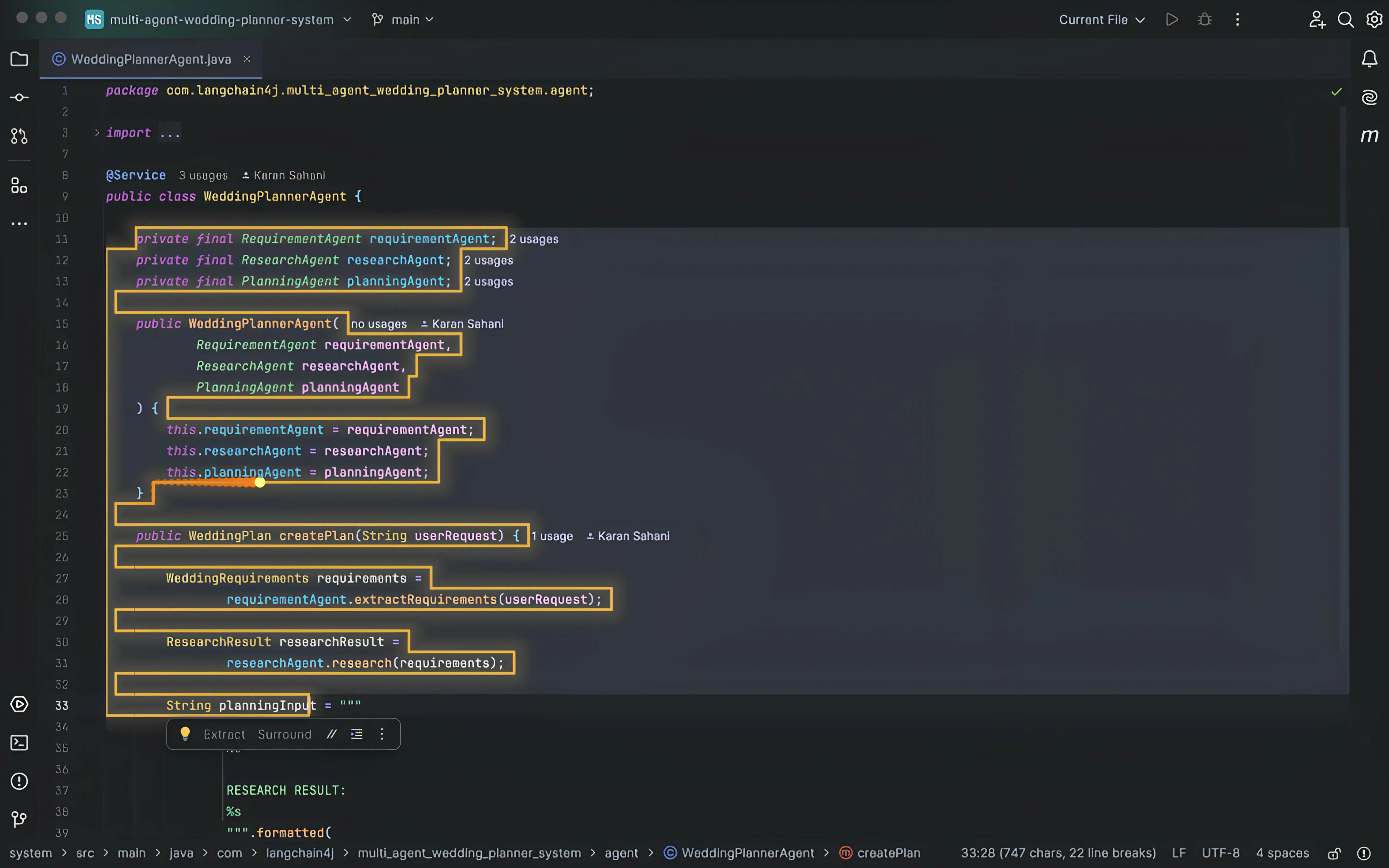
CodeSpotlight is an IntelliJ IDEA plugin built for programming content creators, adding customizable animated highlights to selected code so key lines become "impossible to miss" during presentations. It targets a niche long overlooked by mainstream IDEs: guiding viewer attention effectively in tutorial recordings, live coding streams, and tech talks. Unlike static tools like Carbon and Ray.so or screen recorder zoom features, CodeSpotlight is embedded directly in the IDE and works in real time. Built by indie developer Karan Sahani, it has 69 upvotes on Product Hunt, currently supports IntelliJ IDEA only, and expanding to VS Code is seen as its biggest growth opportunity.
Developer tools for teaching and live-coding scenarios are becoming increasingly specialized. CodeSpotlight, which recently launched on Product Hunt, is a prime example — it zeroes in on a seemingly small but genuinely frustrating problem: how to make on-screen code easier for audiences to follow during a presentation.
What Problem Does It Solve?
CodeSpotlight is an IntelliJ IDEA plugin whose core feature is adding customizable animated highlights to selected code, making key lines visually stand out. Its target audience is crystal clear: programming content creators.
For anyone recording tutorials, live-coding on stream, or giving technical talks, audiences often struggle to keep up — it's hard to instantly spot the few lines being discussed amid a dense wall of code. The traditional workarounds are manually bumping up font size, dragging the cursor around, or verbally directing viewers to "look at line 15" — all of which are inefficient and break the viewing experience. CodeSpotlight uses animation to guide attention directly to the target code, making it "impossible to miss" — which is also where its tagline comes from.
Target User Profile
From the product description, CodeSpotlight's audience is quite focused: programming YouTubers, online course instructors, coding teachers, live streamers, technical presenters, and any developer who wants their code to stand out on screen.
This is a group that mainstream IDEs have long overlooked. Editors like IntelliJ IDEA and VS Code are designed around "writing code efficiently," not "presenting code effectively." When developers become content creators, the editor's default presentation often falls short. CodeSpotlight targets exactly this gap — it doesn't change the coding experience itself, but enhances the "presenting to an audience" layer.
IntelliJ IDEA is JetBrains' flagship Java/Kotlin IDE. Its plugin ecosystem is distributed via the JetBrains Marketplace, and plugins typically work across the entire JetBrains family (including PyCharm, WebStorm, GoLand, etc.). This means CodeSpotlight's potential audience isn't limited to Java developers — it covers the entire JetBrains user base. JetBrains reports over 11 million active users globally, with particularly strong penetration among enterprise and backend developers. By contrast, VS Code's free, open-source, and lightweight nature gives it higher penetration among frontend developers, indie developers, and content creators — which explains why expanding to VS Code is seen as the single biggest growth opportunity.
Product Positioning and Market Reception
On Product Hunt, CodeSpotlight has earned 69 upvotes, 4 comments, and a ranking of 16th, categorized under Productivity, Education, and Developer Tools. The product is built by indie developer Karan Sahani.
By the numbers, this is a classic indie developer product: laser-focused positioning, a single core feature, and a niche use case. The value of tools like this isn't in covering broad needs — it's in solving one specific problem really well. For content creators, the visual quality of what's on screen directly affects audience retention and comprehension. A small tool that makes code highlights look more polished can deliver an outsized improvement in the viewing experience.
Comparison with Existing Solutions
Current approaches coding content creators use to improve code readability include tools like Carbon and Ray.so to generate static code screenshots, or using screen recording software's zoom and annotation features. But these either disconnect from the live coding environment or require post-processing. CodeSpotlight's differentiator is that it's embedded directly in the IDE and supports real-time animated effects — making highlights part of the live coding workflow rather than an afterthought.
Carbon (carbon.now.sh) and Ray.so are the most popular code screenshot beautification tools, letting developers render code snippets as polished images with window frames, syntax highlighting, and custom themes — widely used for social media and blog posts. However, these tools are fundamentally an "offline screenshot" workflow: you copy-paste code into a webpage, export an image, then embed it in your presentation materials, completely disconnected from live coding. Screen recording software like OBS or Camtasia does offer zoom and annotation features usable during live streams, but the interactions are clunky, and zoom actions interrupt the flow of the explanation while annotations often cover the code itself. IDEs' native "Presentation Mode" (such as IntelliJ's) only increases font size globally — it can't precisely direct viewer attention to specific lines. CodeSpotlight fills the gap of "precise visual guidance within a live coding environment."
A Few Things Worth Watching
Customizable animated effects are CodeSpotlight's core selling point. Animation draws the eye far more effectively than static highlights, especially in video and live streaming — inherently dynamic mediums. That said, the product description doesn't disclose which specific animation types are supported or what the performance overhead looks like — details that require hands-on testing to verify.
Another observation: it currently only supports IntelliJ IDEA. Given VS Code's massive share among content creators, expanding to more editors would significantly broaden its potential user base.
Summary
CodeSpotlight represents an interesting direction in the developer tools ecosystem: optimizing for "teaching code" rather than "writing code." As programming education and technical content creation continue to grow, we'll see more niche tools purpose-built for content creators. For teachers, YouTubers, and instructors who regularly need to present code, it's worth adding to your toolkit and giving it a spin.
Related articles

DeepSeek Open-Sources DeepInfer: What Is an Inference Framework Actually For?
DeepSeek open-sources its inference framework DeepInfer under Apache 2.0, supporting DeepSeek V4.1 Flash offline inference. This article explains its request scheduling, FlashMLA/DeepGEMM compute optimization, DSPark speculative verification acceleration, and what it means for developers and ordinary users.

Open-Source AI Learning Agent: A Full Workflow Experience from Topology Graphs to Exam Generation
Explore an open-source AI learning agent: built on DeepSeek API, it constructs knowledge systems via topology graphs, with automatic document generation, notes, super documents, and exams. Learn about its Agent workflow and design highlights.

DeepSeek Whale Girl Open-Source MV Meme: AI Industry Coded Slang About Pivoting to Closed Source
Bilibili's DeepSeek Whale Girl rap MV uses fictional memes to tease the AI open-source vs. closed-source debate, with lyrics full of industry slang. This article explains the meme culture, the Whale Girl symbol, and the open/closed tension.