Codex from Installation and Login to Hands-On Practice: The Complete Workflow of Mounting Skills and Connecting External Tools via MCP
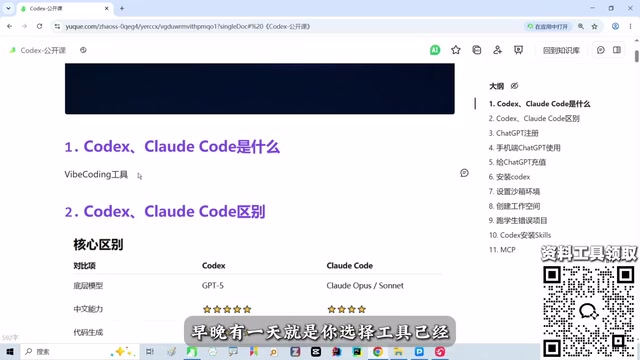
A step-by-step guide for beginners to run through the entire Codex agentic coding workflow, from account registration to Skills and MCP integration.
Based on a Bilibili creator's hands-on walkthrough, this article systematically covers the entire process of getting started with the Codex agentic coding tool through to practical integration. It first clarifies the fundamental difference between Codex and ordinary chat models—the former is an agent that gives the large model "hands and feet," enabling it to directly manipulate files, execute commands, and call external services. It then breaks down the challenges of account registration in detail: bypassing internet restrictions, email verification, virtual phone number SMS verification, registering a US region App Store account and mobile approval, and recharging and subscribing through an Apple account (the Turkey region can save about half the cost). Finally, it introduces the practical sequence for mounting Skills and connecting external tools via MCP, and offers four practical tips for beginners, emphasizing that preparing an SMS verification platform and a regional account in advance can significantly lower the barrier.
In an era where AI coding tools are evolving rapidly, Codex and Claude Code are regarded as the first tier of agentic coding tools. For many developers—and even users without a programming background—the real barrier to hands-on practice is how to complete account registration, environment configuration, and integrate Skills and external MCP tools into their workflow from scratch. This article is based on a complete hands-on walkthrough shared by a Bilibili creator, covering the entire process from installation and login to real-world integration, with key screenshots to help beginners avoid common pitfalls.
1. First, Understand What Codex Is: An Agent, Not Just a Large Model
Many beginners conflate Codex with ordinary chat-based large models, but there is a fundamental difference. The creator explained it clearly with an analogy during the livestream: a large model is like a "brain"—it can only think, not act; whereas tools like Codex and Claude Code give the brain "hands and feet" and "tools," enabling it to directly manipulate files, execute commands, and call external services.
This is why Codex is regarded as a representative of AI coding agents. After comparing the Codex, Claude Code, and Cursor installed on his own machine, the creator concluded that Codex is currently the best one to use. There are three reasons: first, the underlying configured model has better Chinese comprehension and stronger requirements analysis capabilities; second, it excels at full-stack front-end and back-end development; third, the MCP ecosystem is developing rapidly, backed by OpenAI's largest official investment.
On the question of "which tool to choose," the creator's view is pragmatic: foreign models are indeed slightly ahead at this stage, but they will converge sooner or later—ultimately the choice comes down to which is cheaper. For both programmers and non-programmers, this kind of tool is worth having—even if it's just setting up GPT for everyday research, that's a great starting point.
Codex's positioning: Codex was originally a code generation model released by OpenAI in 2021, and later evolved into a coding agent product for developers. It is not a single model, but an agent runtime built on the GPT series of large models, capable of understanding natural language instructions, planning multi-step operations, and completing tasks such as writing files, running commands, and looking up information through tool calls. Compared with ordinary chat models, Codex's core difference lies in its "execution loop": model output is no longer the endpoint, but the starting point for triggering tool actions, and it continues reasoning based on execution results. This is also why it is regarded as a representative agentic coding tool.
2. Account Registration: From Bypassing Internet Restrictions to Virtual Phone Number Verification
The prerequisite for using Codex is binding a usable model account; the creator chose a GPT account paired with Codex. This step is exactly where most people get stuck, and it has even spawned a "proxy registration" business. The whole process can be broken down into several key milestones.
2.1 Prerequisites
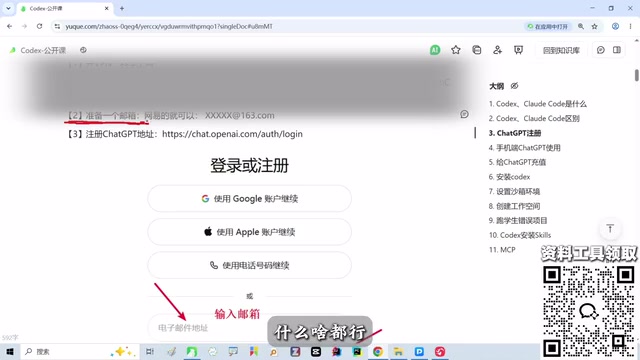
The first thing is to bypass internet restrictions—this is the foundation for all subsequent steps. The second is to prepare an email address; a Google email or an ordinary webmail will do—the creator himself temporarily registered a webmail for the demonstration.
2.2 Registration and Email Verification
After opening the GPT registration page in a browser, enter your email and click continue; the system will send a verification code to that email. Enter the code back on the page and click continue to proceed to the next step. This part is relatively smooth; the real challenge is phone number verification.
2.3 Virtual Phone Number SMS Verification
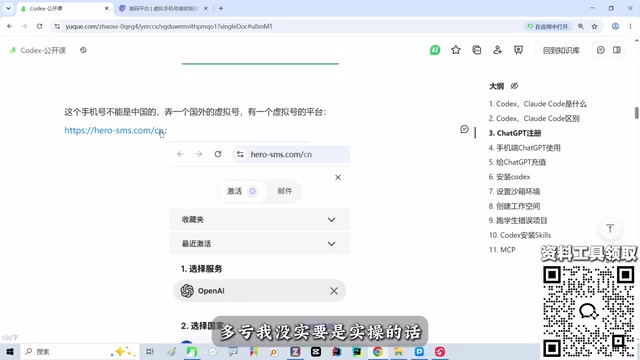
Phone number verification requires a foreign number; Chinese phone numbers cannot pass. Therefore, an SMS verification platform is needed: select the OpenAI service on the left side of the platform, then choose an available country (the platform will indicate which countries are available), recharge a small fee, and the platform will assign a virtual number. Enter the virtual number on the registration page, then return to the SMS platform to receive the verification code and fill it in to complete verification. The creator specifically reminded that on the day of the livestream the SMS platform happened to be inaccessible, but fortunately key screenshots had been saved in advance—this also shows that preparing backup plans before hands-on practice is important.
2.4 Mobile App Approval and App Download
After completing registration on the web, logging in requires approval on the mobile app. Here another new hurdle appears: the domestic App Store account cannot find ChatGPT. The solution is to register a US region (or Turkey region) App Store account and switch the phone's App Store to the corresponding region.
During registration, note the following: enter an age over 18; you can use your own phone number; in the App's personal information, switch the country from Mainland China to the US or Turkey; choose US as the payment method; and for the home address, you can use an online US address generator. The phone's system version must be 16.1 or above, and the phone also needs to bypass internet restrictions.

The principle behind App Store region switching: Apple App Store content and pricing are tied to the country/region of the account. Domestic accounts cannot search for apps like ChatGPT that are not listed in the China region, so you need to register a US or Turkey region account. When switching regions, Apple requires the account's payment method to match the region (e.g., US address, US payment method), which is why a US address generator is needed. Due to exchange rates, the Turkey region's subscription price is significantly lower than the US region, making it a choice for many users, but Apple adjusts regional pricing from time to time—it's advisable to verify current prices before proceeding.
2.5 Recharge and Subscription
The web version cannot make direct payments; you need to first recharge money to the account of the corresponding region on an Apple device, then subscribe to ChatGPT through the App Store. The creator currently uses the $20 personal plan; the upgrade plans on the left also include a Business team tier, suitable for company-wide purchases. If $20 feels expensive, the creator mentioned a money-saving trick: register a Turkey region account, where the cost is about half that of the US region—he knows companies that use Turkey region accounts for their entire team. However, details like exchange rates change, so it's best to choose according to your needs.
3. Mounting Skills and Connecting External Tools via MCP
Once the account is set up, Codex's practical value truly emerges. The creator emphasized that Codex's MCP ecosystem is developing rapidly, meaning it can connect to external tools and services via the MCP protocol, extending the "brain" to scenarios like file systems, command lines, and third-party APIs. Mounting Skills allows Codex to load specific capability modules on demand, rather than stuffing all tools into the context at once.
Following the creator's "hands-on walkthrough" approach, the practical integration can proceed in the following order: first confirm that Codex is correctly bound to the model account and can converse normally; then mount the required Skills through configuration; finally connect external tools via MCP so the agent can actually execute tasks. The creator repeatedly mentioned during the livestream that "it will be slower when running projects later," hinting that actual operation has requirements for network and toolchain stability—it's recommended to do small-scale validation before officially running projects.
MCP (Model Context Protocol) is an open protocol proposed by Anthropic at the end of 2024, aimed at standardizing the way large models connect to external data sources and tools. You can think of it as the "USB-C interface for AI applications": as long as an external service implements an MCP server, any MCP-compatible client (such as Codex or Claude Code) can call it in a unified way, without writing separate adapter code for each tool. The rapid expansion of the MCP ecosystem is exactly the key to Codex's flexible access to file systems, databases, and third-party APIs.
Skills, on the other hand, is a capability modularization mechanism: packaging instructions, tools, and knowledge for specific scenarios into mountable skill packages, allowing the agent to load them on demand rather than stuffing all tools into the context at once. This saves context window space and makes the model perform more professionally on specific tasks. Skills and MCP work together—one handles "loading capabilities on demand," the other handles "standardized connection to external tools"—together forming Codex's extension system.
4. Practical Advice for Beginners
Looking at the entire sharing session, there are several lessons worth noting. First, the most common stumbling blocks in the registration process are phone number verification and App region switching; preparing in advance an SMS verification platform and a US region App Store account can save a lot of time. Second, the creator organized screenshots of the entire registration process into notes; following the images after class is more reliable than watching a live demonstration. Third, don't agonize over tool choice—foreign models currently have a slight edge but the gap will narrow, and cost is the long-term variable. Fourth, non-programmers can use it too; the key is to get the account and environment working, then gradually delve into Skills and MCP configuration.
For readers who want to seriously invest in AI programming, Codex's complete chain—from login and subscription to mounting Skills and connecting external tools via MCP—is worth going through firsthand. Once you've done it once, switching tools or models later will be much easier.
Related articles
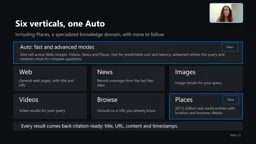
Microsoft WebIQ: Verifiable Real-Time Web Grounding for AI Agents
Microsoft WebIQ gives AI Agents real-time, citable web grounding across web, news, images, videos, and Places—164ms P95 latency, 50% fewer tokens, Scopes source control, and MCP integration.
Augmentable Gaussian Splatting: Building Photorealistic Simulation Environments for Robot Training
Team combines Gaussian Splatting with meshes to build photorealistic robot simulation environments, integrating MuJoCo Warp physics and Franka Panda for augmentable, relightable real-site simulation.

Gemini 4 Carbon Released: The Leap from Gemini 3 to Gemini 4 in Under a Year
Google releases Gemini 4 Carbon, less than a year after Gemini 3. In the official demo, Carbon reverse-engineered the Theme Park binary, added a new DeepMind-themed ride, and ported it to the web in one shot.