Codex vs Cursor vs Claude Code: Which One Should Frontend Developers Choose?

Codex's new standalone App beats Claude Code on price and stability, especially for frontend UI work.
OpenAI's Codex coding assistant has launched a standalone App, making it the most complete and polished of its four available modes. Compared to Claude Code and Cursor, Codex offers clear advantages in API pricing and account stability, and is particularly well-suited for frontend developers given its stronger grasp of UI details, visual fidelity, and interaction design. Claude Code, meanwhile, holds an edge in backend logic and complex feature implementation. Based on extensive real-world testing, the practical recommendation is to master all three tools — Cursor, Claude Code, and Codex — and switch between them based on task type, team tooling, and budget to maximize both efficiency and cost-effectiveness.
Codex Now Comes in Four Forms — The App Is the Best One
Codex recently launched a standalone App, bringing its total to four distinct forms: Siri terminal, web interface, IDE plugin, and standalone App. Compared to the plugin mode most developers have been using, the App form offers significantly better feature completeness and overall experience — and it's the officially recommended way to use Codex.
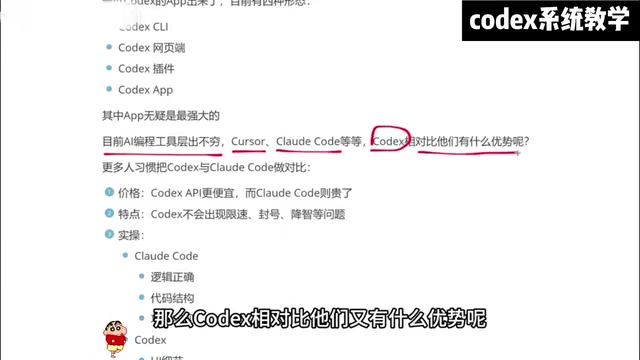
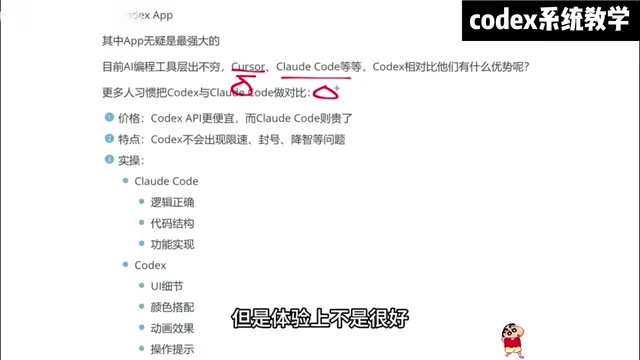
This shift puts Codex in more direct competition with Cursor and Claude Code. As AI coding tools continue to multiply, developers have more options than ever — but these three remain the core players.
Price and Stability: Codex's Core Advantages
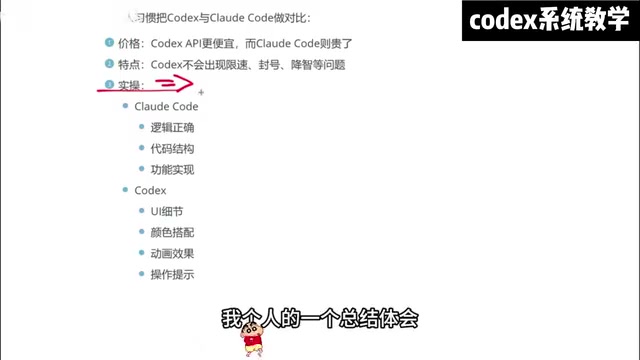
From a cost perspective, Codex's API pricing is noticeably lower than Claude Code's. For high-frequency users, the long-term cost difference is hard to ignore. Even more important is usage stability — Claude Code users frequently run into rate limiting and account suspension issues, while Codex proves far more reliable in this regard.
There's some debate around "quality degradation": some users report that Codex can also deliver inconsistent responses, but this hasn't been noticeable in real-world usage scenarios. Compared to the constant account management headaches with Claude Code, Codex clearly wins on stability.
Different Strengths: Frontend UI vs. Backend Logic
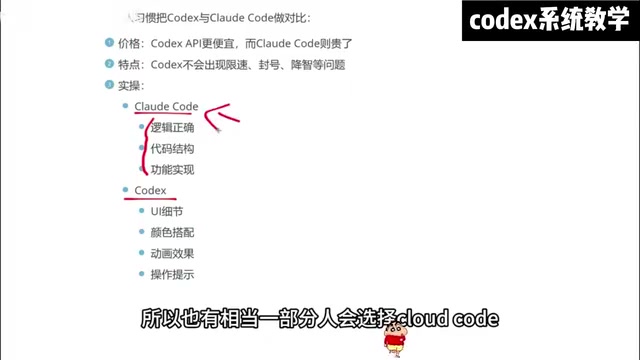
After extensive hands-on testing, Codex and Claude Code show clear differences in where they excel:
Claude Code's strengths:
- Logical reasoning and code architecture design
- Complex feature implementation
- Backend development scenarios
Codex's advantages:
- UI detail and visual fidelity
- Color schemes and animation effects
- Interaction cues and user experience
- Frontend and mobile development
This distinction means frontend developers tend to favor Codex, while backend engineers may prefer Claude Code. In practice, Codex demonstrates stronger comprehension and execution precision when handling interface requirements — especially in scenarios that involve frequent visual adjustments.
The Realistic Strategy: You Should Know All Three
Despite their different strengths, the reality is: you should master all three — Cursor, Claude Code, and Codex. Here's why:
- Company policy differences: Different teams may have purchased licenses for different AI tools
- Task fit: Different types of development work suit different tools
- Cost optimization: Switching flexibly based on project budgets helps control overall development costs
From a personal usage journey perspective: many developers start with Cursor (often for around six months), but find renewal costs high; switching to Claude Code with a locally-hosted model reduces fees, but the experience isn't ideal; ultimately, Codex's App form combined with a hybrid setup using traditional IDEs like VS Code hits the sweet spot of value and experience.
Advice for Beginners: Where to Start
For users with less coding experience or those just getting into AI-assisted development, Codex is more approachable in terms of visual output and ease of use. It can quickly turn ideas into tangible, visual results — which is incredibly helpful for prototype validation and the learning process.
For scenarios involving complex business logic, Claude Code may be more suitable. The ideal approach is to choose your tool based on the specific task: use Codex for UI-heavy work, Claude Code for logic-heavy tasks, and stick with the familiar Cursor for everyday development.
Key Takeaways
- Codex's App form is the most powerful of its four available modes
- Codex is more affordable and doesn't suffer from frequent rate limiting or account bans
- Codex excels at UI details, visual effects, and frontend development scenarios
- Claude Code has the edge in backend logic processing
- It's recommended to learn all three tools — Cursor, Claude Code, and Codex — and switch based on your specific needs
Related articles

Deconstructing a Scalable AI Agent Automation System Architecture
Deconstructing a scalable AI Agent automation system from a Bilibili creator's open-source practice: backend handles task dispatch and data management, Agent handles collection and execution, with flexible extension via MCP and Skills, and explores the architecture's reuse value in workflow automation.

Stop Hand-Writing Prompts: Deconstructing the Graph Engineering Workflow for AI Agents
Deconstructing Graph Engineering for AI Agents: distinguishing control graphs, knowledge graphs, and graphs of loops, explaining the code-as-graph and model-as-graph paths, plus the Super Design team's daily bad-design triage and change-release cases with key design points.

From In-the-Loop to Out-of-the-Loop: The Next Leap in AI Agent Architecture
From in-the-loop to near-loop to out-of-loop, this article analyzes the evolution of AI agent architecture: how persistent agents, event triggers, and sandboxes form proactive agent systems, and how the four elements of context, model, prompt, and tools amplify engineers' leverage.