Compose Graphics New Features: Mesh Gradients and Polygon Shapes

Jetpack Compose 1.12/1.13 graphics upgrade: mesh gradients, wide gamut, polygon morphing, and progressive blur, plus performance tuning.
The Android team presented Jetpack Compose's latest graphics advances, noting that high-rated apps leverage system-level API updates. The talk covered the three-layer graphics stack: Compose APIs (MeshGradients, polygon shapes, progressive blur), draw scope and AGSL, and the native canvas. Compose 1.12 adds mesh gradients and wide gamut; 1.13 brings native polygon shapes, morphing, and progressive blur, with background blur via RenderNode.setBackdropRenderEffect. Performance tips include decoding images at container size, creating runtime shaders once, and wrapping animations in graphics layers.
In a recent tech talk, Rebecca Franks, Ayush Chaudhry, and Rahul Ray from the Android team systematically presented the latest advances in Jetpack Compose's graphics rendering capabilities. Their core observation: apps that earn high ratings and feel "premium and native" to users consistently make good use of system-level API updates, striking a balance between shared elements, blur, multi-form adaptation, and performance.
This talk covered multiple layers of capability, from Compose's high-level APIs down to the underlying rendering engine, and also provided practical performance tuning guidance.
The Three-Layer Graphics Stack: From Declarative APIs to Native Canvas
The speakers divided Android's graphics capabilities into three layers. At the top is the Compose API, which carries new interfaces like mesh gradient painters, polygon shapes, and progressive blur. The middle layer is Compose's draw scope, draw modifier nodes, and AGSL, used to build custom effects. At the bottom is the Android platform—Compose always has access to the native canvas, using the latest system rendering primitives directly within modifiers.
This layering means: high-level APIs handle out-of-the-box needs, while lower-level capabilities push boundaries. The legacy View UI toolkit has entered maintenance mode, but the team continues to invest in the underlying hardware rendering engines—and those engines are what power Compose.
AGSL (Android Graphics Shading Language) is a shader language introduced in Android 13, syntactically based on Skia's SkSL. It compiles and executes fragment shaders at runtime for custom drawing effects such as dynamic gradients, filters, and distortions. Compared to traditional RenderScript or OpenGL ES approaches, AGSL is deeply integrated with the Android rendering pipeline and can be used directly within RenderNode and Compose's draw scope without managing a GL context. In Compose, AGSL is typically exposed through the RuntimeShader class, paired with Brush or Paint to achieve complex visual effects—making it a key bridge between declarative UI and low-level GPU capabilities.
Mesh Gradients: More Natural Multi-Color Blending
Compose 1.12 introduced MeshGradients. Compared to linear and radial gradients, mesh gradients suit scenarios requiring two-dimensional color transitions—like ambient backgrounds and fluid light effects—where positions and colors can bend through space.
The usage pattern: first specify the number of rows and columns, then in the draw lambda call setVertex for each mesh intersection point, assigning a normalized offset from 0 to 1 and a color; with animated offsets the vertices can move; finally apply it to any composable via a paint modifier.
One practical detail is enabling bicubic color interpolation (hasBicubicColor). By default, colors interpolate linearly within triangles, which can produce visible banding; when enabled, colors blend seamlessly. The talk demonstrated a double-tap-to-like effect in a chat app, and a dynamic ambient glow behind an input field—the latter using two infinite animations of different durations to make vertex motion feel organic, while pinning the outer ring of vertices to fully transparent so the glow feathers naturally.
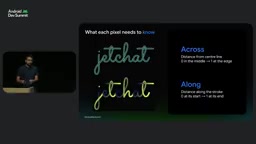
A vertex is the basic control point of a mesh gradient, carrying position offset and color information. The mesh consists of quadrilaterals divided by rows and columns; each quadrilateral is split into two triangles, and vertex attributes are interpolated within each triangle during rendering. The normalized offset (0 to 1) passed to setVertex represents the vertex's position relative to its own mesh cell, not to the entire canvas, so adjusting the row/column count changes the granularity of the gradient. Bicubic interpolation is a higher-order method that, compared to linear interpolation, ensures first-derivative continuity of color transitions—eliminating banding and hard edges at triangle boundaries—at a slightly higher computational cost.
DrawMesh: Shader-Driven Arbitrary Geometry Effects
When preset gradients aren't enough, you need to drop down to the Raw Mesh API (Android 14+). The mesh consists of triangles with vertex data; the vertex shader computes each corner's position and values to interpolate; the rasterizer then interpolates per pixel; finally the fragment shader computes the color.
The talk demonstrated a ribbon effect with non-uniform width and colors that change along the path. Traditional approaches either flatten the path into many short segments drawn one by one (one draw call and one paint object per segment), or use a runtime shader (which only gets pixel positions within the container and can't directly express path information). DrawMesh passes "progress along the path" and "which side of the stroke" as attributes through the vertex shader, letting the fragment shader compute coverage and color accordingly.
On the Compose side, you declare shaders, vertex attribute layouts, and buffers through a mesh specification, combining them into a mesh object. Since Compose Canvas doesn't yet expose DrawMesh, you need to drop down to the Native Canvas to draw.
A vertex shader and a fragment shader are the two programmable stages of the GPU rendering pipeline. The vertex shader runs once per vertex, computing the vertex's final position on screen and attribute values to pass to subsequent stages; the rasterizer discretizes triangles into pixels and interpolates vertex attributes; the fragment shader runs once per pixel, computing the final color from interpolated attributes. The key to DrawMesh is encoding geometric semantics like path progress and stroke side as vertex attributes, enabling the fragment shader to reproduce arbitrary geometry effects at the pixel level without relying on pre-generated triangle meshes.
Wide Gamut: More Than Just the Screen
Compose 1.12 began supporting wide gamut. The range of colors a screen can reproduce varies by hardware; sRGB is the standard range for most screens, while newer devices can display more saturated colors. But the speakers specifically distinguished two concepts: display gamut and gradient interpolation.
On a standard sRGB screen, the screen itself physically cannot render colors outside the sRGB range; but even on such screens, interpolating color stops in a wider or linear color space changes the mathematical path of the gradient, avoiding muddy midtones and harsh banding. So the benefit Compose 1.12 brings is: smoother gradient blending on any screen, plus true wide gamut on supported hardware.
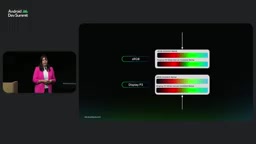
Enabling wide gamut requires setting the window color mode in the manifest or programmatically within a composable; otherwise the window stays in 8-bit sRGB and wide-gamut colors rendered by the GPU get clipped. The team recommends enabling it only on screens that actually display media, photos, or rich graphics, to save power and performance. For Bitmaps, use hardware config to preserve color information—configs like 565 lose precision and produce visible banding.
Polygon Shapes and Morphing
Compose 1.13 natively supports polygon shapes, simplifying the construction of custom shapes and organic UI elements. Previously you had to describe geometry as polygons, produce a path, then hand-write a Shape wrapper, manually scaling and translating inside createOutline. The new API as a dedicated Shape builder receives density and size directly, can compute vertices dynamically, and allows corner radii specified in either dp or percentages—then pass it directly to any API that accepts a Shape.
The same version introduced morph polygon shape, supporting smooth transitions between different polygons. The example is a recording button that morphs from a circle to a star upon interaction—just provide the start shape, end shape, and progress value. The key point: reading progress happens during outline resolution rather than composition, so frame-by-frame morphing merely resolves a new outline and doesn't trigger recomposition.
Blur: From Uniform Radius to Progressive and Background
Compose has had a blur modifier since Android 12, suitable for uniform-radius blur. But modern design more commonly calls for smooth transitions from sharp to blurred, so progressive blur became an official API in Compose 1.13: the blur modifier accepts a blur radius spec, drivable by vertical, horizontal, or radial gradients, or by custom shaders—the talk demonstrated an animated diagonal sine-wave fragment shader mapping a 0-to-1 mask to a maximum blur radius. In the example, a vertical gradient keeps the top half of a photo sharp at 0dp while the bottom edge rises to 32dp; in the radial example, the center is 0dp and smoothly rises to 24dp outward at 300dp.
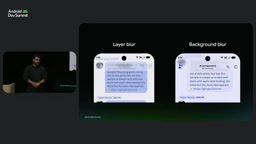
Here we need to distinguish layer blur from background blur. Layer blur applies to the composable itself—titles and icons blur along with it, and content behind is unaffected; background blur samples only the scrolling content behind the top bar, keeping text and icons sharp. Starting with Android 37.2, background blur can be achieved via RenderNode.setBackdropRenderEffect—create a custom modifier node, configure the render node effect, call drawIntoCanvas and drawRenderNode, then drawContent to draw the unblurred content. This capability can also be chained, e.g., blur plus saturation, to create frosted glass, kaleidoscope, magnifier effects, and more. The speakers mentioned that a built-in backdrop blur modifier is in development and is being prepared for backporting to Compose 2.
Another new API is SurfaceView.setBlurRegions. SurfaceView punches a hole in the window and isn't part of the app's render node tree, so Compose can't sample its buffer—making local blur difficult until now. This API lets apps declare blur regions, passing bounds relative to the SurfaceView, blur radius, alpha, and a list of corner radii.
Runtime Color Filters and Performance Tuning
Android 16+ introduced runtime color filters. Previously images could only have static matrix color filters; now you can pass a shader that receives input pixel colors and produces new colors—for example, applying a cyberpunk style to photos. It can be converted to a Compose color filter and applied to any composable, not just images.
Once effects stack up, performance becomes critical. The speakers used a macrobenchmark to launch the app and scroll through a conversation, counting frames that missed their deadline—initially getting 6 delayed frames. Investigation revealed: when prefetching the next message, the image was decoded on the main thread without yielding, blocking new frames from starting; when the message scrolled into view, the render thread had to allocate memory and upload pixels, slowing the second frame.
Traces record a marker when a large bitmap is drawn into a much smaller area, giving the full bitmap size and actual coverage area—dividing by screen density gives dp values. This pinpointed that painterResource was decoding images at full resolution; replacing it with Coil's async image, which measures the container first and decodes on demand on another thread, reduced main-thread decoding to zero and delayed frames to 2.
There are two more subtle costs: runtime shaders should be created only once—otherwise each rebuild re-passes the source string, with parsing and construction on the main thread taking up to hundreds of microseconds; creating them at process level or remembering them and only updating uniforms afterward made construction about 40x faster. And per-frame animated effects should be wrapped in a graphics layer—otherwise Compose walks up to the nearest graphics layer node and re-records the entire layer; placing the layer directly on the animation box narrows the re-record scope and reduces main-thread draw time by about 0.2ms.
The team also mentioned that trace analysis tools and the Compose performance skill can help with diagnosis. All examples can be viewed in the JetChat app.
A macrobenchmark is an official Android performance testing tool that drives the app externally through user behaviors like launch, scroll, and tap, collecting frame timestamps and counting frames that exceed the frame deadline (typically 16.6ms). Unlike microbenchmarks, macrobenchmarks focus on end-to-end real interaction experience, exposing issues like main-thread blocking and render-thread resource contention. Trace analysis uses Perfetto or Android Studio Profiler to record system-level events—including main-thread decoding, RenderThread drawing, and GPU uploads—helping pinpoint specific time-consuming stages. The "large bitmap drawn into a much smaller area" marker mentioned in the article is a diagnostic that Compose proactively outputs when it detects a mismatch between texture size and draw area.
One-line Summary
Jetpack Compose 1.12/1.13 graphics stack upgrade: mesh gradients, wide gamut, polygon morphing, and progressive blur—plus a performance tuning path.
Paragraph Summary
The Android team systematically presented the latest advances in Jetpack Compose's graphics rendering, with the core observation that high-rated apps consistently leverage system-level API updates. The talk covered a three-layer graphics stack: high-level Compose APIs (MeshGradients, polygon shapes, progressive blur), the mid-level draw scope and AGSL, and the native canvas below. Compose 1.12 introduced mesh gradients and wide gamut support; 1.13 brought native polygon shape, morph morphing, and the official progressive blur API, with background blur achievable via RenderNode.setBackdropRenderEffect. The performance section used macrobenchmarks to locate delayed frames, offering practical advice like decoding images at container size, creating runtime shaders only once, and wrapping animated effects in graphics layers.
Related articles

Vibe Coding Full-Stack in Practice: AI Programming from Beginner to Enterprise Deployment
From Cursor to Claude Code, this Bilibili AI programming course uses four progressive projects to cover full-stack development, open-source secondary development, and team collaboration. The article analyzes the shock to frontend roles, the efficiency shift from 50 people to 5, and the methodology required for enterprise-grade projects.

David Blaine's Global Quest for Real Magic: From South Africa to Japan and India
David Blaine travels to South Africa, Japan, and India in his Do Not Attempt special, documenting Spinning drivers, black mamba rescuers, iaijutsu masters, and ascetics—exploring the boundary between magic and real human极限 challenges.

Is a Touchscreen MacBook Coming? Vergecast Reveals Apple Executive's Response
Vergecast podcast reveals a conversation between a reporter and Apple executive John Ternus about a touchscreen MacBook and Apple Pencil support. Ternus says iPad is the best device for a stylus, while the reporter bets MacBook will eventually support Apple Pencil.