Coze Workflow Tutorial: One-Click Historical Short Video Generation – Complete Guide

Complete tutorial on automating historical short video production using Coze workflows
This article details how to use ByteDance's Coze AI workflow platform to automate historical short video production through six modules. By simply inputting a historical topic keyword, the system automatically completes script generation, protagonist image creation with background removal, theme extraction, storyboard and subtitle generation, voice synthesis, and CapCut draft output — generating a complete video in 2-3 minutes and dramatically reducing the time and technical barriers of traditional short video production.
Historical story short videos have always been a traffic magnet on major platforms, but the traditional production process involves scriptwriting, voiceover recording, storyboard illustration, and video editing — making a single high-quality historical short video can take hours or even days. Now with Coze workflows, we can chain these steps together for automation — just input a historical topic (like "The Xuanwu Gate Incident"), and a complete immersive historical story short video can be generated in 2-3 minutes.
Coze is an AI application development platform launched by ByteDance that allows users to combine LLMs, plugins, databases, and other capabilities into automated workflows through visual drag-and-drop, without writing complex code. Its workflow is essentially a DAG (Directed Acyclic Graph) orchestration system where each node represents a processing unit, and data flows between nodes through variables. This low-code paradigm significantly lowers the barrier to AI capability integration, enabling content creators to build complex multimodal automation pipelines.
This tutorial will fully break down the workflow's architecture and configuration details for each node, helping you replicate the entire process from scratch.
Overall Coze Workflow Architecture: One Input, Six Modules
The core approach can be summarized as "one input, six modules":
- Input: User provides a historical topic keyword
- Module 1: LLM generates video narration script
- Module 2: LLM generates protagonist image prompt + image generation + background removal
- Module 3: LLM extracts a two-character theme
- Module 4: LLM generates storyboard subtitles and storyboard image prompts
- Module 5: Batch storyboard image generation + voice synthesis + audio duration retrieval
- Module 6: Data integration + CapCut draft generation (including keyframes, subtitles, titles, background music, etc.)
The final output is a CapCut draft link that can be imported into CapCut for preview and export.
Module 1: Generate Video Narration Script with DeepSeek V3
Configuring the Start Node
Create a new workflow in the Coze workspace resource library. The start node needs one input variable — the historical topic entered by the user (e.g., "The Xuanwu Gate Incident").
Prompt Design for the LLM Node
Add the first LLM node, name it "Generate Video Script", and select DeepSeekAd V3 as the model.
DeepSeek V3 is a large language model released by DeepSeek, using a MoE (Mixture of Experts) architecture with 671 billion parameters but only activating 37 billion per inference, maintaining high performance while significantly reducing inference costs. In multiple benchmarks, DeepSeek V3's code generation, mathematical reasoning, and Chinese comprehension capabilities are on par with GPT-4o and Claude 3.5 Sonnet, but its API pricing is roughly one-tenth of comparable models, making it one of the most cost-effective choices for automation workflows requiring heavy LLM calls.
The core structure of the system prompt contains five requirements:
- Suspenseful opening: Create suspense to grab viewer attention immediately
- Identity immersion: Let viewers step into the historical figure's shoes using first/second person
- Escalating conflict: Build tension progressively
- Breakthrough details: Add vivid descriptions at key turning points
- Thematic conclusion: Elevate the theme and provoke reflection
The prompt also includes three reference script examples and explicitly requires: no more than three sentences per paragraph, short sentences for tension, at least two historical terminology references, and sensory descriptions at key turning points. For production, aim for ~1000 words; during testing, reduce to 200-300 words to save API resources.
Output format is set to JSON with the variable name content.
Module 2: AI-Generated Protagonist Image with Auto Background Removal
LLM Generates Image Prompts
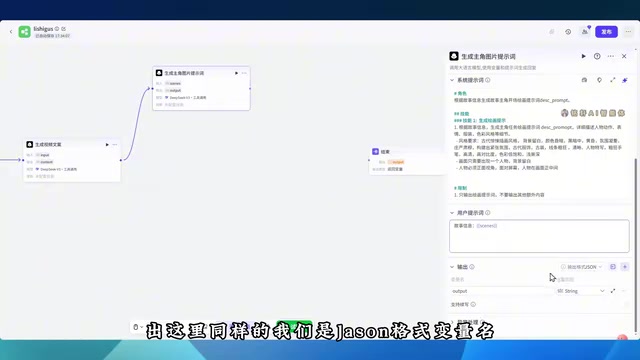
Add a second LLM node, also using DeepSeek V3. The input references the content variable from the previous step, and the system prompt requests generating a protagonist opening image prompt based on the story information, including character positioning, skill descriptions, and constraints.
Image Generation Node Configuration
Add an "Image Generation" node with these settings:
- Model: General Pro
- Aspect Ratio: 4:3
- Generation Quality: Maximum
- Positive Prompt: Reference the image prompt from the previous step
The image generation node typically relies on Diffusion Models, using positive prompts to guide the model toward generating images matching the description. Prompt quality directly determines style consistency and visual detail, which is why a dedicated LLM step generates structured image prompts rather than passing raw script text directly to the image generation node.
Background Removal Node
Add a background removal node, pass in the generated protagonist image, and keep default parameters. This node relies on semantic segmentation models (such as SAM, U²-Net, etc.) that automatically identify the main subject and remove the background, outputting a PNG with a transparent channel. In video production, the cutout protagonist image can be overlaid on any background to create a "character overlay" effect — a common visual technique in short video openings and a key preparation step for superimposing the protagonist in the opening frame.

Module 3: Extract Two-Character Theme for Video Title Display
This node's task is simple: extract a precise two-character theme from the generated script (such as "Coup" or "Mutiny"
Related articles
 Tutorials
ChatGPT Plus Subscription Guide: Are GPT-5.5, image-2, and Codex Worth the Upgrade?
A detailed look at ChatGPT Plus features — GPT-5.5, image-2, and Codex — with a Plus vs Pro comparison and a complete step-by-step subscription guide for users outside the US.
 Tutorials
Harness AI Engineering in Practice: Using Claude Code to Master Enterprise-Level E-Commerce Development
Deep dive into Harness AI Engineering: master enterprise e-commerce development with Claude Code using the Rules, Skills, Wiki, and Changes framework.
 Tutorials
Cursor + Codex Dual-IDE Collaboration: A Practical Methodology for Open-Source Project Customization
A complete methodology for open-source project customization based on real-world experience, detailing the Cursor+Codex dual-IDE workflow, seven-stage process, MVP validation, and AI source code reading techniques.