CTRL Micro: Turn Your iPhone into a Haptic Control Console for AI Agents

CTRL Micro turns your iPhone into a haptic control console for managing AI agents on Mac.
CTRL Micro is an app that transforms your iPhone or iPad into a haptic-feedback control deck for AI agents on Mac. It monitors Codex, Claude, and Cursor in real time, offers desktop mirroring, trackpad/keyboard control, local Whisper voice dictation, and customizable panels — all with near-field and end-to-end encrypted remote connectivity. Born when the team's hardware product sold out, it's a software Stream Deck for the AI agent era.
When Your Phone Becomes a "Haptic Remote" for Your Mac
As AI coding assistants become increasingly prevalent, efficiently monitoring and controlling these agents running in the background is emerging as a new product pain point. CTRL Micro, recently launched on Product Hunt, offers a remarkably creative solution: turn your iPhone or iPad into a haptic-feedback-enabled "control deck" specifically designed to manage AI agents on your Mac.
According to its Product Hunt page, the product — built by Andrew Flores — received 92 upvotes after launch, ranking 16th on the daily leaderboard across the Mac, Productivity, and Artificial Intelligence categories.
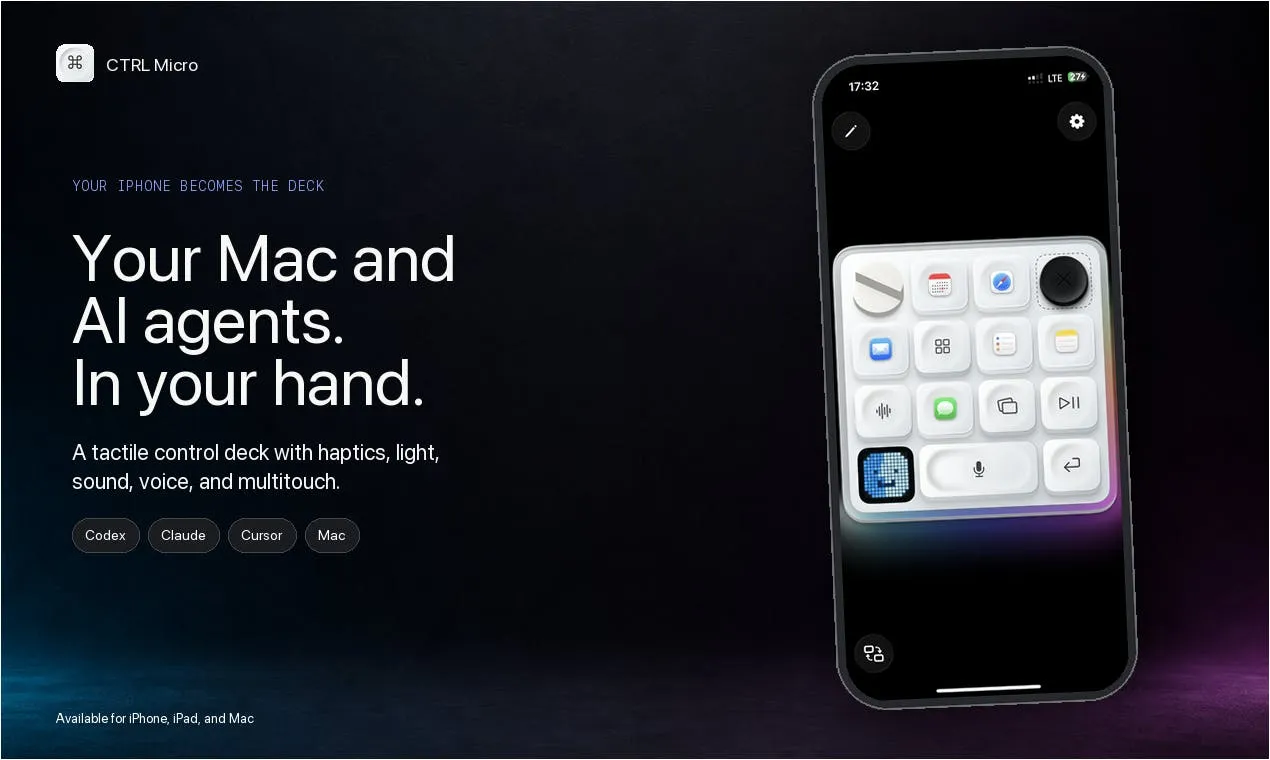
Interestingly, the product was born out of happenstance — the team's original hardware product, Codex Micro, went out of stock. Since the dedicated hardware couldn't keep up with demand, why not leverage the iPhone that's already in everyone's pocket? So they built a software solution powered by Apple's Taptic Engine.
CTRL Micro Core Features Explained
Real-Time Monitoring of Major AI Coding Assistants
CTRL Micro's core positioning is as a "dashboard" for multiple AI agents on your Mac. It can simultaneously monitor the status of three major AI coding tools: Codex, Claude, and Cursor.
For developers who frequently run multiple AI coding sessions at once, this solves a real pain point: when you have Cursor running a large-scale refactor and Claude handling another task, you don't need to keep switching back to your computer to stare at the screen. The phone-based console uses haptic feedback to alert you about task progress or moments that require human intervention — this is exactly where the Taptic Engine shines, translating the abstract concept of "agent status" into perceivable physical vibrations.
Desktop Mirroring and Remote Control
Beyond monitoring AI agents, CTRL Micro also provides a complete set of remote interaction capabilities:
- Live Desktop View: See your Mac desktop in real time on your phone
- Trackpad and Keyboard: Use your iPhone as a trackpad and keyboard to control your computer
- Local Voice Dictation: Built-in Whisper model performs speech-to-text locally, with no cloud upload required
Running Whisper locally is a noteworthy detail. For developers working with code and sensitive projects, having voice input bypass third-party servers ensures both low latency and privacy protection.
Near-Field and Remote: Two Connection Modes
CTRL Micro supports two modes of operation. When your phone and Mac are on the same local network, you can connect directly via near-field connection. When you're away from your computer, you can access it remotely through the end-to-end encrypted Remote Anywhere feature.
The design philosophy is clear: whether you're sitting on the couch wanting to glance at your agent's progress, or you're out and need to intervene on a task, you can "keep your agents in sight from anywhere." The inclusion of end-to-end encryption also addresses the most common security concerns around remotely controlling a personal computer.
Customizable Control Interface: Beyond Just AI Tools
CTRL Micro doesn't limit itself to a handful of preset AI tools. The product allows users to build their own custom controls, making the console adaptable to any app you want.
This means its potential extends well beyond AI coding. In theory, you could configure a dedicated haptic control panel for video editing software, music production tools, or any desktop application that benefits from quick-access shortcuts. This extensibility elevates it from an "AI agent monitor" to a general-purpose Stream Deck-style software solution — except it runs on the iPhone you already own, with the added layer of haptic feedback.
The Thinking Behind the Product
From Hardware Shortage to Software Breakthrough
The story behind CTRL Micro is instructive in itself. When the dedicated hardware Codex Micro couldn't meet demand, the team didn't stubbornly stick to the hardware route. Instead, they cleverly recognized that modern smartphones already have all the necessary components built in — a high-quality haptic engine, touchscreen, microphone, and ubiquitous network connectivity.
By reorganizing these existing capabilities, they were able to replicate — and even surpass — the dedicated hardware experience through software. This is a classic case of "software eating hardware," and it lowers the barrier to entry for users: no need to purchase additional devices.
A New Interaction Challenge in the Age of AI Agents
From a broader perspective, CTRL Micro reflects an emerging trend: as AI agents increasingly run autonomously in the background, the focus of human-computer interaction is shifting from "operation" to "supervision and coordination."
We're no longer just sitting at our computers writing code line by line — we're simultaneously managing multiple AIs working on our behalf. What we need is a "console" that lets us sense status at any time, intervene quickly, and doesn't require us to be glued to a large screen. CTRL Micro uses haptic feedback to solve the "sensing" problem and remote control to solve the "intervention" problem, targeting precisely this new challenge.
Conclusion
CTRL Micro is a product with a narrow focus but a clear vision. It transforms your iPhone/iPad into a haptic control console for AI agents on your Mac, covering monitoring, desktop mirroring, trackpad/keyboard control, local voice dictation, and supporting both near-field and end-to-end encrypted remote connections, along with custom controls adaptable to any app.
For developers juggling multiple AI tools like Codex, Claude, and Cursor simultaneously, this kind of "agent management layer" product is likely to become increasingly common. CTRL Micro's value isn't in any single standout feature — it's in its keen identification of a real, underserved need that has emerged as AI agents become mainstream.
Related articles

Private Key Set to 4? CA's Elementary Mistake Leaves TLS Exposed
CA eMudra set private keys to tiny values like 4, making TLS certificates brute-forceable. A Computerphile video demonstrates the full process from extracting public keys to forging certificates, and explores the fragility of the PKI trust chain.

How Gen Turns Data into Decisions with ChatGPT Work
In an OpenAI user case, business leader Gen shares how ChatGPT Work turns data into decisions: within hours of launch, teams can judge whether integrations and onboarding flows work, shifting decision iteration from hundreds of trial-and-error attempts to a fast feedback loop.

ChatGPT vs. Claude In-Depth Comparison: Strong at Coding but Weak at Research — How to Bridge the Gap?
A user considers switching from ChatGPT to Claude, finding Claude stronger at coding but shallower at research. We analyze the differences and share tips to make Claude's research deeper.