DeepSeek Harness Quick Start Guide: From Installation to 5 Real-World Cases

DeepSeek Harness is an out-of-the-box AI Agent software, with five cases showcasing its development and creation capabilities.
The article introduces DeepSeek Harness, an AI Agents software released by DeepSeek, with "Model + Harness = Agent" as its core philosophy, enabling AI to operate files, call tools, and directly develop software. It covers the installation and configuration process and the four working modes—Standard, PTC, Minimal, and Creative—and demonstrates its capabilities through five real-world cases: a 3D racing game, a game website, a web music player, a science animation, and a self-developed plugin, with each task costing 1 to 6.5 yuan. The article also explains the API's peak/off-peak pricing and caching mechanism, offers four money-saving tips, and notes that the plugin architecture is key to pushing AI from a chat tool to an execution tool.
You've surely heard of DeepSeek, but what is the newly launched DeepSeek Harness? How is it different from regular DeepSeek? Based on a hands-on tutorial from Bilibili creator "翻滚拔拉灰", this article takes you from installation and configuration to five real-world cases, helping you quickly get started with this AI Agent software.
What Is Harness? How Is It Different from DeepSeek?
DeepSeekAd Harness is a brand-new AI Agents software released by DeepSeek, with the official tagline "Now, ready out of the box." The DeepSeek we were familiar with in the past was mainly used for chat conversations, while Harness lets AI operate files, call tools, and directly help users develop software on a computer.
The official explanation of how it works is elegantly simple: Model + Harness = Agent. The AI model is responsible for understanding requirements and thinking, while Harness provides tools and an execution environment, enabling AI to actually get hands-on and complete tasks. This design decouples "thinking" from "execution," amplifying the model's capabilities through Harness's tool layer.
In addition, Harness emphasizes a design philosophy of "everything is a plugin"—models, tools, skills, and even the interface can be extended through plugin combinations, and AI can even develop new plugins for itself.
A noteworthy detail: just over two months after going open source, Harness has already racked up more than 260,000 stars on GitHub, a clear sign of its popularity.
AI Agent refers to an AI system capable of autonomously perceiving its environment, planning tasks, calling tools, and executing actions to achieve goals, as distinct from a chatbot that can only engage in one-question-one-answer exchanges. Traditional chat models only output text, whereas an Agent uses the large model as its "brain," combined with tools such as file read/write, code execution, and network requests to form a closed loop, thereby completing complex multi-step tasks. The industry often uses the analogy "the model is the brain, the Agent is the hands and feet." DeepSeek Harness is precisely the productization of this paradigm: the model handles reasoning and decision-making, while Harness provides tools and a runtime environment—only together can AI truly "get hands-on." Understanding this distinction helps grasp why, in the five cases below, AI can plan on its own, write code, and debug.
Quick Installation and Initial Setup
The installation process isn't complicated: open the official website, download and install the package for your system, launch the client, and log in to your account as prompted.
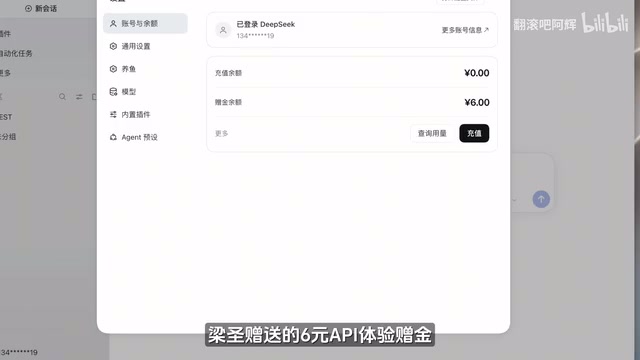
In the settings interface, new accounts receive an official 6-yuan API trial credit. In the model settings, you can switch to third-party model providers or connect to locally deployed models. In the demonstration, the creator used DeepSeek's official V4.1 Flash model.
Next, choose a folder as your workspace, and AI can then process files and execute tasks there. Harness offers four working modes:
- Standard Mode: The most full-featured, suitable for daily office work, file processing, and programming development—recommended for beginners
- PTC Mode: Combines multiple tool calls through code, suited for complex tasks
- Minimal Mode: Retains only two core features—terminal and file editing—mainly used for model testing
- Creative Mode: Lets AI develop plugins and customize functionality
For regular users, remembering just two is enough: use Standard Mode for everyday tasks and switch to Creative Mode when developing plugins.
PTC Mode, short for Programmatic Tool Calling, centers on having the model generate a piece of code to orchestrate multiple tool calls, rather than issuing calls one by one in natural language. The benefits are fewer round trips, lower token consumption, and support for complex logic such as loops and conditionals—well suited for data processing, batch operations, and similar tasks. By contrast, tool calls in Standard Mode are more intuitive but involve more steps. Minimal Mode deliberately strips away most tools, keeping only terminal and file editing, in order to evaluate the model's own capabilities with minimal variables—commonly used for model testing and comparison. Understanding the positioning of these modes helps users choose based on task complexity and cost budget.
Five Real-World Cases: What Harness Can Do
Case 1: Developing a 3D Racing Game from Scratch
The creator's first "wish" for Harness was to develop a genuinely playable 3D racing game from scratch, with a bold requirement—referencing a flying Tesla, install thrusters on the race car so it could briefly take flight.
Harness began planning tasks, writing code, and calling tools on its own. In Harness's unique trajectory interface, you can view the specific execution process and time taken. The entire development took about an hour and a half, and the final product, "Leap Speed," exceeded expectations in graphics, car modeling, and handling. The game achieved a 99.7% cache hit rate and cost about 6.5 yuan.
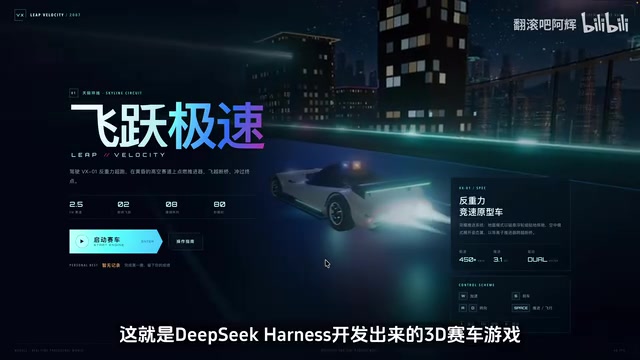
Case 2: Building an Official Website for the Game
Once the game was done, the creator had Harness build an official website for it, requiring full display of the game's features. This time it took about 20 minutes, and the website's UI style was highly consistent with the game. A particularly satisfying aspect was that the game screenshots and gameplay descriptions on the website were based on the actual developed game—nothing was fabricated. The cache hit rate was 99%, costing about 1 yuan.
Case 3: A Web-Based Music Player
Switching direction, the creator asked Harness to develop a web-based player for local music, which took about half an hour. The result was basically usable, though the interface had room for improvement. The cache hit rate was 99%, costing about 1.5 yuan.
Case 4: Creating a Science Animation
Harness can also create science animations. The creator had it produce an animation explaining the differences between Harness and regular DeepSeek and how it works, which took about 20 minutes. The script, illustrations, and animation effects were all done well. The cache hit rate was 99%, costing about 1.2 yuan.

Case 5: Letting Harness Develop a Plugin for Itself
This is the most interesting manifestation of the "everything is a plugin" philosophy. Harness's plugin marketplace has plenty of fun plugins, such as the "Whale Girl Outfit Change" plugin, which gives Harness a whole new interface style once installed.
The creator further demonstrated: in daily use, checking the account balance requires entering the settings interface, which is inconvenient. So he switched to Creative Mode and had Harness develop a plugin that displays the balance directly in the sidebar. Harness wrote the plugin code on its own and automatically completed installation and debugging, and the balance successfully appeared in the sidebar. The whole process took about 20 minutes and cost 1.5 yuan.

Token Costs and Money-Saving Tips
DeepSeek's official API charges by token usage and implements peak/off-peak pricing—peak hours are 9 AM to 12 PM and 2 PM to 6 PM Beijing time on weekdays, with all other times at half price. In addition, when input content hits the cache, the token price is much cheaper, and as seen in the cases above, cache hit rates were generally above 99%.
The creator shared several money-saving tips:
- Describe requirements as clearly as possible in one go to reduce back-and-forth revisions
- Control the scope of AI's work and execute complex tasks in stages
- Adjust thinking intensity based on task difficulty
- When time permits, choose off-peak hours to execute tasks
Token is the basic unit of measurement for large models processing text, roughly understood as word or character fragments; in Chinese, one character typically corresponds to about 1 to 2 tokens. The API bills by the total number of input and output tokens, so the longer the task and the more revisions, the higher the cost. Cache hit means that when input content highly overlaps with previously processed content, the server can directly reuse the computed results, thereby billing at a lower price. In Agent scenarios, system prompts, tool definitions, and historical context often repeat, so cache hit rates easily reach above 99%—which is an important reason why a single task in the cases costs only one or two yuan. Understanding tokens and the caching mechanism is the prerequisite for mastering money-saving tips.
Summary
DeepSeek Harness pushes AI from a "chat tool" to an "execution tool," using a plugin-based architecture to make model capabilities flexibly extensible. From 3D games, official websites, and music players to science animations and self-developed plugins, the five cases demonstrate its playability in development and content creation. For users wanting to try AI Agents, the combination of Standard Mode and Creative Mode is enough to cover most scenarios. For the complete prompts and illustrated tutorials from the cases in this article, refer to the pinned comment on the creator's original video.
One-line Summary
DeepSeek Harness is an out-of-the-box AI Agent software, with five cases showcasing its development and creation capabilities.
Paragraph Summary
The article introduces DeepSeek Harness, an AI Agents software released by DeepSeek, with "Model + Harness = Agent" as its core philosophy, enabling AI to operate files, call tools, and directly develop software. It covers the installation and configuration process and the four working modes—Standard, PTC, Minimal, and Creative—and demonstrates its capabilities through five real-world cases: a 3D racing game, a game website, a web music player, a science animation, and a self-developed plugin, with each task costing 1 to 6.5 yuan. The article also explains the API's peak/off-peak pricing and caching mechanism, offers four money-saving tips, and notes that the plugin architecture is key to pushing AI from a chat tool to an execution tool.
Related articles

9 AI Subscription Plans Compared: The Real Cost Per 100M Tokens Revealed
Bilibili creator tests 9 AI subscription plans from Volcano, Alibaba, Tencent, Baidu, Zhipu, Xiaomi, MiniMax and more, converting them all to real cost per 100M tokens, breaking down fixed-quota vs. three-tier coefficient billing and how caching, time-of-day discounts, and window limits affect actual quota.

Vibe Coding for Beginners: Expressing Intent Instead of Handwriting Code
What is Vibe Coding? A 137-episode Bilibili course defines it: the core is expressing intent, not writing code. This article analyzes Vibe Coding's productivity logic, target audience, and entry expectations to help beginners decide if it's worth learning.

LangChain Beginner's Guide: An Agent Development Roadmap from LangGraph to Deep Agents
Clarify the encapsulation relationship among LangChain, LangGraph, and Deep Agents, and master the learning path and selection logic for agent development frameworks—suitable for beginners in large model development.