DeepSeek Harness Workbench Plugin: Generate Agent Apps with a Single Sentence
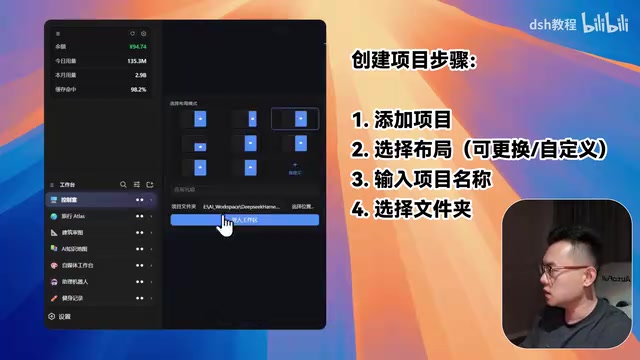
An open-source plugin adds a visual workbench to DeepSeek Harness, exploring Agent interaction and industry endpoint needs.
The article introduces a fully open-source WebCoding workbench plugin for DeepSeek Harness that adds a visual operation area alongside the chat, upgrading Agent interaction from voice-assistant style to smartphone style. It dissects six demo projects corresponding to real practitioner needs—travel map, architectural review, AI learning site, self-media workbench, assistant bot, and fitness guide—and discusses the multi-round correction and huge token costs behind one-sentence app generation, concluding the plugin is better as direction validation than a finished tool.
An open-source plugin that turns DeepSeek Harness from a chat box into a visual workbench.
DeepSeekAd Harness is still at version 0.1, and most people use it within a chat box—entering commands and waiting for replies. But Bilibili creator "Deep Sea Carnies" spent a week adding a "screen you can directly operate": a fully open-source WebCoding workbench plugin. Once installed, you can manage projects, bind conversations, and one-click generate a travel footprint map, an architectural drawing review tool, an AI learning website, a self-media animation workbench, and even an assistant bot that helps you filter and promote information—all within a visual interface.
This article doesn't intend to repeat installation steps, but rather to dissect the design philosophy behind this plugin: why it exists, what pain points in Agent interaction it solves, and what the "everything is a plugin" open-source strategy means for the industry.
From Chat Box to Workbench: The Missing Screen in Agent Interaction
The creator made an analogy in the video: the large language model era is like using a non-smartphone—you can only make calls, not operate. After the Agent explosion, AI grew hands and feet and can do work for you, but most people still interact with Agents in a "voice assistant" style: say one sentence, wait for it to finish, then say the next.
For batch repetitive labor or complex workflows, this approach is actually sufficient. But making simple tasks run through the Agent from start to finish feels awkward. The workbench plugin's idea is to keep the chat on the right (which the creator calls "Siri") while providing a visual operation area on the left, allowing users to directly click, drag, preview, and edit.
This control room interface is the plugin's entry point. All created projects are arranged as cards, each with two small dots next to it: one indicates status (working/idle), the other binds an independent conversation. Clicking a card enters the project's main view, and the chat window can be swapped left or right according to habit. The creator emphasizes that each project must bind a conversation—this is the context source for the Agent to execute tasks.
Six Projects, One Philosophy: Translating Industry Needs into Agent Applications
The projects demonstrated in the video span a wide range, but the underlying logic is consistent: each project corresponds to a specific need of a real practitioner, not a variation of a general chat scenario.
Travel Footprint Map: Turning Photos into Geographic Archives
This is the first project demonstrated. On the left is a list of countries; clicking a country or city pops up a detail panel and album on the right. The album supports viewing original images, and drone panoramic images can be previewed 360 degrees, zoomed, and full-screened with the built-in viewer. The creator specifically mentions that the location and altitude in photos are extracted from EXIF coordinate information, and "the extraction is quite accurate."
The globe model itself also has details: saturation, contrast, and brightness are adjustable, the scale zoom range is large, and shadow relationships sync with real-world time—when the video was shot at night, the China region on the map was also in nighttime state. The middle panel can also switch between linear map or annual card views. The creator says this project had a short development time and some features are incomplete, but it will be open-sourced to the community later so everyone can have their own travel map.
EXIF (Exchangeable Image File Format) is a metadata specification that digital cameras and phones write into JPEG and other files. Besides capture time, aperture, and shutter speed, it often includes GPS latitude/longitude, altitude, and even orientation information. Panoramic images shot by drones often carry attitude data that can be used for stitching or 360-degree preview. Note that coordinates in EXIF may be missing due to device location being off, post-processing compression, or social platform cleaning, so "quite accurate extraction" depends on original files rather than forwarded images. On the privacy side, publicly sharing original images with EXIF exposes shooting locations; tools usually need to provide stripping or blurring options before display.
Architectural Drawing Review Software: A Need Only Practitioners Know
The creator's day job is in the architectural industry, and this project is something he "wanted to do long ago." The logic: feed national and local codes into the system, have humans do a layer of reinforcement learning (the creator himself put quotes around this, saying it doesn't reach the depth of modifying the model—actually optimizing at the scale level), then import DXF files to start review.
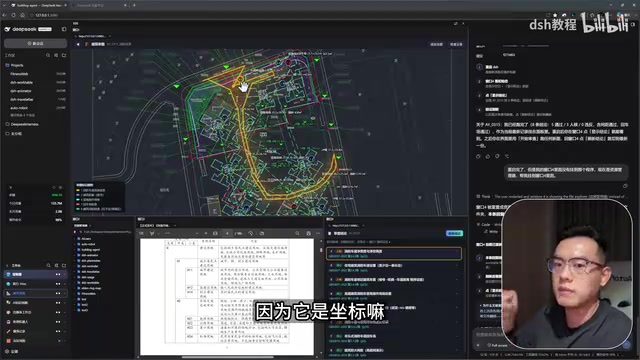
The recognition principle is not the large model looking at images, but understanding each line from coordinates, then combining with Tianzheng's default layer naming rules to judge the intent and spatial position of lines. Review results fall into two categories: confirmed ones are marked "pass," uncertain ones are marked "manual." In the screenshot, residential outlines, fire lanes, turnaround areas, and building fire separation distances can all be identified; clicking a highlighted item pops up the corresponding code clause. The left resource manager can drag in code files to cross-verify against review results.
The significance of this case: the architectural industry is not a focus area for frontier companies doing post-training, and large models in architecture can only intervene in early ideas or late-stage effect presentation. Practitioners building their own tools can instead share part of the drawing review workload.
DXF files are an open vector graphics exchange format designed by Autodesk for AutoCAD, recording layers, line types, coordinates, and entity information in ASCII or binary, readable and writable by almost all CAD software. Architectural drawing review chooses DXF over images or PDFs because every line and block retains precise coordinates and layer attributes, allowing programs to reconstruct the true geometric relationships of walls, axes, doors, and windows rather than guessing from pixels. Domestic CAD plugins like Tianzheng Architecture name layers according to established conventions when drawing (such as "WALL", "AXIS", "WINDOW"), and these naming rules become important prior knowledge for review tools to judge "what this line represents."
AI Learning Website: Understanding Abstract Concepts Through Audiovisual Dimensions
The motivation was that the creator found Transformer architecture, embedding vectors, and convolution kernels abstract when learning them. He had AI pull popular GitHub tutorials (like learn code, awesome agentic AI, Karpathy's neural network teaching), spread them out by chapter, cluster by topic, sort by learning order, and form a knowledge network map.
The lower part is interactive tools: convolution kernel animation demonstrations, token tokenizers, embedding semantic maps, Transformer vector visualization. The creator's judgment is that in the Agent era, information formats with higher audiovisual dimensions are more easily accepted—images generally better than text, and video better than images.
Self-Media Workbench: A Pipeline from Copy to Animation
This project's purpose is straightforward: to be lazy. Input copy on the left, AI does semantic segmentation; add effects to segmented content in the middle; add and modify text boxes like PPT on the right, and finally generate animation in the preview area. The creator says the features are rough, but it basically saves time making videos.
Assistant Bot: Information Filtering and Restrained Promotion
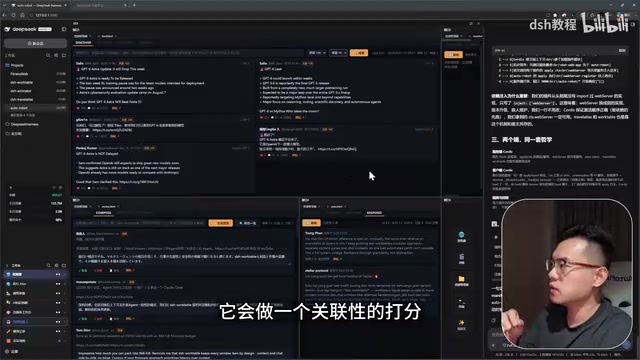
The upper part is information filtering: scrape content from X (Twitter), AI filters, AI scores, sorts by relevance. The creator demonstrated searching for GTA latest news, scraping 100 items and keeping 100, each with view and like counts. Scraping uses the Twitter CLI, millisecond-level, but adds a few seconds of search jitter to control request frequency. Compared to traditional search, less noise, more freedom, no ads.
The lower part is self-promotion: input content you want to promote, the system matches related discussions on X, generates polite replies with restrained promotional copy, and sends after approving or rejecting each one. The creator tried sending two, recorded in the right panel.
Fitness Guide: Visual Records of Muscle Training
Click a body part (like upper chest, shoulders) to display corresponding training methods and exercises, with a plus sign to record training data. Simple features, but fits the positioning of "your own recording and guide tool."
Generating Agent Apps with One Sentence: What's the Cost
When demonstrating an Elden Ring interactive map, the creator gave only one prompt. After the project binds the conversation, the Agent starts injecting context and executing tasks. During the process, the status dot turns to working state; when complete, a small green dot appears in the chat window.
The result is a zoomable tile map with clickable markers, complete with a compendium and search. But the creator gave an important lesson: never let DeepSeek draw content itself. His exact words were "what he draws is very ugly, he's a pure science student." The correct approach is to have the Agent find existing information online, then do a round of modification. Multiple rounds of communication are needed to achieve the goal; one round is rarely enough.
On cost, the creator revealed that plugin development took about a week and used close to 3 billion tokens—high-intensity usage. The video was shot during off-peak hours, so costs were relatively low, but he still complained that after the price increase "it really hurts." This number is worth noting: behind the experience of generating apps with one sentence, token consumption is not small.
Token is the basic unit of measurement for large language models processing text. One Chinese character roughly corresponds to 1 to 2 tokens, and an English word about 1.3 tokens. The model is billed by tokens for each prompt read, context and history, as well as each output; long context and multi-round tool calls multiply consumption. The "close to 3 billion tokens" in the article means extensive repeated code generation, file reading, and debugging back-and-forth, far exceeding ordinary chat usage. This also explains why the "one-sentence app generation" demo looks light but has considerable compute and cost behind it; for high-frequency developers, caching, streamlined context, and limiting tool call rounds are key means of cost control.
Three Reflections: Workbench, Industry Endpoints, and Zero-Intrusion Open Source
The creator summarized three points at the end of the video, which I think are more valuable than the feature demonstrations.
First, interaction upgrade in the Agent era. From non-smartphone to smartphone, if you still only use Siri, you're wasting the screen. The workbench is that screen, conversation is Siri, both coexist.
Second, satisfying "needs only you have." Self-media workers can manage past drafts and do image-text-video conversion; gamers can build auxiliary web pages. There must be needs in the world that only you can think of; the workbench provides a Lego-like base, entering everyone's work environment in modular form.
Third, reaching the nerve endings of industries. The design of everything being a plugin and fully open source allows Agents to go beyond AI researchers and ordinary users, entering industries not yet thoroughly penetrated by AI. Vendor-built Agents are always median values; developers can build general infrastructure but find it hard to understand each industry's specific intent. Only practitioners know their industry's needs—the architectural drawing review demo is an example.
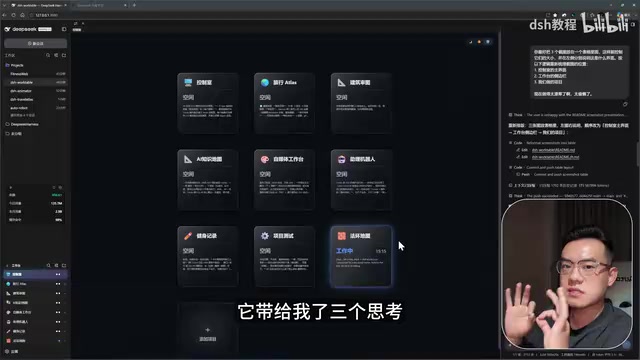
Technically, the creator emphasizes a basic principle: clean to the host, no modification, no replacement. Harness is still version 0.1, with frequent official updates; if you modify the framework, projects are easily lost. His plugin is a native incremental plugin, all implemented through the socket protocol, zero intrusion to the host. He also wants to write VGN JSON files later to make the panel look more like a real dashboard.
How to Install, Is It Worth Trying
The creator displayed the installation method directly on screen: copy the pinned comment, send it to any AI tool with Agent functionality (like Workbody, Doubao Desktop), first enable GitHub connection in the plugin marketplace, and it will install automatically. The control room panel appears only after installation.
Whether it's worth trying depends on how you view the evolution of Agent interaction. If you're satisfied with conversational Agents completing complex tasks, this plugin may not be essential. But if you have an industry need only you understand, or want to experience what "giving the Agent a screen" feels like, this is a rare, fully open-source visual workbench implementation. The creator says various projects will be open-sourced successively; those interested can leave comments.
A reminder: Harness itself is still iterating rapidly, and plugin features are incomplete—the travel map and self-media workbench both have rough edges. Treating it as a direction validation rather than a finished tool is probably more appropriate.
One-line Summary
An open-source plugin adds a visual workbench to DeepSeek Harness, exploring Agent interaction and industry endpoint needs.
Paragraph Summary
The article introduces a fully open-source WebCoding workbench plugin developed by a Bilibili creator for DeepSeek Harness. While keeping the chat on the right, it provides a clickable, draggable, previewable visual operation area on the left, upgrading Agent interaction from "voice assistant" style to "smartphone" style. The author dissects six demo projects—travel footprint map, architectural drawing review, AI learning website, self-media workbench, assistant bot, and fitness guide—noting they all correspond to specific needs of real practitioners. The article also discusses that generating Agent apps with one sentence requires multiple rounds of correction and consumes huge tokens, and summarizes three reflections on workbench interaction, satisfying individual needs, and entering industry endpoints via zero-intrusion plugins, concluding that the plugin is more suitable as direction validation than a finished tool.
Related articles
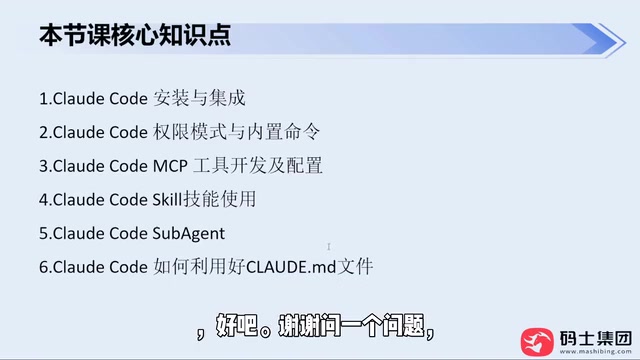
Claude Code Practical Guide: Installation, Permission Modes, and Productivity Tips
Based on a Bilibili creator's hands-on sharing, this guide covers Claude Code installation (NPM recommended), permission modes, slash commands, CLAUDE.md configuration, context management, and practical tips for stable use and avoiding account bans.
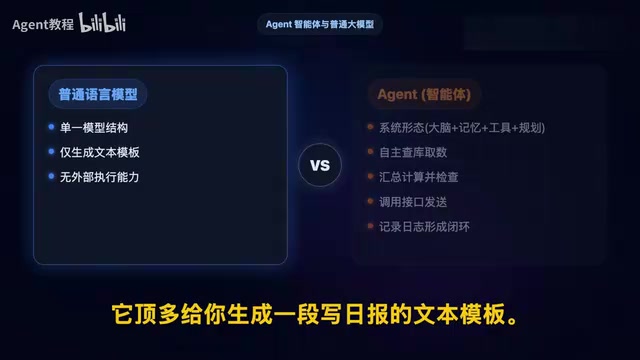
The Essential Difference Between AI Agents and Traditional AI: From Functions to Autonomous Task Executors
What is the essential difference between AI Agents and traditional AI? This article systematically breaks down the nature of Agents from six core components, dynamic decision-making authority, boundaries with Chatbots and Workflows, safety boundaries, and observability, helping you understand key concepts in LLM application development.
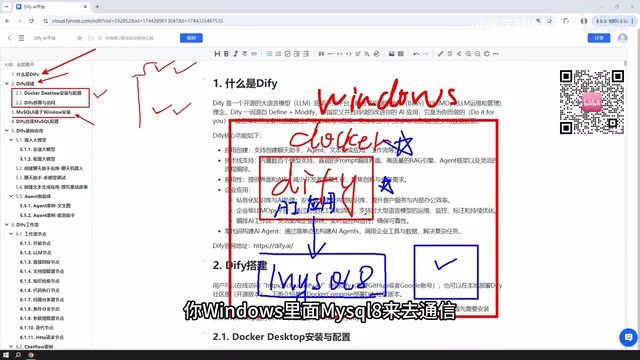
Dify Low-Code AI in Practice: RAG and Agents Made Easy
Based on a Bilibili Dify course, this article systematically covers Dify's five application types (Chat Assistant, Text Generation, Agent, Chat Flow, Workflow), Windows + Docker deployment, MySQL connection configuration, model integration strategies, and application publishing methods, helping beginners quickly build their own intelligent assistants.