Director Master Tutorial: Full Workflow for AI Character Voice Design and Binding
Director Master integrates voice design into character assets and automatically inherits it into storyboard prompts.
Based on a Bilibili tutorial, this article breaks down the character voice design and binding workflow in Director Master. The voice card is the sole entry point for a character's voice attributes, offering two paths: directly uploading an audio file, or configuring a ComfyUI audio service and generating a voice through a workflow. Creators can select which workflow parameters to expose in the interface, preventing technical details from overwhelming them. When the intelligent Agent generates character information, it simultaneously produces a voice profile that is stored in the asset library with the character, and creators can rewrite the description and regenerate previews repeatedly. At the storyboard stage, the system automatically brings the character's voice definition into the prompt and can connect to workflows such as the MiniMax H3 Director Console. Voice thus becomes an asset that travels with the character, reducing repetitive work and cross-voice risk in multi-shot projects.
In short drama production, designing and binding a fitting voice to a character is often the key step that brings the visuals to life. As a tool positioned as a "dedicated AI full-process creation Agent," Director Master deeply integrates voice design into its character asset system. Based on a Bilibili tutorial video, this article breaks down the complete path from voice upload and workflow generation to automatic storyboard binding, and analyzes the practical value of this mechanism for AI short drama workflows.
Two Entry Points for Voice Design: Upload and Generation
In the assets module of Director Master, opening any character detail page reveals a standalone voice card—the sole entry point for a character's voice attributes. The tutorial offers two paths: the first is "Upload Voice," suited for creators who have already downloaded audio files or have existing assets on hand; simply select a file to complete binding with zero barrier to entry. The second is "Generate Voice," which requires first configuring an audio service in settings, then using a ComfyUI workflow to synthesize the voice.
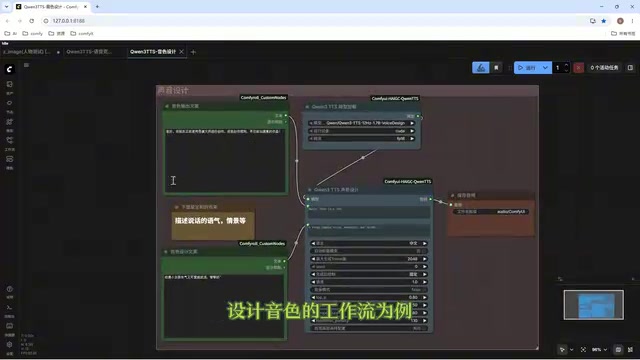
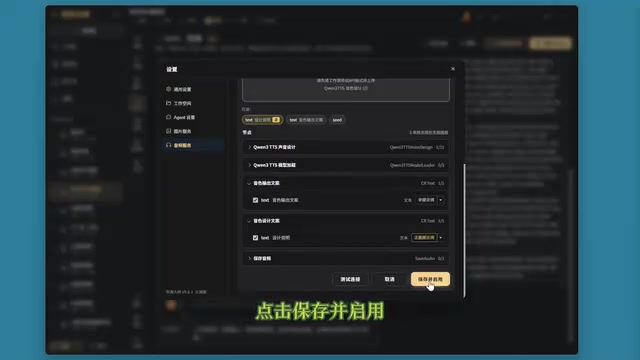
According to the Bilibili creator's demonstration, the generation path uses the Qwen TTS voice design workflow as an example: right-click in ComfyUI to export the API, return to Director Master to add a ComfyUI service and upload that API file, and the system automatically parses all nodes in the workflow and lets creators select which properties to expose in the Director Master interface—for example, renaming "voice output text" or setting "design description" as the positive prompt, or choosing not to expose certain parameters (click the X to discard). After saving and enabling, the character voice description is automatically filled into the design description field, saving the trouble of manual copying.
The clever part of this design is the control over the "exposed surface": rather than dumping all parameters of the entire workflow onto the user, creators check only what they need, preserving flexibility while preventing the interface from being overwhelmed by technical details. For short drama creators unfamiliar with ComfyUI, this encapsulation approach significantly lowers the barrier to use.
ComfyUI and API Export: ComfyUI is an open-source Stable Diffusion frontend based on node graphs, where users build image or audio generation pipelines by dragging and connecting nodes. Its "Export API" feature serializes the current workflow into a JSON description that records each node's type, parameters, and connection relationships. Director Master reads this JSON to reconstruct the workflow's node structure and lets creators select which node parameters should appear in their own interface. This "build once, reuse many times" model lets non-technical users invoke complex workflows without opening ComfyUI itself.
Qwen TTS and Voice Design: TTS (Text-to-Speech) converts text into speech. Qwen TTS is the speech synthesis service in Alibaba Cloud's Tongyi Qianwen series, whose "voice design" capability supports describing a target voice in natural language (such as age, speaking rate, and timbre quality), with the model generating the corresponding voice rather than selecting from a fixed voice library. This is precisely why the "design description" field in this article can be used as a positive prompt.
Generating a Voice Profile Alongside Character Design
Once the audio service is configured, voice generation is no longer an isolated step. When generating character information in the intelligent Agent, the system automatically designs the character's voice characteristics alongside the character design draft. The tutorial's example shows an 8-year-old boy's voice described as "slightly low volume, slow and clear speech, with a faint trailing tone." After confirming the draft and clicking to write it into the asset library, the voice profile is stored together with the character.
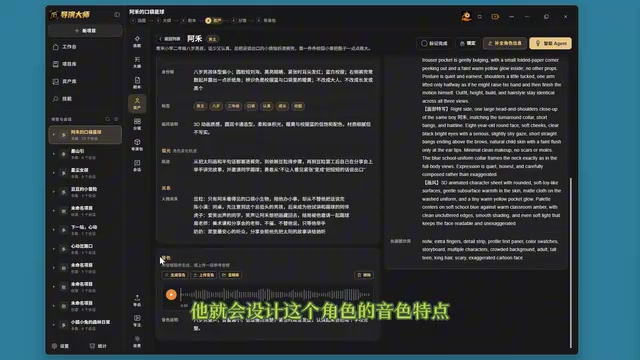
Creators can rewrite the design description on this basis, then click to generate the voice and wait for synthesis to complete before previewing. The tutorial demonstrates the generated results for two characters, a boy and an 8-year-old girl, with the preview text being "Hello, you are now using Director Master for creation. Wishing you smooth creative work and satisfactory results soon." If the result doesn't sound right, you can regenerate and adjust repeatedly until it matches expectations.
This approach of "character cards carrying their own voice profile" moves voice from the post-production stage forward to the character setup stage. In traditional workflows, voice casting often waits until the script and storyboard are finalized, but here voice characteristics are defined together with personality, age, and speaking habits, providing stronger consistency.
Automatic Voice Inheritance at the Storyboard Stage
The value of voice binding truly pays off at the storyboard stage. The tutorial demonstrates a storyboard containing dialogue from the character "Ahe": when entering the intelligent Agent to generate the prompt for that shot, the system automatically brings Ahe's voice definition into the prompt without manual specification. According to the creator, this prompt and asset settings can be used directly in the MiniMax H3 Director Console or other workflows, keeping the voice bound to the character during video generation.
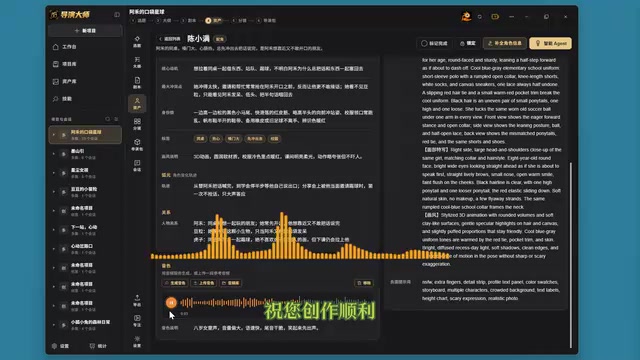
This means voice is no longer a variable that must be reselected for each generation, but part of the character asset that follows the character. For multi-shot, multi-character short drama projects, this asset-based approach reduces a great deal of repetitive work and lowers the risk of characters "crossing voices."
Voice Inheritance in Prompts: Storyboard prompts typically include visual descriptions, camera movement, character actions, and other elements. When the system writes the voice profile into the prompt, it is effectively embedding the character's voice characteristics into the text so that downstream video generation models can reference this information when synthesizing dialogue or lip sync. This approach depends on downstream tools' ability to understand text prompts, which is why the article emphasizes that the prompt can be used directly in workflows such as the MiniMax H3 Director Console—the voice definition flows along with the prompt in text form rather than being tied to any single vendor's speech API, giving it a degree of portability.
Significance for AI Short Drama Workflows
In terms of tool positioning, Director Master attempts to cover the complete chain from character design and voice synthesis to storyboard prompt generation. The two entry points of the voice module serve creators at different stages: those with existing assets can upload directly, while those without can generate via workflow. The ComfyUI workflow integration, meanwhile, puts the technical choice of voice synthesis in users' hands—you can switch to different TTS workflows as long as parameters are exposed according to the specification.
One note: the tutorial only demonstrates the Qwen TTS workflow as an example. The actual integration results, voice quality, and generation speed of other TTS services are not covered in the source material. Teams pursuing specific voice styles or dialect capabilities will still need to test and verify on their own. But in terms of process design, incorporating voice into character assets and automatically passing it into storyboard prompts is a pragmatic example of AI short drama toolchains moving toward "full-process Agents."
Related articles

Fifty Years Studying Power: Robert Caro's Writing and Insights on Power
Robert Caro reflects on 50 years studying power: Lyndon Johnson's persuasion and leverage, Robert Moses's transformation from idealist to ruthless builder, the dilemmas of large-scale construction, and his methods of compressing themes and solitary focus in biography writing.

Can a $20,000 Robot Do Your Chores? The Test Results Are Surprising
A YouTube test video shows how a $20,000 robot responds to commands like washing dishes, turning off lights, taking out trash, and feeding the dog. This article analyzes its real capability boundaries, the state of voice interaction technology, and how far household robots are from mainstream adoption.
The Complete Guide to Running AI Models Locally: Inference Engines and Tool Stack Explained
A systematic breakdown of the complete local LLM tool stack: from PyTorch and GGML compute libraries to llama.cpp, vLLM, SGLang inference engines and Ollama, LM Studio wrapper layers, with benchmark data on performance differences and selection logic.