DokBot: A No-Code Tool That Turns Documents Into Website Support Chatbots

DokBot turns your documents into a no-code AI support chatbot that never makes up answers.
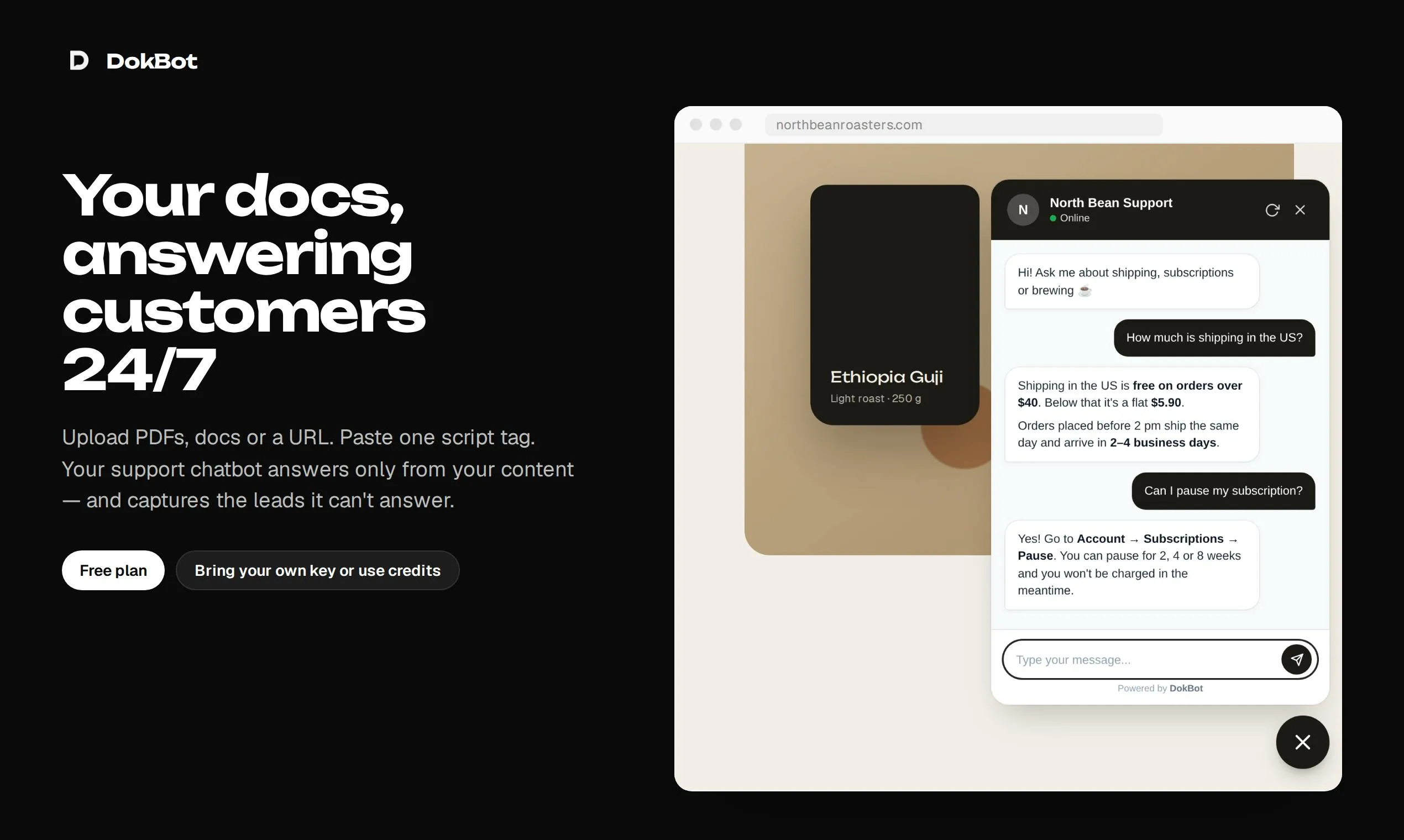
DokBot is a no-code AI customer support tool for small teams. Upload a PDF or text file and it automatically generates a 24/7 chatbot you can embed in your website. Its core principle is never fabricating answers — using RAG to strictly ground responses in your documents. When a question falls outside the docs, it collects the user's email and routes to a human agent, forming a complete AI-plus-human support loop. It currently has 62 upvotes on Product Hunt and remains in early validation.
What Problem DokBot Is Trying to Solve
For most small and mid-sized teams, customer support is both critical and resource-intensive. Users often just want to find an answer buried somewhere in the documentation, yet they're forced to send emails and wait — while the team struggles to maintain round-the-clock availability. DokBot targets this exact pain point: it lets you upload PDF and text files, automatically builds an AI-powered support chatbot from that content, and embeds it directly into your website.
The product was launched on Product Hunt by Maker Lautaro Silva, positioned across the "Customer Communication," "Artificial Intelligence," and "No-Code" categories. It reached #20 on the daily leaderboard with 62 upvotes. The numbers aren't viral by any stretch, but the product represents a rapidly growing class of applications — ones that transform a company's existing knowledge assets into conversational interfaces.
Core Mechanism: Document-Grounded, Hallucination-Free
DokBot's workflow can be summarized in three steps: upload documents, generate a bot, embed it on your site. You simply provide PDF or plain-text files; the system uses that content as a knowledge base to train a chatbot capable of answering questions 24/7.
What's genuinely worth noting is a principle the product explicitly highlights — it never makes up an answer. This is the central selling point of today's Retrieval-Augmented Generation (RAG) applications. Large language models have an inherent tendency to "confidently make things up," and when a support bot delivers incorrect information, the consequences for customer trust can be severe. DokBot constrains the model with a "document boundary": answers can only come from the materials you've provided.
A Fallback Design for Unanswerable Questions
Another detail that reflects product maturity is how it handles failure. When the bot encounters a question it can't resolve, rather than forcing an answer, it collects the user's email address and escalates the issue to a human agent. This design seems simple, but it draws a meaningful line between "AI-only support" and "AI-plus-human hybrid support": the AI handles high-frequency, standardized questions, while humans take care of long-tail, complex cases. In real-world operations, the ability to "know what it doesn't know" is often more valuable than squeezing out a few more automated answers.
Retrieval-Augmented Generation (RAG) is currently the most mainstream engineering approach for addressing hallucinations in large language models. The core idea is this: rather than relying on knowledge stored in the model's parameters, when a user asks a question, the system first retrieves the most relevant text passages from an external knowledge base, then feeds those passages along with the question into the model — instructing it to answer based solely on the retrieved content. This "anchors" the model's output to real documents, dramatically reducing the likelihood of fabricated information. For customer support scenarios, RAG has another key advantage: the knowledge base can be updated at any time simply by replacing documents, with no need to retrain the model — making it extremely cost-effective. That said, RAG isn't a silver bullet: if the source documents contain errors, if retrieved passages aren't accurate enough, or if a user's question falls outside the document coverage, the model may still produce inaccurate responses — which is precisely why the fallback design for unanswerable questions exists.
Why the No-Code Positioning Matters
DokBot explicitly places itself in the "No-Code" camp, which defines its target audience: teams without engineering resources who want to deploy an intelligent support bot quickly — independent developers, small SaaS companies, content sites, or knowledge base operators.
For these users, building a RAG system from scratch means handling document parsing, vectorization, retrieval, prompt engineering, frontend components, and more. The cost is high and the learning curve is steep. DokBot abstracts all that complexity away, leaving users with a simple path: upload a file, get an embed code. This reflects a broader trend in AI application-layer startups over the past two years — rather than competing at the model layer, they package mature capabilities into ready-to-use vertical tools.
"Vectorization" is a key foundational step in any RAG system and worth a brief explanation. After a document is uploaded, the system splits the text into chunks and uses an embedding model to convert each chunk into a high-dimensional numerical vector, which is then stored in a vector database. When a user asks a question, that question is also converted into a vector, and the system identifies the most relevant document passages by computing similarity between vectors. This entire process is invisible to the user, but on the engineering side it involves multiple decisions requiring real expertise — text chunking strategies, embedding model selection, vector index construction, and more. DokBot hides all of these details; users simply upload a file, and the vectorization and retrieval pipeline runs automatically in the background. This is the core value of "no-code" abstraction.
Where It Sits in a Crowded Market
The "documents-to-support-chatbot" space is far from empty — quite a few products share a similar positioning. DokBot's differentiation, as it currently presents itself, lies more in restrained product design — focusing on document-based Q&A, emphasizing no hallucinations, and building in an email fallback — rather than piling on flashy features.
Based on its Product Hunt performance, 62 upvotes and 1 comment indicate it's still in early validation. Real-world user feedback has yet to accumulate. For teams considering adoption, several questions are worth testing directly: How quickly does the knowledge base sync after a document update? How well does it handle multiple languages? How accurately does it parse complex tables or image-heavy PDFs? And how does response quality hold up under high concurrency?
Takeaway
DokBot is a lightweight AI support tool with a clear product thesis — it centers on the logic of "existing documents + no-code + reliable answers." For small teams struggling with support staffing who don't want to invest in custom development, it offers a low-barrier option. The real test will be knowledge base accuracy and long-term maintenance experience — which remains the ceiling for every RAG-based support product in this space.
Related articles

iSurge: An All-in-One Mac Monitoring Tool for the Notch
iSurge is an activity monitor built for Mac that brings real-time status, per-app volume control, disk cleanup, and developer tools into the notch area. One-time purchase at $14.99, no account required—ideal for efficiency-minded Mac users.

Nocto: Turning the MacBook Notch into a Control Center
Nocto is a native macOS app that turns the MacBook notch into a control center with music controls, meeting countdown and one-click join, file shelf, clipboard history, and battery levels. One-time purchase with free music features forever, supporting macOS 14 and above.

Faylee: Hand Bug Reports to AI Coding Agents for One-Click Fixes
Faylee turns screen recordings, console logs, network requests, and clicks into a single-link bug report, letting AI coding agents like Claude Code, Codex, and Cursor read and fix issues via MCP. Free for teams under 3.