Dots: Turn Your Mac Notch into a Custom Workbench, No Subscription Required
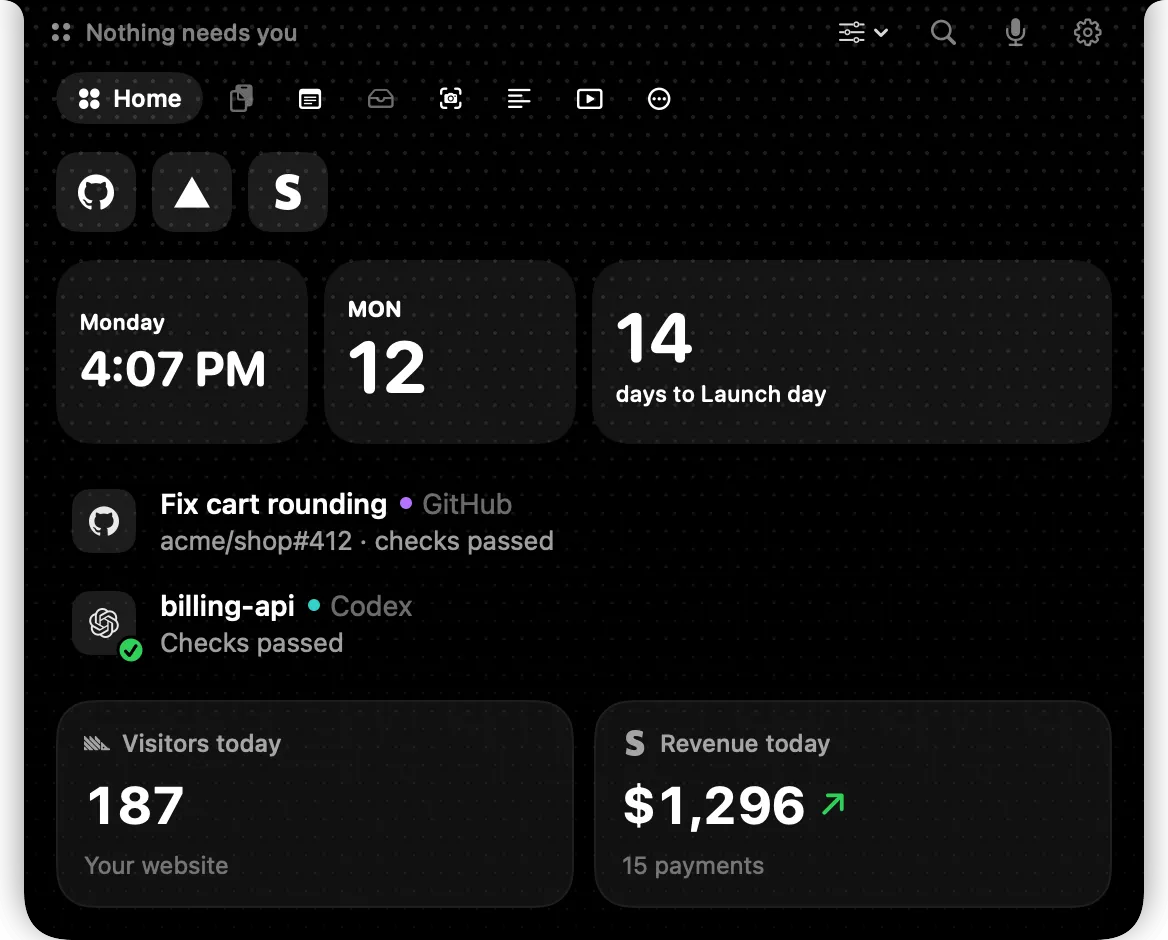
Dots turns the Mac notch into a customizable workbench, free with no subscription, integrating quick access and mini-tools.
Dots is a productivity tool that transforms the MacBook notch area into a customizable workspace, created by developer Jakob Edhel Puri and receiving 82 upvotes on Product Hunt. Its core logic is to reduce window switching: users can place frequently used apps, website bookmarks, and system shortcuts into the notch panel for instant access. Additionally, Dots includes practical features like picture-in-picture video, scrolling screenshots, and voice commands, aiming to create a lightweight productivity center within limited space. Its pricing explicitly states "free to start, no subscription," targeting multitasking scenarios for students, programmers, and creators. The article analyzes the natural limitations of notch apps—serving only MacBook models with a notch, limited area, and competition with native system features—but believes Dots' "integrative micro-innovation" still has a chance to find its users in the productivity tool track.
A Second Life for the Notch: From Notification Bar to Workbench
The MacBook notch has been controversial since its debut, but developers have long been exploring the potential of this "extra area." We've seen many notch apps in the past, mostly focused on music playback controls or system notifications, with relatively limited functionality. Dots, recently appearing on Product Hunt, tries to go further—it turns the notch area into a customizable workspace that lets you quickly access frequently used apps, websites, and shortcuts without switching windows.
According to the Product Hunt page, Dots was created by developer Jakob Edhel Puri and received 82 upvotes after launch, ranking 18th for the week. While the vote count isn't explosive, its "no subscription, free to start" pricing strategy and "watch videos while working" scenario positioning give it a differentiated approach among Mac productivity tools.
The MacBook notch is a design introduced in 2021 with the 14-inch and 16-inch MacBook Pro (M1 Pro/Max chips), and expanded to MacBook Air (M2) in 2022. It is essentially a screen cutout to accommodate the 1080p FaceTime camera, with the menu bar areas on both sides automatically avoided by the system. Apple has not opened the notch area API to third-party developers, so all notch apps implement functionality by covering the menu bar area and simulating floating windows, which means they need to handle visual conflicts and event responses with the system menu bar themselves.
Notch apps are a niche category in the macOS ecosystem, with early representatives including Notchmeister (visual effects only), Peninsula (notification aggregation), and NotchNook (file shelf and music control). The common challenge for these tools is that the notch area has limited physical space (about 74 pixels high and 200 pixels wide), information display must be extremely restrained, and it must not obstruct the camera and system status icons.
Core Features: More Than Just Notch Beautification
Quick Access to Apps and Websites
The core logic of Dots is to reduce window switching. Users can place frequently used apps, website bookmarks, and system shortcuts into the notch panel, clicking to use them without jumping back and forth between the Dock, Launchpad, and browser tabs. For users who need to frequently reference documents, look up information, or switch communication tools, this "call anytime, leave when done" interaction can save a lot of fragmented time.
Picture-in-Picture Video and Scrolling Screenshots
Beyond quick launching, Dots also includes some practical mini-tools. Particularly notable is "watch videos while working"—allowing videos to play in the notch area or a floating window, suitable for users who need to watch tutorials, attend meetings, or follow courses. Another noteworthy feature is scrolling screenshots, which can capture long web pages or long chat histories, saving the hassle of manual stitching. These features aren't original individually, but integrated into a notch panel, they form a "lightweight productivity center" positioning.
Picture-in-Picture (PiP) is a natively supported macOS feature that allows videos to be displayed in a floating small window always on top. However, system-level PiP usually only works with native players like Safari and QuickTime, and window position and size adjustments are limited. Dots combines PiP with the notch area, essentially providing a persistent video playback position below the menu bar. Its technical implementation may involve AVPictureInPictureController or custom borderless floating windows.
Scrolling Capture generates long screenshots by continuously capturing screen content and stitching it together, commonly seen in browser extensions (like GoFullPage) and third-party tools (like CleanShot X). Implementing scrolling screenshots on macOS requires simulating scroll events, identifying overlapping areas, and performing image alignment, which has certain performance requirements. Dots builds this into the notch panel, eliminating the need for users to install separate screenshot tools.
Voice Commands
Dots also supports voice commands, meaning some operations can be completed without keyboard and mouse. Although the Product Hunt page doesn't elaborate on the specific implementation and accuracy of voice recognition, for scenarios where you're typing or your hands are busy, a voice entry point is a reasonable supplement.
Pricing and Positioning: Free to Start, No Subscriptions
Dots explicitly states "Free to get started. No subscriptions."—free to start, no subscription model. This is a selling point in an era where productivity tools are generally shifting toward subscription models. For students and budget-sensitive users, a one-time purchase or free + in-app purchase model is more acceptable. However, "free to start" also implies that premium features may require payment to unlock. The specific boundaries aren't detailed on the Product Hunt page, and whether the free version is sufficient requires actual experience to judge.
From the scenario description, Dots targets three groups: students, programmers, and creators. Studying requires looking up information and watching videos, programming requires quickly switching between terminals and documents, and creating requires referencing materials—the common thread across these scenarios is "multitasking in parallel without being dragged down by window management." The notch area happens to be a position that doesn't occupy main screen space yet is always accessible.
The productivity tool industry has experienced a collective migration from one-time purchase to subscription models over the past five years, with representative cases including TextExpander, 1Password (transitioned to subscription), and Bear (launched subscription). The rationale for subscriptions lies in continuous updates and cloud service costs, but it's unfriendly to light users.
The statement "Free to get started. No subscriptions." is common on Product Hunt for two business models: one is completely free + donations, and the other is a free basic version + one-time purchase premium version (Lifetime Deal). The latter is particularly popular among indie developer products because it quickly recovers funds without creating long-term burdens for users. The specific paywall location of Dots (such as whether it limits the number of quick access entries or locks voice commands) hasn't been disclosed, which is also a key variable for evaluating its long-term value.
Limitations and Opportunities of Notch Apps
The notch app category has a natural ceiling: it only serves MacBook models with a notch, limiting the user base. Additionally, the notch area is limited in size and can't carry high information density—making it too complex would actually interfere with vision. Dots' choice of "quick access + mini-tools" combination is a reasonable attempt to add value in limited space, but whether it can find a balance between "sufficient" and "non-intrusive" depends on the refinement of interaction details.
Another point worth observing is macOS system updates themselves. Apple continues to optimize the menu bar and notification center at the system level, and third-party notch tools need to continuously prove they're more convenient than native solutions, otherwise they're easily overshadowed by system features. Dots' differentiation lies in customizable workflows, which is something native system features can't fully replace in the short term.
macOS's Menu Bar is a system-level global status area, and third-party apps add icons to it through NSStatusItem. Notch apps actually draw custom views below or over the menu bar, which involves setting NSWindow levels (like NSStatusWindowLevel) and event interception. Apple continues to adjust menu bar behavior in macOS Ventura and Sonoma (such as allowing notch hiding and automatically adjusting icon spacing), which poses ongoing challenges to the layout stability and user expectation management of third-party notch tools.
Regarding native system solutions, macOS's notification center, control center, and Stage Manager are all sharing the responsibility of multitasking switching. If third-party notch tools can't provide efficiency gains significantly better than native options, they're easily perceived by users as "dispensable beautification plugins." Dots' customizable workflows (placing any app/website/shortcut into the notch) are difficult for native features to cover, but this also requires users to be willing to invest time in configuration, involving a certain learning cost.
Who Should Try It
If you frequently switch windows on your Mac every day, often need to do things while watching videos, or simply want the notch area to serve some practical purpose, Dots is worth spending a few minutes to download and try. Free to start lowers the trial-and-error cost. But if you're sensitive to visual interference in the notch area, or use a Mac device without a notch, the value of this tool is greatly diminished.
Overall, Dots doesn't try to reinvent the wheel, but rather packs several mature mini-features into a novel container. This kind of "integrative micro-innovation" in the productivity tool track often finds its users more easily than large all-encompassing products.
Related articles

world2vec: Building Mechanistic World Models with Latent Dynamics Learning
world2vec proposes a reward-free method for learning mechanistic world models via latent dynamics, faithfully reproducing systems over long horizons with at least an order of magnitude fewer parameters than DreamerV3, TD-MPC2, and LeWM, and achieving accurate system identification on 71 attractor benchmarks.

A New KL-DRO Paradigm: Adaptive Scenario Generation Around a Learned Density Model
KL-DRO research proposes centering the KL ball on a learned density model instead of the empirical distribution, with adaptive scenario generation guiding sampling toward the worst case. Experiments show lower cost under distribution shift when records are scarce and the model can extrapolate, with comparable in-distribution cost.

ODE Samplers for Discrete Diffusion Models: Exponential Residual Flows Accelerate Generation
Discrete diffusion models lack deterministic ODE sampling? This article introduces Exponential Residual Flows (ERFs), which introduce continuous residual variables per token to construct piecewise ODEs for deterministic sampling and support consistency distillation acceleration. Superior to prior methods on code and text generation tasks.