Fake Claude Plugin Slips into Cursor Store: 11-Hour Window Requires Urgent Self-Check

A fake Claude Code extension slipped into the Cursor store; users within the roughly 11-hour window need to check SSH configuration and rotate keys.
The article discloses that a fake Claude Code extension impersonating official Anthropic appeared in the Cursor extension store. The same-named versions on npm and OpenVSX are normal, and the issue exists only at the Cursor distribution link. The risk window is from 17:27 Beijing time on October 29 to 04:35 on October 30, about 11 hours, during which developers who installed or updated the extension may have been exposed. The self-check method is to inspect the SSH configuration for the SVC telemetry entry; remediation is to clean up per Cursor's official announcement and rotate all potentially exposed keys on a clean device. The incident highlights weak review in the AI coding tool plugin ecosystem and reminds developers to default to distrust and cross-verify official channels.
Event Overview: A Textbook Case of Supply Chain Poisoning
According to a report on Bilibili, a fake Claude Code extension impersonating an official Anthropic release appeared in the Cursor extension store. The extension was not from an official channel, yet it was downloaded or updated by users during a specific time window. It has been confirmed that the same-named versions on npm and OpenVSX are legitimate packages—the problem exists only at the Cursor extension store distribution link.
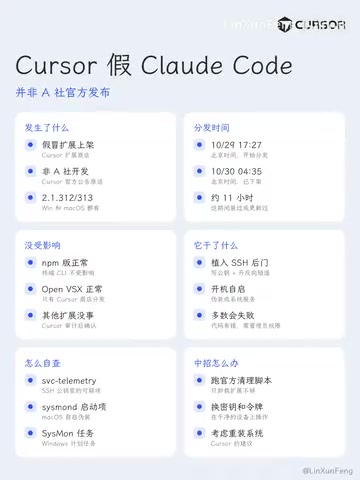
Between 5:27 PM Beijing time on October 29 and 4:35 AM on October 30—a window of about 11 hours—users who installed or updated this extension need to investigate immediately. This incident is another wake-up call: the plugin ecosystem of AI coding tools is becoming a new entry point for supply chain attacks.
Attack Window and Scope of Impact
The precise timeline
According to information disclosed in the video, the risk window is precise to the minute: from 17:27 on October 29 to 04:35 on October 30. During this period, any developer who installed or updated the fake Claude Code extension in Cursor may have already been exposed.
Why Cursor?
As a fast-growing AI code editor, Cursor's extension store review mechanism is relatively young. The attacker chose to deploy the fake package in the Cursor store rather than npm or OpenVSX, most likely because the latter two have more mature community oversight and review processes. The video specifically points out that the versions on npm and OpenVSX are normal, further confirming that the attacker was looking for the weakest link in the distribution chain.
OpenVSX is a vendor-neutral, open-source VS Code extension marketplace led by the Eclipse Foundation, designed to provide a distribution channel for VS Code derivatives (such as VSCodium and Gitpod) that does not depend on Microsoft's official marketplace. Unlike the Microsoft Marketplace, OpenVSX operates on a community basis with a relatively transparent review process. Any organization or individual can publish extensions, but they are also subject to public community oversight and reporting. Editors based on the VS Code core, such as Cursor, can either connect to the Microsoft Marketplace or maintain their own extension store. In this incident, the attacker did not choose OpenVSX, most likely because that platform already has a relatively mature community maintenance mechanism, making malicious packages easier to detect and remove quickly, whereas the self-built stores of emerging editors are still lacking in review experience and report response.
Self-Check and Remediation Steps
Step 1: Check SSH Configuration
The core troubleshooting method given in the video is to check whether the SVC telemetry entry exists in the SSH configuration. The specific path is usually in ~/.ssh/config or a related SSH configuration file. If this entry is found, it means your environment may have been implanted with malicious configuration.
Identifier hijacking in SSH configuration is a common credential theft technique. When connecting to a remote host, the SSH client reads configuration entries from ~/.ssh/config. An attacker can insert custom entries into this file (such as a forged Host section or ProxyCommand), causing subsequent SSH connections to be redirected to an attacker-controlled server, or executing arbitrary commands through directives such as LocalCommand. The SVC telemetry entry mentioned in the article is exactly one of these implanted malicious configurations—it disguises itself as a telemetry-related setting to lower user vigilance. Once the attacker controls the SSH channel, they can intercept login credentials, forward internal network traffic, and even execute commands on the target machine. Therefore, checking ~/.ssh/config and other files such as authorized_keys and known_hosts for abnormal entries is a key step in confirming whether persistent control has been established.
Step 2: Clean Up According to the Official Announcement
Cursor has published an official announcement explaining the cleanup method. Users should strictly follow the announcement's instructions to delete the relevant configuration and extensions, and should not guess at operations. For entries you are unsure about, it is recommended to back them up before making changes.
Step 3: Rotate Keys
The most critical final step: after confirming the cleanup is complete, be sure to rotate all potentially exposed keys on a clean, uncontaminated device. This includes but is not limited to SSH keys, API keys, code repository access tokens, and so on. Do not generate new keys on an infected device, otherwise the new keys may also be stolen.
Key rotation is a standard final step in security incident response. Its core principle is: once it is confirmed that an attacker may have had access to a key, that key must be treated as compromised, regardless of whether there is direct evidence. Key rotation should be performed on a device known to be clean, because keyloggers, memory scraping, or malicious extensions on an infected host may intercept new keys when they are generated or entered. The scope of rotation should cover all credentials that may have been read during the exposure window: SSH private keys, cloud platform API keys, personal access tokens for code hosting platforms, database passwords, and CI/CD deployment keys. After rotation, the old keys must also be revoked on the relevant platforms, and audit logs should be reviewed to confirm whether there are any unauthorized access records. For team environments, collaborators should also be notified to rotate shared credentials in sync.
Deeper Lessons for Supply Chain Security
The Review Dilemma of Plugin Stores
The plugin ecosystem of AI coding tools naturally pursues openness and rapid iteration, which is in fundamental tension with security review. The fact that the fake Claude plugin was able to slip into the Cursor store and survive for about 11 hours shows that automated review cannot fully identify carefully disguised malicious packages. Developers need to establish a "default distrust" habit when using plugins.
The Necessity of Verifying Official Channels
In this incident, the npm and OpenVSX versions were normal while the Cursor store version was abnormal, forming a sharp contrast. This reminds developers that the status of the same plugin may differ across distribution channels, and official release channels should be cross-verified before installation. The fact that Anthropic never published this extension in the Cursor store is itself the strongest warning signal.
Emergency Checklist for Individual Developers
For developers who have already been affected, the order of operations within the time window matters: first disconnect from the network and isolate, then check the SSH configuration, then clean up according to the official announcement, and finally rotate keys on a clean device. For developers who have not been affected, it is recommended to immediately review the list of installed Cursor extensions and remove any plugins of unknown origin or not officially released.
Conclusion
This fake Claude plugin incident is not an isolated case, but a concentrated exposure of security risks in the AI toolchain. Although the 11-hour attack window was short, it was enough to cause key leakage. The video author's reminder is concise and forceful: if you installed it, check immediately. As AI coding tools accelerate in popularity, supply chain security awareness must keep pace with the speed of tool iteration.
One-line Summary
A fake Claude Code extension slipped into the Cursor store; users within the roughly 11-hour window need to check SSH configuration and rotate keys.
Paragraph Summary
The article discloses that a fake Claude Code extension impersonating an official Anthropic release appeared in the Cursor extension store. The same-named versions on npm and OpenVSX are normal, and the problem exists only at the Cursor distribution link. The risk window is from 17:27 Beijing time on October 29 to 04:35 on October 30, about 11 hours, during which developers who installed or updated the extension may have been exposed. The self-check method is to check whether the SVC telemetry entry exists in the SSH configuration. The remediation process is to clean up according to Cursor's official announcement and to replace all potentially exposed keys on a clean, uncontaminated device. The incident reflects weak review links in the plugin ecosystem of AI coding tools and reminds developers to establish a default-distrust habit for plugins and cross-verify official channels.
Related articles

Anthropic IPO Explained: Fuel for the AI Boom or the Spark for a Bubble?
Anthropic files for an IPO under ticker ANT. Breaking down the prospectus: 80% of revenue from usage-based pricing, $72B of an $80.7B net loss being non-cash charges, 900% net revenue retention, and how past IPOs like SpaceX performed on day one and over three years — answering the AI bubble question.

Will AI Kill the Research Paper? Mathematicians Offer a New Answer
Mathematicians on the Lex Fridman podcast discuss whether AI will kill research papers—from journal review pressure to Lean formal verification, GitHub open source fatigue to Mathlib's crowdsourcing model, exploring the evolution of academic contributions and the future of mathematical knowledge verification.

Enterprise LLM Development: From RAG to Multi-Agent in Practice
A course breakdown of enterprise LLM application development: from prompt engineering and RAG to multi-agent engineering practice and FDE project delivery, helping developers understand why Agent technology is a key focus for enterprise deployment and learn systematically to avoid detours.