Five Common AI Agent Proxy Mistakes: Making Your Agent Blend In
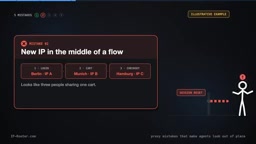
Five proxy configuration mistakes and fixes to help AI agents fetch real content like local visitors.
This article addresses AI agents getting blocked by websites due to improper proxy configuration during tasks like data collection. It summarizes five common mistakes and their fixes: egress country and language header mismatch; rotating IPs mid-flow causing abnormal behavioral trails; using datacenter IPs on strict sites; sharing a single egress across tasks causing geolocation errors; and failing to log the actual egress location. Fixes include binding country and language in the same request, using sticky sessions, choosing residential or mobile egress for strict sites, per-task routing, and logging route.reason for auditing.
Title
Five Common AI Agent Proxy Mistakes: Making Your Agent Blend In
Meta Description
AI agent getting blocked? This article distills five proxy configuration mistakes: country-language mismatch, mid-flow IP rotation, datacenter IPs being detected, shared egress across tasks, and never checking the actual egress—plus fixes like sticky sessions, per-task routing, and logging route.reason so your agent can fetch real pages as a local visitor.
Article Content
When an AI agent gets blocked by a website, the problem often isn't that it's a proxy—it's that it doesn't look like a local visitor. An agent sitting on a German IP but frequently requesting English pages is like a foreign tourist asking for directions in English on the streets of Berlin—the details don't add up, and the website naturally gets suspicious. This article outlines five common proxy configuration mistakes and their fixes to help your agent successfully retrieve the content real users see during tasks like data collection and price monitoring.
Mistake 1: Country and Language Mismatch
The most common mistake is a mismatch between the request's egress country and the request's language header. For example, the proxy IP is in Germany, but the request asks for English pages. Real Berlin visitors rarely send this combination, so the website may return a different page or apply stricter checks. The fix is simple: bind country and language in the same request. If no language header is sent, the IP routing service automatically adds a language matching the egress IP.

Mistake 2: Rotating IPs Mid-Flow
If an agent sends every step of a flow—login, add to cart, checkout—from a different IP address, to the website it looks like three people sharing one credit card: clearly abnormal. The right approach is to use a sticky session: name a session for the entire flow and ensure all requests go out from the same egress IP until the task is complete. That way the website sees a consistent behavioral trail.
Sticky Session: In the proxy context, a sticky session means binding all requests in the same business flow to the same egress IP, ensuring the IP stays unchanged for the duration of the session. This is typically implemented by attaching a session identifier (e.g., session_id) to the proxy request, and the proxy service maintains the mapping until the session times out or is actively released. Timeout is configurable, from a few minutes to several hours, and should be adjusted based on task duration. Sticky sessions are used not only for flows like login and add-to-cart but also for any operation requiring state consistency, such as paginated scraping and form submission. Note: sticky sessions and IP rotation are not contradictory—rotation suits stateless requests, while stickiness suits stateful flows.
Mistake 3: Using Datacenter IPs on Strict Sites
Datacenter IPs are fast and cheap, and they're perfectly adequate for many websites. But strict risk-control systems often treat cloud service addresses as automated traffic, triggering verification challenges instead of returning normal pages. For such sites, choose residential or mobile egress. Residential and mobile IPs come from real consumer connections, including IP routing farms made up of real Android phones, and can significantly reduce the probability of being identified as a bot.

Residential IP vs. Mobile IP: Residential IPs are assigned by ISPs to home broadband users and genuinely reflect ordinary consumers' internet egress; mobile IPs come from cellular network operators, usually shared via NAT and highly dynamic. What they share is that both are associated with real user devices and carriers, so they enjoy high reputation in risk-control systems. In contrast, datacenter IPs belong to cloud providers and are easily identified in bulk. The "dynamic" nature of mobile IPs actually helps evade static-IP-based blocking policies, but costs are usually higher. When choosing, weigh the strictness of the target site against your budget.
IP Routing Farm: Refers to a proxy network composed of a large number of real devices (e.g., Android phones), each acting as an independent egress node. Such services route requests to real user devices, making the egress IP look exactly like an ordinary consumer. The advantage is extremely high IP reputation, making it hard to distinguish from real traffic; the drawbacks are higher latency, stability dependent on device online rates, and privacy and compliance risks. When using them, confirm whether the provider has obtained device owners' authorization and avoid sensitive operations.
Mistake 4: Sharing the Same Egress Across All Tasks
Germany price checks, UK ranking monitoring, US ad verification—if all three tasks go out from the same IP, two of the results are wrong from the start. The right strategy is per-task routing: each request carries its own geolocation, so each task goes out from the region where its target customers are located. Only then can the agent see what local users actually see.
Mistake 5: Never Checking the Actual Egress
You requested Berlin, but did you really go out from Berlin? If no one checks, you won't even notice when routing falls back elsewhere. The fix: log route.reason in every response, including the actual egress country and city. This gives every result a "receipt" for traceability and verification.

The route.reason field: This is metadata returned by the proxy service to explain the egress routing decision actually used for this request. It usually includes fields like country, city, and network_type, and sometimes a reason code indicating why routing fell back (e.g., "target city unavailable, fell back to country egress"). Logging this field is equivalent to attaching an "egress receipt" to every response, facilitating post-hoc auditing and debugging. Without it, when the proxy is misconfigured or routing falls back, the agent may unknowingly fetch content for the wrong region, causing data bias. It's recommended to store this field structurally in logs and set alerting rules to notify you when the actual egress doesn't match expectations.
One-Stop Configuration and Applicable Boundaries
Integrate all five fixes into a single request: match country, city, and language; adapt network type to site strictness; specify a session name for the flow; and store route.reason for auditing. These settings work across tasks in different regions and won't make the agent look more suspicious.
Not every scenario needs this routing setup. If your agent only reads its own data, calls internal APIs, or accesses public pages with globally consistent content, an ordinary connection is enough. Start simple, and only introduce routing when page views vary by region.
Key takeaways: Match country and language; keep sticky sessions per flow; use residential or mobile egress for strict sites; route independently per task; log route.reason. That way your agent can act like a local visitor and see what that visitor should see.
One-line Summary
Five proxy configuration mistakes and fixes to help AI agents fetch real content like local visitors.
Paragraph Summary
This article addresses the problem of AI agents getting blocked by websites due to improper proxy configuration during tasks like data collection. It summarizes five common mistakes and their fixes: (1) egress country and language header mismatch; (2) rotating IPs mid-flow, causing an abnormal behavioral trail; (3) using datacenter IPs on strict sites, getting identified as automated traffic; (4) sharing a single egress across multiple tasks, causing geolocation errors; and (5) failing to log the actual egress location, making routing fallbacks undetectable. Corresponding fixes include binding country and language in the same request, using sticky sessions to keep flow IPs consistent, choosing residential or mobile egress for strict sites, routing independently per task, and logging route.reason to audit egress. Finally, it notes that not every scenario needs complex routing—only introduce it when page views vary by region.
Related articles

Private Key Set to 4? CA's Elementary Mistake Leaves TLS Exposed
CA eMudra set private keys to tiny values like 4, making TLS certificates brute-forceable. A Computerphile video demonstrates the full process from extracting public keys to forging certificates, and explores the fragility of the PKI trust chain.

How Gen Turns Data into Decisions with ChatGPT Work
In an OpenAI user case, business leader Gen shares how ChatGPT Work turns data into decisions: within hours of launch, teams can judge whether integrations and onboarding flows work, shifting decision iteration from hundreds of trial-and-error attempts to a fast feedback loop.

ChatGPT vs. Claude In-Depth Comparison: Strong at Coding but Weak at Research — How to Bridge the Gap?
A user considers switching from ChatGPT to Claude, finding Claude stronger at coding but shallower at research. We analyze the differences and share tips to make Claude's research deeper.