Gemini 4 Neon In-Depth: How to Get the Most Out of the Pro Plan's Strongest Model

Gemini 4 Neon replaces Argon on the Pro plan, scoring highest—but model selection depends on cost and thinking level.
Google's Gemini 4 family adds Neon, replacing Argon in the Gemini app and arriving on the AI Pro plan. Official charts show Neon scores 61, above Carbon's 60 and Hydrogen's 54. The article breaks down model positioning, the December API pricing flip, diminishing returns across four thinking levels, and Neon's narrow loss to Opus on terminal coding. Conclusion: use Hydrogen for daily tasks and Neon for deep work, and leverage Medium to save money.
Gemini 4 Neon In-Depth: How to Get the Most Out of the Pro Plan's Strongest Model
Google's Gemini 4 family has a new member: Neon, which directly replaces Argon in the Gemini app and arrives on the Google AI Pro subscription plan. Meanwhile, Google's own chart shows that this "mid-tier" model scores highest across several benchmarks—even beating Carbon, which is exclusive to the Ultra plan. But is Neon really right for everyone? A YouTube creator breaks down model selection, pricing traps, and thinking-level strategy in a recent video. Here are the key takeaways.
Three Models Repositioned: Why Neon Is the Default Choice for Pro Users
According to the Gemini 4 family chart Google released, the current lineup has been streamlined to three models: Carbon, Neon, and Hydrogen. Carbon targets the hardest, longest-running projects and deep research, is the slowest, and is exclusive to the Ultra plan; Hydrogen focuses on speed and low cost for everyday tasks and is available to free users too; Neon sits in the middle, officially positioned for "deep reasoning across software engineering, knowledge work, and science."
The key data comes from the quality row of Google's chart: Carbon scores 60, Hydrogen scores 54, and Neon scores 61—the mid-tier model actually scores highest. Argon is no longer listed in the new lineup, but according to Chrome Geek, it remains accessible via the paid API. The model card also reveals that Neon was adapted from Carbon, which you can think of as a faster "sibling" of Carbon rather than a scaled-up Hydrogen.
The Real Trade-Off Between Score and Cost
On the Artificial Analysis Intelligence Index chart, Neon's highest thinking level scores 61, while Carbon tops out at 60. But the video nails the point: a one-point gap is basically a tie, and the real story is on the cost side. Neon already hits 60 at default settings, and Google says it costs 32% less per task than Carbon.
The API pricing "trap" is worth noting: before November 30, Carbon costs $2 per million input tokens and $10 output, lower than Neon's $3 and $15; but starting December 1, Carbon doubles to $4 and $20, making Neon the cheaper option. If you're still running Argon on the API, the video suggests testing Neon soon: after December, Argon costs $4 and $20 while Neon is cheaper—and Neon scores 60 at default settings versus Argon's 50.
The Artificial Analysis Intelligence Index is a composite benchmark published by the third-party evaluation firm Artificial Analysis. It normalizes and weights scores from several mainstream evaluations (such as MMLU, HumanEval, and GPQA) into a single 0–100 score for comparing general capabilities across models from different vendors. The index is widely cited in the industry, but note that its weighting isn't tailored to any specific task, so a high score doesn't necessarily mean better performance in your particular use case. The article cites this chart to show that the gap between Neon and Carbon is only 1 point—using this third-party perspective to support the "basically a tie" judgment.
What the Demos Signal About Engineering Capability
Google's official demos show Neon's performance on extreme tasks: in Anti-Gravity, it wrote a first-person skiing simulator from scratch based on real elevation data from Mont Blanc, including roughly 10,000 lines of custom shader code, ski physics, carved tracks, and even avalanches—with zero pre-made assets; it scraped archival photos of King's College, Cambridge and reconstructed Turing's 1936 study from the exterior chapel to the interior rooms, complete with a working Turing machine on the desk; and from just a single photo of a neon sign, it reconstructed the image in Google Sheets using 100,000 cells and over 500,000 live formulas—with formulas handling edge detection and depth mapping, and changing a single number altering the lighting.
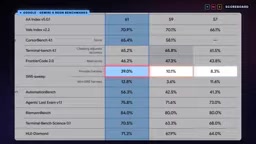
These demos were hand-picked by Google, but they're enough to show the model's capacity to handle "weird instructions." The video's honesty lies here: in coding tests like SWE sweep, Neon scores 39%, far ahead of Opus's ~10% and Sol's ~8%, but the fine print notes this is each model running in its own tooling; when switched to a unified simple tool, Neon scores 12.8 and Sol 11.6, and the advantage narrows sharply. Google itself admits that a large part of the win comes from the Anti-Gravity environment.
Three Losses and Where Competitors Really Stand
Neon doesn't dominate across the board. On the Terminal Bench 4.1 terminal coding test, Opus edges ahead 65.8 to 65.2; Opus leads by about a point on frontier code; and Sol is better at reading dense charts. All three losses are narrow, but two of them are coding tests—if you work in the terminal with Claude long-term, this table isn't a reason to switch. Also, Claude Fable 5.2 isn't in the main table and only appears in two safety charts, winning one against Neon each.
The cost comparison also deserves a sober look: Google's own chart shows GPT 6.2 Sol reaches 57 points at about $1 per task, while Neon's 60 points costs about $3.70—3 points higher at nearly 4x the cost. Against Claude Opus 5.5 it's the opposite: Opus needs about $10 to reach 59 points, so Neon is cheaper and scores higher. The video's conclusion is restrained: Neon beats both Carbon and Opus on score and cost simultaneously, but if cost is the top priority, Sol remains the cheapest path to a "near-top score."
Terminal Bench and SWE-bench are two coding evaluations that are often confused. SWE-bench requires a model to locate and fix GitHub issues in real open-source repositories, emphasizing code understanding and patch generation; Terminal Bench simulates a terminal environment and requires the model to complete tasks like file operations, script writing, and environment configuration via the command line, closer to the scenario of "an agent working autonomously in a shell." The article notes that Neon leads by a wide margin on SWE sweep but narrowly loses to Opus on Terminal Bench 4.1, 65.2 to 65.8—precisely illustrating that the two test different capability dimensions: the former leans toward code reasoning, the latter toward tool use and command-line operations. Users who work in the terminal with Claude long-term therefore have no strong reason to switch.
Thinking Levels: The Overlooked Cost-Saving Switch
Neon offers four thinking levels: Low, Medium, High (default), and Extra High. The diminishing returns are clear in testing: Low scores 44, Medium jumps to 55, High reaches 60, and Extra High adds just 1 point to reach 61. But costs keep climbing: Medium is about $1.85 per task, High about $3.70, and Extra High about $6.40—Extra High costs roughly 70% more than High for just one extra point.

The video's rule is simple and practical: keep High for real work, drop to Medium for routine tasks, and reserve Extra High only for a single problem you're stuck on. If you can't tell the difference between Medium and High, stay on Medium—costs are nearly halved.
Thinking level is a reasoning-budget control mechanism widely introduced in reasoning models in recent years. Before generating a final answer, the model first outputs an internal reasoning chain; the higher the level, the more reasoning tokens are allowed, giving the model more chances to try multiple approaches and self-check. The cost is that reasoning tokens are also billed, so cost rises roughly linearly with level while accuracy tends to show logarithmic diminishing returns. The article's measured Low→Medium→High→Extra High (44→55→60→61) is a textbook example of this pattern. Understanding this makes it clear why "default to High, drop to Medium for routine tasks" is the most cost-effective strategy rather than maxing out blindly.
Practical Scenarios for Non-Coding Users
In the Gemini app, Pro and Ultra subscribers can select Neon directly from the model menu. Google says it reads uploaded files more accurately—spreadsheets, PDFs, even photos—and can extract details from Gmail and Docs. The official examples are quite down-to-earth: upload a bill and ask why a particular utility charge spiked, or submit receipts and documents and have it help you put together a refund justification. In office scenarios, Neon ranks first in legal research and tax tests and leads in most of Surge AI's finance and accounting tests.
On the trustworthiness of autonomous work, the video gives three numbers: in Gray Swan's indirect injection tests, with protections enabled and running at the highest thinking level, Neon wasn't fooled; in Google's coding-cheating tests, about 2.5% of tasks took shortcuts, which Google says is the lowest level; and it passed 99.2% of agent honesty tests. Two honest caveats: most of these are Google's own tests, and the full safety report hasn't been released yet—the model card says it will be published in the coming days.
Quick Selection Cheat Sheet
For everyday tasks—email, quick research, simple builds—use Hydrogen: fastest, cheapest, and available on all plans. For deep work—long documents, analysis, coding agents—use Neon: it's the strongest model on the Pro plan. Only consider Carbon for the hardest, longest-running projects; it's Ultra-only and the most expensive starting in December. If you're still running Argon on the API, you should test Neon this week. The video creator's personal advice: start with Hydrogen, switch to Neon when you get stuck, and always keep Neon on your shortlist.
For users who want to squeeze maximum value out of the Pro plan, this three-tier strategy is more practical than blindly chasing high scores—Neon isn't positioned as "the strongest," but as the dependable workhorse that covers the vast majority of high-value tasks at an acceptable cost.
One-line Summary
Gemini 4 Neon replaces Argon on the Pro plan, scoring highest—but model selection depends on cost and thinking level.
Paragraph Summary
Google's Gemini 4 family adds Neon, replacing Argon in the Gemini app and arriving on the AI Pro plan. Official charts show Neon scores 61, above Carbon's 60 and Hydrogen's 54—the mid-tier model comes out on top. The article breaks down model positioning, the API pricing flip (Carbon rises to $4/$20 on December 1, making Neon's $3/$15 cheaper), the diminishing returns of four thinking levels (Extra High adds just 1 point for ~70% more cost), and the fact that Neon narrowly loses to Opus on terminal coding tests. The conclusion: Neon isn't universally the strongest, but a dependable workhorse covering most high-value tasks at acceptable cost. Use Hydrogen for daily tasks and Neon for deep work, and make good use of the Medium level to save money.
Related articles

No Coding Required: He Shipped an App Store App by 'Cutting Features' and Nitpicking with AI
A game designer with zero frontend/backend skills shipped a dual-platform App Store app with AI—not via one-click generation, but by cutting scope and nitpicking like a demanding client.

What Is Harness Engineering? From Concept Origins to Enterprise-Level Agent Implementation
What is Harness Engineering? This article traces the concept's origins and analyzes enterprise-level Agent requirements for tool call fault tolerance, data security, tenant isolation, and memory gaps.

Coze in Practice: A Three-Tier Agent Classification and a Multi-Agent Collaboration Guide
A Bilibili tutorial breaks down the multi-agent collaboration toolchain into three categories: building platforms like Coze Studio and Dify, Agent software like Claude Code, and development frameworks like LangChain—plus a Coze demo of industry templates, three-platform interoperability, local Agent integration, and the trade-offs of credit consumption.