Get Started with Hermes Agent in 20 Minutes: Build Your AI Assistant with Zero Code

Deploy a Hermes personal agent in 20 minutes with a VPS and template—connect a model, link Telegram, set scheduled tasks, and enable cross-session memory.
Based on a Bilibili creator's tutorial, this article explains how to get Hermes Agent running independently within 20 minutes with no coding background. The five steps: deploy on a VPS with Hostinger's one-click template for 24/7 operation isolated from personal devices; connect an inference model via the built-in Nels Portal, starting with cheap, tool-savvy DeepSeek Flash; link your phone via a Telegram QR code with whitelist security; assign monitoring tasks in natural language so the agent builds skills, sets schedules, and tracks shown content; and demonstrate cross-session memory, where one preference correction persists across all devices and sessions. Hermes is free—you pay mainly for the monthly VPS and usage-based model fees, with first-day model costs around 8 cents.
Hermes Agent is becoming a popular choice in the personal AI assistant space. According to a tutorial by Bilibili creator Matt, even with zero programming background—as long as you can use a browser and a chat app—you can have an agent running independently within 20 minutes. It monitors the things you care about, proactively texts you when there's news, and remembers how you like things handled.
Matt uses Hermes every day, and his agent runs more than 20 scheduled tasks, from monitoring flight prices to planning itineraries. He emphasizes that only a few core components actually get an agent running, and the tutorial covers only these key parts. Hermes itself is free—you only pay for the server and the model.
Step 1: Where Should the Agent Live?
Your agent needs a machine that meets three conditions: it stays awake, it's independent of your personal devices, and it's accessible from multiple devices like phones and tablets. A laptop in your bag is powered off at 3 a.m. and can't support scheduled tasks; and letting an agent run commands and delete files on the computer where you store photos, passwords, and bank accounts carries obvious risks.
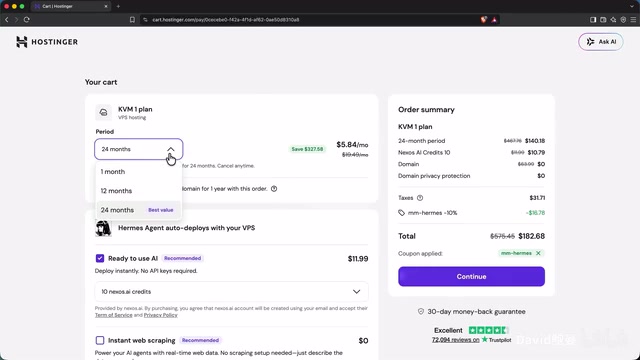
The answer is a VPS (Virtual Private Server)—a computer in a data center that runs around the clock and only you can log into, with the lowest configurations costing just a few dollars a month. The tutorial recommends Hostinger's one-click Hermes template, which automatically handles installation, deploys to a secure URL, provides a login page, and includes backup, one-click update, and restart buttons. According to Matt's demo, when purchasing you should choose at least 12 months to get the discount, uncheck the default AI add-on services, and keep the admin password safe after deployment.
A VPS (Virtual Private Server) uses virtualization technology to split a physical server into multiple isolated virtual instances, each with its own operating system, IP address, and resource quota. For individual users, the core value of a VPS is that it sits in a data center where power, network, and hardware are guaranteed by the provider, so it can run 24/7 without interruption; at the same time, it's completely isolated from your local devices, so even if the agent executes a dangerous command, it won't affect the computer where you store photos and passwords. Common VPS providers include DigitalOcean, Linode, Vultr, and Hostinger, and entry-level configurations (1-2 CPU cores, 1-2GB RAM) typically cost around $5 per month, with significant discounts for annual payment. When choosing a VPS, pay attention to the data center location (which affects latency), whether snapshot backups are supported, and whether it supports one-click deployment of Docker applications—the latter is exactly what makes the Hostinger template simplify Hermes installation.
Step 2: Connect a Model to the Agent
Once installed, Hermes still can't think. Entering anything in the chat interface will prompt "No inference provider configured"—it needs a model account to provide intelligence.
According to the tutorial, Nels Portal, provided by the Hermes development team, is built into Hermes and connects upon login. A single account gives access to more than 200 models from major AI companies, plus work tools like web search, web reading, image generation, and voice. For $20 a month you get $22 in credits.

For model selection, Matt suggests starting with the fast and cheap DeepSeekAd Flash, because it's good at using tools and costs less than a cent per message. After searching and switching on the model page, return to the chat interface and conversations work normally. If you ask the agent what tools it has, it will list capabilities including a built-in browser, terminal commands, file handling, code execution, web search, sub-agent delegation, and scheduled tasks.
An inference provider is a service that supplies large language model reasoning capabilities to an AI agent. It receives conversation and tool-call requests from the agent via API and returns model-generated text or structured instructions. Hermes itself is just an orchestration framework responsible for managing memory, tools, and scheduled tasks—the actual "thinking" happens on the inference provider side. The value of aggregation platforms like Nels Portal is that they unify access to more than 200 models from OpenAI, Anthropic, Google, and other companies under one account and one bill, so users don't need to register and configure each provider's API key separately. Models are billed by token, and prices can differ by dozens of times between models, so the tutorial recommends beginners first use a cheap model that's good at tool calling (like DeepSeek Flash) to get the workflow running, then switch to stronger models as needed. Note that inference providers usually have rate limits (requests per minute) and credit caps; once exceeded, the agent stops responding—which is why later troubleshooting starts by checking credits.
Step 3: Connect Your Phone via Telegram
An agent in a browser tab can't reach you when you leave your computer. The tutorial chooses Telegram as the connection method because it's the simplest to set up—just scan a QR code, no copying code—and it supports quick replies, files, voice, and photos. Hermes also supports more than twenty platforms including Discord, Slack, and WhatsApp.
The process: enable Telegram on the Channels page, restart the gateway, scan the QR code with your phone to create a bot, click connect in Telegram, save, and restart. Then send a test message and run the command to set the main channel, and scheduled task results will be pushed to Telegram. On security, the process adds your Telegram account to a whitelist, so messages from strangers won't get a reply; but Telegram bot chats are not end-to-end encrypted, so you shouldn't send passwords or bank account information.
If the bot suddenly stops responding, check three things in order: the model provider's credit and rate limits, the gateway status (click restart if abnormal), and error messages in the logs. If all three fail, restart the whole application from Hostinger's Docker manager.
A Telegram Bot is an automated bot interface provided by the Telegram platform. Users create a bot through the official account @BotFather and receive a unique token, which third-party programs use to send and receive messages. Hermes's QR code connection flow essentially wraps the steps of creating a bot, obtaining the token, and configuring the webhook into a single scan, eliminating manual code copying. The whitelist mechanism is key to security: bots are visible to everyone by default, and without restrictions, strangers could send commands to your agent, consume your model credits, or even trick it into performing sensitive operations. When setting the main channel, Hermes adds your Telegram account ID to the allowlist, and messages from other sources are simply dropped. In addition, Telegram bot chats are relayed through platform servers and are not end-to-end encrypted, so the tutorial explicitly warns against sending passwords or bank account information through them—such sensitive data should be handled through other secure channels.
Step 4: Assign Your First Monitoring Task
A good task for beginners is a monitor: check something on a schedule and notify you only when there's a change. Matt demonstrated this instruction—track the Barcelona-to-London flight price trend, build a reusable check skill, check every few hours, and send a Telegram message only when there's something new.

This task actually took about 30 to 45 minutes to run: the agent connected to the live internet, figured out the best approach, built the mechanism, created the skill, set up a schedule, and also set up memory to track what had already been shown. On the scheduled tasks page you can see the task runs every 6 hours. Matt's own 20-plus tasks include weekly bookkeeping checks, birthday gift tracking, and twice-daily travel quotes and negotiation follow-ups.
Step 5: Teach Once, Remember Forever
Ordinary chatbots can only maintain context within a single conversation—correct them once, and they forget in the next session. Hermes's differentiator is cross-session memory. The tutorial's example: ask the agent to write a short article about studio lighting for beginners, and the result is too long and wordy; correct it with "too wordy, I prefer short and punchy sentences, at most three paragraphs, no headings or bullet points—save this as a preference"—it writes the preference to memory and then gives a better-structured response.

The key verification is in a brand-new session: ask for a short article about roasting coffee, and the output still follows the previously set structure. This preference persists across every conversation on all devices.
Cross-session memory is different from the "context" of an ordinary chat window. The context window is the range of tokens the model can see in a single conversation, cleared when the conversation ends; an agent's long-term memory is usually implemented as external storage (a database or files), with the framework retrieving relevant memories and injecting them into the prompt at the start of each new conversation. Hermes's approach is to write preferences the user explicitly asks to save (such as "short and punchy, at most three paragraphs, no headings") into persistent memory, after which they're loaded whether a new session starts from Telegram or the web. This also means memory needs active management by the user: the more specific and actionable the preferences, the better the agent follows them; conversely, vague or contradictory memory entries can lead to unstable behavior. For multi-task scenarios, memory can also record "what has already been shown," preventing scheduled tasks from repeatedly pushing the same information.
Costs and Getting-Started Tips
Server costs are fixed monthly, while model costs vary with message volume. According to Matt, the model cost on the first day of setting up the agent was a little over 8 cents. For users who want to further expand their agent's capabilities, he suggests continuing with his full Hermes guide to connect the agent to everyday apps and build a team.
Looking at the whole process, Hermes Agent compresses deployment that used to require terminal operations into a templated workflow, simplifies model access into a single login authorization, and replaces complex API integration with a messaging app. This combination lets users with zero foundation have a personal agent that runs around the clock, proactively reports in, and remembers across sessions—rather than yet another chat window that needs constant tuning.
One-line Summary
Deploy a Hermes personal agent in 20 minutes with zero background using a VPS and template—connect a model, link Telegram, set up scheduled tasks, and enable cross-session memory.
Paragraph Summary
Based on a tutorial by Bilibili creator Matt, this article explains how to get Hermes Agent running independently within 20 minutes with no programming background. The process has five steps: first, deploy on a VPS with Hostinger's one-click template to ensure 24/7 operation and isolation from personal devices; second, connect an inference model through the built-in Nels Portal, starting with the cheap, tool-savvy DeepSeek Flash; third, connect your phone via a Telegram QR code with a whitelist for security; fourth, assign monitoring tasks in natural language, with the agent building skills, setting schedules, and tracking what it has shown; fifth, demonstrate cross-session memory, where a single preference correction persists across all devices and sessions. On cost, Hermes is free—you mainly pay the monthly VPS fee and usage-based model fees, with first-day model costs around 8 cents.
Related articles

Private Key Set to 4? CA's Elementary Mistake Leaves TLS Exposed
CA eMudra set private keys to tiny values like 4, making TLS certificates brute-forceable. A Computerphile video demonstrates the full process from extracting public keys to forging certificates, and explores the fragility of the PKI trust chain.

How Gen Turns Data into Decisions with ChatGPT Work
In an OpenAI user case, business leader Gen shares how ChatGPT Work turns data into decisions: within hours of launch, teams can judge whether integrations and onboarding flows work, shifting decision iteration from hundreds of trial-and-error attempts to a fast feedback loop.

ChatGPT vs. Claude In-Depth Comparison: Strong at Coding but Weak at Research — How to Bridge the Gap?
A user considers switching from ChatGPT to Claude, finding Claude stronger at coding but shallower at research. We analyze the differences and share tips to make Claude's research deeper.