ilse: Point-and-Click Editing That Lets AI Agents Modify Your App Code Directly
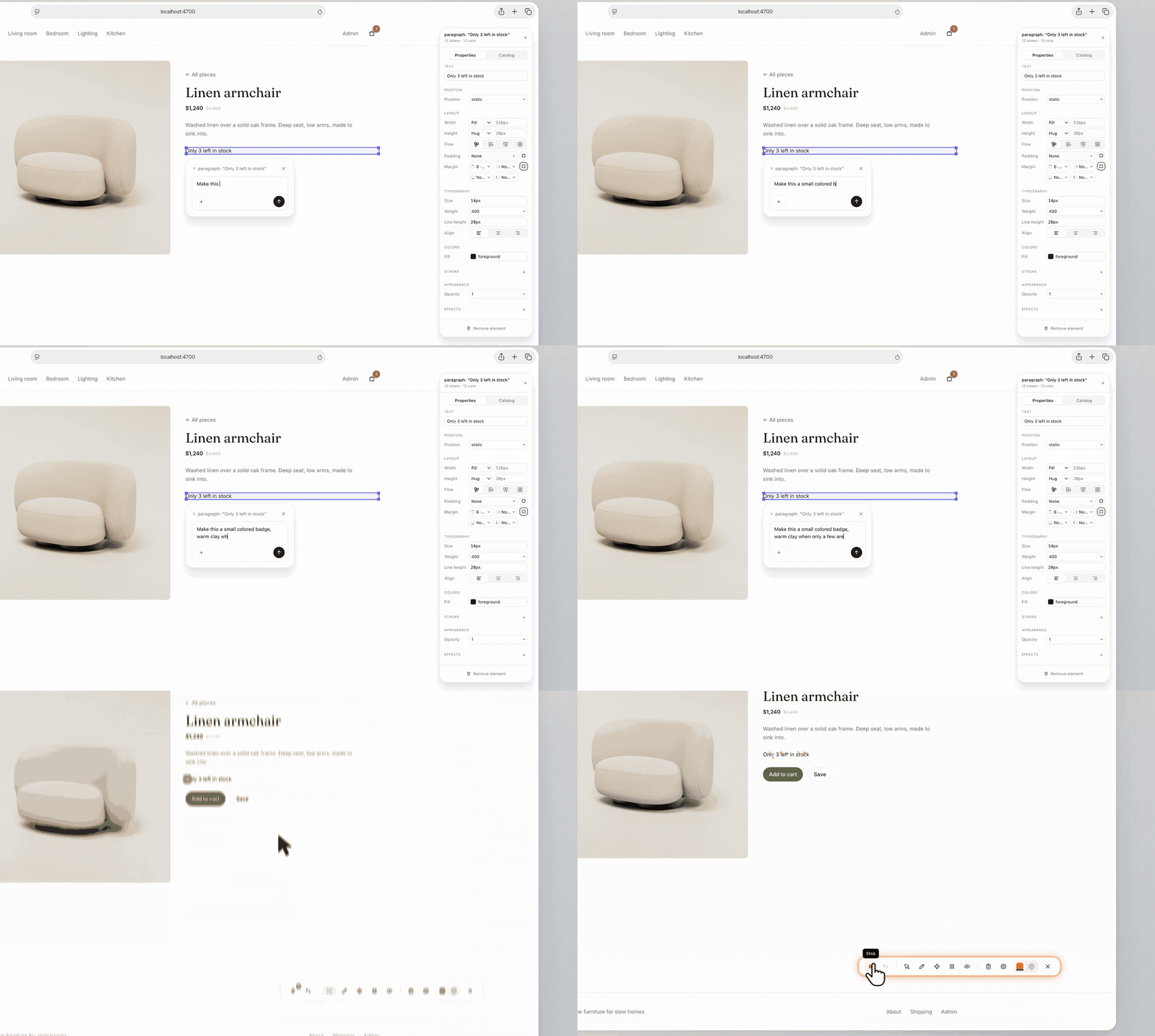
ilse overlays a toolbar on React apps for point-and-click edits—simple styles apply instantly, complex changes route to existing AI agents.
ilse is a design and developer tool launched on Product Hunt. It floats a toolbar over a running React app so users can click a UI element and state what to change. It uses layered handling: simple style tweaks (colors, spacing, sizes) are completed instantly without AI and reuse the project's own design tokens; complex logic or structural changes are precisely routed to the developer's existing AI agents (Claude Code, Codex, Cursor, Gemini), mapping spatial positions to code locations and reducing ambiguity. Pro adds Test Mode, which autonomously completes real user journeys and reports issues. Currently React-only and early-stage, it is positioned as an efficiency layer, not a replacement.
ilse: Point-and-Click Editing That Lets AI Agents Modify Your App Code Directly
With AI coding tools proliferating by the day, most products are still solving the question of "how to get AI to write more code." ilse, newly launched on Product Hunt, takes a different approach: let you point directly at the interface and say "change this here," then hand the rest to an AI agent. The tool earned 80 upvotes and ranked 12th on Product Hunt. Positioned as a design and developer tool, it tries to bridge visual editing and AI code generation.
Core Concept: Overlay a Toolbar on Your React App
ilse works in a very intuitive way—it floats a toolbar on top of your already-running React app. Click any UI element and simply say what you want changed, such as adjusting spacing, colors, or sizes, or dragging to reorder. For these operations, simple style tweaks are completed instantly by ilse itself without invoking AI at all; complex changes involving logic or structure are handed off to the AI agent you already use (such as Claude Code, Codex, Cursor, or Gemini), precisely pointing to the corresponding location in the code.
The cleverness of this design lies in layered handling: high-frequency, low-risk visual adjustments go through a local instant channel to guarantee responsiveness; only low-frequency, high-complexity code modifications are handed to large models, avoiding using a sledgehammer to crack a nut and reducing the latency and uncertainty of AI calls.
Simple Adjustments Take Effect Instantly, Complex Changes Go to AI Agents
According to the Product Hunt page description, ilse handles "simple tweaks" entirely without AI—meaning operations like colors, spacing, and sizes are completed instantaneously. More interestingly, it uses the project's own design tokens rather than arbitrarily generating style values, which is crucial for maintaining design system consistency.
When a change goes beyond styling, ilse routes the task to your existing AI agent. This stands in sharp contrast to many "AI-generated UI" tools: ilse does not try to replace Claude Code or Cursor, but rather acts as an "aimer" between them and the visual interface—precisely aligning natural language instructions with code locations, reducing the friction of developers repeatedly switching between editor and browser and manually locating things.
Design Tokens are the atomic units of a design system. They abstract visual decisions such as colors, fonts, spacing, corner radii, and shadows into named variables (e.g.,
--color-primary,--spacing-md), stored as JSON, CSS custom properties, or platform-specific formats. Their core value lies in a single source of truth: when a brand color or spacing scale needs adjustment, you only modify the token value, and all components referencing it update automatically, avoiding the scattering and inconsistency caused by hard-coded styles. ilse's use of the project's own design tokens in instant style adjustments, rather than generating arbitrary pixel values, means changes naturally integrate into the existing design system without introducing "wild styles" that deviate from the spec—especially critical for maintaining multi-theme, dark mode, or cross-platform consistency.
Pro Version Test Mode: Let ilse Walk Through the User Journey Itself
The ilse Pro version adds a rather imaginative feature: Test Mode. In this mode, ilse autonomously completes real user journeys and reports which steps went wrong.
This effectively extends the tool from "passively responding to modification instructions" to "proactively discovering interface issues." For front-end teams, regression testing and interaction flow validation are often time-consuming and easily overlooked, and ilse attempts to automate this part of the work with agents. However, the Product Hunt page does not disclose the specific implementation details or coverage of Test Mode, and its actual effectiveness remains to be verified by early users.
User Journey refers to a series of interaction steps a user goes through to accomplish a goal, such as "log in → search for products → add to cart → checkout." In a testing context, an agent autonomously completing a user journey is an intelligent variant of end-to-end (E2E) testing: traditional E2E testing relies on tools like Playwright and Cypress to write fixed scripts, which are costly to maintain and sensitive to interface changes; agent-based testing attempts to have the model understand interface semantics, dynamically decide click and input paths, and report failure points. Its potential advantages are reducing the burden of script writing and covering exploratory paths, but the challenge lies in stability control over dynamic content, asynchronous loading, and non-deterministic flows—this is also a core dimension to watch when evaluating the actual effectiveness of ilse's Test Mode.
Relationship with Existing AI Coding Workflows
ilse's positioning can be understood as middleware between the "visual layer" and the "code layer." When developers currently use tools like Claude Code or Cursor, they usually need to describe the interface location in conversation ("that card component," "the button in the top right"), and ambiguous descriptions easily lead AI to modify the wrong place. Through its "point-and-shoot" interaction, ilse maps spatial positions directly to code locations, which in theory can significantly reduce communication costs.
Another layer of value is that it does not lock you into an AI vendor: it supports multiple agents including Claude Code, Codex, Cursor, and Gemini, allowing developers to continue using the toolchain they are already familiar with and paying for. This open strategy is more likely to be accepted in the AI tool ecosystem.
The Claude Code, Codex, Cursor, and Gemini mentioned in this article fall into two product categories: coding agents within terminals/IDEs and general-purpose large models. Claude Code is a command-line coding agent launched by Anthropic that can read and write local files and execute commands; Codex originally referred to OpenAI's series of code generation models and now also refers to its cloud coding agent; Cursor is an AI-first editor based on VS Code with built-in multi-model chat and codebase indexing; Gemini is Google's general-purpose model family, which can be integrated into coding scenarios via API or plugins. Rather than locking into a single vendor, ilse injects the spatial positioning information of "where to change" as context into these agents, allowing developers to continue using their existing subscriptions and workflows—which also explains its positioning as an "aimer" rather than a "replacement."
Limitations Worth Noting
Based on currently public information, ilse focuses on React apps, meaning users of Vue, Svelte, and other tech stacks cannot benefit for now. In addition, how the boundary of "simple adjustments that don't use AI" is defined, how code quality is ensured after complex changes are handed to agents, and how well Test Mode covers dynamic content all require actual use to judge. The data of 80 upvotes and 5 comments on Product Hunt also indicates that it is still in an early stage with limited community discussion.
For React teams already using AI agents to write code, ilse's "pointing" interaction is worth a try; but if you expect it to completely replace manual coding or existing AI coding tools, it is more of an efficiency-enhancement layer than a replacement.
ilse was developed by Iverson Dantas and is currently live on Product Hunt, categorized under design tools, developer tools, and artificial intelligence.
One-line Summary
ilse overlays a toolbar on React apps for point-and-click edits—simple styles take effect instantly, while complex changes route to existing AI agents.
Paragraph Summary
ilse is a design and developer tool launched on Product Hunt. Its core idea is to float a toolbar over an already-running React app, letting users click UI elements and state their modification needs to trigger changes. It uses layered handling: simple style adjustments like colors, spacing, and sizes are completed instantly without AI, reusing the project's own design tokens for consistency; complex changes involving logic or structure are precisely routed to the developer's existing AI agents (Claude Code, Codex, Cursor, Gemini), mapping spatial positions to code locations and reducing description ambiguity. The Pro version also offers Test Mode, which can autonomously complete real user journeys and report issues. Currently React-only and in an early stage, it is positioned as an efficiency-enhancement layer rather than a replacement.
Related articles

DeepSeek Open-Sources DeepInfer: What Is an Inference Framework Actually For?
DeepSeek open-sources its inference framework DeepInfer under Apache 2.0, supporting DeepSeek V4.1 Flash offline inference. This article explains its request scheduling, FlashMLA/DeepGEMM compute optimization, DSPark speculative verification acceleration, and what it means for developers and ordinary users.

Open-Source AI Learning Agent: A Full Workflow Experience from Topology Graphs to Exam Generation
Explore an open-source AI learning agent: built on DeepSeek API, it constructs knowledge systems via topology graphs, with automatic document generation, notes, super documents, and exams. Learn about its Agent workflow and design highlights.

DeepSeek Whale Girl Open-Source MV Meme: AI Industry Coded Slang About Pivoting to Closed Source
Bilibili's DeepSeek Whale Girl rap MV uses fictional memes to tease the AI open-source vs. closed-source debate, with lyrics full of industry slang. This article explains the meme culture, the Whale Girl symbol, and the open/closed tension.