JetBrains Open-Sources AI IDE ThinkRail: Multi-Workspace Parallelism and Spec-Driven Development

ThinkRail is a Pi-based open-source agentic IDE focused on multi-workspace parallelism and spec-driven development.
ThinkRail is an open-source agentic IDE built on Pi under the JetBrains Innovation Hub, licensed under Apache 2.0 and completely free. It reuses Pi's agent capabilities and automatically inherits its API keys, model configs, permission rules, and skills, making migration nearly effortless. Key features include Git worktree-based multi-workspace parallelism, spec-driven development with metadata-rich Markdown specs built into the system prompt, and Monaco read-only preview with diff and issue review tracking. It's ideal for Pi users juggling multiple features or wanting structured specs to constrain AI output.
What Is ThinkRail: A Pi-Based Agentic IDE
ThinkRail is an open-source agentic IDE that is completely free—there isn't even a paid plan to subscribe to. It's built on top of Pi—Pi provides the underlying agent capabilities, and ThinkRail layers a graphical interface, web UI, and desktop client on top of it, as part of a collaboration project under the JetBrains Innovation Hub. According to NeuralNine, the creator of the Bilibili video, the project is open-sourced under the Apache 2.0 license and hosted on GitHub.
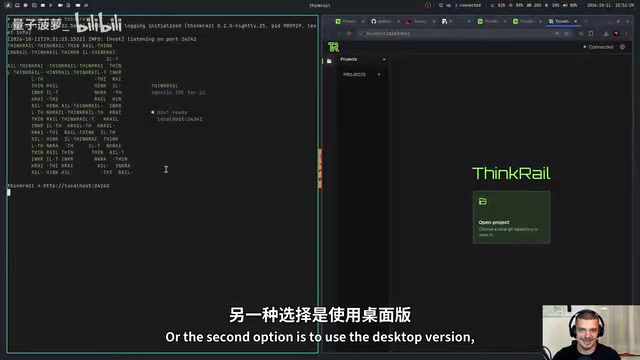
Installation is fairly straightforward: visit thinkrail.ai to download the installer for your system, or use a curl command in the terminal to pull the latest version directly from GitHub. After installation, there are two ways to launch it—type thinkrail in the terminal to use the browser as the front end, or open the desktop client from the launcher. Both methods are functionally identical; only the medium differs.
Deep Integration with Pi: Zero-Config Inheritance
One of ThinkRail's most practical aspects is that it's fully integrated with Pi's configuration. If a user is already using Pi, their API keys, model configurations, permission settings, and skills are all automatically recognized and carried over directly. In the video demonstration, when the author opens a new conversation, ThinkRail automatically recognizes the OpenCodeGo provider he configured—no need to re-enter any keys.
Permission control is likewise inherited from Pi. By modifying Pi's permissions config file, you can require the agent to request approval before modifying files, and ThinkRail reflects this change immediately. In the demo, when the author asks to add a login page, a "permission required" prompt pops up in the interface, waiting for the user to confirm the tool call. This consistency means the migration cost for Pi users is virtually zero, while also gaining additional graphical capabilities.
Pi here refers to an underlying agent runtime/framework that handles model invocation, tool execution, permission validation, and skill loading. It is itself command-line and configuration-driven, without providing a graphical interface. ThinkRail doesn't reimplement these capabilities; instead, it acts as a "front-end shell" that reuses Pi's config directory and permission model. As a result, API keys, default models, and allowed tool scopes only need to be maintained on the Pi side. The benefit of this layered approach is that Pi upgrades directly benefit ThinkRail, and users aren't locked into any particular IDE—the same Pi configuration works both in the terminal and in the graphical interface. Understanding this relationship makes it clear that "zero-config inheritance" is not marketing speak, but a natural consequence of sharing the same state at the architectural level.
Multi-Workspace Parallelism: Develop Multiple Features Simultaneously with Git Worktree
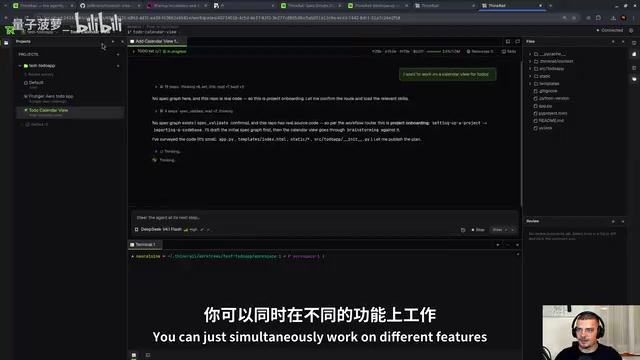
One of ThinkRail's core selling points is multi-workspace parallel development. It's essentially a visual wrapper around Git worktree: the main branch code stays unchanged, each workspace checks out an independent sub-branch from the same repository, each with its own file changes, which are then merged back into the mainline.
In the video, the author demonstrates opening two workspaces simultaneously—one handling a calendar view for to-do items, and the other performing a complex UI redesign. Changes in either workspace don't contaminate the other workspace or the main branch. When a feature is complete, clicking "settle" marks it as ready to merge. For developers who need to push multiple features forward at once, this isolation mechanism is far clearer than frequently switching branches.
Git worktree is a feature introduced in Git 2.5 that allows multiple working trees to be checked out simultaneously from the same repository, each associated with a different branch but sharing the same .git object database. Compared to traditional git stash or copying the entire repository, worktree saves the disk overhead of repeated cloning and avoids the hassle of uncommitted changes being carried away when switching branches. Each worktree has its own HEAD and index, so you can write feature A in one directory and modify feature B in another without interference. Common commands include git worktree add <path> <branch> to create, git worktree list to view, and git worktree remove to clean up. ThinkRail's multi-workspace feature is precisely a graphical version of this command-line workflow, letting users create or merge worktrees with a few clicks.
Spec-Driven Development: Letting the IDE Evolve with Use
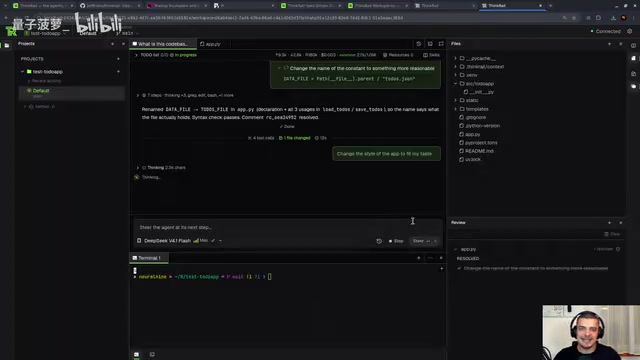
Spec-driven development is another key capability of ThinkRail. It's similar in spirit to test-driven development, except that instead of writing tests, you write specs—using Markdown files to formally define what the software should do. A typical structure includes documents like goals and requirements, architecture, and front end, with nested relationships established through metadata fields (id, type, title, status, parent), so that architecture documents hang under goal documents, and front-end specs hang under architecture.
What makes ThinkRail special is that references to these spec files are built into the system prompt—users don't need to write an additional agent.md to point to the specs like with other agents. The sidebar automatically recognizes and displays the spec tree, and the user only needs to say "implement the specs" for the agent to implement and verify each item according to the specs. The author also admits that the specs in the demo are very minimal; if a project had multiple interconnected, complete Markdown spec files, the value of this workflow would be more obvious—it turns "prompting by luck" into a structured engineering process.
Spec-Driven Development is a working method that has emerged alongside AI coding agents. The core idea is to first write "what the software should do" as structured documents that are machine-readable and human-reviewable, then have the agent implement the code based on those documents, rather than relying on one-off prompts. Its difference from test-driven development is that TDD uses executable tests as the contract, while spec-driven development uses natural-language specs plus metadata as the contract—better suited to scenarios where requirements are still evolving and tests are hard to write upfront. Common practices include maintaining a unique id and parent-child hierarchy for each spec, allowing the agent to trace "which requirement this line of code corresponds to" during implementation, and making it easier to locate affected modules when changes occur later. ThinkRail's integration of the spec tree into the sidebar and injection into the system prompt is precisely the productization of this method.
Differentiated Review: Diff View and Issue Tracking
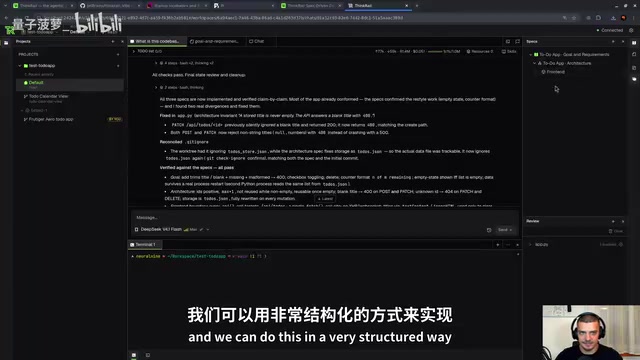
In addition to agent conversation and the terminal, ThinkRail also provides a read-only preview via the Monaco editor, where users can select code snippets and right-click to comment directly, letting the agent make changes to specific lines. The Diff view displays changes to each file in standard Git style, making it easy to review before committing.
The review feature allows users to mark a piece of code as an "issue," record a to-do item, and later jump to the corresponding file location or mark it as resolved. The agent will also attempt to fix marked issues. This mechanism is especially useful during long sessions and parallel multi-tasking—it's essentially adding a traceable ticketing system to the AI coding process.
Monaco Editor is Microsoft's open-source browser-based code editor and the editor core of VS Code. It supports syntax highlighting, code folding, multi-cursor, diff comparison, and more, and is often integrated into web IDEs. ThinkRail embeds Monaco in read-only mode, mainly for its rendering performance and line-level positioning capabilities: users can select specific lines or snippets and attach comments directly, and the comments carry the file path and line number to the agent, making fine-grained instructions like "change this specific line" possible without pasting large chunks of code into the conversation. The read-only design avoids conflicts between direct user edits in the IDE and agent changes—all modifications still go through the agent's tool calls and review workflow.
Who It's For
ThinkRail's interface style continues Pi's minimalist aesthetic, using the JetBrains Mono font with a compact, technical-oriented layout. It's best suited for developers who are already using Pi and want a more complete project view. If your workflow involves multiple parallel features, requires strict spec documents to constrain AI output, or you simply want a more intuitive agent workbench than the terminal, this Apache 2.0 open-source project is worth trying. It should be noted that the video is sponsored content by JetBrains, and the author states that he maintains an independent review.
One-line Summary
ThinkRail is a Pi-based open-source agentic IDE focused on multi-workspace parallelism and spec-driven development.
Paragraph Summary
ThinkRail is an open-source agentic IDE built on Pi, part of the JetBrains Innovation Hub, licensed under Apache 2.0 and completely free. It reuses Pi's underlying agent capabilities and automatically inherits its API keys, model configurations, permission rules, and skills, making migration cost for Pi users virtually zero. Core features include: multi-workspace parallel development wrapped around Git worktree, letting multiple feature branches avoid contaminating each other; spec-driven development, using Markdown spec files with metadata to define software behavior, with spec references built into the system prompt; and Monaco read-only preview, Diff view, and issue review tracking, filling the visual management gaps of pure terminal agents. It's best suited for developers already using Pi who need to push multiple features forward simultaneously or want to constrain AI output with structured specs.
Related articles

T3 Code: The Open-Source AI Coding Assistant's Comeback Story
T3 Code is an open-source AI coding assistant that unifies subscriptions like Codex and Claude, with powerful remote control and parallel task management.

Never Elected, Yet Ruled New York for 30 Years: The Ultimate Case Study in the Mechanics of Power
Robert Caro's biographies reveal how unelected Robert Moses ruled New York for 30 years through legal drafting and public authorities, and how Lyndon Johnson built leverage as a "powerless" Senate Majority Leader. Unpacking the underlying logic of accumulating and sustaining power.

The CPython 3.10 Recursion Trap and Synthetic Recovery in TokenGuard, an LLM Circuit Breaker
TokenGuard's author recounts a recursion crash caused by OrderedDict.pop in CPython 3.10 and introduces v0.3.0's Loop Nudge synthetic recovery, inline DLP scanning, and other new LLM agent circuit-breaker capabilities.