LangChain4j in Practice: Pitfalls of Writing Frontend with an AI Coding Agent

A hands-on record of AI Coding Agent auto-generating a frontend: it can build the skeleton, struggles to debug, and model capability is key.
The article documents a real attempt to use an AI Coding Agent to automatically generate a frontend for a LangChain4j streaming backend. The author first prepared requirements, technology stack, interface definitions, and interface code as a Markdown document, asking the Agent to plan before coding. Claude Code with MiniMax 3.0 smoothly built the interface skeleton and completed dependency installation, but then a chain of bugs followed: API path 404, session ID type mismatch with Integer, and values exceeding the Integer range. The most troublesome was that the backend returned 200 and data was sent, but the frontend did not render, and repeated Agent modifications made no progress. The author then switched to Cursor's Plan Mode for a retry, where the model showed differences by proactively consulting backend code and asking questions about contract details. The article summarizes three points: contracts must be aligned in advance, Agents are good at generation but not debugging, and the gap in model capability is real.
Title
LangChain4j in Practice: Pitfalls of Writing Frontend with an AI Coding Agent
Meta Description
A real-world account of using an AI Coding Agent to build a frontend after completing a LangChain4j backend: the full workflow of generating UI with Claude Code + MiniMax, the five-element prompt structure, and the debugging process for a chain of bugs including session ID type mismatches and data not rendering, plus lessons from retrying with Cursor.
Article Content
After completing streaming output development with the LangChain4j backend, how do you quickly put together a usable frontend interface for the backend API? This article documents a real attempt at using an AI Coding Agent to automatically generate a frontend—from hooking Claude Code up to the MiniMax model to switching to Cursor for a retry. The pitfalls encountered along the way may be more instructive than the final result.
Why Let AI Write the Frontend
According to a tutorial shared by a Bilibili creator, in the previous videos the streaming output feature of LangChain4j had basically been working, and backend API development was largely complete. At this point a very practical problem emerged: the backend capability was there, but there was no frontend interface for actual interaction.
The creator's approach was to stop writing the frontend line by line and instead rely on an AI Coding Agent to do it. The premise of this approach is that the backend interface is already stable and the requirement boundaries are clear—which fits the scenario of this tutorial series perfectly. The tool used was Claude Code, with the backend connected to the MiniMax 3.0 model. The creator also mentioned that the model could be swapped for Kimi 2.6 or Kimi 3.0, and that MiniMax 3.0 was chosen simply because it happened to be available.
This choice itself sends a signal: the effectiveness of a Coding Agent depends heavily on the underlying model's capabilities; the toolchain is secondary.
Claude Code is a command-line AI programming agent released by Anthropic. It can directly read and write local files, run terminal commands, and complete multi-step development tasks in an "agent loop" manner, rather than merely completing code within an editor. Cursor, on the other hand, is an AI editor built as a secondary development on top of VS Code; its Plan Mode allows the model to first output an execution plan and only touch the code after user confirmation, making it suitable for scenarios where requirement boundaries are not yet clear. Although the two take different forms, they share the same point: both put "model capability" above the toolchain. With the same requirements document, swapping the underlying model will noticeably change planning quality, proactive context-checking behavior, and reasoning depth during debugging. This is also the technical background behind the original article's emphasis that "choosing a Coding Agent is essentially choosing the underlying model."
Five Elements of a Good Prompt
The creator summarized a prompt structure for having AI write the frontend, consisting of five parts: requirement description, technology stack, backend interface definition, backend interface code, and optionally a frontend UI sketch. In actual use, the sketch was omitted, and the remaining four items were placed in the frontend project directory as a Markdown document.
This practice of documenting requirements is worth borrowing: after reading local files, the AI Agent gains complete context rather than relying on scattered descriptions in the conversation. Placing the document in the project folder also makes it easy to reuse directly when switching tools later.
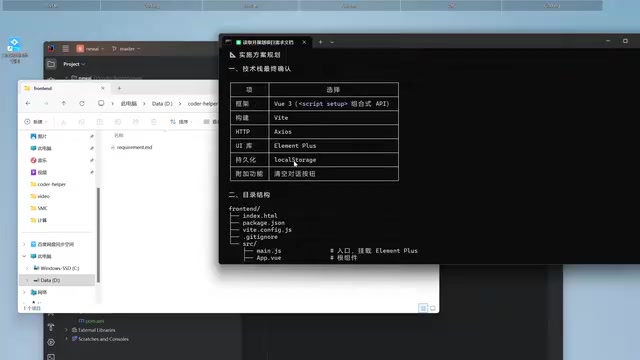
In a frontend-backend separation architecture, an "interface contract" refers to the explicit agreement between both sides on request paths, HTTP methods, parameter types, field value ranges, response structures, and so on. It is typically solidified in the form of OpenAPI/Swagger documents or TypeScript type definitions. In the original article, the session ID was generated by the frontend as a long numeric string, while the backend Controller expected an Integer-type memoryId—a typical manifestation of an unaligned contract. More insidious is the value range issue: even if both sides use integers, values outside Integer's ±2.1 billion range will still throw an exception during deserialization. Writing such constraints (type, range, nullability, default values) into the requirements document is more reliable than explaining them verbally in conversation, because the Agent gains stable, complete context when reading the file.
First Attempt: Claude Code + MiniMax
After starting Claude Code, the creator first asked it to read the requirements document to understand the requirements and explicitly instructed: "Don't write code yet—plan first, and check with me where anything is uncertain." This constraint is crucial—letting the Agent produce a plan before acting prevents it from improvising.
The Agent then raised a series of questions that required human decisions: whether to use Element UI, whether to persist chat messages (chose to store in localStorage), whether to include stop and clear conversation features (kept clear), and tool selection (Vite). After the plan was confirmed, the Agent began planning and writing code, and also included usage instructions for Login and Video.
Frontend dependency installation (npm install) and startup (npm run dev) both completed smoothly. But the real trouble only began with the first functional test.
A Chain of Bugs: From 404 to Type Mismatch
The first message send immediately hit a 404 not found, and cookie-related warnings appeared in the backend logs. After passing both frontend and backend error messages to the Agent, it analyzed that the API path had an extra segment; after removing it, a retry was attempted.
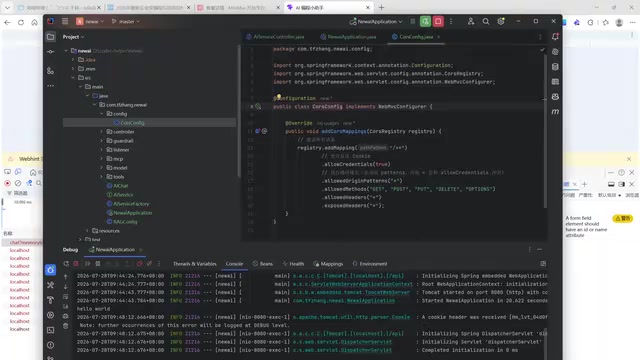
The problem was not over. On the next test, the backend threw a type conversion exception: the session ID generated by the frontend was a long string of digits (starting with 3241, for example), while the backend Controller expected an Integer-type memoryId, and the string could not be converted to an integer. The Agent modified two generation logic points in the frontend.
Then a new problem appeared—the generated number exceeded the Integer range. The creator admitted in the video that this was an error they should have been able to judge themselves. The Agent adjusted the value range again so that the data fell within the Integer range.
Data Reaches the Frontend but Doesn't Display
After the type issue was resolved, the backend returned 200 OK, and the response data was indeed sent out, but nothing appeared in the chat window. The creator fed back the information that "the frontend receives data but cannot display it" to the Agent, and after multiple modifications the problem persisted. The creator's comment in the video was blunt: "Our AI doesn't seem especially capable—it's been working on this bug for ages and still can't fix it."
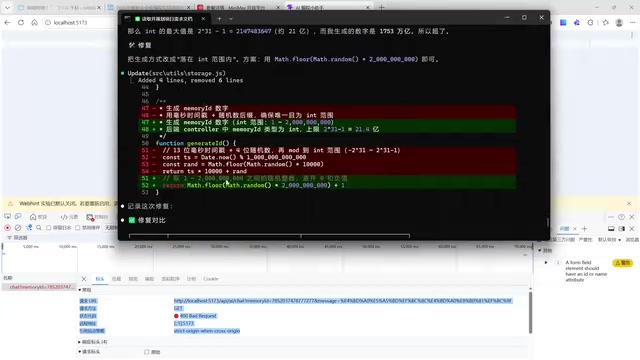
One detail is worth noting here: during their own troubleshooting, the creator confirmed that the backend had no errors, CORS was fine, and the data had been returned, precisely localizing the problem to the frontend's rendering or streaming handling. This ability to manually narrow down the scope of the problem becomes especially important when AI repeatedly fails.
Streaming output relies on HTTP chunked transfer or SSE (Server-Sent Events); the backend continuously pushes incremental data chunks rather than returning a complete response at once. If the frontend uses ordinary fetch to read response.json(), it will wait until the entire stream ends before parsing, causing the interface to remain blank for a long time. The correct approach is to read response.body's ReadableStream, decode it chunk by chunk, and append it to the message list. In addition, chat scenarios need to handle message concatenation, auto-scrolling, incremental Markdown rendering, and other details. The phenomenon in the original article—"the backend returns 200 and the data has been sent, but the frontend doesn't render"—very likely lies in the streaming read or state update layer, which is also why it is difficult for the Agent to locate based solely on error logs: it needs to understand runtime data flow, not just static code.
Retrying with Cursor
Because the Claude Code + MiniMax combination was stuck on this bug for too long, the creator decided to switch models—using Cursor's free standard version, creating a new frontend2 directory, reusing the same requirements document, and choosing Plan Mode to let the Agent plan first and then execute.
Cursor's default model behaved differently: it proactively searched the parent directory for relevant backend code, and also raised questions requiring human decisions—how the memory ID should be generated (chose random integers), whether to use native fetch or Axios for streaming responses (chose native fetch to preserve extensibility), whether to support Markdown rendering, and whether to preserve conversation history after refresh.
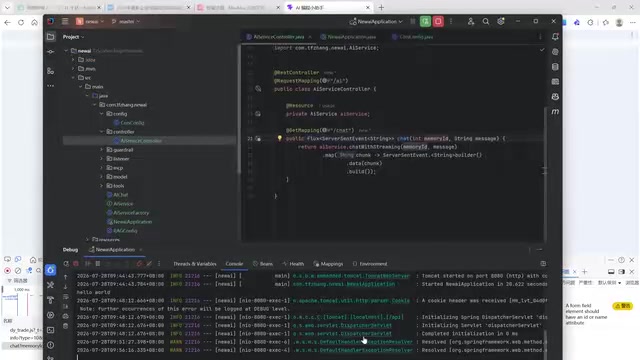
The creator mentioned that if the free version's capability is insufficient, a subscription to a stronger model might be needed. The video ends here without a final conclusion, and whether Cursor can get it running in one go remains unknown.
memoryId is the identifier used in LangChain4j to distinguish different session memories. ChatMemoryStore uses it to store and retrieve historical messages, thereby allowing multi-turn conversations to maintain context. It usually needs to be a stable integer or string. If it is randomly generated on each request, historical memory will be lost after refreshing the page, so "random integer" is only a simplified choice. Related to this is the message persistence strategy: storing in localStorage allows the frontend to restore the conversation display after refresh, but backend memory is still associated with memoryId, and the two need to be consistent; otherwise, there will be a disconnect where "the interface has records but the model doesn't remember." These design decisions are exactly what the Agent proactively confirms with the human during the planning phase, which also shows that the earlier contract-type issues are settled, the less rework there will be later.
Three Realistic Problems Exposed by These Pitfalls
The frontend-backend contract must be aligned in advance. If basic conventions such as the session ID's type and value range are not explicitly fixed in the prompt, it is very easy for the Agent-generated code to mismatch the backend. The two type errors in the tutorial both trace back to this.
Agents are good at generation, not debugging. Writing a chat dialog interface from scratch was completed quickly by Claude Code; but when facing problems like "data arrives but doesn't render" that require understanding runtime behavior, its iteration efficiency dropped noticeably.
The gap in model capability is real. With the same requirements and the same document, after switching to a different model and tool, both planning quality and proactivity differed. The creator's experience shows that selecting a Coding Agent is essentially selecting the underlying model.
For developers preparing to use AI to write frontend, a practical suggestion is: let the Agent handle skeleton setup from 0 to 1, write contract details into the requirements document, and when encountering a bug it repeatedly fails to fix, first manually troubleshoot to narrow down the problem to the smallest scope, then decide whether to continue the conversation or switch tools.
One-line Summary
A hands-on record of AI Coding Agent auto-generating a frontend: it can build the skeleton, struggles to debug, and model capability is key.
Paragraph Summary
The article documents a real attempt to use an AI Coding Agent to automatically generate a frontend for a LangChain4j streaming backend. The author first prepared requirements, technology stack, interface definitions, and interface code as a Markdown document, asking the Agent to plan before coding. Claude Code with MiniMax 3.0 smoothly built the interface skeleton and completed dependency installation, but then a chain of bugs followed: API path 404, session ID type mismatch with Integer, and values exceeding the Integer range. The most troublesome was that the backend returned 200 and data was sent, but the frontend did not render, and repeated Agent modifications made no progress. The author then switched to Cursor's Plan Mode for a retry, where the model showed differences by proactively consulting backend code and asking questions about contract details. The article summarizes three points: contracts must be aligned in advance, Agents are good at generation but not debugging, and the gap in model capability is real.
Related articles

AO3 Announces 2-4 Week Maintenance Shutdown: An Unexpected Halt for the Fanfiction Community
Archive Of Our Own (AO3) announces a 2-4 week maintenance shutdown, sparking Hacker News discussion. This article analyzes the impact on fanfiction creators, readers, and nonprofit platform operations.

T3 Code: The Open-Source AI Coding Assistant's Comeback Story
T3 Code is an open-source AI coding assistant that unifies subscriptions like Codex and Claude, with powerful remote control and parallel task management.

Never Elected, Yet Ruled New York for 30 Years: The Ultimate Case Study in the Mechanics of Power
Robert Caro's biographies reveal how unelected Robert Moses ruled New York for 30 years through legal drafting and public authorities, and how Lyndon Johnson built leverage as a "powerless" Senate Majority Leader. Unpacking the underlying logic of accumulating and sustaining power.