Making AI Animated Science Videos with Claude and DeepSeek — Even Beginners Can Replicate It

A full breakdown of the AI-writes-code animated philosophy video workflow and prompting method.
The article breaks down how popular 'small truths of daily life, grand truths of the universe' animated science videos on Bilibili are made: the core isn't hand-drawing or filming but Agent software calling a large model to write code and render video from structured prompts. The workflow has three steps — install Agent software like Claude Desktop, configure API access via CCSwitch, and write prompts in five layers (basic specs, visual imagery logic, unified visual style, shot-by-shot timeline, delivery format). The author notes that the same prompt yields clearly different results across models, with the model determining the upper bound; templates lower the barrier, but topic selection, narrative, and visual logic still require human thought, and API calls carry ongoing costs.
Why Are These Videos Going Viral?
Recently, if you've scrolled through Bilibili or short-video platforms, you've probably seen those animated science-explainer videos about "small truths of daily life, grand truths of the universe" — pure black background, warm golden objects, slow camera movement, paired with an oddly catchy soundtrack, holding viewers completely spellbound. At first I thought it was just a niche trend, until I saw the numbers: accounts like "Bit Star Universe" (比特星宇) have nearly 800,000 followers with just 20 videos; "Q Standing Outside" (站在外面的Q) posted only two videos, one of which broke 1.2 million views. Even more extreme, people on second-hand marketplaces are already taking commissions for this kind of work, making money off the craft.
One question keeps appearing in the comments: how on earth are these made? Can someone with zero AI knowledge pull it off themselves? Bilibili creator "Yuanbao Yitai" (元宝一台) released what he calls the "most detailed breakdown on the internet," claiming that as long as you can copy-paste and click a mouse, you can follow along step by step. I've combined his tutorial with a reorganized look at the principles, toolchain, and prompt-writing methods, so you can get hands-on right after reading.
How It Actually Works: AI Doesn't Draw the Video — It Writes It
These videos aren't live-action footage, nor are they frame-by-frame hand-drawn animation. The core logic is: describe the scene you want clearly in words, hand it to the AI, and the AI writes code to render the video itself. That text is the prompt — essentially an instruction manual for the AI.
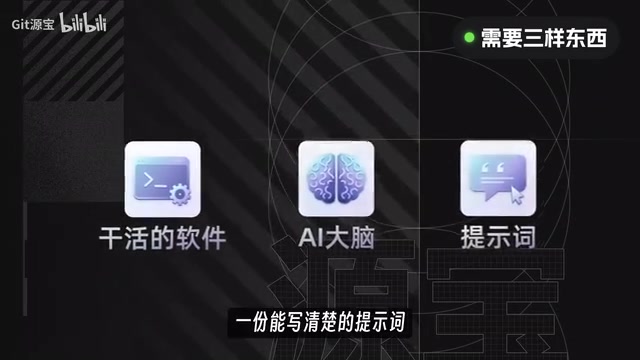
So the preparation comes down to three things: a piece of software that can do the work, an AI brain, and a clearly written prompt. Sounds simple, but there are pitfalls at every step.
Step 1: Install Agent Software, Not a Chat AI
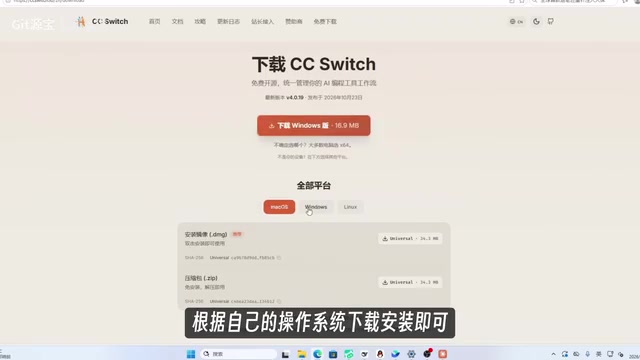
A regular chat AI only answers in text — it can't do this kind of work. What you need is Agent-type software that can write code, execute code, and generate files on its own. Workbody and DeepSeekAd Harness, mentioned in the video, both fall into this category. But to ensure consistent output, the tutorial uses Claude Desktop throughout. The path is straightforward: open the official download page, select the installer for your system, double-click, and follow the prompts.
After installing, you'll find you can't get into the main interface — because at this point the software is just an empty shell without a "brain."
Step 2: Connect an AI Brain to the Software
The so-called "brain" is a large language model, such as Claude Opus 5.5 or DeepSeek V4.1. The tutorial uses Claude Opus 5.5, and also encourages trying DeepSeek, but reminds you that different models differ in their ability to understand visuals and write code, so the final results will vary.
If you have an official Claude account, just log in through the official flow. If you're going the API route, you need three pieces of information: the API Key (the key to call the model), the endpoint address (tells the software where to find the model), and the model name (determines which one to call). The tutorial uses CCSwitch for configuration management: after downloading and installing, create an API Key, find the endpoint address and model name, select the Claude Desktop preset or a custom configuration in CCSwitch, and fill in the information. Note that you must select the Desktop version matching your installed version; if you're using a model like DeepSeek, you also need to enable model mapping and enter the actual model name provided by the service provider.
After saving and switching the configuration, fully quit Claude Desktop and reopen it to make the configuration take effect. All subsequent prompt input and video production happens here. The key reminder for this step: when using this kind of integration, CCSwitch must stay running.
The Essential Difference Between an Agent and a Chat AI: A regular chat AI (like the web version of ChatGPT) can only passively answer questions and output text; Agent-type software, on the other hand, is given "tool use" and "task execution" capabilities — it can autonomously write code, run code, read and write files, and even call external programs based on your instructions. In this article's scenario, after receiving the prompt, the Agent generates a piece of Python or JavaScript code (for example, using rendering libraries like Manim or Three.js), then executes that code locally and ultimately outputs a video file. This is the technical root of the saying "AI doesn't draw the video, it writes it": every frame of the video is driven by code logic and rendered, rather than the AI directly generating pixels.
The Roles of API Key, Endpoint Address, and Model Name: When you connect to a large model via API, all three pieces of information are indispensable. The API Key is your identity credential and billing credential — the service provider uses it to identify the caller and charge accordingly; the endpoint address tells the software which server to send requests to, and different providers (such as Anthropic, DeepSeek) have different addresses; the model name specifies which particular model version to call, since a single provider often offers multiple models with different capabilities and prices. Tools like CCSwitch help you manage multiple sets of configurations and switch with one click, avoiding manual entry each time. It's worth emphasizing that API calls are billed by token, and long prompts and multiple generations all incur costs.
The Prompt Is the Real Dividing Line: Write Your Requirements as an "Instruction Manual"
Connecting the model only means it can do the work. Whether what comes out is what you want depends entirely on how you state your requirements. Many people start with "make me a 3D video" without saying anything about the theme, visuals, or camera movement — the AI can only guess, and the result inevitably goes off track.
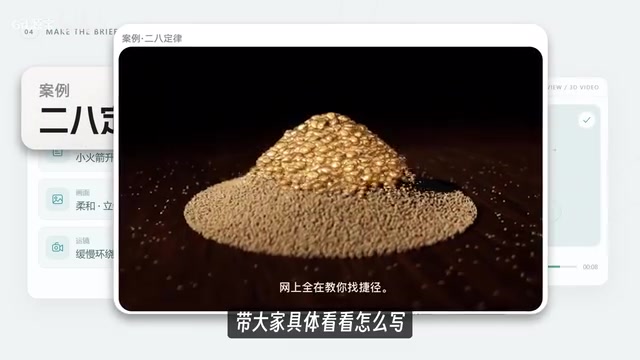
The tutorial demonstrates with a video about the "28 Rule" (Pareto Principle), with the prompt advancing in five layers:
1. Basic Requirements: what the theme is, how long the video is, vertical or horizontal, and the resolution. This video is set to 85.4 seconds, horizontal 1920x1080, 60 frames. Written at the very top so the AI knows what specifications to produce to.
2. Visual Content and Expressive Logic: clearly state what each image represents — sand represents the endless daily trivialities, gold grains represent the few things that truly matter, the hourglass represents the passage of time, the balance scale compares the value of things, and the gold pan shows the sifting process. With the relationships spelled out, the AI knows why each object appears and how to connect them to convey a message.
3. Unified Visual Style: set the overall tone — pure black background, warm golden lighting, slow camera movement, smooth transitions between shots. Then refine down to the objects: the hourglass is transparent glass, the stand is brass, the gold grains have irregular surface undulations and metallic reflections. Write everything clearly from the overall to the details, and the visuals are more likely to stay consistent.
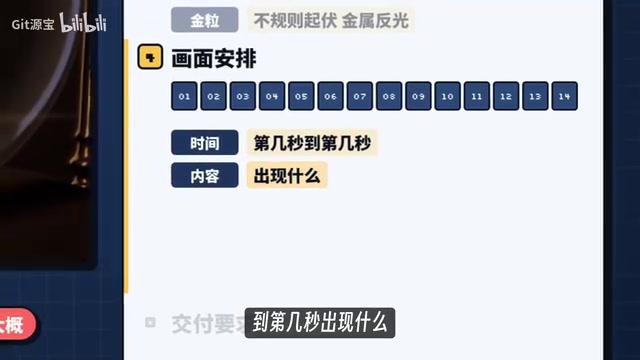
4. Shot Arrangement (the most critical): break the video into 14 shots, starting with gold falling into a pile of sand, through sand being blown apart and gathering into an hourglass, passing through a desert, a balance scale, and a gold pan, and finally returning to the hourglass to summarize the method with a card. For each shot, specify from which second to which second, what appears, what changes, and how the camera moves, while also placing the corresponding voiceover and subtitles. This way the AI knows where the visuals should be when a given line is spoken.
5. Delivery Requirements: have it continue rendering and exporting a directly playable MP4 file after production is complete, and specify the save location. Otherwise it might just finish writing the code without generating the actual video.
This writing approach sounds tedious, but you don't need to start from scratch every time. The tutorial provides 15 fixed templates covering different 2D and 3D styles, with all the above requirements embedded. It's fine if you don't understand some parameters — just replace the theme, voiceover, and storyboard first, and get your first one running before worrying about the rest.
How Big Is the Gap Between Models?
For a direct comparison, the tutorial ran the same prompt through DeepSeek V4.1 Flash 1017 and Claude Opus 5.5, and the generated results differed noticeably. Although no quantitative scores were given, the statement "different models differ in their ability to understand visuals and write code, so results will vary" is itself the conclusion: the prompt determines the lower bound, the model determines the upper bound. For those who want stable output, choosing a model with strong coding ability saves more time than repeatedly tweaking prompts.
Why Models with Strong Coding Ability Perform Better: The generation quality of these videos depends heavily on the model's ability to "translate natural language descriptions into runnable rendering code." Models with strong coding ability (like the Claude Opus series) are more accurate at understanding complex spatial relationships, camera movement, and material/lighting descriptions; the generated code logic is more complete with fewer syntax errors, and the rendered visuals are closer to the prompt's intent. Weaker models may miss shot details, write incorrect rendering parameters, or even fail to run the code in one pass, requiring repeated manual debugging. So "the prompt determines the lower bound" because structured prompts guarantee the basic framework, while "the model determines the upper bound" because the final visual precision and code stability are determined by model capability.
Can a Beginner Do It? My Assessment
Looking at the process, the barrier really has been lowered to "can copy-paste, can click a mouse." But there are a few hidden costs worth knowing in advance:
- API calls cost money — the tutorial mentions preparing a certain amount of API credit for testing; long-term batch production requires calculating costs;
- Model output is non-deterministic — running the same prompt multiple times may give different results, requiring selection and fine-tuning;
- Describing 14 shots is a fair amount of work — templates save you the effort of structural design, but the theme-specific visual logic still has to be figured out yourself.
In other words, the toolchain is no longer the obstacle; the real dividing line is whether you can translate "what you want to say" into visual language the AI can execute. These videos gain followers not because of AI itself, but because of topic selection and narrative pacing — AI has simply driven down the cost of production.
If you just want to get one video working first, follow the tutorial order: install Claude Desktop, connect the model via CCSwitch, take a template and replace the theme and voiceover, and export your first MP4. Once you've done it once, the rest will flow smoothly.
Related articles
 Tech Frontiers
MuJoCo: An Analysis of DeepMind's Open-Source General-Purpose Physics Simulator
An in-depth analysis of Google DeepMind's open-source physics simulator MuJoCo: high-performance C++ kernel, MJCF modeling format, contact solving principles, MJX GPU acceleration, and robot reinforcement learning use cases.
 Tech Frontiers
Claude API Quick Start: The Official Quickstarts Project Collection
Anthropic's official claude-quickstarts project collection helps developers quickly build deployable apps with the Claude API. Nearly 20k stars, Python-based, great for beginners and prototyping.
 Tech Frontiers
AI Agents Connecting Directly to APIs: Which Calls Can Be Safely Allowed?
AI agents can call any API, but the real challenge is deciding which calls can be safely allowed. This article analyzes allowance decisions from three dimensions—intent matching, least privilege, and controllable impact—and argues that the control layer should sit outside the agent, combined with audit traceability to build a trustworthy API call governance mechanism.