MCP Protocol Explained: The Path to Standardized Tool Integration for AI Agents
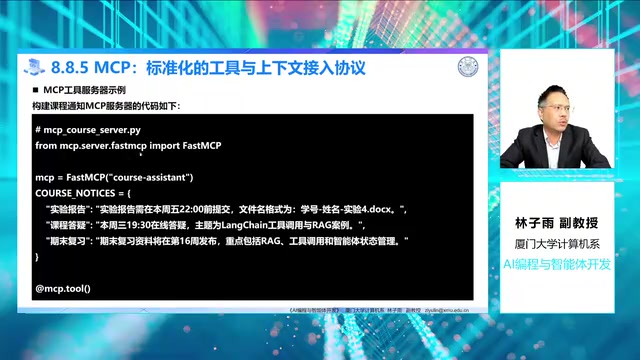
A comprehensive guide to MCP protocol for standardized AI agent tool integration.
This article explains MCP (Model Context Protocol), an open standard by Anthropic for connecting AI agents to external tools and resources. It covers MCP's three-role architecture (Server, Client, Agent Framework), demonstrates building an MCP server with FastMCP, shows how to load MCP tools in LangChain, and provides three practical design recommendations for engineering teams.
In the practice of AI agent development, tools are the critical bridge connecting large language models to the outside world. In his course AI Programming and Agent Development, Professor Lin Ziyu of Xiamen University provides an in-depth explanation of MCP (Model Context Protocol), an open standard that reveals how agents can evolve from "local tools" to a "tool ecosystem." Based on the course content, this article systematically covers MCP's core value, architectural components, and engineering practices.
Why Do We Need MCP?
In frameworks like LangChain, we typically use the @tool decorator to define tools directly in the project code — whether it's a calculator, date processor, or file writer. LangChain is an open-source framework created by Harrison Chase in 2022, specifically designed for building applications based on large language models. It provides core abstractions such as Chains, Agents, Memory, and Retrieval, enabling developers to combine LLMs with various data sources and tools into complex application workflows. Its @tool decorator mechanism allows developers to declare any Python function as a tool callable by the LLM, with the framework automatically extracting tool description information from the function signature and docstring for the model to reference during reasoning. While this approach is convenient for learning and rapid experimentation, it presents clear bottlenecks in real-world systems.
Professor Lin raises a key question: if the same database query capability, file retrieval capability, or course management interface needs to be used simultaneously by multiple agent applications, multiple IDE assistants, or multiple desktop clients, does every application really need to write its own tool wrapper from scratch?
The answer is obviously no. MCP is an open protocol born precisely to solve this kind of problem. MCP was officially released and open-sourced by Anthropic in November 2024, aiming to address the fragmentation of integration between LLM applications and external data sources and tools. Before MCP, every AI application had to write custom integration code to connect to external systems, resulting in massive duplication of effort and incompatible interface implementations across the industry. MCP borrows from the idea of USB ports unifying hardware connections, attempting to provide a universal "plug-and-play" standard for AI applications. The protocol uses JSON-RPC 2.0 as its underlying communication format and supports two transport methods: stdio and SSE.
Think of MCP as a standard interface for LLM applications to connect to external capabilities. It doesn't replace LangChain, nor does it replace the LLM itself. Instead, it specifies how external systems' tools, resources, and prompts can be exposed in a unified manner. This way, agent applications don't need to care whether a given capability is backed by a local function, a database, a file system, or a remote business service — they simply discover and invoke it through the protocol.
Comparing Local Tools vs. MCP Tool Integration
The course systematically compares the two approaches, helping us understand when each is appropriate:
| Dimension | Local Custom Tools | MCP Tool Integration |
|---|---|---|
| Tool Location | Written in the current project code | Hosted by independent MCP servers, reusable by multiple clients |
| Use Cases | Classroom experiments, single applications | Enterprise systems, cross-application ecosystems, IDE assistants |
| Integration Method | @tool decorator + type annotations + docstrings | Discovered via MCP protocol, then converted by adapters |
| Key Advantages | Direct implementation, simple debugging, few dependencies | Standardized interfaces, easy to reuse and govern |
| Key Costs | Coupled with application code, high reuse cost | Requires understanding MCP server and client configuration |
In short, local tools are great for quick experiments, while MCP is better suited for production environments that require engineered management.
MCP's Three-Role Architecture
To understand the relationship between MCP and LangChain tools, we can break it down into three roles:
- MCP Server: The capability provider, responsible for exposing tools, resources, or prompts from external systems. For example, a course materials server might provide capabilities like querying announcements, reading lab requirements, and fetching course syllabi.
- MCP Client: The capability consumer, responsible for connecting to servers, discovering available capabilities, and initiating calls.
- Agent Framework (e.g., LangChain): Responsible for incorporating these capabilities into the execution workflow, letting the model choose tools at the appropriate moment.
MCP servers typically expose three types of content: tools (executable actions, such as querying announcements or writing files), resources (readable context materials, such as course syllabi or configuration files), and prompts (reusable prompt templates). For beginners, tools are the easiest entry point since they're most similar to the LangChain tool concept.
The design philosophy of this three-layer architecture is highly similar to the "service provider – service consumer – orchestration layer" pattern in microservices architecture. The MCP server is analogous to a service node in microservices, the MCP client to a service consumer, and the LangChain agent plays the role of the business orchestration layer. This decoupling allows each layer to evolve independently — servers can upgrade tool logic independently, clients can freely switch which servers they connect to, and the framework layer can flexibly orchestrate tools from different sources.
Hands-On: Building a Course Notification Server with FastMCP
The course provides a simplified server-side example that wraps course notification queries as an MCP tool. The core code is built on the FastMCP framework. FastMCP is a high-level wrapper framework for building MCP servers that dramatically simplifies the implementation complexity of the MCP protocol. Developers don't need to manually handle JSON-RPC message parsing, capability negotiation, or protocol handshaking — they simply declare tools, resources, and prompts via decorators. FastMCP's design philosophy is similar to what FastAPI is for HTTP servers — providing a clean declarative API while automatically handling serialization, validation, and protocol compatibility.
from mcp.server.fastmcp import FastMCP

mcp = FastMCP("course-assistant")
course_notice = {
    "实验报告": "实验报告需要在本周二12点之前提交",
    "课程答疑": "本周三19点半答疑",
    # ...
}

@mcp.tool()
def query_course_notice(topic: str) -> str:
    """根据主题查询课程通知"""
    if topic in course_notice:
        return course_notice[topic]
    return f"未找到主题,当前可参与主题包括:{'、'.join(course_notice.keys())}"

if __name__ == "__main__":
    mcp.run(transport="stdio")
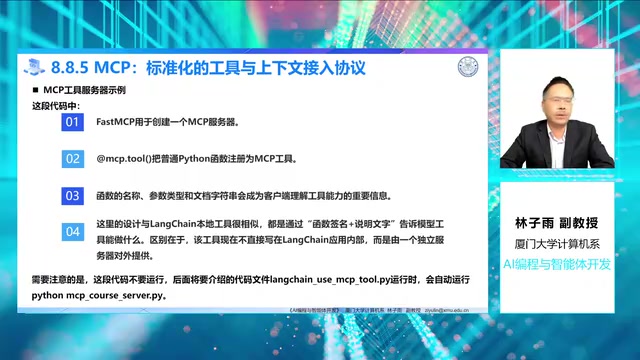
There are several key points in this code worth highlighting:
First, the @mcp.tool() decorator registers a regular Python function as an MCP-exposed tool. FastMCP automatically reads the function name, parameter type annotations, and docstring to generate the JSON tool description required by the MCP protocol. Professor Lin specifically emphasizes: the docstring is crucial, because MCP passes this annotation directly to the LLM as the tool description. The model relies on this text to understand the tool's purpose and parameter meanings — never delete it carelessly. The essence of this mechanism is leveraging the LLM's natural language understanding capability — the model reads tool descriptions to determine whether the current user intent matches a given tool, so the accuracy and clarity of the description directly determine the success rate of tool invocation.
Second, transport="stdio" indicates the use of standard input/output communication mode. JSON-RPC 2.0 is a lightweight remote procedure call protocol that uses JSON format to encode request and response messages. Each message contains a method name, parameters, and a unique identifier, supporting both one-way notifications and request-response patterns. In stdio transport mode, the client writes JSON-RPC requests to the server process via stdin and reads responses via stdout, enabling inter-process communication without HTTP ports. The advantage of this approach is that it requires no network port binding, offers higher security, and naturally supports local deployment scenarios. In contrast, MCP also supports SSE (Server-Sent Events) mode, which uses HTTP long-polling connections for server-to-client message pushing, suitable for remote or cloud deployment scenarios.
A small detail worth noting: this server script does not need to be started manually — the client will automatically spawn the process when it runs.
Loading MCP Tools with LangChain: The Complete Workflow
With the server in place, LangChain can load tools through an MCP adapter. The core client logic is as follows:
from langchain_mcp_adapters.client import MultiServerMCPClient
from langchain.agents import create_agent
from langchain_ollama import ChatOllama

async def main():
    client = MultiServerMCPClient({
        "course": {
            "command": "python",  # 后续会改为 sys.executable
            "args": ["mcp_course_server.py"],
            "transport": "stdio"
        }
    })
    tools = await client.get_tools()
    model = ChatOllama(model="gemma3:4b")
    agent = create_agent(model=model, tools=tools)
    result = await agent.ainvoke(...)
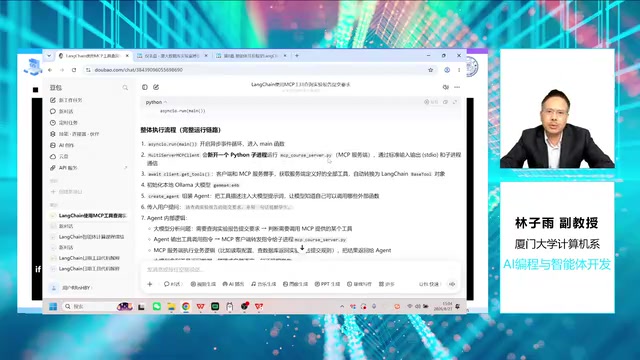
MultiServerMCPClient can connect to one or more MCP servers, and get_tools() automatically performs the handshake and converts MCP tools into LangChain-compatible Tool objects. The ChatOllama used in the code is LangChain's wrapper for the Ollama runtime. Ollama is an open-source local LLM runner that supports downloading and running various open-source large language models on personal computers, including the Llama, Gemma, Mistral, and Qwen series. It encapsulates underlying details like model quantization, memory management, and GPU acceleration, providing a Docker-like command-line experience. The gemma3:4b used in the course is the 4-billion-parameter version of the Gemma 3 series released by Google DeepMind. After quantization, it runs smoothly on consumer-grade GPUs, balancing reasoning capability with resource efficiency.
The complete execution flow is: the client spawns a new Python subprocess to run the server script → performs a JSON-RPC handshake to retrieve the tool list → initializes the local Ollama model → assembles the agent → the LLM analyzes the question and decides to invoke a tool → the client sends the invocation request to the server via the stdio pipe → the server executes the business logic and returns the result → the model organizes the result into a natural language response.
Debugging Pitfall: Interpreter Path Issues in Virtual Environments
During the course demonstration, an interesting debugging detail emerged: the program threw a ModuleNotFoundError on its first run. After investigation, the cause was that the code specified command: "python", which resolved to the global Python installation on the C drive (where MCP was not installed) rather than the virtual environment's interpreter.
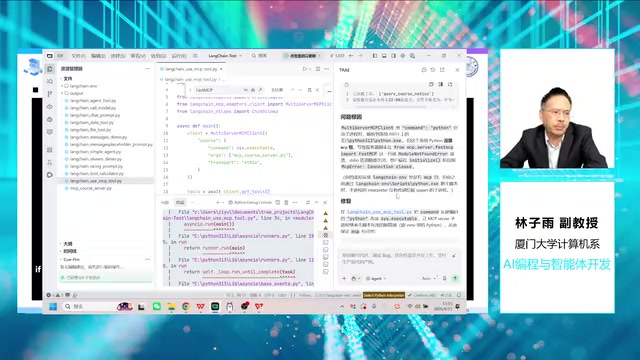
This issue involves a core mechanism of Python virtual environments. Python virtual environments (such as venv and conda) modify the PATH environment variable to prioritize a specific directory's Python interpreter and packages. When the main script runs within a virtual environment, sys.executable points to the interpreter path inside the virtual environment. However, when launching a subprocess via subprocess or similar mechanisms, if "python" is written directly as the command, the operating system re-searches the PATH environment variable and may find the globally installed Python rather than the virtual environment version, causing the subprocess to be unable to access third-party packages installed in the virtual environment.
The solution is to change command from the hard-coded "python" to sys.executable, so the MCP server subprocess inherits the same interpreter used by the main script, ensuring that MCP packages installed in the virtual environment are available. This detail reminds us: when working with virtual environments, always ensure subprocesses use the correct Python interpreter. The course also demonstrated how to use AI coding assistants (Doubao/Trae) to automatically diagnose and fix such errors — a typical workflow in the AI programming era.
The Essence of MCP: Changing How Tools Are Provided, Not the Mechanism
From this example, it's clear that MCP does not change the fundamental mechanism of agents — "model decision + tool execution." The model is still responsible for understanding the problem, determining whether a tool is needed, and composing the answer; tools still handle deterministic operations. What MCP changes is how tools are provided — tools no longer have to be defined locally by the current application but can be provided in a standardized way by independent servers.
Furthermore, the "C" (Context) in MCP's name reminds us that it's not just about calling functions — it also encompasses providing context materials to the model. This context may come from user input, conversation history, web files, databases, or knowledge bases. MCP uses a unified protocol to describe these resources, enabling different AI applications to discover and read context in a consistent manner. This naturally complements the concept of RAG (Retrieval-Augmented Generation). RAG is a technical paradigm that combines external knowledge base retrieval with LLM generation. Its core approach is to retrieve relevant document fragments from vector databases or search engines before the model generates a response, injecting these fragments as context into the prompt so the model can generate more accurate answers based on real data. MCP can serve as a standardized interface for the context acquisition layer in RAG systems, providing retrieved documents, database records, and other resources to agent frameworks through a unified protocol.
Three Design Recommendations for MCP Engineering Practice
Professor Lin concludes with practical engineering advice:
First, decide whether to use MCP based on reuse value. A simple calculator tool can be written as a local tool; only capabilities that need to be shared across multiple applications (such as database access, file retrieval, or enterprise system interfaces) are worth turning into MCP servers. This principle aligns with the software engineering philosophy of "don't over-engineer" — abstraction should be introduced when reuse needs actually arise, not preventively to add architectural complexity.
Second, pay serious attention to tool docstring descriptions. When the model selects a tool, it reads the tool name, parameters, and docstring. Vague descriptions (like "query information") make it difficult for the model to judge when to invoke a tool; clear descriptions (like "query course notifications by topic") can significantly improve invocation accuracy. In practice, an excellent tool description should include three elements: a functional overview of the tool, the meaning and value range of parameters, and the format of the return value. This is essentially writing a concise API document for the LLM, helping it make accurate selection decisions among many tools.
Third, maintain security boundaries and implement proper access control. MCP makes it easier to integrate external capabilities, which also means tool permissions must be carefully managed. Any tool involving file writing, database modification, network requests, or system commands should have restricted parameter ranges, call logging, and where necessary, a Human-in-the-Loop confirmation mechanism. The closer a tool is to a real business system, the more attention should be paid to "should it be called" rather than just "can it be called." This security philosophy is known as the "principle of least privilege" in the AI Agent field — agents should only be granted the minimum tool permissions necessary to complete the current task, and any operation with side effects should go through an additional verification layer.
Summary: The Learning Path from Local Tools to Tool Ecosystems
For beginners, the most natural learning path is: first master LangChain local tools and understand how tool descriptions influence model selection; then learn how MCP decouples tools from local code; and finally combine MCP with RAG retrieval, long-term memory, and other capabilities into more complete agent systems.
Overall, MCP can be seen as an engineering extension of LangChain's tool mechanism — LangChain is responsible for organizing the agent's reasoning and execution workflow, while MCP is responsible for allowing external tools and context to plug into that workflow in a standardized way. Understanding this division of labor is a key step in moving from single-application development to tool ecosystem development. As the MCP ecosystem grows, a large number of open-source MCP servers have already emerged, covering common scenarios such as GitHub repository operations, Slack message management, PostgreSQL database queries, and file system access. Developers can directly reuse these community-contributed servers to quickly equip their agent applications with rich external capabilities, without writing integration code from scratch.
Related articles

Fifty Years Studying Power: Robert Caro's Writing and Insights on Power
Robert Caro reflects on 50 years studying power: Lyndon Johnson's persuasion and leverage, Robert Moses's transformation from idealist to ruthless builder, the dilemmas of large-scale construction, and his methods of compressing themes and solitary focus in biography writing.

Can a $20,000 Robot Do Your Chores? The Test Results Are Surprising
A YouTube test video shows how a $20,000 robot responds to commands like washing dishes, turning off lights, taking out trash, and feeding the dog. This article analyzes its real capability boundaries, the state of voice interaction technology, and how far household robots are from mainstream adoption.
The Complete Guide to Running AI Models Locally: Inference Engines and Tool Stack Explained
A systematic breakdown of the complete local LLM tool stack: from PyTorch and GGML compute libraries to llama.cpp, vLLM, SGLang inference engines and Ollama, LM Studio wrapper layers, with benchmark data on performance differences and selection logic.