Microsoft Copilot Adds Code Tab: Build Apps with Natural Language

Microsoft Copilot's new Code tab lets ordinary employees generate working apps using natural language.
Microsoft Copilot launched a Code tab that lets users describe requirements in natural language and, after follow-up questions, directly generate working apps with live preview—no IDE switching or deployment knowledge needed. With permission, Copilot can read emails, meetings, documents, and chat records to infer details, essentially using AI for data integration and requirements clarification. Apps can run locally, deploy to Microsoft Cloud for teams, or move to GitHub for larger projects. Currently an early Frontier preview requiring a Copilot license and admin enablement, the article notes technical feasibility is no longer the main obstacle—permission boundaries, deployment environments, and maintenance responsibilities are the real dividing line for enterprise adoption.
Microsoft Copilot is taking app-building out of developers' hands and giving it to any ordinary employee who can describe what they need in natural language. According to a YouTube Shorts video, Copilot's new Code tab lets users describe what they want—say, a dashboard—and Copilot asks a few follow-up questions before building a working app directly, complete with a live preview.
From Description to Live Preview
The interaction flow is straightforward: users describe their goal in natural language, Copilot fills in the gaps through follow-up questions, then generates the app and displays a live preview within the same interface. This means users don't need to switch to a separate IDE or development environment, and they don't need to understand frameworks or deployment processes—what they see is the final result.
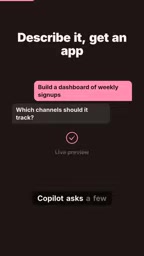
This "conversation-as-development" model compresses the traditional development stages of requirements gathering, prototyping, and coding into a single continuous dialogue. For scenarios that only need a small tool—an internal data dashboard, a simple workflow helper—this path has noticeably less friction than scheduling developer time.
Live Preview is a common mechanism in low-code/no-code platforms: after users modify requirements or code, the system instantly renders the app's interface and interactions without manual compilation, refresh, or deployment. Its technical implementation typically relies on a sandboxed runtime environment within the browser (such as an iframe or WebContainer), executing the generated code in an isolated environment and returning the rendered results. For non-developers, live preview eliminates the feedback delay of "you can only see the result after writing it," greatly reducing the cost of trial and error. For the platform, it requires balancing security isolation with rendering performance to prevent user code from affecting the host page.
Data Access: Permission as Prerequisite
Microsoft says that, with permission, Copilot can access users' emails, meetings, documents, and chat records to fill in missing details. This is the key to whether such tools are truly usable: many internal tools are hard to build not because the logic is complex, but because data is scattered across multiple systems that need to be connected one by one.
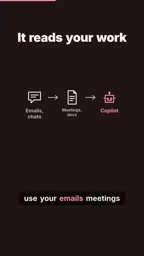
Having Copilot infer requirements from existing context essentially means using AI to handle the two most labor-intensive tasks: "data integration" and "requirements clarification." Of course, this requires a clear enough permission system so users know exactly what data is being read and where it's used.
Emails, meetings, documents, and chat records are office data assets uniformly exposed by Microsoft Graph, with content readable by third-party or internal apps controlled through the OAuth 2.0 authorization framework and granular permission scopes. In enterprise scenarios, these permissions are typically configured centrally by administrators through Entra ID (formerly Azure AD) and constrained by data loss prevention (DLP) and compliance policies. For Copilot to fill in requirements based on this data, it essentially performs retrieval-augmented generation (RAG) within authorized scopes: first retrieving relevant context, then letting the model infer user intent. Therefore, the clarity of permission boundaries directly determines whether this feature can pass enterprise security review.
Deployment Destinations and Project Scale
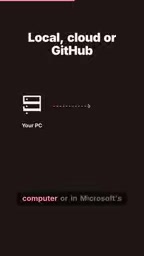
Generated apps can run on users' own computers or be deployed to Microsoft Cloud for team use; larger projects can go to GitHub. This tiered design shows that Microsoft doesn't intend for this feature to stay at the "personal tool" level—it has reserved a path for migration to team collaboration and formal engineering.
From a product positioning standpoint, this directly targets cloud-based code generation tools, but the target audience is completely different: not professional developers, but people who don't write code at all. This also explains why Microsoft put the entry point inside Copilot rather than building a separate development platform—it wants to cover the workflows of existing office suite users.
"Local run" and "cloud deployment" correspond to two different runtime forms: local run typically means the app executes in a sandbox or lightweight container on the user's device, with data staying on the machine—suitable for personal validation; cloud deployment is platform-hosted, with an accessible URL, authentication, and team sharing capabilities, but it needs to be integrated into the enterprise's network and compliance systems. Moving to GitHub means the output is exported as a standard code repository that can be integrated into CI/CD, code review, and version management processes. This tiering essentially strings together "personal prototype—team tool—formal engineering" into a progressive path, allowing apps produced by non-developers to smoothly hand off to professional engineering systems as they scale.
Barriers and Limitations: Early Preview
This feature isn't available out of the box. It's an early preview in the Frontier program, requiring users to hold a Copilot license and administrators to enable it manually. These two barriers mean that few people can actually use it in the short term, and enterprise IT controls remain an unavoidable step.
Early preview also means capabilities and stability are still being refined. For teams interested in trying it, a more practical approach is to validate in low-risk scenarios first—such as internal tools that don't involve sensitive data—rather than taking on critical business processes right away.
The Frontier program is Microsoft's early access initiative for letting users preview features not yet broadly available. Its features are typically experimental, with interfaces, capabilities, and availability subject to change at any time, and without the service level agreements (SLAs) of formal products. Unlike general public previews, Frontier features often require administrators to explicitly enable them at the tenant level and may require specific license combinations. The significance for enterprises: such features don't automatically enter employee workflows by default, and IT departments retain the decision on whether to allow them, enabling them to evaluate risks within a controlled scope before deciding on rollout pace.
Who Is Responsible for AI-Generated Apps
The question raised in the video deserves serious consideration: would you trust an app your colleague built with AI? When the person building the app lacks code review skills and the app needs to access data like emails, meetings, and documents, the basis for trust is no longer "who wrote it" but whether permission boundaries, deployment environments, and subsequent maintenance responsibilities are clear.
This is also the real dividing line for such tools when they land in enterprises. Technical feasibility is no longer the main obstacle—whether a mechanism can be established that lets non-developers use it safely and gives IT departments the confidence to approve it is what determines how far it goes.
One-line Summary
Microsoft Copilot adds a Code tab that lets ordinary employees generate working apps using natural language.
Paragraph Summary
Microsoft Copilot has launched a Code tab feature that allows users to describe requirements in natural language, then after follow-up questions fill in details, directly generate a working app with live preview—no need to switch IDEs or understand deployment processes. With permission, Copilot can read emails, meetings, documents, and chat records to infer requirement details, essentially using AI to handle data integration and requirements clarification. Generated apps can run locally, be deployed to Microsoft Cloud for team use, or move to GitHub for larger projects, forming a tiered path from personal tools to formal engineering. The feature is currently an early preview in the Frontier program, requiring a Copilot license and administrator enablement. The article notes that technical feasibility is no longer the main obstacle—permission boundaries, deployment environments, and maintenance responsibilities are the real dividing line for enterprise adoption.
Related articles

T3 Code: The Open-Source AI Coding Assistant's Comeback Story
T3 Code is an open-source AI coding assistant that unifies subscriptions like Codex and Claude, with powerful remote control and parallel task management.

Never Elected, Yet Ruled New York for 30 Years: The Ultimate Case Study in the Mechanics of Power
Robert Caro's biographies reveal how unelected Robert Moses ruled New York for 30 years through legal drafting and public authorities, and how Lyndon Johnson built leverage as a "powerless" Senate Majority Leader. Unpacking the underlying logic of accumulating and sustaining power.

The CPython 3.10 Recursion Trap and Synthetic Recovery in TokenGuard, an LLM Circuit Breaker
TokenGuard's author recounts a recursion crash caused by OrderedDict.pop in CPython 3.10 and introduces v0.3.0's Loop Nudge synthetic recovery, inline DLP scanning, and other new LLM agent circuit-breaker capabilities.