No API Key Required: Building an Automated Bookkeeping Workflow with n8n

Build an automated payment tracker in n8n using Gmail and Google Sheets — no API keys needed.
This article walks through a zero-barrier automated bookkeeping solution built with n8n: using OAuth credentials instead of manual API keys to connect Gmail and Google Sheets, with lightweight JavaScript parsing payment data from emails and writing structured records into a spreadsheet. The four-node workflow — date range filter, Gmail query, JavaScript parsing, and Sheets write — requires no LLMs and suits freelancers, small merchants, and n8n beginners looking for a low-friction way to automate payment reconciliation.
Why n8n Doesn't Always Need an API Key
Many people who are new to n8n automation get discouraged by all the API key configuration involved. In reality, not every n8n workflow requires that kind of setup. Thanks to n8n's built-in Credentials mechanism, popular services like Gmail and Google Sheets can be connected directly via OAuth authorization — no need to manually apply for or enter standalone API keys, and no large language models (LLMs) required.
This article is based on a YouTube demo that shows how to build a real-world automated bookkeeping workflow using n8n. The scenario is straightforward: a merchant collects payments online, and all payment notifications flow into their Gmail inbox. The goal is to automatically organize the payment details from those emails — filtered by a specific date or date range — into a clean, structured spreadsheet.
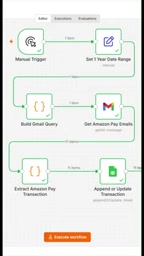
What makes this approach valuable is its near-zero barrier to entry: no API keys, no LLMs — just Gmail reading and Google Sheets writing to build a fully functional financial tracking tool.
Core Components of the Workflow
As demonstrated in the walkthrough, this automation consists of a few key parts:
Date Range
The first step is defining the time window for data retrieval. You can specify a single date or a date range. This determines which emails get pulled in downstream, and serves as the filtering baseline for the entire bookkeeping logic.
Gmail Query and Credentials
Next comes the Gmail node configuration. This requires enabling a Gmail credential connection — meaning you complete the account binding through n8n's authorization flow, not by manually entering an API key. Combined with a search query, the workflow can precisely target emails containing payment information.
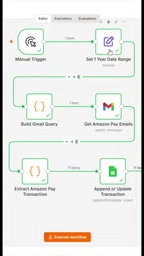
It's worth saying more about n8n's OAuth credential mechanism. Unlike traditional API integrations, OAuth (Open Authorization) lets users sign in directly with their Google account, with Google issuing an access token that n8n automatically manages and refreshes in the background. Users never have to touch any string-based secret keys. In the n8n interface, when you configure a Gmail node for the first time and click "Create new credential," a Google authorization page appears. Once authorized, the credential is saved in your n8n instance and can be reused by any node that references it — no need to re-authorize. This same mechanism applies to Google Sheets, Google Drive, Google Calendar, and other Google ecosystem services, making it one of n8n's most user-friendly features for non-technical users.
JavaScript Processing Node
The raw email data fetched from Gmail needs to be cleaned and structured. The demo uses a JavaScript snippet to extract a structured list of payments from the email content — essentially transforming messy email bodies into readable fields like date, merchant, ID, and subject. This highlights n8n's flexibility: when built-in nodes fall short, you can use a code node for custom processing.
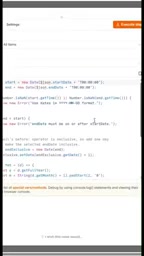
n8n's built-in Code node (formerly called the Function node) supports writing JavaScript or Python directly, running in a sandboxed environment. Its core value lies in bridging gaps where built-in nodes hit their limits — for complex string parsing, regex matching, array deduplication, or custom data structure transformations, the Code node can directly operate on n8n's $input.all() data stream and return standardized JSON objects for downstream nodes. In email parsing scenarios, payment notification formats often vary by sender, so JavaScript regex can flexibly extract key fields like amounts, timestamps, and transaction IDs. However, this also means the parsing logic needs to be debugged and maintained against specific email templates — a significant investment point when scaling this kind of solution.
Google Sheets Write
The structured data is finally written into a pre-prepared spreadsheet. Each time the workflow runs, the sheet updates with new payment records based on the configured fields, building up a continuously growing ledger of incoming payments.
What It Looks Like in Action
Once configured, a single click to execute runs the entire flow automatically: read Gmail messages within the specified date range → parse payment details with JavaScript → write to Google Sheets.
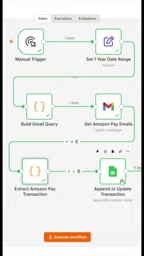
The resulting spreadsheet includes columns like date, merchant, ID, and subject — giving you a clear view of every online payment received. For small and medium-sized businesses, this means no more manually digging through emails or copy-pasting into Excel. You get an automatically updated payment ledger with minimal effort.
Who Is This For?
The biggest highlight of this use case is how it lowers the technical barrier to automation. It's especially well-suited for:
- Individual merchants and freelancers: Payment notifications are scattered across their inbox and need to be periodically consolidated for reconciliation.
- n8n beginners: Those who want to quickly experience the value of automation without getting bogged down in complex API application processes from the start.
- Lightweight financial scenarios: Payment tracking needs with relatively small data volumes and fixed logic.
It's worth being realistic: the demo is a proof of concept. The robustness of the JavaScript parsing logic, compatibility with different email formats, and handling of duplicate records all require further refinement before production use. But as a starter template, it clearly proves a point: automation doesn't have to be expensive or complicated. With the right use of existing email and spreadsheet tools, you can solve real business problems.
Wrapping Up
n8n's real strength is connecting disparate tools through a visual workflow. While this bookkeeping example is relatively simple, it demonstrates a practical path forward — using Gmail as a data source, Google Sheets as the output, and a small amount of JavaScript for intermediate processing, all without relying on API keys or LLMs. For anyone looking to take their first step into automation, this is a starting point worth replicating hands-on.
Related articles
Build a Reasoning Model from Scratch: An 11-Hour Open-Source Course Breakdown
Sebastian Raschka releases a free 8-episode, ~11-hour video course teaching you to build a reasoning model from scratch with Python and PyTorch—from a small Qwen3 model through Verifier, Inference Time Scaling, GRPO, and distillation, with open-source code on GitHub.

An 11-Hour Reasoning Model Course in Practice: How Small Models Learn to Think
Starting from Sebastian Raschka's 11-hour reasoning model course and HN buzz, this analyzes small-model training, legal text version control, Anthropic data policy, and product reliability reviews.

Lightpanda: A Headless Browser Built for AI and Automation
Lightpanda is a headless browser built from scratch in Zig for AI and automation, with 37,852 GitHub stars. This analysis covers its technical approach, design choices, and use cases.