Ollama vs LM Studio vs Llama.cpp: How to Choose the Right Local AI Deployment Tool

Bionic for beginners, Ollama for transition, Llama.cpp for pros — a practical guide to local AI deployment tools.
This article compares three popular local AI deployment tools: Bionic stands out for its pure GUI and smart hardware recommendations, making it ideal for beginners with built-in MCP support; Ollama sits in a hybrid GUI+CLI middle ground, best suited as a transitional tool; Llama.cpp is the foundational layer behind both, offering pure CLI operation, near-universal GGUF model support, and maximum flexibility — but with a steeper learning curve. The recommendation: beginners start with Bionic, experienced developers go straight to Llama.cpp.
As AI large language models become increasingly mainstream, more developers want to run models locally — free from token fees and subscription costs. But with tools like Bionic, Ollama, and Llama.cpp all competing for your attention, how do you choose? This article breaks down the core differences between these three popular local deployment tools based on real-world usage.
Bionic: The Best Entry Point for Beginners
Bionic is the most beginner-friendly local deployment tool available, with its standout strengths being visual operation and intelligent hardware adaptation.
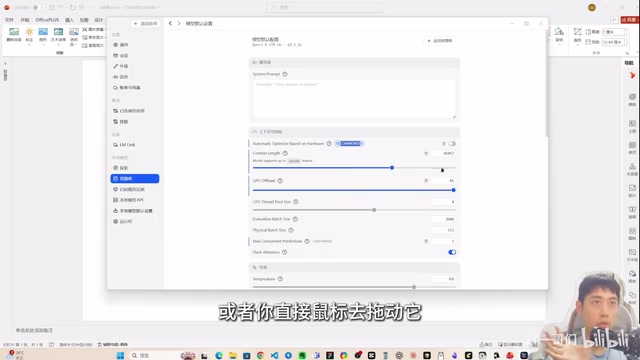
With Bionic, you can deploy models without writing a single line of code. The interface clearly displays a range of LLMs (such as ChatGLM, Gemini, Mistral, and more), and a single click on "Download & Use" is all it takes to get started. What makes it especially user-friendly is that it automatically recommends model versions based on your hardware — particularly your GPU — and labels them with a "Recommended" tag.
Configuration is equally streamlined: sliders let you adjust VRAM usage, context length, and other key parameters without needing to understand the underlying technology. Bionic also has built-in agent functionality, supporting MCP (Model Context Protocol) and skill extensions, so you can directly enable plugins already installed in tools like Claude Desktop or Cursor.
Best for: AI enthusiasts with no coding background who want to get up and running quickly.
Ollama: A Middle Ground Between GUI and CLI
Ollama occupies an awkward position among the three. While it does offer a graphical interface, core functionality still relies on the command line.
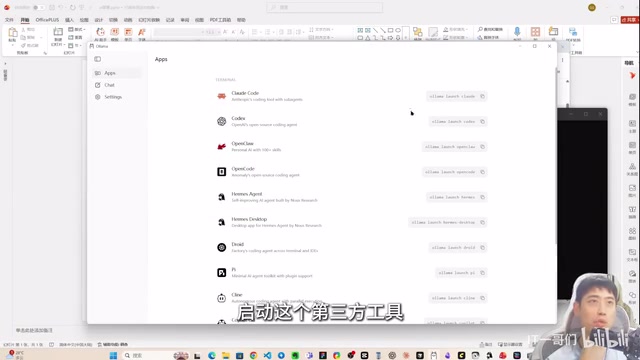
To download a model, you need to visit the Ollama website to find the model name, copy the install command, and then run it in a terminal. This hybrid "GUI + CLI" approach feels inconsistent — if there's already a graphical interface, why isn't model downloading integrated directly into it? The design feels disjointed.
That said, Ollama does have some genuine strengths:
- Easy third-party agent integration: Launching something like DeepSeekAd Coder and connecting it to a local model requires just one command copied into the terminal
- Cloud deployment service: Offers a free tier, letting users experiment with certain models without local hardware
However, neither of these is a must-have. Agent integration can be handled with a one-time configuration in other tools, and the free cloud tier comes with limited model performance. Overall, Ollama works best as a transitional tool — bridging the gap between GUI-based and CLI-based workflows.
Best for: Users with basic command-line familiarity who still want some graphical assistance.
Llama.cpp: The Ultimate Tool for Professional Developers
Llama.cpp is the most compelling option for experienced developers, with three defining strengths: purity, compatibility, and flexibility.
First, an important fact worth stating upfront: both Bionic and Ollama are built on top of Llama.cpp. As the foundational layer, Llama.cpp has no extras — no model community, no download portal, no account registration required. It does one thing and does it well: deploying and running models efficiently.
Loading and launching models via command-line commands is straightforward and efficient. While the CLI approach has a learning curve for newcomers, experienced developers will find it more controllable and transparent.
Model Compatibility Is Where It Truly Shines
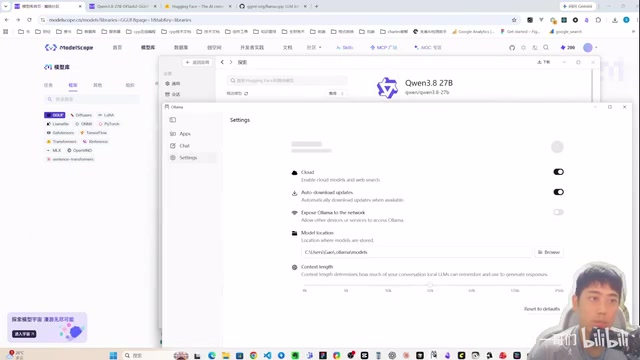
Llama.cpp supports the widest range of models of the three. Nearly every GGUF-format model on ModelScope and Hugging Face runs on it directly. Bionic and Ollama, by contrast, require individual adaptation for each model before it can be supported.
To put it simply: any model that runs on Bionic will definitely run on Llama.cpp, but not every model supported by Llama.cpp is available on Bionic or Ollama.
A Higher Technical Bar to Clear
Llama.cpp does come with steeper onboarding requirements. Some models require a specific version or branch of Llama.cpp, which means manually switching Git branches and compiling the code locally. For users unfamiliar with Git workflows and build processes, this is a significant hurdle.
Best for: Developers with programming experience who prioritize flexibility and maximum model compatibility.
Comparison Summary and Recommendations
| Dimension | Bionic | Ollama | Llama.cpp |
|---|---|---|---|
| Learning Curve | ⭐ Very Low | ⭐⭐ Moderate | ⭐⭐⭐ High |
| Model Compatibility | Limited (requires adaptation) | Limited (requires adaptation) | Widest (GGUF universal) |
| Interface | Pure GUI | GUI + CLI hybrid | Pure CLI |
| Flexibility | Moderate | Moderate | Highest |
| Agent Integration | Built-in support | Easy connection | Manual configuration |
Specific recommendations:
- Beginners → Bionic: Zero barrier to entry, visual controls minimize the learning curve
- Intermediate users → Ollama: Good for gradually getting comfortable with command-line workflows
- Professional developers → Llama.cpp: Maximum flexibility and compatibility, highest long-term payoff
More powerful tools generally come with higher learning costs. If you're new to local deployment, starting with Bionic is a smart move — build your foundation, then transition to Llama.cpp as your skills grow. For developers who already have a technical background, going straight to Llama.cpp will deliver the best long-term results.
Related articles

Vibe Coding Full-Stack in Practice: AI Programming from Beginner to Enterprise Deployment
From Cursor to Claude Code, this Bilibili AI programming course uses four progressive projects to cover full-stack development, open-source secondary development, and team collaboration. The article analyzes the shock to frontend roles, the efficiency shift from 50 people to 5, and the methodology required for enterprise-grade projects.

David Blaine's Global Quest for Real Magic: From South Africa to Japan and India
David Blaine travels to South Africa, Japan, and India in his Do Not Attempt special, documenting Spinning drivers, black mamba rescuers, iaijutsu masters, and ascetics—exploring the boundary between magic and real human极限 challenges.

Is a Touchscreen MacBook Coming? Vergecast Reveals Apple Executive's Response
Vergecast podcast reveals a conversation between a reporter and Apple executive John Ternus about a touchscreen MacBook and Apple Pencil support. Ternus says iPad is the best device for a stylus, while the reporter bets MacBook will eventually support Apple Pencil.