One Click of "Don't Ask Again" Sent 1,122 Claude Code Config Files to GitHub — Complete with Passwords

Claude Code's "Don't ask again" option writes plaintext keys into config files — 1,122 files leaked to GitHub.
The article reveals a systemic credential leak caused by AI coding tools' default behavior. When Claude Code's permission prompt is answered with "Yes, don't ask again," the tool writes the entire command — passwords, tokens, and API keys included — verbatim into a local config file, turning one-time input into persistent plaintext on disk. Worse, many developers only added the ignore rule to their personal global gitignore, not the project-level .gitignore, so collaborators' commits picked the file up normally and pushed it to public repos. Researchers found 1,122 config files with plaintext credentials on GitHub, and of 1,105 repositories investigated, 539 had sensitive-file changes co-authored by Claude. The prescribed response: rotate all exposed credentials, remove the file from version control with git rm --cached and add it to the project-level gitignore, and stop writing passwords directly on the command line.
A seemingly convenient "Don't ask again" button is quietly pushing developers' passwords and keys into public repositories. According to a Bilibili AI news report, 1,122 Claude Code configuration files containing plaintext passwords and keys have been found on GitHub — and the source of the problem is that confirmation option countless people click without a second thought.
How a Single Button Leaks Your Passwords
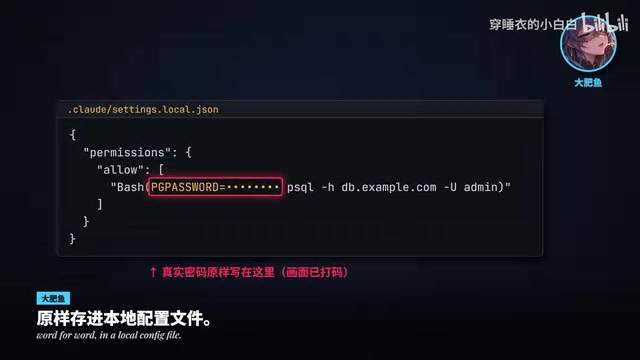
When Claude Code executes a command, it pops up a permission confirmation dialog. If you choose "Yes, don't ask again," the tool writes the entire command — including any passwords, tokens, and API keys it carries — verbatim into a local configuration file.
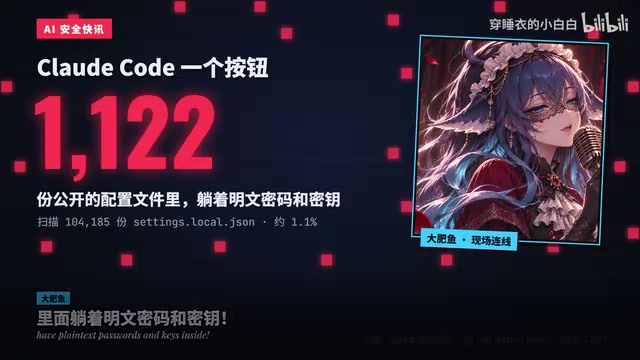
The original intent behind this design was to reduce repeated confirmations and boost developer efficiency. But the price of that convenience is this: sensitive information goes from a one-time terminal input to persistent plaintext storage on disk. In other words, you think you're just saving yourself a few confirmation clicks — but you're actually making a copy of your keys and leaving it in the project directory.
Why Local Files End Up on GitHub
Many people's first reaction is: this file is in my local ignore rules, so it won't get committed. That's exactly where the problem lies.
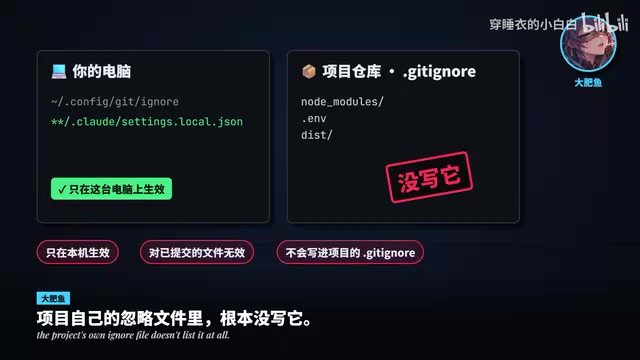
Developers add this ignore rule to their personal global gitignore, but it only takes effect on their own machine. The project's own .gitignore file has no corresponding rule, so when other collaborators clone the project or commit code from a different environment, the configuration file can be picked up normally into version control and pushed all the way to a public repository.

The boundary between global and project-level ignores is the most overlooked link in this leak incident. If a security configuration exists only in a personal environment, it's as good as no configuration at all.
Git ignore rules come in three tiers: project-level .gitignore, global-level (configured via core.excludesFile, typically located at ~/.config/git/ignore or ~/.gitignore_global), and the repository's .git/info/exclude. In terms of precedence, project-level rules are distributed with the repository and apply to all collaborators; global rules apply only to the current user's machine and are not passed along when the repo is cloned. Therefore, if a file is only ignored globally and not declared in the project .gitignore, other collaborators' commits will still pick it up via git add. Once a file enters the Git index, adding an ignore rule afterward won't automatically untrack it — you must explicitly remove it with git rm --cached. This is the fundamental reason security configurations must live in the project-level ignore file rather than relying on individual environment settings.
What the Data Reveals: 1,122 Files and 539 Commits
The researchers' tracking results give a more concrete sense of scale. There are 1,122 Claude Code configuration files on GitHub containing plaintext passwords and keys. Among the 1,105 repositories investigated, 539 had commits that modified this file with Claude listed as a co-author.
This data is worth reading closely: in nearly half of the repositories examined, changes to sensitive files were generated automatically by the tool. That means the leaks aren't the result of a few careless developers — they're a systemic risk arising from the tool's default behavior combined with the version control workflow. When an AI coding assistant "does the work" on someone's behalf, whatever it writes gets faithfully recorded by Git all the same.
"Co-authored-by" is a trailer convention in Git commit messages, formatted as Co-authored-by: Name <email>, commonly used to record pair programming or tool-assisted commits. GitHub parses this field and displays multiple author avatars on the commit page. When an AI coding tool executes git commit on the user's behalf and automatically appends its own co-author tag to the commit message, those commits leave evidence of the tool's involvement at the metadata level. It's precisely by leveraging this field that researchers were able to link "sensitive file modified" with "modification triggered by Claude," distinguishing human oversight from automatic tool behavior — and that's the technical precondition that made the number 539 countable.
After a Leak, Three Things to Do
If you use Claude Code and have clicked "Don't ask again," here's the recommended order of action.
Step one: Rotate every credential that was exposed. Replace all passwords, API keys, and access tokens that have ever appeared on the command line. Once plaintext enters a public repository, even if you delete it afterward, it may already have been scraped or cached — rotating is the only way to stop the bleeding.
Step two: Move the configuration file out of version control. Use git rm --cached to remove the file from the tracking list, and add it to the .gitignore in the project root. Note that this must be the project-level ignore file, not your personal global config.
Step three: Change your command habits. Don't write passwords directly into the command line. Switch to environment variables, a secrets management service, or interactive input so that sensitive information never enters command history or the tool's persistent records.
Credential rotation refers to issuing new credentials for an account or key and revoking the old ones without interrupting service. For API keys, this typically means generating a new key in the provider's console, updating the caller's configuration, and then deleting the old key; for passwords, all points of use must be updated in sync. The necessity of rotation lies in this: once plaintext enters a public repository, copies may persist in Git history, forks, mirror sites, and crawler caches — simply deleting the current file cannot retract information that has already leaked. A more thorough approach is to rewrite history using tools like git filter-repo or BFG, but even then you should treat the credentials as compromised — rotation always comes first when it comes to damage control.
Rethinking the Line Between Convenience and Security
The core of this incident isn't a defect in Claude Code as a product — it's a design tension that AI coding tools broadly face: the more automated a tool is, the more decisions it makes on the user's behalf, and those decisions may not align with every project's security baseline.
"Don't ask again" essentially shifts the responsibility for security confirmation from the tool to a one-time judgment by the user — but users often click confirm without the necessary context. For developers, this means re-examining AI tools' default behavior; for tool makers, reducing prompts should come with clearer protection for how sensitive content is written to disk.
That line between convenience and security deserves one more second of thought before you click confirm.
Related articles
 Tech Frontiers
MuJoCo: An Analysis of DeepMind's Open-Source General-Purpose Physics Simulator
An in-depth analysis of Google DeepMind's open-source physics simulator MuJoCo: high-performance C++ kernel, MJCF modeling format, contact solving principles, MJX GPU acceleration, and robot reinforcement learning use cases.
 Tech Frontiers
Claude API Quick Start: The Official Quickstarts Project Collection
Anthropic's official claude-quickstarts project collection helps developers quickly build deployable apps with the Claude API. Nearly 20k stars, Python-based, great for beginners and prototyping.
 Tech Frontiers
AI Agents Connecting Directly to APIs: Which Calls Can Be Safely Allowed?
AI agents can call any API, but the real challenge is deciding which calls can be safely allowed. This article analyzes allowance decisions from three dimensions—intent matching, least privilege, and controllable impact—and argues that the control layer should sit outside the agent, combined with audit traceability to build a trustworthy API call governance mechanism.