One-Click Takeover for Cursor/Devin/Kiro: A Hands-On Guide to the Codei Local AI Gateway
Codei uses a local transparent proxy to unify AI requests across multiple editors, with failover and remote development support.
Codei is an AI connector that runs on the developer's local machine. Through a local transparent proxy and certificate injection, it routes AI requests from editors like Cursor, Devin, and Kiro—as well as terminal tools like Claude Code, Codex, and Gemini CLI—to user-configured upstreams without any editor-side configuration changes. It supports both OpenAI-compatible and Claude protocols, with one-click model list sync, customizable display names and prices, and adjustable thinking intensity. Its core value is automatic failover: when an upstream is rate-limited or goes down, it switches sources imperceptibly without interrupting the conversation, covering chat, Agent, and tool-call traffic. In Remote SSH scenarios, remote traffic is tunneled back to the local machine—code on the server, models from the local source—and it also provides request-level token and latency accounting, usage statistics, and a diagnostics page. It suits complex multi-editor, multi-upstream setups; enterprise environments should evaluate certificate compliance.
The same AI capability gets split into three copies, configs get copied back and forth, and when an upstream goes down all you can do is wait—this is probably the daily reality of every developer who uses multiple AI editors at once. This episode on Bilibili introduces a local tool called Codei, and the idea is straightforward: run an AI connector on your own machine that routes requests from all your editors to the upstream sources you've configured. After watching the demo, I think what it solves isn't "one more feature" but "the missing infrastructure for the multi-editor era."
Core principle: a local transparent proxy, zero editor modification
Codei positions itself as "a local AI connector." It listens for requests locally, automatically converts the AI protocol emitted by the editor, and forwards it to your configured upstream—OpenAI-compatible endpoints, Anthropic's Claude protocol, and self-hosted services all work.
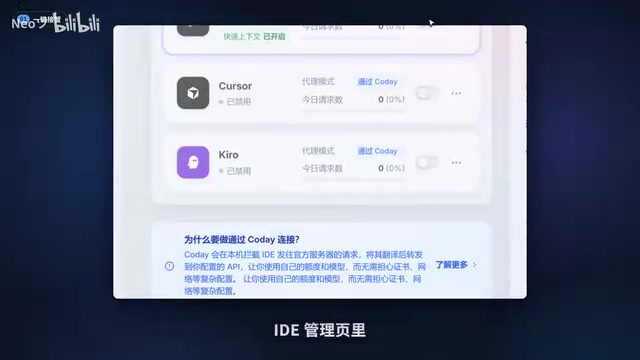
The most critical detail is that not a single line of editor-side configuration needs to change. It ships with an IDE management page where Devin, Cursor, and Kiro are taken over one by one, and when you return to the editor, the model list simply gains a whole new page. This is powered behind the scenes by a local transparent proxy plus certificate configuration—set it up once and everything is automatic from then on.
This means one thing: you don't have to edit each editor's settings just to switch sources, and you don't have to sync configs across different tools. The gateway adds a layer of abstraction—the editor only knows it, and it knows every upstream.
Transparent proxy and certificate injection: A transparent proxy means the client doesn't need to explicitly configure a proxy address; traffic is automatically redirected to the proxy server at the network layer. For Codei to make editors send requests to itself without changing editor configs, it typically relies on proxy settings at the system or environment level, along with man-in-the-middle (MITM) certificate injection for HTTPS traffic—that is, Codei generates a local root certificate and installs it into the system trust store, then uses it to dynamically issue certificates for target domains, thereby decrypting and forwarding the editor's AI requests. This is also why the article mentions "set it up once and everything is automatic," and why the "applicable boundaries" section reminds you that enterprise environments need to confirm certificate compliance: once a root certificate is trusted, it can theoretically decrypt the relevant HTTPS traffic on that device, which is a security boundary that needs careful evaluation.
Upstream and model management: from connectivity testing to one-click sync
Adding an upstream is lightweight: fill in the address, paste the Token, and both OpenAI-compatible and Claude protocols are recognized. Click test connectivity and it immediately tells you whether it connected and how many milliseconds the latency is.
After clicking sync, all upstream models are listed at once. Display names can be changed, prices can be custom-labeled, custom models can be added on the fly, and thinking intensity supports one-click adjustment from off to maxed out. If you want image generation, point image output at a separate image source; switch sources with one click and the models in the editor switch instantly—no restart needed.
The design orientation here is obvious: treat models as orchestration-ready resources rather than fixed options tied to a particular subscription.
OpenAI-compatible endpoints and the Claude protocol: An OpenAI-compatible endpoint refers to a service endpoint that follows the request/response format of OpenAI's Chat Completions or Responses API. Many third-party model services, self-hosted inference frameworks, and aggregation platforms provide this compatibility layer, so "fill in the address, paste the Token" is enough to connect. The Claude protocol, on the other hand, is the format of Anthropic's own Messages API, which differs from OpenAI in message structure, system prompt placement, and tool-calling fields. Codei supporting both protocols means it needs to do protocol conversion and model capability mapping internally, which is also the prerequisite for its ability to "one-click sync the model list, customize display names and prices, and adjust thinking intensity"—model metadata from different upstreams needs to be normalized into a unified management interface.
Automatic failover: when upstream goes down, conversations continue
This is the feature I consider the most valuable in the video. After turning on the automatic failover switch, if an upstream is rate-limited, throws errors, or even goes down entirely, Codei automatically switches traffic to the next source, and your conversation continues as usual, almost imperceptibly.
The demo at the start of the video is exactly this scene: the upstream has just gone down, but it's still printing characters, because the route was switched three seconds ago.
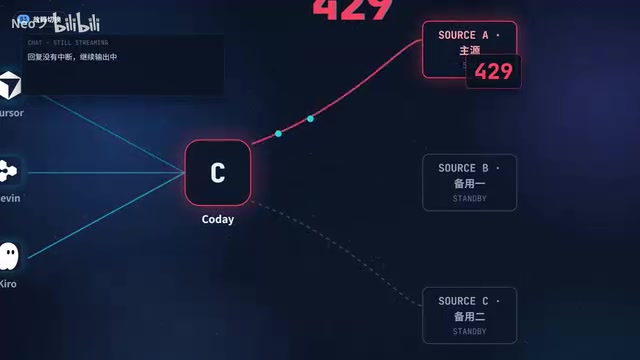
It doesn't just manage chat—all four traffic types including Agent and tool calls are covered. Rules can also be configured per editor: custom system prompts can replace or append, and the editor's built-in context is preserved. Each editor has its own identity and quota, clearly visible in the panel.
Remote development and the full CLI suite: code on the server, models locally
The handling of remote development scenarios is quite clever. When you use Remote SSH to write code on a server, the remote AI traffic is routed back to your local machine through a tunnel and still goes through your configured source, with automatic certificate injection and automatic link redirection. Linux remotes are currently supported.
In other words: the code runs on the server, but the models still use your local setup. For people who often write code in remote environments, this solves the old problem of "not being able to conveniently use your own subscription remotely."
CLI tools are managed the same way. The full suite in the terminal—Claude Code, Codex, Gemini CLI, and others—is under its management. Pick a source and write it into the config with one click, with an automatic backup made before writing so you can roll back anytime. MCP servers are managed in the same place too: check them and inject with one click, leaving the original config untouched.
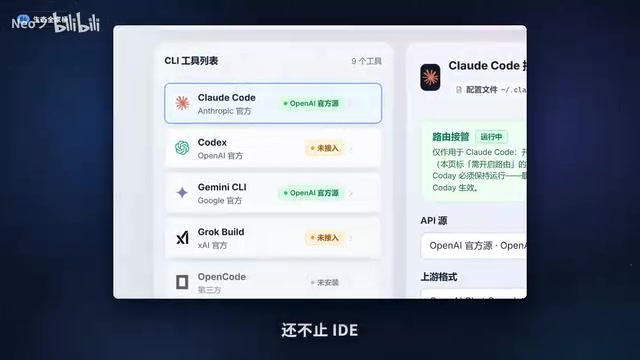
Remote SSH tunneling and CLI config injection: Remote SSH is the mode where editors like VS Code connect to a remote server over SSH and run the development environment on the remote side. By default, network requests initiated by remote processes go through the server's network and cannot directly use a local subscription or local proxy. Codei's approach is typically to establish reverse port forwarding (an SSH tunnel) over the SSH connection, routing remote AI traffic back to a local listening port, combined with remote certificate trust configuration to achieve transparent takeover. For CLI tools, Claude Code, Codex, Gemini CLI, and others typically specify model endpoints through environment variables (such as API Base URL and API Key) or local config files. Codei's "one-click write into config" is essentially safely rewriting these configuration items, and backing up the original files before rewriting so you can roll back.
Fast Context and observability: keeping the books clear
Fast Context is another highlight: it directly calls Devin's codebase retrieval, automatically reusing your local Devin login with zero configuration. When you clone a new project, your very first question can hit the point. The rules center, meanwhile, lets one set of rules serve all editors, so the same specification doesn't have to be copied everywhere.
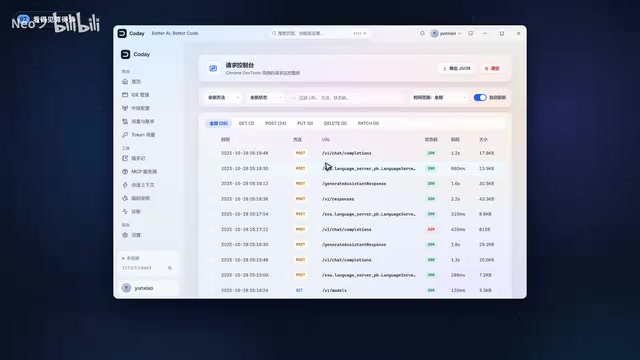
On the observability side, every request is accounted for: in the network panel you can break down each one to see which model, how many tokens, how many milliseconds it took, and whether it succeeded. The diagnostics page lays out certificate and interception status in full, so you don't have to guess when something goes wrong. Combined with usage statistics, you can finally figure out how many requests were made this month, how many tokens were burned, and which model is the most expensive.
There are also two more playful designs: a built-in desktop pet whose food is the tokens you burn; and Stash, which catches ideas flashing through your mind and helps you follow up and expand them into prompts you can use directly—the longer you use it, the richer the knowledge base becomes.
MCP and codebase retrieval: MCP (Model Context Protocol) is an open protocol proposed by Anthropic for letting AI applications connect to external tools, data sources, and context servers in a standardized way; editors and CLIs can extend their capabilities through MCP servers. Codei managing MCP servers in the same place and "injecting with one click" centralizes the configuration for tool integration. The "codebase retrieval" that Fast Context calls is an engineering implementation of the retrieval-augmented generation (RAG) approach: index the codebase, retrieve relevant file snippets when a question is asked, and inject them into the context, so the model can quickly locate things in an unfamiliar project. Its reuse of the local Devin login for zero configuration indicates that the retrieval capability is hosted by the upstream service, and Codei is only responsible for calling it and assembling the context.
Getting-started cost and applicable boundaries
Three steps to get started: download and install, click connect and you're done, then open your editor and switch sources freely. Connections and traffic all stay local.
Objectively speaking, this kind of gateway tool solves the configuration complexity of "multiple editors + multiple upstreams." If you only use one or two editors and a single fixed subscription in your daily work, the benefits are limited; but as soon as you use Cursor for frontend, Devin for tasks, and the CLI for scripts at the same time, the value of unified takeover and failover becomes apparent. One thing to keep in mind is that the takeover process relies on local certificate injection, so enterprise environments or scenarios sensitive to certificate management need to confirm compliance first.
Related articles
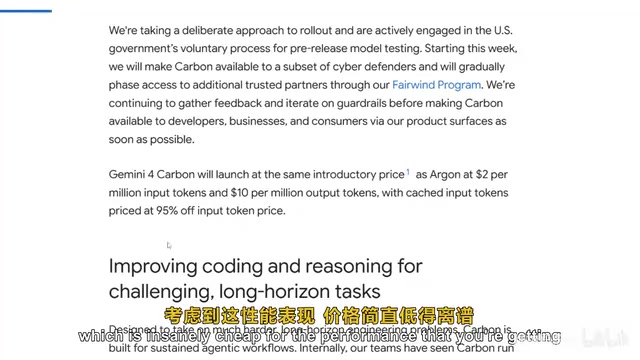
Gemini 4 Carbon Hands-On: The Strongest AI Model? Compared with Claude Opus 5.5
Google's Gemini 4 Carbon tops the Artificial Analysis leaderboard with 71% on CW Bench and leads Vending Bench. Hands-on comparison with Claude Opus 5.5: stunning front-end design but slightly behind in web development, with a clear price advantage.

Gemini 4 Carbon Tops Global Rankings as AI Productivity and Open-Source Ecosystems Surge
Google DeepMind's Gemini 4 Carbon tops global benchmarks, built for complex agents and system security. ByteDance launches Doubao Work integrated with Feishu, Anthropic's AI autonomously breaches 5 system-level attack chains, and ModelBest and Fudan open-source on-device multimodal and image generation models.

Overseas Creator Breaks Down N8n AI Agent Business Playbook: From Tooling to Monetization
An overseas creator breaks down the N8n AI agent business playbook: comparing Zapier, Make, and N8n, detailing four monetizable automation categories—lead capture, WhatsApp follow-up, booking, and content pipelines—plus agency pricing and a sales playbook.