Open Design: A Free Open-Source Alternative to Claude Design That Activates Your Coding Agent

Open Design is a locally run open-source design tool that reuses coding agents and offers 250+ design skills.
Open Design is a free, open-source design tool positioned as an alternative to Claude Design. It reuses existing coding agents as a design engine, ships with 250+ design skills for prototypes, slides, mobile interfaces, and dashboards, and auto-detects 16 coding agents. It runs fully locally, though users pay for their own model API costs.
Introduction
AI design tools are moving from the cloud to local machines. An open-source project called Open Design turns your existing coding agent into a design studio, supporting over 250 design skills and automatic detection of 16 coding agents. According to the YouTube channel SpeedLearn AI, this tool is completely free and runs on your own machine.

What Is Open Design?
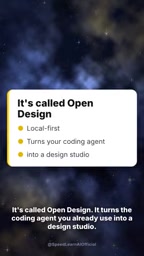
Open Design is described as a free, open-source alternative to Clawed Design. Rather than relying on cloud services, it runs locally and directly invokes the coding agent you already use day to day. This means you can complete design tasks within your familiar programming environment without switching workflows.
The project's core idea is "reuse"—using coding agents (such as Clawed Code, Codex, Cursor, Gemini, and others) as the design engine, extending their capabilities through a skill library. According to SpeedLearn AI's video, Open Design ships with more than 250 design skills, covering common scenarios such as prototyping, slide creation, mobile interfaces, and dashboards.
Coding Agent refers to an AI agent with code comprehension and generation capabilities that can autonomously execute tasks within a development environment. Typical examples include Cursor, GitHub Copilot, and Claude Code. They generally use large language models as their reasoning core and complete multi-step tasks through tool calls (reading/writing files, executing commands, searching codebases). The key design of Open Design is that it does not retrain models; instead, it "borrows" the code generation and tool orchestration capabilities these agents already possess for design scenarios—design artifacts (such as HTML/CSS prototypes, SVG graphics, and slide structures) are themselves objects that can be described in code, so coding agents can serve as a design engine without additional adaptation. This reuse approach significantly reduces both the R&D cost of the tool and the learning curve for users.
Core Features at a Glance
250+ Design Skill Library
Open Design offers more than 250 preset design skills that users can invoke directly to generate different types of design artifacts. Whether it's rapid prototypes, presentations, mobile screens, or dashboards, all can be accomplished through tools in the skill library.
Design Skill in the context of agents is not model weights but a structured encapsulation of prompt templates, tool invocation flows, and output specifications. Each skill typically defines the input parameters for a specific design task (such as theme, style, dimensions), execution steps (such as retrieving design specifications, then generating layout code, and finally rendering a preview), and acceptance criteria. The essence of a skill library is to codify domain experts' experience into reusable "operating manuals," enabling general-purpose agents to perform more consistently on specific tasks. With over 250 skills covering categories like prototypes, slides, mobile interfaces, and dashboards, users no longer need to write prompts from scratch—they simply select a skill and fill in the parameters to obtain structured design output. This model aligns with the thinking behind Anthropic's Agent Skills specification.
Automatic Detection of 16 Coding Agents
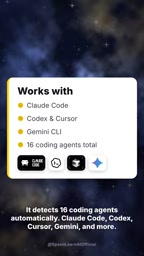
The tool can automatically identify 16 coding agents, including mainstream options such as Clawed Code, Codex, Cursor, and Gemini. This means that regardless of which agent you prefer, Open Design integrates seamlessly with no manual configuration required.

Automatic agent detection relies on probing mechanisms for the local development environment: the tool checks installed CLI executables, API keys in environment variables, running editor extension processes, and common configuration file paths (such as .cursor and .codex directories) to determine which agents are available and their authentication status. When multiple candidates are detected, the default engine is typically selected by priority or user configuration. The value of this mechanism lies in eliminating manual configuration—users don't need to re-enter keys or specify model endpoints in Open Design; the tool directly reuses existing development environment configurations, achieving a "zero migration cost" onboarding experience. It also introduces considerations around permissions and key management: the tool needs to read local credentials, and users should confirm that its open-source code does not leak credentials externally.
Local Execution, Free and Open Source
Open Design runs entirely on the local machine, and the tool itself is free. However, the video honestly points out that users must bear the cost of the models they invoke—i.e., "you pay for your own model." This model is fairly common among open-source tools: the tool is free, but the underlying API call costs are borne by the user.
User Experience and Caveats
SpeedLearn AI offers an "honest note" in the video: Open Design is still in its early stages, and its features and stability may not yet be mature. Additionally, users need to arrange model access themselves and pay the corresponding costs. Nevertheless, for developers looking to try AI design automation at low cost, this tool offers an entry point worth watching.
How to Get It
At the end of the video, it mentions that a usage guide can be obtained by leaving a comment, but only for followers. Interested readers can search for Open Design's open-source repository or follow SpeedLearn AI for future updates.
Conclusion
Open Design combines coding agents with a design skill library, lowering the barrier to AI design tools through a free, open-source approach. Although still in its early stages, its "local execution + multi-agent compatibility" approach offers a new direction for AI-assisted design.
One-line Summary
Open Design is a locally run open-source design tool that reuses coding agents and offers 250+ design skills.
Paragraph Summary
Open Design is a free, open-source design tool positioned as an alternative to Claude Design. Its core idea is to reuse the user's existing coding agent as a design engine rather than relying on cloud services. It ships with over 250 design skills covering prototypes, slides, mobile interfaces, and dashboards, and can automatically detect 16 coding agents (such as Claude Code, Codex, Cursor, and Gemini). The tool itself is free and runs entirely locally, but users must bear the API costs of the models they invoke. The project is still in its early stages, with features and stability not yet mature. Its "local execution + multi-agent compatibility" model offers a new entry point for trying AI design automation at low cost.
Related articles

VERS: Editing Activation Explanations to Halve Reasoning Model Tokens
VERS guides reasoning models by editing activation explanations, cutting 45.8% of tokens on GSM8K with only a 0.82 pp accuracy drop and transferring to larger models, but losing accuracy on competition problems.

Finding Errors Is Not Enough: Selective Model Escalation for Entity-Targeted Sentiment Analysis
This study explores selective model escalation for entity-targeted sentiment analysis, comparing data collection ordering, uncertainty-driven re-examination, and model routing—finding that minority-class priority only helps at very small data volumes, the oracle upper bound far exceeds actual gains, and escalation must be tailored to each dataset.

WAS-PO: Using Whitened Advantages to Solve the Correlation Trap in Multi-Reward Reinforcement Learning
WAS-PO paper proposes whitening advantages to correct correlation bias in multi-reward RL: when rewards are correlated, naive weighted summation effectively applies Σ^{1/2}w instead of w. Experiments show training reward improves steadily, but held-out accuracy does not improve in sync, and under two rewards it actually falls behind.