Open-Source Image Model MOSS-Image Local Deployment Review: Anime & Speed Benchmarks

MOSS-Image deploys fast locally with great character and text aesthetics, but lacks editing to replace mature models.
MOSS-Image is a newly open-sourced text-to-image model deployable locally via ComfyUI. With an 8-step accelerated LoRA, sampling takes ~30s, and dual-model generation completes in ~1 minute. Compared with Qwen Image 2.1, it excels in soft character aesthetics and text layout taste and is uncensored for more creative freedom, but falls short in realistic materials, detail, and character training, and completely lacks image editing (img2img, inpainting, outpainting) — so it serves only as a secondary generation engine, not an all-in-one replacement. Best for anime, lifestyle portraits, and e-commerce text layout.
Title
Open-Source Image Model MOSS-Image Local Deployment Review: Anime & Speed Benchmarks
Meta Description
Local deployment test of open-source image model MOSS-Image: ComfyUI bundle with 8-step accelerated LoRA, ~30s sampling, compared with Qwen Image 2.1 on character aesthetics, text layout, and detail quality — revealing its lack of image editing capability.
Article Content
The open-source text-to-image arena has a new contender worth watching — MOSS-Image. In a recent video, a Bilibili creator gave a full walkthrough of the model's local deployment process, the accelerated LoRA setup, and a side-by-side image comparison with Tongyi Qianwen Image 2.1 (hereafter Qwen Image 2.1). The verdict up front: MOSS-Image shines in character aesthetics and text layout taste, and its speed isn't bad either — but it's missing one key capability: image editing, which means it can't yet fully replace mature models in production workflows.
Low Deployment Barrier: Drag the Workflow into ComfyUI and Run
The creator's bundle approach is straightforward: download the model, place it in the corresponding Models folder under the ComfyUI root directory, open ComfyUI, drag the workflow into the interface, reselect the model path, and you're ready to generate. The workflow is split into two blocks — a MOSS-Image generation module and a Qwen Image 2.1 comparison module. In daily use, disable the side you don't need to avoid wasting VRAM.
For model selection, the creator used the SFT version of MOSS-Image. This version is fine-tuned from the Base version and outperforms Base in most scenarios. For acceleration, an 8-step accelerated LoRA was used, optimized by community author Cook, which positively affects generation logic and image beautification; the Qwen Image 2.1 side used a 6-step accelerated LoRA. At the parameter level, you only need to enter prompts in the text block, adjust aspect ratio and resolution, and you're good to go — no complex node modifications required.
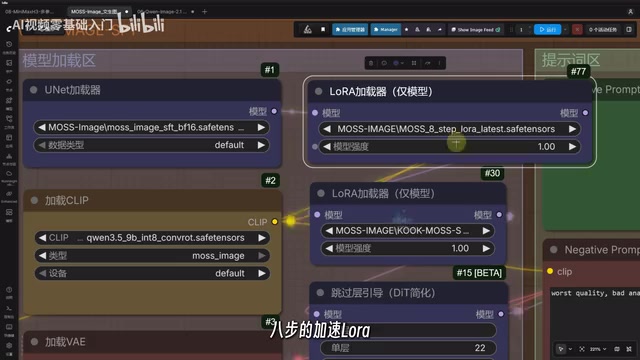
For users familiar with ComfyUI, this workflow has virtually zero learning curve; for beginners, the bundle pre-configures model paths and workflows, with the main barriers being VRAM and model file size.
ComfyUI is a node-based graphical interface for building and running workflows with generative AI models like Stable Diffusion. Users drag and drop nodes (e.g., load model, encode prompt, sample, decode image) and connect them to define the generation process, rather than writing code. Its advantages include high customizability, strong visualization, and support for saving and sharing workflows (usually as .json files). The community often releases bundles containing preset workflows and model paths, lowering the barrier for beginners. ComfyUI has some VRAM requirements but is well-optimized and suitable for local deployment.
Accelerated LoRA (Low-Rank Adaptation) is a lightweight fine-tuning technique that injects trainable parameters via low-rank decomposition, greatly reducing training costs. In text-to-image, accelerated LoRA specifically refers to distilled or specially trained adapters used to reduce sampling steps (e.g., compressing from 20–50 steps to 4–8 steps), significantly speeding up generation while preserving image quality as much as possible. These LoRAs are typically trained and shared by community authors and must be used with a base model. An 8-step accelerated LoRA means the model can generate usable images within 8 sampling steps, several times faster than standard step counts — ideal for rapid local generation.
Speed Test: Dual-Model Generation in About One Minute
Speed is the most convincing data from this test. With both modules generating simultaneously, the full round consistently took between 80-something and 92 seconds — about one minute. Breaking it down, sampling time is clearer: Qwen Image 2.1 completed sampling in about 43 seconds, while MOSS-Image completed in about 30-something seconds.
This result assumes both sides are running accelerated LoRAs. The 8-step and 6-step compression drastically shortens the sampling phase, making the actual experience feel like "enter your prompt and wait for a cup of coffee." Note that this is performance on a local consumer-grade GPU; different hardware will vary, but the relative relationship — MOSS-Image sampling slightly faster than Qwen Image 2.1 — is a useful reference.
Image Quality Comparison: Soft Aesthetics vs. Detail and Texture
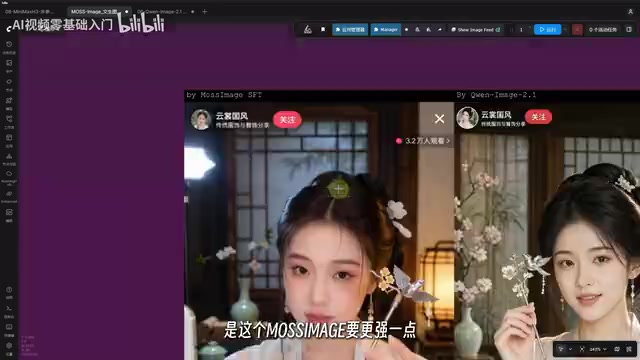
The first character comparison already reveals the personality differences between the two models. MOSS-Image output is softer, with a slight softening tendency; Qwen Image 2.1 has more detail and a more solid sense of realism and texture. The creator's judgment: MOSS-Image is better suited for lifestyle portraits and gentle, sweet-style portraits; Qwen Image 2.1 has the edge in realistic photography and material rendering.
In the e-commerce product page scenario, neither model made obvious errors with small text, but MOSS-Image had better text layout aesthetics. Interestingly, semantic understanding stumbled — Qwen Image 2.1 interpreted "electrode cap" as a ball and drew a sphere, a prompt-following deviation that can be costly in product image scenarios.
The livestream scene comparison is more nuanced. MOSS-Image produced more natural images with less AI feel and more realistic people; Qwen Image 2.1 had higher facial attractiveness and more likable faces, but small text broke down. The creator's summary: both are strong in text handling, but overall MOSS-Image edges ahead, especially in the coordination of layout and typography.
Anime Characters and Scene Details: Trade-offs on Both Sides
Tests with game and anime characters reveal the training data emphasis of each model. Both recognize popular game and anime characters, but Qwen Image 2.1 is better trained on characters from works like Elden Ring, producing a Ranni that's closer to the original.
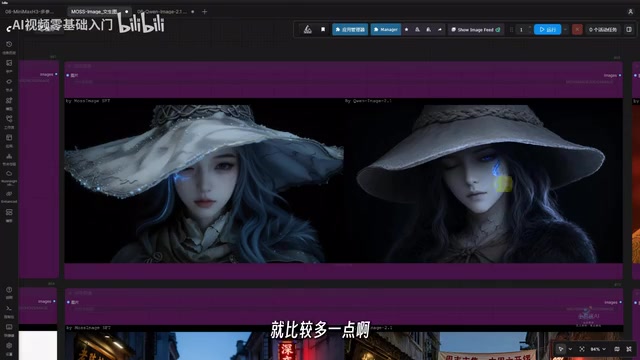
Style-wise, the earlier pattern continues: Qwen Image 2.1 likes to pack in details with high information density; MOSS-Image takes a minimalist route with cleaner, more comfortable images. At 1K resolution, Qwen Image 2.1 has a higher probability of small-text errors than MOSS-Image. In scene comparisons, Qwen Image 2.1's texture advantage is obvious, while MOSS-Image looks "bare-bones" in scenes demanding high detail.
Worth noting: MOSS-Image is an uncensored model with loose prompt constraints, which is a plus for creative freedom but means users must set their own boundaries.
Shortcomings and Conclusion: Missing Editing Capability Is a Critical Flaw
MOSS-Image's most fatal problem is the lack of image editing capability. This means it can't handle image-to-image modifications, inpainting, outpainting, or similar tasks — in a complete workflow it can only serve as the "generate from scratch" component, unable to replace Qwen Image 2.1's all-in-one positioning. The creator's stance is open-ended: the open-source community may fill this gap later.
Overall, MOSS-Image's positioning is clear — fast generation, on-point character aesthetics and text layout taste, and uncensored creative freedom, suitable for anime, lifestyle portraits, and e-commerce text layout needs; but realistic materials, high-detail scenes, and image editing tasks still belong to more mature models like Qwen Image 2.1. For local deployment enthusiasts, using it as a second generation engine in a ComfyUI workflow is a cost-effective complement.
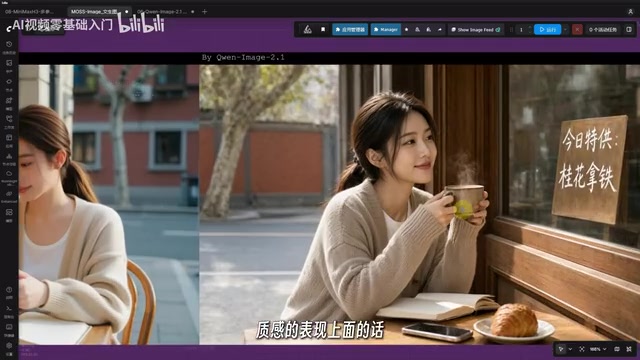
Image editing capability typically refers to tasks like image-to-image, inpainting, and outpainting. Image-to-image starts from an input image and modifies it with prompts; inpainting lets users regenerate specified regions; outpainting extends the canvas with intelligent filling. These capabilities rely on the model's understanding of image context and specialized editing training. Without them, a model can only generate from scratch and can't fit into workflows requiring iterative modification (e.g., e-commerce retouching, design iteration). Editing capability is therefore a key indicator of a text-to-image model's practicality.
One-line Summary
MOSS-Image deploys quickly locally with great character and text aesthetics, but lacks editing capability to replace mature models.
Paragraph Summary
MOSS-Image is a newly open-sourced text-to-image model deployable locally via a ComfyUI bundle. With an 8-step accelerated LoRA, sampling takes about 30 seconds, and dual-model generation completes in about a minute. Compared with Tongyi Qianwen Image 2.1, MOSS-Image is superior in soft character aesthetics and text layout taste, and as an uncensored model offers more creative freedom; but it falls short in realistic materials, detail, and character training coverage, and completely lacks image editing (image-to-image, inpainting, outpainting), so it can only serve as a second generation engine in a workflow — not a replacement for all-in-one models. Suitable for anime, lifestyle portraits, and e-commerce text layout scenarios.
Related articles

world2vec: Building Mechanistic World Models with Latent Dynamics Learning
world2vec proposes a reward-free method for learning mechanistic world models via latent dynamics, faithfully reproducing systems over long horizons with at least an order of magnitude fewer parameters than DreamerV3, TD-MPC2, and LeWM, and achieving accurate system identification on 71 attractor benchmarks.

A New KL-DRO Paradigm: Adaptive Scenario Generation Around a Learned Density Model
KL-DRO research proposes centering the KL ball on a learned density model instead of the empirical distribution, with adaptive scenario generation guiding sampling toward the worst case. Experiments show lower cost under distribution shift when records are scarce and the model can extrapolate, with comparable in-distribution cost.

ODE Samplers for Discrete Diffusion Models: Exponential Residual Flows Accelerate Generation
Discrete diffusion models lack deterministic ODE sampling? This article introduces Exponential Residual Flows (ERFs), which introduce continuous residual variables per token to construct piecewise ODEs for deterministic sampling and support consistency distillation acceleration. Superior to prior methods on code and text generation tasks.