Passing Tests ≠ Correct Code: Cursor's Four-Step AI Code Review Method
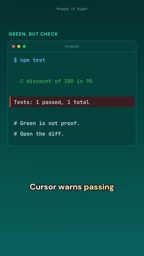
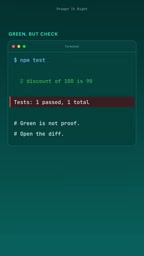
Passing tests doesn't equal correct code; AI programming must insist on human review.
Based on Cursor's official warning, the article notes that AI-generated code may harbor hidden logical issues even when tests pass, since coverage can't exhaust edge cases and AI code's surface reasonableness breeds complacency. Cursor advises a closed loop: watch the diff in real time, stop and redirect on deviation, use Review/Find Issues for systematic checks, and finally read the diff line by line. The core view: the more powerful AI tools become, the heavier human review's responsibility.
AI coding tools are becoming increasingly widespread, and with them a dangerous misconception is spreading: as long as the tests pass, AI-generated code is fine. Cursor recently issued a warning — passing tests does not equal correct code. This short commentary video from YouTube highlights the most easily overlooked aspect of AI-assisted programming: human review.
Passing tests is only the starting point, not the finish line
Tests are a tool for verifying whether code behavior meets expectations, but tests themselves have limitations. No matter how high the test coverage, it can never exhaust all edge cases; AI-generated code may happen to satisfy existing test cases while planting hidden logical pitfalls. Cursor's reminder is direct: passing tests is only a basic threshold, not sufficient proof that code is correct.
The deeper problem is that code generated by AI agents often looks "reasonable" — well-named, clearly structured — and this surface-level reasonableness actually makes people let their guard down. Developers easily fall into the habit of "tests are green, so merge," neglecting the need to examine code line by line.
Test coverage is a metric measuring the proportion of code executed by test cases, typically presented as line coverage, branch coverage, and similar forms. However, high coverage does not equal high effectiveness: it only shows that code has been "executed," not that all logic paths and edge cases have been "verified." For example, a function may be called by tests, but the test assertions don't cover its exception branches or extreme inputs. AI-generated code is especially prone to exploiting this blind spot — it may precisely satisfy existing assertions while harboring logical flaws in untested paths. Therefore, developers need to distinguish between "coverage" and "test strength," and must not treat coverage numbers as a quality certificate.
Real-time monitoring: review while generating
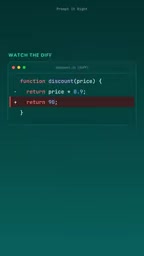
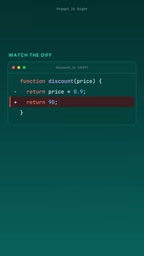
Cursor's first line of defense is watching the diff while the AI works. This is not after-the-fact review but real-time monitoring. When an AI agent generates or modifies code, the diff view synchronously displays every change, and developers can intervene at any time.
The value of this approach lies in its timeliness. If you wait until the agent finishes all its work before reviewing, problems may already be deeply nested; but by watching the diff as it generates, you can spot errors the moment they appear. According to the video, menu layouts may differ across versions, but the core operation logic is the same: find the diff view and stay focused.
Diff view is an interface in version control systems (such as Git) for displaying file changes, typically highlighting added, deleted, and modified lines in a side-by-side or inline comparison. In AI coding tools, the diff view updates dynamically, reflecting each step the agent takes on the codebase. It is not only a tool for after-the-fact code review but can also serve as a window for real-time monitoring — when the agent generates or modifies files in the background, the diff synchronously presents the changes, letting developers track the agent's "behavior trail" at all times. Understanding how to read diffs (e.g., focusing on red deleted lines, green added lines, and context lines) is the foundation of effective real-time review.
Spot deviation, stop immediately and redirect
When you see in the diff that the agent has deviated from expectations — modified the wrong file, introduced unnecessary dependencies, or headed in the wrong logical direction — stop it immediately and redirect it. This is the second key action Cursor emphasizes.
There is a mindset shift here: an AI agent is not a one-shot black-box executor but a collaborator that can be interrupted and corrected at any time. Many developers are used to letting the agent run through a task in one go and then checking the results, but Cursor's advice is the opposite: when you spot a problem, stop, pull the agent back on track — this is more efficient than reworking afterward.
Stopping and redirecting itself depends on continuously watching the diff. If you're not watching the diff, it's hard to notice in time that "it's heading in the wrong direction." So the first action and the second action are connected: watch the diff → spot deviation → stop → redirect.
Line-by-line review after task completion: Review and Find Issues
After the agent completes a task, the review is not over. Cursor points out that you can click Review, then select Find Issues, to have the tool check the edits line by line. This feature is essentially a systematic health check for AI-generated code, flagging potential problems.
However, Cursor also notes that menu items change with versions and their exact locations may differ. More importantly, after the tool check, developers still need to read the diff themselves. Find Issues is an auxiliary aid, not a replacement. The final judgment of whether code is correct and fits the project context still depends on human judgment.
Find Issues is a built-in code review feature in Cursor that uses static analysis or AI models to scan a specified changeset and flag potential errors, style issues, or anti-patterns. Unlike traditional linters, Find Issues focuses more on semantic-level checks, such as unhandled exceptions, logical inconsistencies, or security vulnerabilities. But note that such tools rely on rules and model training data and may produce false positives or false negatives, especially for code with unique business logic or complex context. Therefore, Find Issues output should be treated as "leads to be verified" rather than a final verdict, and developers still need to confirm manually against the project background.
Why human review cannot be replaced
A core point can be distilled from this Cursor tip: the more powerful AI coding tools become, the heavier the responsibility of human review. Tests, automated checks, and Find Issues are all safeguards at the tool level, but they cannot understand business intent, cannot judge a code's impact on the larger system, and cannot identify situations where "tests pass but the design is poor."
The question posed at the end of the video is worth every developer using AI coding to consider: What are your code review steps? If the answer is simply "check whether the tests pass," then it may be time to redesign your workflow.
An actionable review loop can be built like this: watch the diff during generation, stop and redirect immediately when deviation is spotted, use Review/Find Issues for a systematic check after task completion, and finally read through the diff yourself line by line. Only after these four steps does passing tests truly mean something.
Practical recommendations
- Don't wait: watch the diff while the agent works, not after it finishes
- Dare to interrupt: when you see the direction is wrong, stop immediately and redirect
- Use tools but don't depend on them: Review and Find Issues are aids; your own eyes are the final gate
- Make review a habit: after every AI code generation, consistently run the "watch diff → check issues → read diff" process
Cursor's warning is not complicated, but it points to an easily overlooked fact: the output of AI agents needs supervision. Passing tests is only the beginning; true quality assurance comes from continuous, conscious human review.
One-line Summary
Passing tests does not equal correct code; AI programming must insist on human review.
Paragraph Summary
Based on Cursor's official warning, the article points out that AI-generated code may harbor hidden logical pitfalls even when tests pass, because test coverage cannot exhaust edge cases, and AI code's surface-level reasonableness easily makes people let their guard down. Cursor recommends developers adopt a closed-loop process: monitor the diff in real time, stop and redirect immediately upon spotting deviation, use Review/Find Issues for systematic checks after task completion, and finally read the diff line by line themselves. The core view is: the more powerful the AI tools, the heavier the responsibility of human review; passing tests is only the starting point, and true quality assurance comes from continuous, conscious human review.
Related articles
 Tech Frontiers
MuJoCo: An Analysis of DeepMind's Open-Source General-Purpose Physics Simulator
An in-depth analysis of Google DeepMind's open-source physics simulator MuJoCo: high-performance C++ kernel, MJCF modeling format, contact solving principles, MJX GPU acceleration, and robot reinforcement learning use cases.
 Tech Frontiers
Claude API Quick Start: The Official Quickstarts Project Collection
Anthropic's official claude-quickstarts project collection helps developers quickly build deployable apps with the Claude API. Nearly 20k stars, Python-based, great for beginners and prototyping.
 Tech Frontiers
AI Agents Connecting Directly to APIs: Which Calls Can Be Safely Allowed?
AI agents can call any API, but the real challenge is deciding which calls can be safely allowed. This article analyzes allowance decisions from three dimensions—intent matching, least privilege, and controllable impact—and argues that the control layer should sit outside the agent, combined with audit traceability to build a trustworthy API call governance mechanism.