Pragma: The New Open-Source Rust Option for Putting Coding Agents Inside the IDE

Pragma builds a single-window IDE with Rust+Tauri, letting editor, coding agent, and browser share one workspace.
Pragma is a free, open-source desktop IDE built with Rust and Tauri. Its core idea is to integrate the code editor, coding agent sessions, browser preview, and terminal into one window, reducing constant switching between tools. It doesn't require new accounts or subscriptions, instead reusing your installed coding CLI with API keys stored in the system keychain. For parallel agents, each session gets an independent git work tree to avoid overwrites. Beyond the agent view, Command+Shift+E switches back to a traditional editor with built-in language servers and terminal. The article finds its product logic clear, but real-world dependency conflicts, indexing performance, and work tree disk overhead still need hands-on verification, and the depth of "any CLI" compatibility is worth watching.
As AI programming tools evolve from "completing code" to "independently completing entire tasks," developers' workflows have become fragmented: an editor on one side, an agent's chat window on another, a terminal running the dev server, and constant switching to the browser to verify results. Pragma attempts to stitch these pieces back together in a single window—it's a desktop IDE built with Rust and Tauri, with the core selling point of letting the code editor and coding agent share the same workspace.
One Window, Three Roles: Editor, Agent, Browser
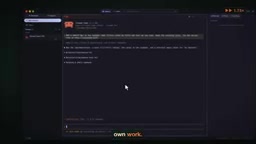
Pragma's entry point is the "agents view." It doesn't require users to sign up for a new account or purchase a new subscription—instead, it directly reuses the coding CLI you've already installed. This restraint stands out at a time when similar tools are rushing to build their own subscription systems. With one click, a session starts within the project; the agent reads the code, plans changes, writes implementations with tests, and self-verifies along the way. In the official demo, a task to add an "input-as-you-type filtering" search bar to a note-taking app called Lumen ran in under a minute in real time, with every step reviewable in the transcript.
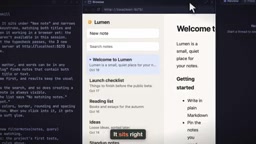
After the task completes, the review pane on the right lists all changed files—click to jump to the specific code location, such as the newly added search function. Want to see it in action? The browser panel sits right next to the session window and loads the dev server directly. Type "launch" and the list filters in real time—the entire verification loop never leaves this window.
Parallel Agents: One Independent git work tree per Session
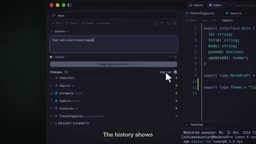
Multi-agent collaboration is often the weak spot of such tools: when two agents modify code simultaneously, conflicts and overwrites are nearly unavoidable. Pragma's approach is straightforward—assign each new session its own independent git work tree. In the demo, the first session adds a dark mode toggle while the second writes unit tests for the Markdown parser. They run in parallel without interfering, each outputting its own change summary. This design turns "parallelism" from a marketing buzzword into an engineering reality.
git work tree is a feature introduced in Git 2.5 that allows the same repository to check out multiple working directories simultaneously. Each work tree is associated with the same .git object database but has its own independent branch, index, and file state without interference. Compared to duplicating the entire repository, work trees share the underlying commit history and objects, consume less disk space, and can build, run, and commit independently in different directories. In parallel agent scenarios, binding each session to a work tree is equivalent to providing the agent with an isolated sandbox: changes only take effect in their respective directories and can be merged or cherry-picked into the main branch afterward, naturally avoiding the conflicts and overwrites that arise when multiple agents edit the same workspace simultaneously.
When You Want to Do It Yourself, It's Still a Proper IDE
Agents aren't omniscient—often developers just want to change a few lines of code by hand. Command+Shift+E switches to the editor view, with the same project and terminal. Language servers are built in, so basic capabilities like hover-to-view-type and go-to-definition are available. The terminal sits below the code—run a build to confirm compilation succeeds, then switch to the git view to commit the dark mode changes: write a description, stage files, commit, and the new commit appears at the top of the history.

The value of this workflow is "context is never lost"—from agent generation to human review to commit, the IDE always holds the same project state, with no need to copy-paste paths or reconfigure environments across multiple apps.
What the Rust + Tauri Architecture Choice Means
Pragma explicitly emphasizes that it's "built with Rust and Tauri, not Electron." This targets the resource consumption issues that VS Code-family tools have long been criticized for. Tauri uses the system WebView rather than bundling the entire Chromium, which in theory significantly reduces memory usage and installation package size—more friendly for scenarios where multiple agent sessions run for extended periods. Of course, actual experience also depends on frontend implementation quality; architectural advantages don't equal experiential advantages, and this needs real-world use to verify.
Tauri is a desktop application framework written in Rust that uses the system's native WebView as its rendering layer. Unlike Electron, it doesn't bundle Chromium and the Node.js runtime; instead, it calls macOS's WKWebView, Windows' WebView2, or Linux's WebKitGTK to host the frontend interface, while backend logic compiles to a native binary. As a result, Tauri app installers are typically only a few MB to a dozen or so MB, and memory usage depends on the system WebView implementation—more friendly for scenarios with multiple sessions running for extended periods. The trade-off is that WebView versions differ across platforms, requiring additional compatibility handling; meanwhile, the development barrier for the Rust backend is higher than for JavaScript.
Customizability and Openness
The tool offers over a dozen themes and lets you manage language servers by language; it supports connecting any coding CLI or bringing your own API key, with keys stored in the system keychain rather than plaintext config files. Pragma itself is free and open source, downloadable directly from GitHub.
For developers, this openness addresses a real pain point: agent tools iterate extremely fast, and binding to a single vendor's subscription system carries no small risk—while "use your existing CLI + your own key" leaves the choice in users' hands.
Language Server Protocol (LSP) is a standardized protocol proposed by Microsoft that enables editors and language intelligence services to communicate via JSON-RPC, thereby providing capabilities like completion, hover types, go-to-definition, and diagnostics. Pragma's built-in language servers, managed by language, mean it doesn't depend on any particular editor's plugin ecosystem but instead reuses LSP implementations maintained by each language community. For users, this means paying attention to whether the LSP server for their chosen language is installed and version-compatible; for the tool itself, LSP standardization allows it to provide code understanding approaching that of mature IDEs without being overly bound to a single language ecosystem.
A Calm Assessment
From the demo, Pragma's product logic is clear: it's not rebuilding an AI coding assistant but reorganizing "the space for human-machine collaboration." But demo videos are always the ideal path—dependency conflicts in real projects, indexing performance on large codebases, and the disk overhead of multiple work trees are all questions that can only be answered after hands-on use. Additionally, the depth of "supports any CLI" compatibility deserves attention: there's a big gap between shallow invocation and deep integration.
If you're already using coding CLIs like Claude Code or Codex and aren't satisfied with jumping back and forth between editor, terminal, and browser, Pragma deserves a spot on your trial list. Being open source means you can review the code before deciding whether to trust it—which, in today's era of largely black-box AI tools, is a form of sincerity in itself.
Related articles

The Truth Behind Titanic's Sinking: Key Decisions and Communication Failures in the National Geographic Documentary
National Geographic's The Unsinkable Ship uses survivor testimony to reconstruct Titanic's fatal decisions—from the missing MSG telegram prefix and the broken boiler-room-to-bridge link to how 'unsinkable' thinking delayed damage control and evacuation.

74M-Parameter Open-Source Model Partially Outperforms Jev AI in Testing
Fastino AI's Glider 2.5 models, with just 74M–300M parameters, reportedly outperform Jev AI in some guardrail benchmarks per YouTube testing, run on consumer hardware, and even play Doom. We analyze small models' competitiveness and deployment value on specific tasks.

Gemini 4 Argon Hands-On: Aggressive Pricing, 3D Capabilities Need Coaching
Gemini 4 Argon hands-on: limited-time $2/$10 pricing, million-token output, strong 3D and reverse-engineering work, but weak front-end aesthetics and zero-shot ability need coaching.