PulseDev: Click Local UI Elements and Let AI Agents Edit Code Directly

PulseDev lets you click UI elements on a local page and have an AI Agent locate and modify the corresponding source code.
PulseDev is a Mac developer tool addressing the inefficiency of describing UI defects to AI in words. It introduces a "click-to-locate" interaction: developers click a problematic UI element on a localhost page and enter a description, and the tool passes the context to coding Agents like Claude Code, Codex, Gemini, or OpenCode, which locate and edit the correct source file. The product emphasizes human-in-the-loop: the Agent's changes can be observed in real time, but the diff must be approved by the developer on the page before being written to files, reducing the risk of erroneous edits. It mainly suits style and layout defects, with limited help for logic bugs and cross-file refactoring. It received 85 votes and ranked 12th on Product Hunt, and is still an early-stage experiment.
PulseDev: Click Local UI Elements and Let AI Agents Edit Code Directly
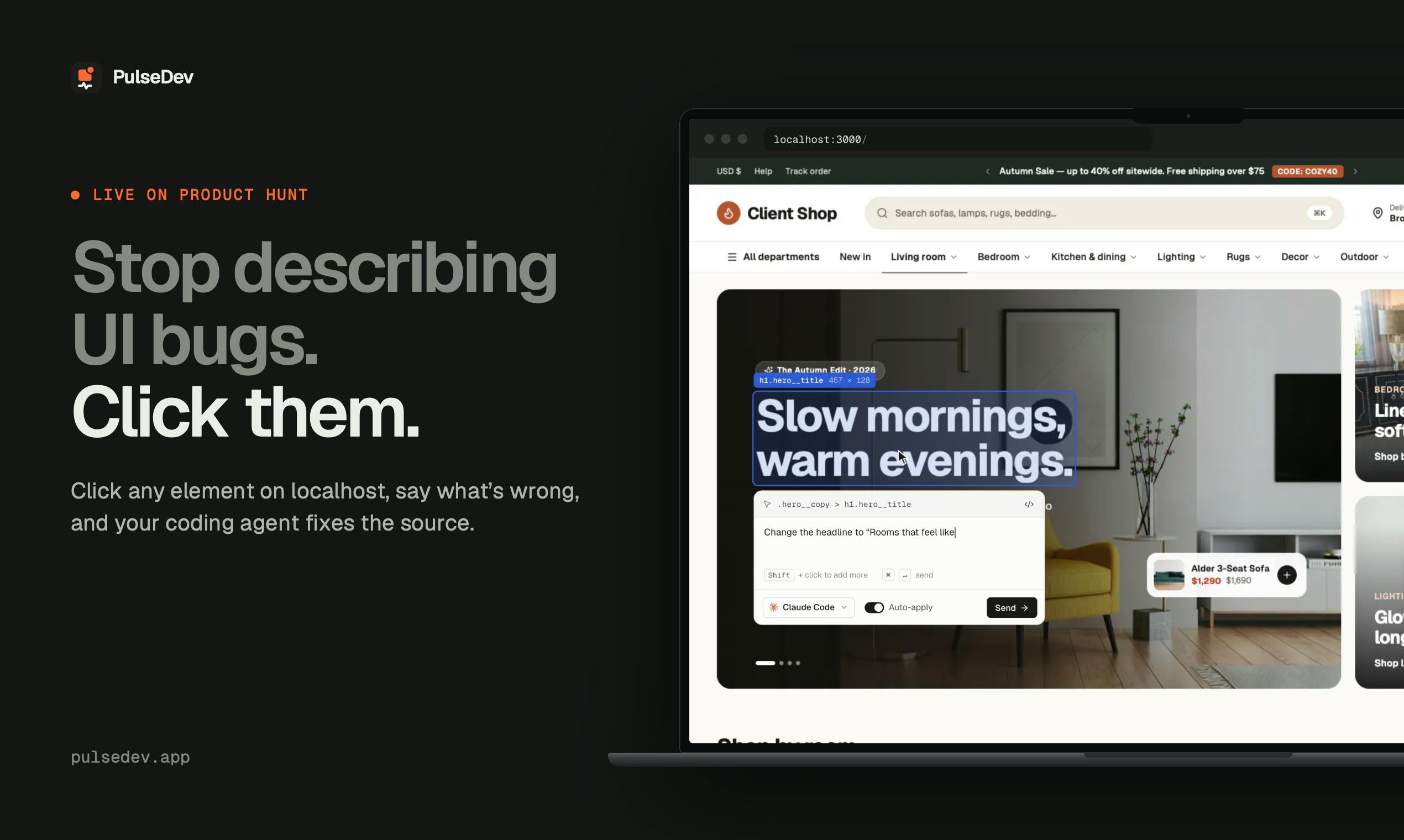
Frontend developers collaborating with AI coding assistants often run into an awkward situation: you notice a misaligned button, wrong color, or broken interaction on your local page, but you can only describe it over and over in words—"move that gray button on the left down a bit"—which is costly to describe and the AI often edits the wrong file. PulseDev, launched on Product Hunt, aims to remove that friction: click the problematic element directly on the localhost page, state the issue, and let an AI Agent make the code change.
From "Describing the Bug" to "Pointing at the Bug"
PulseDev's core interaction is straightforward. Developers click any UI element on their locally running site and type a description of the issue with that element. The tool passes the context to coding Agents such as Claude Code, Codex, Gemini, or OpenCode, which then locate and edit the correct source file. Compared with pasting screenshots into a chat box and describing the DOM structure, this approach hands the "locate the problem" step back to a click, reducing the translation loss between natural language and code structure.
The product currently ships as a Mac developer tool. It received 85 votes and ranked 12th on Product Hunt, published by Perlat Kociaj. The vote count isn't spectacular, but it hits a real gap in AI coding workflows: the connection between visual feedback and code changes.
Technical background on DOM and element location
After a developer clicks a page element, the tool's ability to accurately identify which piece of code it corresponds to depends on the mapping between the DOM (Document Object Model) and source code. Every visible element rendered by the browser has a corresponding node in the DOM tree, but the output compiled by bundlers (Vite, Webpack, etc.) is often minified and merged, with class names and structure differing greatly from the source. Tools like PulseDev typically rely on React/Vue development-mode metadata, source maps, or runtime-injected markers to map the clicked DOM node back to the specific component and file location. Whether this "click—node—source" chain is stable directly determines whether the Agent receives a precise location or a vague clue. It also explains why such tools are better suited to style and layout issues—these properties are tightly bound to specific elements, whereas logic bugs often span multiple modules.
Human in the Loop: Review the Diff Before Deciding to Write
A notable design choice in PulseDev is its approval mechanism. The AI Agent's editing process can be observed in real time, but no change is actually written to a file until the developer approves the diff on the page. This addresses the most commonly criticized risk of AI coding tools—Agents making unilateral changes in the wrong place and introducing regressions. Putting diff approval in the page context, rather than switching back to the editor or terminal, should in theory make judgment more intuitive: what you see is exactly the change corresponding to the effect.
Its support for multiple coexisting AI coding assistants also fits current reality. Claude Code, Codex, and Gemini each have their own preferred users. PulseDev doesn't build its own model; instead, it works at the workflow layer, positioning itself as middleware connecting the browser and the Agent.
Diffs and human-in-the-loop workflows
A diff is the standard format in version control for representing the differences between two versions of a file, showing before and after content as added and removed lines. AI coding Agents typically work by "generating patches": reading relevant files, reasoning out a modification plan, and outputting a diff or writing directly back to files. The approval mechanism PulseDev uses is a human-in-the-loop design that inserts a manual confirmation step between the Agent's output and writing to disk. This is fundamentally different from letting the Agent edit files directly and relying on git rollback afterward: the former moves judgment earlier and prevents erroneous changes from polluting the workspace, while the latter depends on the developer promptly noticing and reverting them. Showing the diff in the page context means "visual problem" and "code change" are compared within the same view, lowering review cost—but it also means every change requires manual intervention, which limits efficiency during batch or high-frequency iteration.
Who It's For, and Who It Isn't
Based on the product description, PulseDev targets frontend iteration during local development and debugging, especially style and layout issues—the kind of defects that are most tedious to describe in words and where click-based location delivers the greatest benefit. For logic bugs, API errors, or cross-file refactoring, clicking an element helps little, and traditional debugging and description methods are still needed.
As an early product, it depends on the local site being accessible to the tool and on the availability of the chosen Agent, and it has not yet disclosed plans for team collaboration or non-Mac platform support. The community feedback of 85 votes shows the concept is recognized, but there is still room to validate before it becomes an everyday tool.
Conclusion
PulseDev's idea is to bring the "point and shoot" instinct into AI coding collaboration: replace description with clicks, and preserve control through diff approval. It doesn't solve whether AI will write wrong code; it makes it easier for developers to point out where the problem is and more confidently decide whether to apply the change. For developers who frequently tweak UI on localhost, this is a workflow experiment worth watching.
One-line Summary
PulseDev lets you click UI elements on a local page and have an AI Agent locate and modify the corresponding source code.
Related articles

T3 Code: The Open-Source AI Coding Assistant's Comeback Story
T3 Code is an open-source AI coding assistant that unifies subscriptions like Codex and Claude, with powerful remote control and parallel task management.

Never Elected, Yet Ruled New York for 30 Years: The Ultimate Case Study in the Mechanics of Power
Robert Caro's biographies reveal how unelected Robert Moses ruled New York for 30 years through legal drafting and public authorities, and how Lyndon Johnson built leverage as a "powerless" Senate Majority Leader. Unpacking the underlying logic of accumulating and sustaining power.

The CPython 3.10 Recursion Trap and Synthetic Recovery in TokenGuard, an LLM Circuit Breaker
TokenGuard's author recounts a recursion crash caused by OrderedDict.pop in CPython 3.10 and introduces v0.3.0's Loop Nudge synthetic recovery, inline DLP scanning, and other new LLM agent circuit-breaker capabilities.