Six Open-Source AI Agents Explained: From Personal Assistants to Autonomous Companies

Six open-source AI Agents compared: from personal chat assistants to autonomous multi-agent companies.
Based on hands-on testing from Tech With Tim, this article systematically covers six leading open-source AI Agent frameworks. It establishes a common framework for understanding Agents — model, tools, memory, interface, and runtime — and highlights VPS as the optimal deployment approach balancing security and cost. Each Agent has a distinct role: OpenClaw for broad chat integration, Hermes for cross-session skill learning, Agent Zero for a sandboxed Linux environment, OpenHands for end-to-end coding and PR output, Paperclip as a multi-Agent "company CEO," and Buzz as a Slack-like workspace for human-Agent collaboration. The author's personal pick is Hermes for its practicality, learning ability, and usability balance.
AI Agents are proliferating at a dizzying pace — OpenClaw, Hermes, Agent Zero, OpenHands, Paperclip, Buzz… new frameworks seem to appear every day. They each claim to be different, yet often do remarkably similar things. This article draws on deep hands-on testing from the YouTube channel Tech With Tim to break down six open-source AI Agents genuinely worth your attention — how they work, when to use them, and how to choose.
What Is an AI Agent? Understanding the Underlying Architecture
A chatbot stops once it answers your question. An Agent, given a goal, keeps working until it's done: plan a step, execute, check the result, move to the next — fully autonomous throughout.
Understanding the common structure of Agents makes comparing different frameworks much clearer. Every Agent is essentially built from five components:
- Model (the brain): Claude, GPT, DeepSeekAd, Qwen, or a local model. Every tool covered here supports free switching, even calling multiple models simultaneously.
- Tools (the hands): Running code, browsing the web, reading and writing files, sending messages. Most Agents now support MCP and CLI tools, enabling integration with almost any capability.
- Memory: Memory systems vary significantly across Agents — some are much better at remembering what was done yesterday.
- Interface: Web dashboard, terminal, Telegram, or desktop app.
- Runtime environment: One of the most critical factors — running on a VPS or locally?
One important premise: this article covers open-source solutions only. Products locked into vendor ecosystems like Claude Code or ChatGPT Agent are excluded. Open source means you choose your own model, your own runtime, and maintain full control — no dependency on any company's pricing.
MCP (Model Context Protocol) is an open standard protocol introduced by Anthropic in late 2024 to standardize how large language models connect to external tools and data sources. Before MCP, every Agent framework had to write custom adapter code for each individual tool. MCP is essentially a "USB standard" for AI tools — developers implement an MCP server once, and every MCP-compatible Agent framework can use it directly. This is why the article notes that "most Agents now support MCP" as a significant feature: it means the same tool (database queries, file management, browser control, etc.) can be seamlessly shared across different frameworks like OpenClawAd, Hermes, and Agent Zero, dramatically reducing duplicated integration work.
Where Should You Deploy Your Agent?
These autonomous Agents deliver the most value when running 24/7 in an isolated environment. You can certainly run them on your laptop — it's free, but it's not isolated, it has access to your entire filesystem, and your machine must stay on at all times. Shut it down and the Agent breaks.
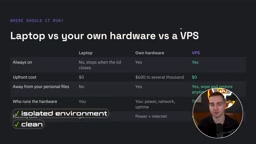
Deploying on dedicated hardware like a Mac mini is also viable, but for anyone just experimenting, the cost is high, setup is complex, and cleaning everything up later requires extensive uninstallation. By contrast, a Virtual Private Server (VPS) costs just $6–$10 per month (excluding token costs), runs in isolation, can be shut down at any time, and can be completely reset if something goes wrong — without risking expensive hardware.
Wherever you deploy, take security seriously. You're giving the Agent various tools, API keys, and open internet access — that's a significant attack surface.
VPS (Virtual Private Server) is a cloud computing service that uses virtualization to partition a physical server into multiple independent instances. Each VPS has its own operating system, fixed IP address, and filesystem, fully isolated from other users on the same physical machine. For AI Agent deployment, the core advantages of a VPS are: first, isolation — the Agent's file operations and network requests are confined to the VPS sandbox, so even if compromised, your local device is unaffected; second, always-on — a VPS runs 24/7 regardless of whether your personal device is powered on; third, resettability — if the Agent causes a serious error or security incident, you can simply destroy and rebuild the instance without losing local data. The "KVM 2" plan mentioned in the article refers to a specific configuration tier based on KVM (Kernel-based Virtual Machine) technology, typically offering 2 CPU cores and ~4GB of RAM — the recommended starting point for running heavier processes like OpenHands.
Breaking Down All Six Agents
The author ranks the six Agents from easiest to hardest to get value from: OpenClaw is a personal assistant living inside your chat apps; Hermes is a self-learning Agent; Agent Zero has its own computer; OpenHands is a software engineer that writes code and submits PRs; Paperclip manages an entire company of Agents; and Buzz is a workspace for humans and Agents to collaborate.
OpenClaw: A Personal Assistant Living in Your Chat Apps

OpenClaw is a persistent personal assistant built around a "chat-app-first" philosophy — it supports WhatsApp, Telegram, Slack, Discord, Signal, and more. The Agent lives behind these apps; you barely need to open its web dashboard. Just message it on Telegram or Discord to get things done.
As one of the earliest and most popular frameworks, it offers hundreds of plugins, rich automation (cron scheduling), and the widest range of chat integrations. The author configured it in Telegram to send a daily morning briefing on AI industry news and funding activity.
Pros: Fastest to get started, compatible with any model, large community (most issues have already been fixed by someone). Cons: Doesn't self-improve, managing multiple channels can get messy, relatively large attack surface (there were notable security incidents early on, most since patched). Best for people who want an assistant they can interact with just like texting a real person.
Hermes: A Learning Agent That Evolves Over Time
Hermes looks similar to OpenClaw on the surface, but is fundamentally different. OpenClaw is a "messaging gateway with an embedded Agent"; Hermes is a "learning Agent wearing a messaging gateway." The former puts the interface first; the latter puts the Agent itself first.
Here's how it works: after completing a task, it reflects on what worked and saves it as a skill — a human-readable, editable Markdown file. The author asked Hermes to create a "weekly YouTube topic briefing." It ran extensive web searches, generated the briefing, saved it to a file, and then automatically generated a skill so it could reuse the workflow in the future and save tokens.
Hermes has noticeably better long-term memory than OpenClaw — it automatically saves, categorizes, and quickly retrieves information about user preferences. The author notes that after running it for several months, it gets smarter over time, and the accumulated skills save significant effort. Cons: More complex to set up, requires more back-and-forth conversation, and it can learn incorrect skills and repeat the same mistakes — requiring manual oversight. Best for people with repetitive workflows who want an Agent that gets better with use.
Hermes's Skill System is essentially an externalized procedural memory mechanism. A traditional LLM's context window clears at the end of a conversation, making it impossible to retain operational experience across sessions. Hermes addresses this by serializing successful task execution flows into structured Markdown files (containing steps, tools used, caveats, etc.), achieving an effect similar to human "practice makes perfect" accumulation. This design also provides auditability: users can directly open a Markdown file to review, edit, or even delete a skill — rather than facing an opaque set of neural network weights. The trade-off is that manual oversight is required. Once an incorrect skill is locked in, the Agent will reproduce the same mistake in subsequent tasks. Periodically reviewing the skill library is therefore an essential maintenance task for Hermes users.
Agent Zero: A General-Purpose Agent With Its Own Computer

Agent Zero gets a full Linux machine inside Docker — entirely its own. Rather than coming pre-loaded with a long list of tools, it writes code and runs it in the terminal when needed. It leans more toward a coding-centric approach.
The author gave it a large task: write a research report on "developer discussions about AI on Hacker News over the past 30 days," and asked it to work as a team. It immediately spawned three sub-Agents — a writing Agent, an analysis Agent, and a data Agent — dividing the work: the data Agent scraped information, the analysis Agent parsed it, and the writing Agent assembled the report, which was then consolidated back into the main conversation.
Its strength lies in flexibility and transparency: an isolated sandbox with its own computer, capable of handling complex tasks, with a fully visible process (you can even see sub-Agent calls), and complete sandboxing so it never touches the rest of your server. Cons: Can go off track on vague tasks, high token consumption (almost everything is done by writing code), and no built-in mobile messaging interface. Best for people who want a flexible Agent capable of autonomously operating a computer.
OpenHands: An Open-Source AI Software Engineer
OpenHands (formerly OpenDevin) is the only coding-focused Agent on this list. It works directly inside your existing GitHub repositories — you hand it an issue or ticket, and it returns a completed Pull Request.
The author connected it to a to-do list API repository and gave it a real task: migrate data to a SQL database, add tagging and search, add a delete endpoint, and write tests for everything. After issuing the command "resolve issue #2" and stepping away, he came back to a ready-to-merge PR containing code changes, a planner, a complete terminal log, and a browser view.
Its strengths are the best end-to-end coding performance on this list, everything stays on your server except model API calls, compatibility with any model, and the ability to run multiple sandboxes in parallel. Cons: Coding only, resource-heavy process (at least a KVM 2 plan recommended), and better suited to handling well-scoped tickets on existing codebases than building from scratch. Best for developers with a backlog of tickets to fix.
The sandboxed code execution model used by OpenHands is what fundamentally distinguishes AI coding Agents from ordinary code completion tools like Copilot. OpenHands spins up a dedicated Docker container for each task, giving the Agent a complete command-line environment: it can install dependencies, run tests, invoke Git commands, and even start a local server to verify browser behavior. This means the Agent isn't just "writing code" — it's executing the full development loop of "write → run → read errors → fix → run again" until all tests pass before submitting a PR. This end-to-end closed loop also explains the higher server resource requirements: each parallel task needs its own container instance, with memory and CPU consumption scaling linearly with concurrency.
Paperclip: Managing a Group of Agents Like a Company
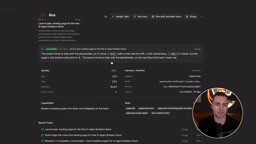
Paperclip doesn't do work itself — it manages other Agents, like running a company. The author created a company called "Agent Builders HQ" with the goal of recruiting a thousand new members for a free community, then hired a small team: CEO Ava, founding engineer Max, and researcher Ray.
You can view an org chart, assign different models to each Agent (e.g., Gemini Flash for lower-cost tasks, Claude Sonnet for complex ones), and set spending limits. Each Agent can start working automatically on a "heartbeat" (e.g., every 30 or 60 minutes), breaking large tasks into sub-tasks and distributing them across Agents to form a complex dependency graph containing parent tasks, blocked tasks, dependencies, sub-tasks, and reviewers.
This type of framework consumes tokens heavily, but is also the most autonomous on the list — Agents can even hire new Agents. The author admits that getting it to run efficiently takes some effort given the complexity involved, but has seen impressive examples of people building entire "companies" with this kind of framework, especially when budget isn't too constrained.
Buzz: A Workspace for Human-Agent Collaboration
Buzz comes from Jack Dorsey's company Block, and is best understood as a "self-hosted Slack where your Agents are teammates." It's not an Agent itself — it's a room where humans and Agents work together.
You can configure multiple Agents with different personalities, roles, and even different providers — Claude, Codex, OpenClaw Agents can all join and be assigned to different channels, just like in a Slack workspace. People, teammates, and Agents interact in shared spaces, reply in threads, and delegate tasks.
Cons: Still in alpha, can only collaborate with Agents that are already integrated, and doesn't offer much value for solo users — it really shines with a team. Best for teams that want humans and Agents collaborating around different channels in a shared workspace.
Which One Should You Choose?
The author offers a clear decision guide:
- Want a personal assistant inside your existing chat apps → OpenClaw
- Have repetitive workflows and want an Agent that improves over time → Hermes
- Want a general-purpose Agent that can autonomously operate a computer → Agent Zero
- Have coding tickets and want back a PR → OpenHands
- Want a group of Agents collaborating toward a shared goal → Paperclip
- Want to bring humans and an Agent team together in one place → Buzz
The author personally uses Hermes most in their day-to-day work — it's the most practical, learns over time, and strikes the best balance between capability and ease of use. For anyone seriously running multiple Agents — especially with access to sensitive information — security hardening is not optional.
Related articles

AI Can Read Neural Network Weights Directly: Do Models Already Exceed Expectations?
A Reddit developer experiment shows language models can directly read neural network weights and infer their function. Astra, Opus 5.5, and Muse Spark 1.3 all passed the test, sparking discussion on model generalization and training sources.

India's Microdrama Market Explodes: EloElo Secures $80M Investment from NBCUniversal
EloElo secures $80M from NBCUniversal to boost StoryTV, its microdrama platform with over 33M monthly active users, as India's microdrama market draws global capital.

Acoustic Detection of Multi-Rotor UAVs: Fusing Handcrafted Features with Pre-Trained Embeddings
Study reveals data leakage from random splits in UAV acoustic detection, proposes source-disjoint protocol with stacked ensemble of handcrafted features and YAMNet embeddings, achieving 95.29% accuracy for low-cost drone detection.