Stitch.ai: Packing Email, Calendar, and Tasks into One AI Workspace

Stitch.ai uses native built-in modules plus a global AI assistant to replace multi-tool switching workflows.
Stitch.ai is a new product ranked No. 7 on Product Hunt, advocating "one workspace" to replace scattered tools like email, calendar, tasks, and documents. It builds these modules natively rather than through integrations, enabling AI assistant Stitchy to work across modules in a unified context; dual-panel drag-and-drop plus Knots, Tags, and Connections lower the cost of creating information associations. The article affirms its clear direction and out-of-the-box usability, but notes the cost: users lose the freedom to choose their own tools, and migration and trust costs concentrate on a single product. Currently, Stitchy's capability boundaries, model sources, and privacy handling have not been disclosed, and whether the email client experience can rival native apps is the key test for daily use.
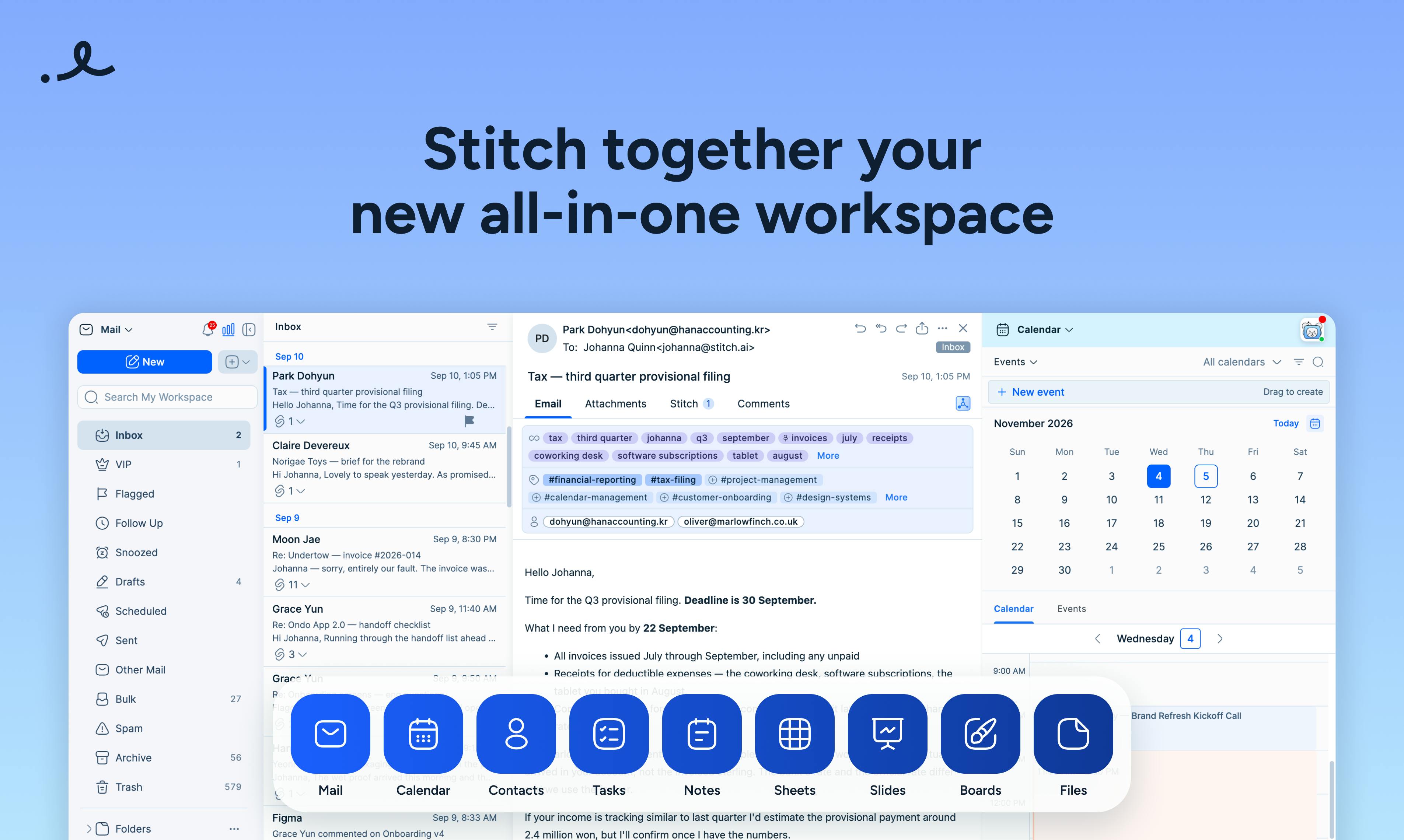
When our work information is scattered across email clients, calendar apps, task boards, and cloud drives, constantly switching tabs becomes an invisible efficiency tax. Stitch.ai, a new product ranked No. 7 on Product Hunt, tries to solve this with "one workspace"—it builds email, calendar, contacts, tasks, notes, spreadsheets, slides, kanban boards, and files all into the same space, paired with an AI assistant named Stitchy that runs throughout.
One Space, Not a Pile of Integrations
The most direct differentiator of Stitch.ai is the product philosophy of "Built-in." The official description explicitly states: no integrations or extra email clients to set up—no additional integration configuration, and no need to log into another email client. Compared with platforms like Notion and ClickUp that emphasize "connecting everything," Stitch.ai chooses to make core objects of daily workflows—email and calendar—into native modules directly, rather than assembling them through connectors.
This choice has pros and cons. The upside is out-of-the-box usability and a unified data model, so AI can understand your email, schedule, and tasks within the same context. The cost is that users lose the freedom to "pick the best tools themselves and combine them," and migration costs and trust barriers concentrate on a single product.
"Integration" in this context refers to connecting third-party apps' data and functionality into a platform through APIs, plugins, or connectors—typical examples include Notion's third-party sync and Zapier's automation flows. The advantage of the integration model is preserving users' existing toolchains, but the costs are heterogeneous data models, sync delays, and longer permission chains; AI often only sees the fragments that have been synced rather than the full context. So-called "native built-in" is the opposite: modules such as email and calendar share the same storage, permissions, and event models with the platform, and cross-module queries and operations do not need to go through external interfaces—this is precisely the technical premise behind Stitch.ai's claim that AI can "see the whole picture."
Dual Panels and "Stitch anything to everything"
Another interaction mechanism the product emphasizes is Dual workspace panels: you can open two workspace panels side by side and drag an email into a task, a note onto a kanban board, or a file into a schedule. This "drag to link" design essentially lowers the operational cost of creating information associations—in traditional workflows, turning an email into a to-do item often requires copy-pasting or jumping across multiple apps.
Combined with AI-driven Knots, Tags, and Connections, the relationships created by dragging are automatically organized and indexed for later resurfacing. The official description sums up this organizational logic as "Nothing gets lost": information is found when needed not through folder hierarchies, but through relationships and tags.
The Positioning of AI Assistant Stitchy
What makes Stitchy special is not that it "can chat," but that it is designed to "works with you across it all"—working across all modules including email, calendar, tasks, and notes. This means it can theoretically see your inbox and schedule at the same time, enabling more contextually appropriate responses, such as extracting a time from a meeting email and placing it on the calendar.
What needs to be viewed calmly is that the Product Hunt page's description of Stitchy's capabilities remains at the vision level, without specific capability boundaries, model sources, or privacy handling. For a product that takes over email and calendar, data access permissions and the scope of AI processing are the issues users care about most, and this information has not yet been elaborated in the available materials.
Email and calendar are typical sensitive data sources, involving compliance issues such as OAuth authorization scopes, data residency, and whether data is used for model training. Common industry practices include: granting only the minimum necessary scopes (e.g., read-only email headers rather than full text), completing inference on the server without returning raw content, and providing data export and complete deletion channels. For all-in-one products, permission design is especially critical—once an AI assistant is granted cross-module access, any unauthorized reading amplifies risk. Therefore, when evaluating such products, focus on the specific clauses in their privacy policies regarding "AI processing scope," "third-party model providers," and "retention periods," rather than just looking at feature descriptions.
Who It Suits, Who Should Wait
From its positioning, Stitch.ai targets knowledge workers and small teams troubled by switching among multiple tools: email, calendar, tasks, and documents are already links in the same workflow, and putting them into an AI-powered workspace can indeed reduce context loss. Its result of 77 votes and No. 7 on Product Hunt shows it has captured some people's pain points, but 6 comments also suggest discussion热度 is still early.
If you are already deeply tied to an ecosystem (such as Gmail + Google Calendar + Notion), Stitch.ai's appeal depends on whether its email experience can match that of a native client—this is the hardest bone for all "all-in-one" products to chew. Conversely, if you care more about "less configuration, less switching, and AI that can see the whole picture," it is worth adding to your watchlist.
One-Sentence Summary
Stitch.ai's approach is to replace the old paradigm of "integration assembly" with native built-in modules plus pervasive AI. The direction is clear, but product maturity, email client experience, and AI data boundaries are the three key variables determining whether it can move from Product Hunt to daily use.
One-line Summary
Stitch.ai uses native built-in modules plus a global AI assistant to try to replace multi-tool switching workflows.
Paragraph Summary
Stitch.ai is a new product ranked No. 7 on Product Hunt, advocating "one workspace" to replace scattered tools like email, calendar, tasks, and documents. It builds these modules natively rather than assembling them through integrations, enabling AI assistant Stitchy to work across modules in a unified context; dual-panel drag-and-drop plus Knots, Tags, and Connections lower the cost of creating information associations. The article affirms its clear direction and out-of-the-box usability, but also points out the cost: users lose the freedom to choose their own tools, and migration and trust costs concentrate on a single product. Currently, Stitchy's capability boundaries, model sources, and privacy handling have not been disclosed, and whether the email client experience can rival native apps is the key test for whether it can move toward daily use.
Related articles

9 AI Subscription Plans Compared: The Real Cost Per 100M Tokens Revealed
Bilibili creator tests 9 AI subscription plans from Volcano, Alibaba, Tencent, Baidu, Zhipu, Xiaomi, MiniMax and more, converting them all to real cost per 100M tokens, breaking down fixed-quota vs. three-tier coefficient billing and how caching, time-of-day discounts, and window limits affect actual quota.

Vibe Coding for Beginners: Expressing Intent Instead of Handwriting Code
What is Vibe Coding? A 137-episode Bilibili course defines it: the core is expressing intent, not writing code. This article analyzes Vibe Coding's productivity logic, target audience, and entry expectations to help beginners decide if it's worth learning.

LangChain Beginner's Guide: An Agent Development Roadmap from LangGraph to Deep Agents
Clarify the encapsulation relationship among LangChain, LangGraph, and Deep Agents, and master the learning path and selection logic for agent development frameworks—suitable for beginners in large model development.