Stop Stacking Tools: Engineering an Agent Harness by Hand

Deconstructing the LLM Agent execution shell Harness: tool design, stage state machines, circuit breakers, and observability.
The article systematically deconstructs the key to turning a language model into an Agent—the Harness execution shell wrapped around the model, responsible for building prompts, defining and executing tools, feeding back results, and enforcing stop rules. Coverage includes: when to build your own harness (recurring tasks requiring hard constraints); the trade-off between Agent SDK and bare tool-calling loops (convenience vs. control and portability); the counterintuitive principle of tool design—less is more, 3 to 5 sharp domain tools beat 30 general-purpose tools, and you must cap return size and turn failures into readable errors; using stage state machines and host-side verification to block model shortcuts; using schema constraints and a finish tool to guarantee structured output; four circuit breakers plus repeated-call detection to prevent agents from spinning and burning money; and append-only transcript.jsonl for observability and deterministic replay testing. Finally, a 150-line crash triage example, emphasizing the decisive impact of keeping the KV cache hot on multi-turn loop speed.
Language models can only take text in and put text out. They can't open files, run tests, or know when a task is complete. What actually turns a model into an Agent is the layer of code wrapped around it—the Harness (execution shell). This instructional video from YouTube breaks down this layer quite thoroughly: the harness is responsible for building the initial prompt, defining the tools the model can request, executing each tool call in your environment, feeding results back to the model, and enforcing stop rules.
When to Write Your Own Harness
General-purpose coding harnesses like Claude Code are great for interactive coding, debugging, and ad-hoc automation—ready to use out of the box. But when a recurring task needs harder constraints than a chat session can provide, it's time to build your own. The video gives concrete examples: overnight crash triage, automated visual QA of rendered frames, multi-step migration pipelines. The common thread: you only want three or four dedicated tools, a fixed stage order, hard budget caps, and a structured JSON output at the end.
According to the video, there are two paths to building a harness in TypeScript or Python. One is the Claude Agent SDK, which equips your script with the same engine and built-in tools as Claude Code; the other is writing a bare tool-calling loop directly against the Anthropic Messages API or OpenAI-, Ollama-compatible endpoints. The choice is fundamentally a trade-off between convenience and control.
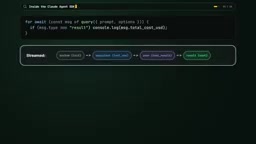
Agent SDK or Bare Loop?
The Agent SDK comes with file editing, search, shell execution, MCP support, and context management, saving you from maintaining file-editing logic yourself. The bare API loop is a blank slate—every token sent to the model is under your control.
The video's decision criteria: if the task "looks like doing software engineering in a repo"—reading files, modifying code, running tests—and you don't want to maintain file-editing logic yourself, choose the Agent SDK. If the agent only needs three or four narrow domain tools, you want to eliminate hidden system-prompt overhead, or you want the same harness code to run on Claude, DeepSeekAd, Kimi, GLM, and local Ollama models, then write a bare loop. The latter's portability comes from the fact that Ollama, vLLM, and various hosted services all speak the standard chat completions tool format—change the base URL and model string, and the same loop can switch from a local model to a cloud frontier model.
When using the SDK, call query with the prompt and options, then iterate over the async message stream it produces. Each turn produces the assistant's thinking and tool calls, ending with a result message reporting the final answer, number of turns, and dollar cost. The video emphasizes locking down the options for each scripted run: allowed tools restricted to only what the task needs, set max turns and max budget USD to prevent a stuck agent from burning through your bill, cwd pointing to an isolated worktree. You can also mount in-process custom tools using tool and createSdkMcpServer, with input schemas defined using TypeScript's Zod or Python's Pydantic. To enforce hard boundaries, pass a canUseTool callback or pre-tool-use hook in your script—before the model modifies files or runs commands, the callback checks the arguments and either allows or rejects with a reason.
Tool-calling loop is a standard interaction pattern for large model APIs: the request body carries a tools (or functions) array, each item declaring a tool name, description, and JSON Schema parameters; the model doesn't answer directly but returns a tool_calls structure, the host code executes the corresponding function by name/arguments, then appends the result as a role: "tool" message back to messages and makes another request. This "request—execute—feed back" round-trip is what the article calls the "loop"; when to stop is entirely determined by the host code (the model no longer requests tools, the turn limit is reached, or a finish tool is called). OpenAI-compatible endpoints, Ollama, and vLLM all follow this format, so the same loop code can migrate by just changing the base URL and model name.
MCP (Model Context Protocol) is an open protocol that exposes tools, resources, and prompt templates to model clients in a unified way, often called the "USB-C interface for AI applications." The server declares a capability list, and the client (such as Claude Code, Agent SDK) pulls it at startup and converts it into tool definitions the model can call. Its value lies in decoupling tool implementation from the harness: the same MCP server can be reused by different harnesses and deployed across processes and languages. The article mentions that the Agent SDK has built-in MCP support and can mount in-process custom tools with createSdkMcpServer—this refers to the standardized channel for injecting tools into the loop.
Tool Design: Less Is More
This section contains the most counterintuitive insight in the article. Give the model 30 general-purpose tools, and every turn will stuff in thousands of schema tokens, and small models or open-weight models will pick the wrong tool. 3 to 5 sharp little tools beat 30 vague big tools. Replace bare shell access with domain actions: rather than giving a crash triage agent a bash shell to write safe commands itself, provide get_stack_trace, blame_file_range, read_source_lines.
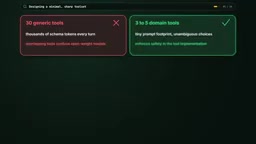
Tool returns must be capped. When a search hits 5000 lines of logs, return only the first 100 lines, plus a clear note telling the total count and how to request the next offset, so a noisy tool call doesn't blow up the context window. When a tool call fails (e.g., the model passes a nonexistent file path), don't throw an unhandled exception that crashes the whole run—catch the error and return a short error string telling the model what went wrong and how to fix the arguments next turn.
Use a Stage State Machine to Block the Model's "Shortcuts"
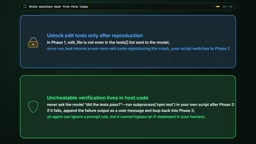
In a free loop with all tools unlocked on the first turn, the model will take shortcuts: modify code before reproducing the bug, or stop without running the test suite. A stage state machine in the host code makes these shortcuts impossible. Break the task into explicit stages—reproduce, fix, verify—and expose only the tools belonging to each stage. In stage one, the model only has read tools and a test runner; the harness watches the test exit code and only unlocks file-editing tools in stage two once the test actually fails.
Don't rely on the model's self-discipline for final verification either. When the model says it's fixed, the host script directly runs type checks, linters, and the test suite. If any fail, the script feeds the error output back to stage two. The video's line is worth copying: an agent can ignore instructions in a prompt, but it can't skip an if statement in the harness.
Structured Output and Circuit Breakers
When the harness runs inside a larger pipeline where the next step is another script rather than a human, extracting JSON from conversational markdown code blocks is fragile. Enforce an output schema: in the Agent SDK, pass output format plus JSON schema; in Ollama or OpenAI-compatible APIs, pass response_format—the inference engine constrains token generation to guarantee the final reply is valid JSON conforming to the schema. A more hardcore pattern is to give the agent a dedicated finish tool whose parameters are the report schema you require. When the model calls finish, the harness validates the payload and checks its own state—did it answer every required checklist item? Did verification tests pass? If not, reject the finish with a tool error naming what's missing, and the agent must do the work before exiting.
An unattended harness will eventually encounter a task that makes the model spin in place. Without hard circuit breakers, a stuck agent will keep burning tokens until timeout. Four safety measures: set the turn limit at 10 to 15 turns; check cumulative token or dollar cost after each turn; wrap every tool execution and model request in a timeout; run file-editing harnesses in a temporary worktree or container. Add a repeating-call breaker: hash the tool name and arguments for each turn—if the model calls the same tool with identical arguments twice in a row, or hits the same test failure three times consecutively, inject a warning forcing it to change approach, or cleanly abort and save state.
Constrained / Structured Decoding is a technique at the inference engine level: compile a JSON Schema or regex into a state machine or grammar that masks out tokens leading to invalid output at each decoding step, guaranteeing validity during generation rather than post-hoc parsing and retrying. OpenAI's response_format, vLLM's guided decoding, and Ollama's format parameter all fall into this category. It explains the article's phrase "the inference engine constrains token generation"—valid JSON isn't achieved by requesting the model's cooperation, but by the decoder physically excluding invalid paths. Note that the stricter the constraint, the less freedom the model has for "thinking"; complex schemas can sometimes degrade output quality, which is why the more hardcore finish tool pattern is often used as an alternative.
Observability: Record Every Turn
At 3 AM a 12-turn task fails at turn 3, and if you only log the final error, you're left guessing what happened at turn 4. Every harness should write an append-only transcript.jsonl at runtime, one JSON object per line, recording turn number, model name, input/output tokens, latency, the exact tool calls requested, and the exact results returned.

Reading two or three transcripts immediately shows what to change. If the agent wastes four turns every run looking for the same config file, write that path into the prompt; if a tool's output format misleads the model, change the tool. Replaying tool results from the transcript into unit tests also lets you deterministically test the harness state machine at zero API cost.
A 150-Line Crash Triage Example
The video ends with a complete assembly. When an overnight test or production job crashes, the harness automatically runs three stages. Stage one uses a fast open-weight model in a read-only loop with three tools: get_stack_trace, git_blame_range, read_lines, then calls finish to give a structured hypothesis—suspect file, line range, offending commit. Stage two creates a temporary git worktree and launches the Claude Agent SDK, capped at 10 turns and $2: write a failing regression test first, then patch. Stage three is pure host code: the harness itself runs the full test suite and type checks, sends the git diff to a reviewing model from another lab, and only keeps the branch if both gates pass. In the morning you don't get a vague chat log but result.json, a complete transcript.jsonl, and a verified branch ready for review.
The advice for your first harness is plain: don't reach for a heavy framework. Start with a recurring task, three sharp tools, a stage loop with a 10-turn cap, and a JSONL transcript.
Performance Detail: Keep the KV Cache Hot
One detail determines whether a multi-turn loop is fast or slow: keep the KV cache hot. Never reorder tool definitions, never inject timestamps into the system prompt, only append to the end of the messages array, so each turn can reuse the previous turn's cached prefix. In multi-model, multi-turn harnesses, this often affects perceived speed more than switching models.
KV cache (Key/Value Cache) is a core optimization in Transformer inference: during autoregressive generation, each token's attention key-value pairs can be reused by subsequent tokens without recomputing the prefix, reducing each step's computation from O(n²) to O(n). Most vendors' prompt caching bills and accelerates by "prefix matching"—as long as the new request's token sequence shares the same prefix as the last one, the hit portion skips prefill. This is why the article's three prohibitions exist: reordering tool definitions changes the prefix order, injecting timestamps invalidates the prefix each turn, and only appending to the end of messages maximizes reuse. Hitting the cache isn't just faster—input-side billing is usually significantly lower too.
One-line Summary
Deconstructing the execution shell Harness of LLM Agents: tool design, stage state machines, circuit breakers, and observability.
Paragraph Summary
The article systematically deconstructs the key to turning a language model into an Agent—the Harness execution shell wrapped around the model, responsible for building prompts, defining and executing tools, feeding back results, and enforcing stop rules. Coverage includes: when to build your own harness (recurring tasks requiring hard constraints); the trade-off between Agent SDK and bare tool-calling loops (convenience vs. control and portability); the counterintuitive principle of tool design—less is more, 3 to 5 sharp domain tools beat 30 general-purpose tools, and you must cap return size and turn failures into readable errors; using stage state machines and host-side verification to block model shortcuts; using schema constraints and a finish tool to guarantee structured output; four circuit breakers plus repeated-call detection to prevent agents from spinning and burning money; and append-only transcript.jsonl for observability and deterministic replay testing. Finally, a 150-line crash triage example, emphasizing the decisive impact of keeping the KV cache hot on multi-turn loop speed.
Related articles

AI Coding Agent Leaks User Email: Inside the Claude Code Privacy Controversy
Claude Code was caught writing user emails into web request headers, sparking privacy concerns. We break down the technical root cause, Anthropic's fix, developer pushback, and tips for protecting yourself as an AI agent user.

Claude Code Allegedly Leaks User Emails: A Privacy Storm Triggered by a Fix
Claude Code was reported to potentially send user emails to visited websites, caused by a change introduced to fix another bug. This article covers the timeline, technical causes, team response, and data boundary issues for AI coding tools.

Claude Personal Email Leak Vulnerability Explored: Risks, Mechanism, and Temporary Fixes
Claude's personal email leak exposed: ClaudeCode writes real user emails into request headers when visiting sites requiring contact emails, causing scam email floods. This article explains the vulnerability, timeline, and temporary fixes like upgrading to 2.1.3.1.7+ and enabling the ccplugin-privacy plugin, while warning against using the skip permissions flag.