Storrito Agent Integrates MCP Server: Demo and Setup Tutorial

Storrito Agent adds MCP server connections, demoing the full AI-guided flow from configuration to account queries.
Storrito Agent has launched MCP server connection support, demoing the complete chain from expressing intent in conversation and reading official docs to account login authorization and querying bound social accounts. As a universal standard connecting AI agents with external services, MCP lets users avoid building separate integrations for each service, with the same mechanism reusable across other MCP-compatible services. The article notes the product chose "agent-guided configuration" over a traditional form page, lowering the barrier to entry—but making the configuration experience dependent on documentation quality. The video doesn't show connection failures, permission revocation, or multiple coexisting servers; these details remain to be observed. To get started, follow the demo path and verify the connection with a simple query.
Storrito Agent's newly launched MCP server connection feature lets AI agents access external services directly. The official demo walks through the complete flow—from triggering via conversation and account authorization to querying social accounts. As a universal standard, MCP is becoming the bridge that connects AI agents to all kinds of services.
What Is MCP and Why It Matters
MCP (Model Context Protocol) is a standard protocol for connecting AI agents with various external services. With Storrito Agent's new support for MCP servers, users no longer need to build a separate integration for each service—agents can call external capabilities through a unified protocol.
According to the video's creator, this feature was added to Storrito Agent just one day before the demo was recorded. This timing shows the product is still iterating rapidly and that MCP support is a recently shipped capability rather than a long-refined, mature module.
MCP is often likened to a "USB-C port for the AI world": it defines how agents discover services, read tool descriptions, initiate calls, and exchange data. The protocol typically has three layers—tools and resources exposed by the server, capability negotiation between client and server, and JSON-RPC-based message transport. For developers, MCP's value lies in turning "write a custom plugin for every service" into "implement an MCP server once and reuse it across all compatible clients," dramatically lowering integration costs.
Note that MCP itself only defines the specification for communication and capability description; it does not prescribe authentication methods. Real-world products often layer on OAuth authorization or account login for access control—which is why the demo includes an "authorization step." Understanding this helps distinguish what the protocol layer and the product layer are each responsible for.
Demo Flow: From Conversation to Authorization
The video shows a complete connection process. The user simply types an intent into the chat box—"I want to connect to the MCP server at Storrito.com"—and the agent automatically reads the relevant instructions on the official website and consults the documentation.
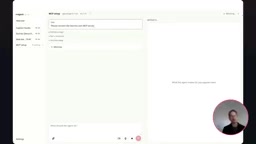
Then comes the authorization step: the user logs in with a Storrito account and grants the agent permission to access that account. Once authorized, the connection is established. The design philosophy is to "let the AI agent itself help you complete configuration" rather than having users manually fill in server addresses, keys, and other parameters.
This "use AI to configure AI" interaction lowers the barrier to entry, especially for ordinary users unfamiliar with technical details.
The authorization step in the MCP ecosystem typically corresponds to the OAuth 2.1 authorization code flow or a similar mechanism: the agent acts as a client, guides the user to the service provider to complete login and consent, then obtains an access token and carries it in subsequent calls. Tokens generally come with scope restrictions limiting access to explicitly consented data, and can have expiry and refresh mechanisms.
This also explains why the demo requires no manual entry of server addresses or keys: the server declares its capabilities and authentication requirements through a standardized description file, and the client automatically initiates the corresponding authorization flow. What the user sees as "log in and consent" is essentially the interface-level rendering of this standard process.
What You Can Do After Connecting
In the demo, the creator asks a specific question: which social accounts are bound to my Storrito account? The agent calls the Storrito MCP server in the background to query the account information and returns the result.
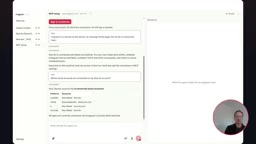
Simple as it is, this example reveals two layers of significance. First, the MCP server acts as a "data channel"—the agent itself doesn't store account data but queries it on demand. Second, because MCP is a universal standard, the same mechanism can be reused with other MCP-compatible services, enabling all kinds of integrations.
Notable Design Trade-offs
Based on the demo, Storrito chose the "let the agent guide configuration" path rather than offering a traditional form-based settings page. This relies to some extent on the agent's ability to read the official documentation, which means documentation quality directly affects the configuration experience.
Additionally, the video does not show how connection failures, permission revocation, or multiple coexisting servers are handled. For users who need to manage multiple MCP connections, these details remain to be observed.
In real MCP deployments, permission revocation and multi-connection management are unavoidable engineering issues. Permission revocation typically comes in two granularities: the user revokes the token in the service provider's backend, causing subsequent calls to fail immediately; or disconnects a server connection on the client side, stopping requests to that service. With multiple servers coexisting, the client needs to maintain a separate tool namespace for each connection to avoid name collisions among tools with the same name, and to provide sufficiently clear tool descriptions for the agent's decision-making.
Common causes of connection failure include token expiry, insufficient scope, server-side rate limiting, and network anomalies. Mature clients generally map these errors to readable prompts with suggestions to retry or re-authorize. Although these details don't appear in the demo, they are key indicators for evaluating whether an MCP integration is actually usable.
Getting Started Tips
If you plan to try this feature, follow the path shown in the demo: first state which MCP service you want to connect to in the conversation, follow the agent's guidance through the official documentation, then complete authorization via account login, and finally verify the connection works with a simple query. The official recommendation is to create project documentation on the website to better organize subsequent work.
Related articles

T3 Code: The Open-Source AI Coding Assistant's Comeback Story
T3 Code is an open-source AI coding assistant that unifies subscriptions like Codex and Claude, with powerful remote control and parallel task management.

Never Elected, Yet Ruled New York for 30 Years: The Ultimate Case Study in the Mechanics of Power
Robert Caro's biographies reveal how unelected Robert Moses ruled New York for 30 years through legal drafting and public authorities, and how Lyndon Johnson built leverage as a "powerless" Senate Majority Leader. Unpacking the underlying logic of accumulating and sustaining power.

The CPython 3.10 Recursion Trap and Synthetic Recovery in TokenGuard, an LLM Circuit Breaker
TokenGuard's author recounts a recursion crash caused by OrderedDict.pop in CPython 3.10 and introduces v0.3.0's Loop Nudge synthetic recovery, inline DLP scanning, and other new LLM agent circuit-breaker capabilities.